TL;DR: Start with the Score Board challenge, then do the 13 challenges that have a built-in Hacking Instructor tutorial, in the order the app itself numbers them. After that, finish the remaining 1- and 2-star challenges one category at a time, and only then move up a star level at a time: 3 stars when you can capture and replay requests, 4 when you can chain findings, 5 and 6 when you are ready to read source code.
OWASP Juice Shop has 110 hacking challenges on six difficulty levels, and its Score Board shows them all at once, which is the problem for a beginner: nothing says where to begin. This article is for learners working through Juice Shop on CyberGym, our hosted instance, or on a copy on their own machine. It gives an order, built from the app's own challenge data, and links the walkthroughs on this site for each class instead of re-solving them here. Practise only on CyberGym, your own Juice Shop or a target you have written permission to test.
How many challenges does OWASP Juice Shop have?
CyberGym runs OWASP Juice Shop 19.1.1 and lists 110 hacking challenges in 16 categories, rated from 1 to 6 stars. We read that from the app's own challenge list, which anyone can fetch, on 16 November 2026:
curl -s https://cybergym.hackergpt.app/rest/admin/application-version
curl -s https://cybergym.hackergpt.app/api/Challenges/ \
  | jq -r '.data | group_by(.difficulty) | .[] | "\(.[0].difficulty) stars: \(length)"'
{"version":"19.1.1"}
1 stars: 14
2 stars: 15
3 stars: 24
4 stars: 25
5 stars: 20
6 stars: 12
So only 29 of the 110 are rated 1 or 2 stars. The Score Board's own counter showed a larger total when we looked, 172, because it also counts coding challenges: 31 of the hacking challenges have one, and each comes in two phases (110 + 31 × 2 = 172). A newer Juice Shop may have more or different challenges, so run the same command against your own copy rather than trusting any fixed list, this one included.
The list also carries the fields that matter for ordering: difficulty, category, tags and tutorialOrder. Everything below comes from those fields.
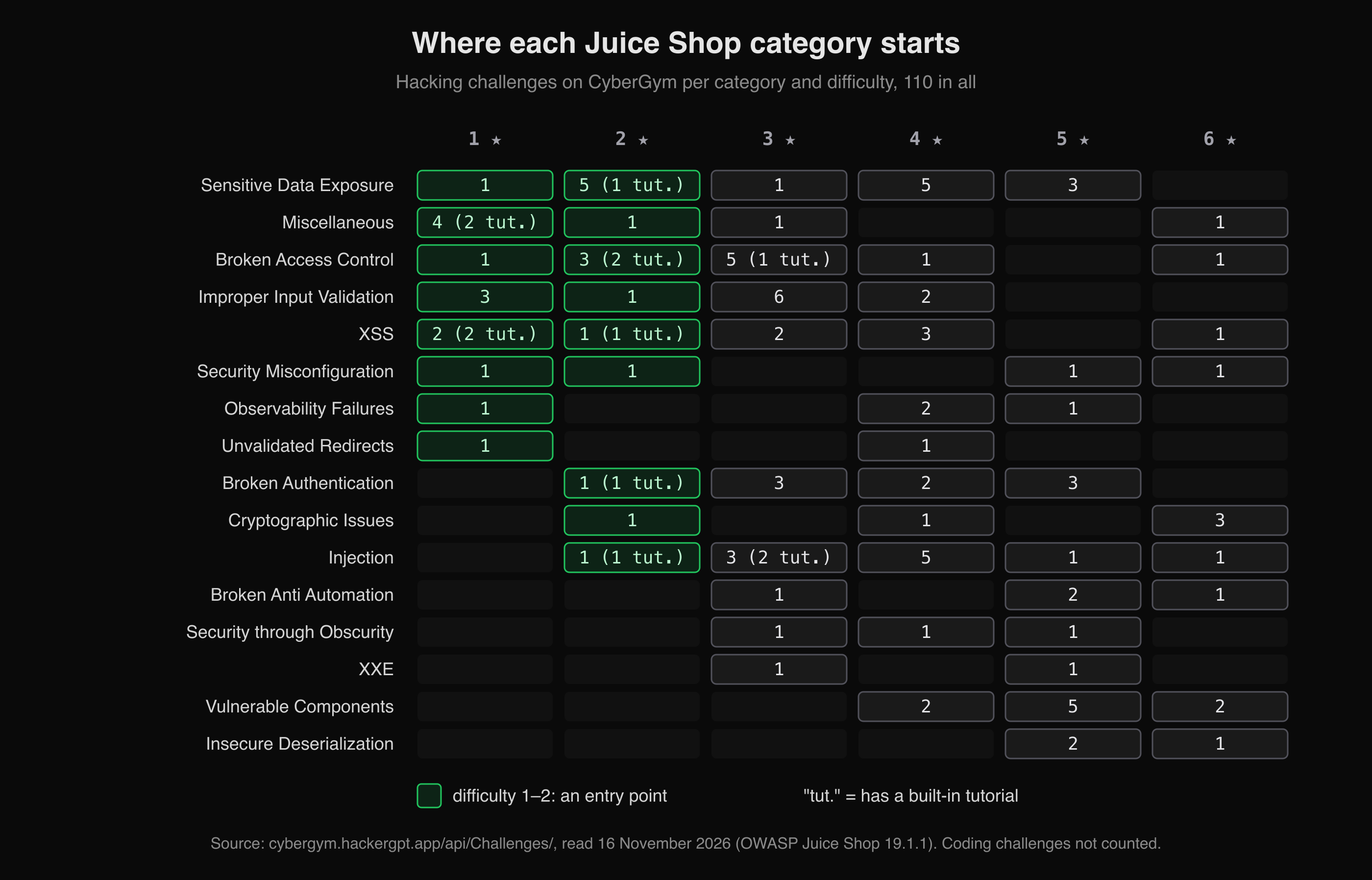 Every category on CyberGym, by difficulty. Green cells are where a category can be started; most of the harder classes have no easy entry at all.
The grid shows something the Score Board hides. Eight categories have a 1-star challenge, and three more (Broken Authentication, Cryptographic Issues and Injection) start at 2 stars. The other five start at 3 stars or later: Broken Anti Automation, Security through Obscurity and XXE at 3, Vulnerable Components at 4, Insecure Deserialization at 5. "Pick a category you like" therefore does not work from day one; for those five, difficulty sets the order whether you like it or not.
Which Juice Shop challenge should I do first?
The Score Board challenge itself: "Find the carefully hidden 'Score Board' page." It is 1 star, first in the tutorial order, and every other challenge is easier to pick once you can see the board. The skill it teaches is the one the whole app rewards: read what the client already tells you instead of clicking through menus. On CyberGym the route is /#/scores, not the score-board route upstream writeups use, which where to practice hacking legally shows how to find from the JavaScript bundle.
The Score Board has filters for difficulty, solved status, tags and category, plus a search box (companion guide, challenges chapter). You will use the difficulty filter and the category buttons for the rest of this path.
What order do the Juice Shop tutorials go in?
The app ships its own beginner order. Its built-in Hacking Instructor offers "a scripted sequence of helpful hints and instructions" for some challenges, launched from the 🎓 button on their Score Board cards (companion guide). Each of those challenges has a tutorialOrder number, and that number is a ready-made path:
curl -s https://cybergym.hackergpt.app/api/Challenges/ \
  | jq -r '.data | map(select(.tutorialOrder != null)) | sort_by(.tutorialOrder) | .[]
      | "\(.tutorialOrder)\t\(.difficulty)★\t\(.category)\t\(.name)"'
| Order | Stars | Challenge | Category | Our walkthrough of the class |
|---|---|---|---|---|
| 1 | 1 | Score Board | Miscellaneous | Where to practice hacking legally |
| 2 | 1 | DOM XSS | XSS | XSS examples |
| 3 | 1 | Bonus Payload | XSS | same |
| 4 | 1 | Privacy Policy | Miscellaneous | How to learn hacking |
| 5 | 2 | Reflected XSS | XSS | XSS examples |
| 6 | 2 | Exposed credentials | Sensitive Data Exposure | Hardcoded credentials in a JavaScript bundle |
| 7 | 2 | Login Admin | Injection | SQL injection example |
| 8 | 2 | Admin Section | Broken Access Control | Privilege escalation in a web app |
| 9 | 2 | Password Strength | Broken Authentication | Broken authentication examples |
| 10 | 2 | View Basket | Broken Access Control | IDOR vulnerability example |
| 11 | 3 | Forged Feedback | Broken Access Control | IDOR vulnerability example |
| 12 | 3 | Login Jim | Injection | SQL injection example |
| 13 | 3 | Login Bender | Injection | same |
One thing we noticed reading the data: 13 challenges have a tutorial order, but only 11 carry the Tutorial tag. Exposed credentials and Admin Section are in the sequence without the tag, so filtering the Score Board by the Tutorial tag misses them. Use the order above, or the 🎓 buttons, rather than the tag filter.
Do the tutorials even if you think you could skip them. They take you once through XSS, SQL injection, access control, weak passwords and exposed data, which are the classes that most of the later challenges build on. When a tutorial gives you the answer, go back and work out why it worked; the walkthroughs in the right-hand column explain the mechanism. For a full beginner path around this, from how HTTP works to testing your own site, see how to learn hacking on a real target.
If you run Juice Shop yourself, the guide describes a tutorial mode, set with NODE_ENV=tutorial, that "hides all challenges without tutorials from the Score Board" and opens the full board only after all of them are solved (companion guide). For a classroom, that enforces this stage for you.
What is the best order for the rest of the Juice Shop challenges?
After the tutorials, go up one star level at a time and, within a level, finish one category before you switch. The companion guide gives the reason to respect the levels: "if hacking a 1- or 2-star challenge takes very long, you might realize quickly that you are on a wrong track", while with "a 5- or 6-star challenge you should expect a real challenge" (companion guide). Staying inside one category means each solve teaches you something about the next one.
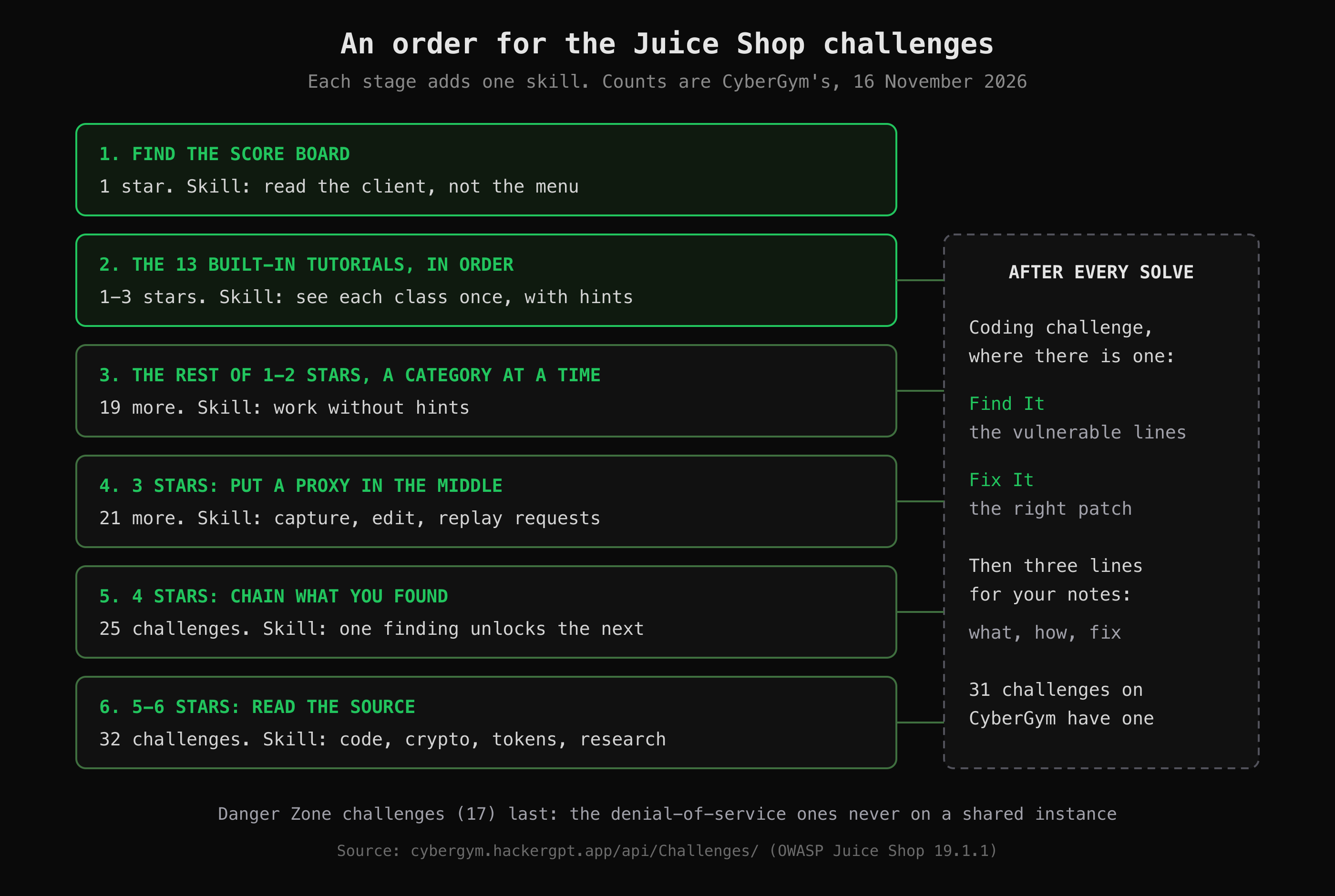 The order this article recommends. The counts add up to the 110 hacking challenges on CyberGym.
To see one category in order of difficulty, filter the list the same way. Broken Access Control on CyberGym:
curl -s https://cybergym.hackergpt.app/api/Challenges/ \
  | jq -r '.data | map(select(.category == "Broken Access Control")) | sort_by(.difficulty) | .[] | "\(.difficulty)  \(.name)"'
1  Web3 Sandbox
2  Admin Section
2  Five-Star Feedback
2  View Basket
3  Forged Feedback
3  Forged Review
3  Manipulate Basket
3  Product Tampering
3  CSRF
4  Easter Egg
6  SSRF
Stage 3: the rest of 1 and 2 stars (19 challenges)
The same kind of reading as the tutorials, without the hints. Good next picks, with the article that covers each class:
- Confidential Document (1★) — a directory listing nobody meant to publish: exposed directory listing.
- Error Handling (1★) and Deprecated Interface (2★) — both tagged
Prerequisite, meaning they help with later challenges: security misconfiguration examples. - Exposed Metrics and Zero Stars (1★) — both solved step by step in how to learn hacking.
- Outdated Allowlist (1★) — a redirect allowlist read from the client: open redirect example.
- Web3 Sandbox (1★) — a route no menu links to: where to practice hacking legally.
- Missing Encoding (1★) — a good one to write up: how to write a CTF writeup.
- Login MC SafeSearch, Meta Geo Stalking, Visual Geo Stalking (2★,
OSINT) — research outside the app: password OSINT walkthrough and photo geolocation for OSINT CTFs. - NFT Takeover (2★) — a leaked seed phrase: leaked seed phrase walkthrough.
Stage 4: 3 stars, with a proxy (21 more)
This is where browsing stops being enough. Most 3-star challenges need you to capture a request, change a field the UI will not let you change, and send it again, so set up an intercepting proxy (Burp Suite Community Edition or OWASP ZAP) or get comfortable with curl and your browser's developer tools first. Covered on this site:
- CSRF — CSRF example.
- CAPTCHA Bypass — rate limiting test.
- Admin Registration — privilege escalation in a web app.
- Upload Size and Upload Type — file upload vulnerabilities.
- Payback Time — the shop accepting a quantity it should reject: business logic vulnerabilities.
- Database Schema — SQL injection example, the
UNIONandsqlite_masterpart. - XXE Data Access — XXE example.
- Reset Jim's Password, Bjoern's Favorite Pet (
OSINT) — the security-question pattern in OSINT CTF: security question reset.
Stage 5: 4 stars, chaining findings (25 challenges)
At 4 stars a solve usually needs something an earlier one gave you. Three of the six Prerequisite challenges sit here: Poison Null Byte, Forgotten Developer Backup and Allowlist Bypass. Read them with:
- Forgotten Developer Backup, Forgotten Sales Backup, Poison Null Byte — backup files exposed on a web server.
- Allowlist Bypass — open redirect example.
- User Credentials — the
UNIONdump in SQL injection example. - NoSQL Manipulation — NoSQL injection example.
- GDPR Data Theft — GDPR data export vulnerability.
- Easter Egg and Nested Easter Egg — crypto CTF challenges for beginners.
- Reset Uvogin's Password — OSINT CTF: security question reset.
Stage 6: 5 and 6 stars, reading the source (32 challenges)
The top two levels hold 7 of the 10 challenges tagged Code Analysis, and they are where tokens, cryptography and third-party components come in. Expect hours per challenge, not minutes.
- Unsigned JWT (5★) and Forged Signed JWT (6★) — JWT vulnerabilities examples.
- Two Factor Authentication and Change Bender's Password (5★) — broken authentication examples.
- Retrieve Blueprint (5★) — Juice Shop Retrieve Blueprint walkthrough.
- Email Leak (5★) — JSONP cross-origin data leak.
- Login Support Team (6★) — security misconfiguration examples.
- Wallet Depletion (6★) and the other Web3 challenges — trace a crypto wallet.
Which Juice Shop challenges should I leave for last?
The 17 challenges tagged Danger Zone. The companion guide describes them as "potentially dangerous challenges which are disabled on Docker/Heroku by default due to RCE or other risks", and a containerised Juice Shop turns them off unless you deliberately run it in unsafe mode (companion guide). On CyberGym none of the 110 is disabled: the disabledEnv field was empty for every challenge on 16 November.
That makes them available, not fair game in every form. Five of them — NoSQL DoS, XXE DoS, Memory Bomb, Blocked RCE DoS and Successful RCE DoS — are about exhausting or occupying the server. CyberGym is one shared instance, so a denial-of-service attempt there slows it down for everyone else practising. Do those on a copy on your own machine, bound to 127.0.0.1, and only once you have read why the guide disables them by default.
Two more groups are worth knowing before you start them:
OSINT(15 challenges) need research outside the application, "Internet research or social stalking" in the guide's words. Keep that research to what the challenge is about, and keep anything you find out of your notes if it is not needed.ContraptionandShenanigansare, by the guide's definitions, "a bit forced or crafted" or "not considered serious and/or realistic". Fun, but they teach less about real applications than the rest; do them when they come up in your category, not first.
What should I do after each challenge?
Solve the coding challenge, if there is one, and write three lines. A coding challenge has two phases: Find It, where you select the vulnerable lines in Juice Shop's real source, and Fix It, where you choose the right fix from three or four options (companion guide, coding challenges). The button opens once you have solved the hacking challenge. On CyberGym 31 challenges have one, and they are the closest the app comes to teaching you to fix what you found.
Then write what you found, how you found it, and what the owner should change. That is the shape of a real finding, and the start of a writeup; how to write a CTF writeup covers the rest. On a shared instance the green tick does not prove you solved anything, because CyberGym's Score Board shows everyone's progress; your three lines do.
Should I read a Juice Shop walkthrough?
After you have tried, yes. The official companion guide has a full solutions appendix, with "just one possible solution" per challenge in most cases (companion guide, solutions). Use it, or the articles linked above, when you are stuck on the mechanism rather than on a typo, and then solve the challenge again without it. A walkthrough read before you try teaches you the payload; one read after you are stuck teaches you the step you missed.
If you want an assistant alongside you, HackerGPT's CTF Mode runs a CTF on your own website, or on CyberGym when you do not have one, and explains each step as it works. Like any tool it reports what it finds rather than everything there is, and it does not replace doing the step yourself.
Key takeaways
- Start with the Score Board, then the 13 tutorial challenges in their
tutorialOrder, not by theTutorialtag, which misses two of them. - Move up one star level at a time and finish a category before switching; if a 1- or 2-star challenge takes very long, you are on the wrong track.
- Get an intercepting proxy or
curlworking before 3-star challenges; most of them need a request you edit and replay. - Leave
Danger Zonechallenges for last, and run the denial-of-service ones only on your own local copy. - After each solve, do its coding challenge and write three lines: what, how, and the fix.
FAQ
How many challenges are in OWASP Juice Shop?
Juice Shop 19.1.1, as run on CyberGym, has 110 hacking challenges in 16 categories, rated from 1 to 6 stars, read from its challenge list on 16 November 2026. Its Score Board shows 172 because it also counts the two phases of each of the 31 coding challenges. Other versions differ, so check your own instance's /api/Challenges/ list.
Which OWASP Juice Shop challenges are easiest?
The 14 one-star challenges, and the Score Board first among them. The app's own tutorial order starts with Score Board, DOM XSS, Bonus Payload and Privacy Policy, all rated 1 star, and each has a step-by-step Hacking Instructor tutorial behind the 🎓 button on its card.
Is there an official OWASP Juice Shop walkthrough?
Yes. The free companion guide, "Pwning OWASP Juice Shop", ends with a challenge solutions appendix, usually one solution per challenge. It is most useful after you have tried a challenge yourself, to find the step you missed.
Do I need Burp Suite for Juice Shop?
Not for the first 1- and 2-star challenges, which a browser's developer tools and curl are enough for. From about 3 stars, most challenges need you to capture a request, change a field and send it again, which an intercepting proxy such as Burp Suite Community Edition or OWASP ZAP makes much easier.
Can I do the Danger Zone challenges on CyberGym?
They are enabled on CyberGym, unlike on a default Docker install of Juice Shop. Do not run the denial-of-service ones there, though: CyberGym is shared, and slowing it down affects everyone practising on it. Run those on your own copy on 127.0.0.1.
Sources
- OWASP Juice Shop project page
- OWASP Juice Shop README, GitHub (MIT licence)
- Pwning OWASP Juice Shop, challenges chapter: Score Board filters, Hacking Instructor, tutorial mode, challenge tags, Danger Zone
- Pwning OWASP Juice Shop, coding challenges: Find It and Fix It
- Pwning OWASP Juice Shop, challenge solutions
- CyberGym's challenge list,
https://cybergym.hackergpt.app/api/Challenges/, and/rest/admin/application-version, read 16 November 2026
Practise the path on CyberGym, or try HackerGPT on your own site at hackergpt.app.