TL;DR: Broken authentication is any flaw that lets someone be treated as a user they are not, or stay that user longer than they should. Test it in three places: the password step (error messages, how passwords are stored and changed), the second factor (can a code be replayed, can 2FA be switched off without one) and the session (does logout, a password change or time actually end it). On CyberGym we found failures in all three in one session, using only our own test account.
This article is for learners who want to see what broken authentication looks like in real requests, and for developers who want to run the same checks on their own login. Everything below was run against CyberGym, our deliberately vulnerable practice target, with an account we registered for the purpose. Run these checks only on an app you own or have written permission to test.
What is broken authentication?
Broken authentication is a weakness in how an app proves who you are and keeps you logged in afterwards. OWASP Top 10:2025 lists it as A07, Authentication Failures (called "Identification and Authentication Failures" in the 2021 edition), and its description covers three layers:
- The credential step: default or weak passwords, password stores that are "plain text, encrypted, or weakly hashed", and weak recovery flows.
- The second factor: "missing or ineffective multi-factor authentication", and weak fallbacks when the second factor is not available.
- The session: identifiers exposed where the client can read them, and sessions or tokens that are not invalidated "during logout or a period of inactivity".
Some neighbours have their own articles. Logging in through a SQL injection in the login form is in SQL injection example: a CTF walkthrough. Taking over an account through a guessable security question is in the security-question reset walkthrough. Forging the token itself (alg: none, weak signing keys) is in JWT vulnerabilities. Brute force and rate limiting are a topic of their own, in Rate limiting test: check your login against brute force. This article covers what remains: what happens after a correct password.
What are common broken authentication examples?
Each row below is a class from the OWASP description with its CWE entry and what we observed on CyberGym on 12 November 2026.
| Example | CWE | Observed on CyberGym |
|---|---|---|
| Password change without the current password | CWE-620 | Accepted when the current parameter is left out |
| Credentials in the URL | CWE-598 | The new password travels in a GET query string |
| Weak password storage | CWE-916 | Unsalted MD5, readable in the session token |
| Session never expires | CWE-613 | The token has no exp claim |
| Logout does not end the session | CWE-613 | The same token works after logout |
| Session survives a credential change | CWE-613 | Old tokens work after a password change and after enabling 2FA |
| One-time code is not one-time | CWE-287 | One TOTP code logged in twice |
| 2FA can be disabled without a second factor | CWE-287 | The password alone switched 2FA off |
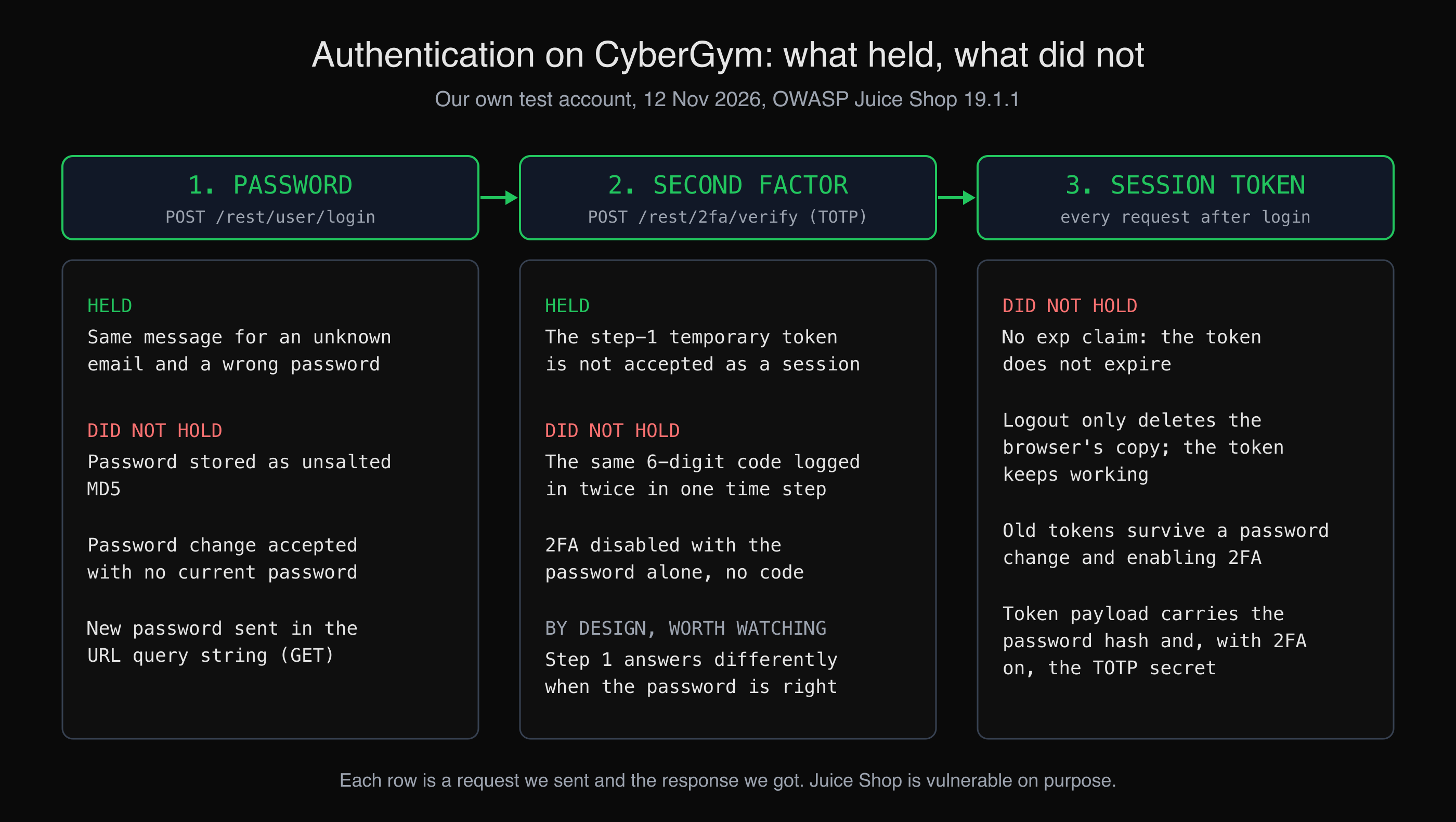 What we observed on CyberGym, by stage. Each line is a request we sent with our own test account.
Two things held, and they matter as much as what failed. CyberGym answered Invalid email or password. for both an unknown email and a wrong password, so the login form did not reveal which accounts exist. And the temporary token issued between the password and the 2FA step could not be used as a session.
How do I test authentication on CyberGym?
Register your own account, then walk it through its whole life: log in, read the token, log out, change the password, turn on 2FA, turn it off. At each step, ask what the server should refuse and check whether it does. CyberGym runs OWASP Juice Shop (version 19.1.1 on the day of our run, from /rest/admin/application-version), so the routes below are Juice Shop's.
Set two variables first. $TOKEN is the token your own login returns.
CYBERGYM=https://cybergym.hackergpt.app
EMAIL='your-test-account@example.com'
Step 1: compare the login error messages
curl -s -X POST "$CYBERGYM/rest/user/login" -H 'Content-Type: application/json' \
  -d "{\"email\":\"$EMAIL\",\"password\":\"wrong\"}"
curl -s -X POST "$CYBERGYM/rest/user/login" -H 'Content-Type: application/json' \
  -d '{"email":"nobody@example.com","password":"wrong"}'
Both returned 401 with the same body:
Invalid email or password.
That is what the OWASP Authentication Cheat Sheet asks for: a generic message, so the form does not confirm that an address is registered. Compare the status code and response time as well as the text.
Step 2: read what the session token carries
A JWT payload is base64url, not encrypted, so anyone holding the token can read it. Decode yours:
python3 -c 'import sys,json,base64; p=sys.argv[1].split(".")[1]; print(json.dumps(json.loads(base64.urlsafe_b64decode(p+"="*(-len(p)%4))), indent=1))' "$TOKEN"
Our token's payload, shortened:
{
 "status": "success",
 "data": {
  "id": 23,
  "email": "hgo100-1794511111@example.com",
  "password": "ef6f948edadf57e6b2e33e91f81f9725",
  "role": "customer",
  "totpSecret": "",
  "isActive": true
 },
 "iat": 1794511112
}
Two findings here. The password field is the unsalted MD5 of the password we registered with; running md5sum (md5 on macOS) on that password gave the same 32 characters. Anyone who can read the token (a cross-site script, a browser extension, a log line) gets a hash that cracks quickly if the password is weak. Second, there is an iat (issued at) but no exp. Juice Shop's code asks for a six-hour lifetime with expiresIn: '6h', but the jsonwebtoken version it pins, 0.4.0, only reads an option called expiresInMinutes. The setting is silently ignored, so the token never expires. A test that reads the code and not the token would have missed it.
Once we enabled 2FA, the token payload also carried the account's TOTP secret, the seed that produces every future 2FA code. Anyone who can read that token can generate valid codes.
Step 3: log out, then reuse the token
Juice Shop's logout runs in the browser. It deletes the token from local storage and the cookie, and tells the server nothing that ends the session. After logging out the way the front end does, we sent the old token again:
curl -s "$CYBERGYM/rest/user/whoami" -b "token=$TOKEN"
{"user":{"id":23,"email":"hgo100-1794511111@example.com","lastLoginIp":"0.0.0.0","profileImage":"/assets/public/images/uploads/default.svg"}}
Still logged in. Our basket endpoint answered 200 with the same token. The OWASP Session Management Cheat Sheet is direct about this: to close a session, the app must take active action on the server side when the user logs out. A stateless JWT with no expiry and no server-side denylist cannot be logged out.
Step 4: change the password without the current one
The change-password route takes its values from the query string:
curl -s "$CYBERGYM/rest/user/change-password?new=$NEW_PASSWORD&repeat=$NEW_PASSWORD" \
  -H "Authorization: Bearer $TOKEN"
It answered 200 and changed the password. With a wrong current= value, it answered 401 Current password is not correct. The code only checks the current password when the parameter is present, so leaving it out skips the check. That is CWE-620. In practice, anyone holding a session, whether from an unlocked laptop or a stolen token, can lock the owner out. The Juice Shop challenge Change Bender's Password is built on this flaw. Getting another user's session for it takes a second bug, and the Pwning OWASP Juice Shop companion guide has the hints.
Two more findings came with it. The new password sits in a URL, where proxies and server access logs record it (CWE-598). And the token we had before the change still worked afterwards. We had not expected the third one: our next 2FA setup failed with 401 until we logged in again, because the server's session cache still held the old password hash. Even the app's own state disagreed with itself after a credential change.
Step 5: walk the 2FA flow
We enabled TOTP 2FA on the account through /rest/2fa/status and /rest/2fa/setup, generating codes with a short RFC 6238 script. Then we logged in again with the correct password:
{"status":"totp_token_required","data":{"tmpToken":"eyJ0eXAiOiJKV1QiLCJhbGciOiJSUzI1NiJ9..."}}
The temporary token's payload was {"userId":23,"type":"password_valid_needs_second_factor_token","iat":...}. Used as a session, it got a 401 from the basket endpoint, so the second step is properly gated. What we found:
- A code worked twice. We logged in twice, back to back, with the same six-digit code, and
/rest/2fa/verifyanswered200both times. RFC 6238, section 5.2 says the verifier "MUST NOT accept the second attempt of the OTP after the successful validation has been issued for the first OTP". - 2FA turned off with the password alone.
POST /rest/2fa/disablewith only{"password": ...}returned200, and the next login skipped the second factor. The OWASP Multifactor Authentication Cheat Sheet names disabling MFA among the sensitive actions where requiring MFA can be appropriate. - The first step confirms the password. A wrong password got
Invalid email or password.and the right one gottotp_token_required. Many two-step logins work this way, because the second step has to know whose code to check, so this is not a bug in itself. It does mean that the password guess was right, and the same cheat sheet recommends treating a correct password followed by a failed second factor as a possible compromise and telling the user. - Sessions from before 2FA survived. A token issued before we turned 2FA on still worked afterwards.
Juice Shop's own Two Factor Authentication challenge comes at 2FA from another angle: the TOTP seeds are stored in plain text in the database, so another bug that reads the database also reads every user's second factor.
How do I test my own login form?
Run the same lifecycle on your own app, with a test account you created, on staging if you have one. For each check, write down the request and the response, and say what you saw rather than what you assumed.
| Check | How | A safe result |
|---|---|---|
| Error messages | Log in with a wrong password, then an unknown email | Same status, same text, similar timing |
| Token contents | Decode the session token or cookie | No password hash, no secrets, an expiry |
| Logout | Log out, replay the old token or cookie | 401 |
| Password change | Change it without, then with a wrong, current password | Both refused |
| Sessions after a change | Change the password, replay a token from before | 401 |
| Code replay | Use one TOTP code for two logins | Second one refused |
| Disabling 2FA | Try with the password only | A current code is required |
| Idle and absolute timeout | Leave a session idle, then reuse it | It ends on the schedule you set |
The endpoints to cover are every route that creates, changes or ends a credential: login, logout, password change and reset, email change, 2FA setup and disable, and token refresh. In a larger app these are easy to miss. AppMap crawls the app and lists every API endpoint with its auth requirement, which gives you that list to check against. The security checklist for vibe-coded apps covers what to check next to authentication.
How do I fix broken authentication in my app?
Most of the failures above come from the server trusting state it no longer controls. The fixes follow from the observations:
- Make logout and credential changes end sessions on the server. Use a server-side session store, or keep JWTs short-lived and add a revocation list or a per-user token version that a password change, a 2FA change and a logout all bump. OWASP's session guidance also asks for a new session ID after any privilege change, password changes included.
- Set timeouts and check that they work. NIST SP 800-63B-4 says that at AAL2 the overall reauthentication timeout should be no more than 24 hours and the inactivity timeout no more than 1 hour. Check the token: if the library ignores your expiry option, as on CyberGym, the setting does nothing.
- Require the current password, and send it in a POST body. Ask for re-authentication before changing the password, the email or the 2FA settings, as the Authentication Cheat Sheet recommends.
- Keep secrets out of tokens and out of local storage. A session token should identify a session, not carry a password hash or a TOTP seed. NIST's guidance says session secrets should not be put in "insecure locations (e.g., HTML5 Local Storage)".
- Store passwords with a slow, salted hash. The OWASP Password Storage Cheat Sheet recommends Argon2id, then scrypt, with bcrypt for legacy systems. MD5 is not on the list.
- Make one-time codes single-use. Record the last accepted time step per user and refuse it the second time. Require a current code to turn 2FA off.
None of this proves a login is safe. It closes the specific paths shown here. Re-run the table after each change, because a fix in one place (a new logout endpoint) is easy to bypass from another (an old mobile API).
Key takeaways
- Test authentication as a lifecycle: login, session, second factor, logout and every credential change, not only the login form.
- Decode your own session token and read it: if it carries a hash or a secret, or no
exp, you have found something. - Replay old tokens after logout, after a password change and after enabling 2FA; each should be refused.
- Treat 2FA settings as sensitive actions: a code should work once, and disabling 2FA should need one.
- Check the behaviour, not the configuration: CyberGym asked for a six-hour expiry and got none.
FAQ
What is an example of broken authentication?
A password change that does not ask for the current password is a common one. On CyberGym, leaving the current parameter out of the change-password request was enough to set a new password, so anyone holding a session could lock the owner out. Others are a logout that leaves the session token valid and a 2FA code that works more than once.
How do I test authentication on my website?
Create a test account and take it through its whole lifecycle: log in, decode the session token, log out and replay the old token, change the password with and without the current one, then enable and disable 2FA. At each step, check that the server refuses what it should. Only test an app you own or have written permission to test.
Does logging out invalidate a JWT?
Not by itself. A JWT stays valid until it expires unless the server keeps a revocation list or a per-user token version it checks on every request. On CyberGym, the front end deleted its copy at logout, and the same token kept working because it had no expiry and nothing on the server revoked it.
Is 2FA enough to fix broken authentication?
No. 2FA protects the login step, but sessions that never expire, a logout that does nothing on the server, or a 2FA setting that can be turned off with the password alone can still undo it. It is one layer, and the session behind it has to be tested on its own.
What is the difference between broken authentication and broken access control?
Authentication decides who you are; access control decides what that identity may do. Logging in as someone else, or staying logged in after logout, is an authentication failure. Reading another user's order while logged in as yourself is an access control failure, like the IDOR example.
Sources
- OWASP Top 10:2025, A07 Authentication Failures
- OWASP Authentication Cheat Sheet
- OWASP Session Management Cheat Sheet
- OWASP Multifactor Authentication Cheat Sheet
- OWASP Password Storage Cheat Sheet
- NIST SP 800-63B-4, Digital Identity Guidelines: Authentication and Authenticator Management (2025)
- RFC 6238, TOTP: Time-Based One-Time Password Algorithm
- CWE-620 Unverified Password Change, CWE-613 Insufficient Session Expiration, CWE-598 Use of GET Request Method With Sensitive Query Strings, CWE-916 Use of Password Hash With Insufficient Computational Effort, CWE-287 Improper Authentication
- Pwning OWASP Juice Shop, Broken Authentication
Try these checks on CyberGym, or point HackerGPT at your own app.