TL;DR: Cross-site request forgery (CSRF) makes a logged-in user's browser send a state-changing request they did not intend, by putting a form or image on a page the attacker controls and letting the browser attach the user's session cookie automatically. You find it by replaying a sensitive POST from a foreign Origin with only the cookie for authentication: if it succeeds, nothing ties the request to your own site. You fix it with an anti-CSRF token the attacker cannot read, a SameSite cookie attribute, or an Origin check — ideally all three.
This article is for learners who want to understand cross-site request forgery well enough to spot it, and for developers who have a form or an API that changes data on a cookie-authenticated session. It shows the bug on CyberGym, HackerGPT's hosted OWASP Juice Shop and a legal practice target, then turns to your own code. Run these checks only against systems you own or have written permission to test.
What is a CSRF vulnerability?
CSRF is a flaw that lets one site trigger an authenticated action on another. MITRE catalogues it as CWE-352: Cross-Site Request Forgery (CSRF): "the web application does not, or cannot, sufficiently verify whether a well-formed, valid, consistent request was intentionally provided by the user who submitted the request." In the OWASP Top 10:2025 CWE-352 is one of the weaknesses mapped to A01, Broken Access Control — the same category that open redirects and IDOR sit in.
The whole attack rests on one browser behaviour: when a page makes a request to your domain, the browser attaches the cookies it holds for your domain, no matter which site the request came from. A session cookie is proof of who you are. It is not proof that you meant to send this particular request. CSRF is the gap between those two things.
So a vulnerable action has three ingredients, and all three have to be present:
- It changes state — updates a profile, transfers money, adds an admin, deletes a record. Reading data is not the target; a forged read goes to the attacker's page, where the browser's same-origin policy keeps them from reading the response anyway.
- It authenticates with something the browser sends automatically — a session cookie, HTTP Basic auth, a client certificate. A token the site has to read from JavaScript and put in a header does not travel on a cross-site request, so it is not vulnerable the same way.
- Its parameters are predictable — the attacker can construct the whole request in advance, with no value they would have to read back from your site first.
How does a CSRF attack actually work?
The attacker builds a page that makes the victim's browser send the request. The OWASP Cross-Site Request Forgery Prevention Cheat Sheet describes the mechanism: the victim, already authenticated to the target site, loads attacker-controlled content, and "the user's browser sends an HTTP request" to the target, attaching the cookies that identify the session.
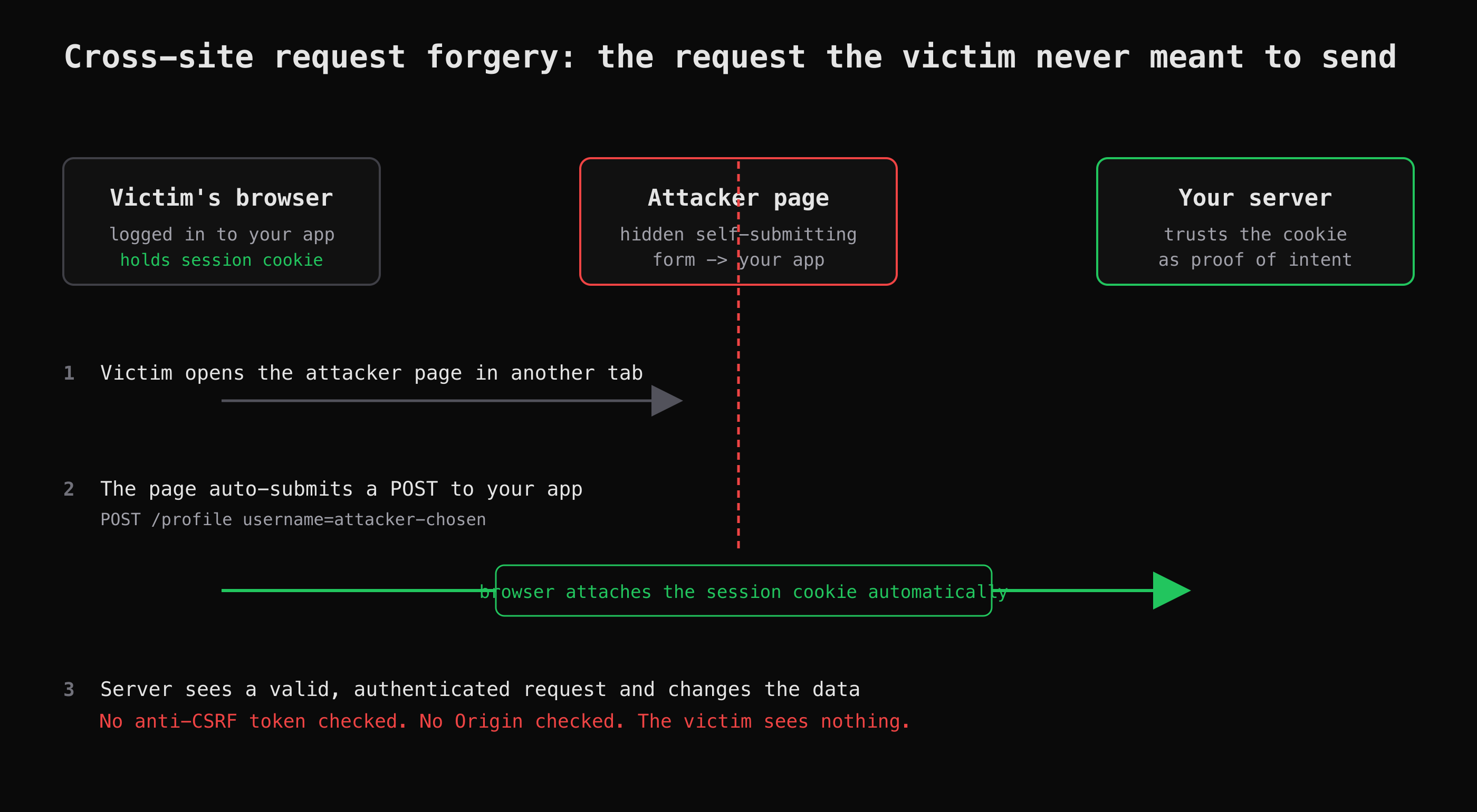
The browser attaches the session cookie to the cross-site request; the server cannot tell it apart from a real one.
Four steps, and the victim only takes the first:
- The victim is logged in to your app in one tab — they have a valid session cookie for your domain.
- In another tab they open a page the attacker controls: a link in an email, a comment, an ad. That page carries a hidden form, or an image whose URL is the request, pointed at your app.
- The page submits the request. Because it goes to your domain, the browser attaches the victim's session cookie. No script reads any response — the attacker never needs to.
- Your server sees a well-formed, authenticated request and carries out the action. The victim sees nothing.
The classic form of this does not even need script: an <img src="https://your-app.example/account/delete"> fires a GET on load, and a hidden self-submitting <form method="POST"> sends a POST with form fields. That is why a state-changing GET is the most exposed shape of all, and why the method alone is never a defence.
What does a CSRF example look like on CyberGym?
CyberGym runs OWASP Juice Shop (version 19.1.1 at the time of writing), which has a username-change form on the profile page with no anti-CSRF protection. I registered a throwaway account and looked at the form the server renders.
First, confirm the target and version — against your own instance only:
curl -s https://cybergym.hackergpt.app/rest/admin/application-version
# {"version":"19.1.1"}
The profile page serves a plain form. Fetching it with the session cookie and stripping the styling shows the fields:
curl -s https://cybergym.hackergpt.app/profile -H "Cookie: token=$TOKEN" \
  | grep -o '<form action="./profile"[^>]*>.*</form>'
<form action="./profile" method="post">
  <input id="email" type="email" name="email" value="csrf-lab@your-app.example" disabled>
  <input id="username" type="text" name="username" placeholder="e.g. SuperUser">
  <button id="submit" type="submit">Set Username</button>
</form>
Two things stand out. The form posts to ./profile with one meaningful field, username. And there is no hidden token — grepping the whole page for type="hidden" returns nothing. The request is completely predictable: an attacker knows every field without ever seeing your session.
That is the whole precondition. To show the server does not care where the request came from, I replayed the POST with a session cookie but an Origin and Referer belonging to a different site:
curl -s -i -X POST https://cybergym.hackergpt.app/profile \
  -H "Cookie: token=$TOKEN" \
  -H "Origin: https://attacker.example" \
  -H "Referer: https://attacker.example/page.html" \
  -H "Content-Type: application/x-www-form-urlencoded" \
  --data "username=csrf-was-here"
HTTP/1.1 302 Found
Access-Control-Allow-Origin: *
Set-Cookie: token=<new JWT>; Path=/
Location: /profile
The server answered 302 and re-issued the session — it accepted the change. Logging back in and re-reading the profile confirms it:
curl -s https://cybergym.hackergpt.app/profile -H "Cookie: token=$TOKEN2" \
  | grep -o 'id="username"[^>]*value="[^"]*"'
# id="username" type="text" name="username" value="csrf-was-here"
The username is now whatever the cross-origin request set. For contrast, the same POST without the cookie returns 500 — the route rejects an unauthenticated request. So the session cookie is doing all the authentication, and nothing is checking intent. That is CWE-352 exactly.
A few honest notes from the run. The forged value here lands on my own account, because a curl sends my cookie — that is a faithful test of the server's checks, not a demonstration against anyone else. A real CSRF attack delivers the request through the victim's browser, which supplies their cookie; a safe reproduction of that side belongs on a target you own with a browser you control. And Juice Shop's own challenge file carries a telling comment next to this one: it "No longer works in Chrome >=80 and Firefox >=100". That is not the server getting safer — it is the browser. Which is the hinge of the whole fix.
Why does a modern browser stop some of this on its own?
Because the cookie never gets attached in the first place. Since Chrome 80 (February 2020), a cookie with no explicit SameSite attribute is treated as SameSite=Lax: the browser withholds it from most cross-site requests, including a cross-site POST from an auto-submitting form. Firefox and other major browsers followed. So the top-of-stack HTML form attack that Juice Shop's challenge was built around no longer fires by default — the forged POST arrives with no cookie, and the server rejects it, which is the 500 we saw.
This is real defence-in-depth, and it is also why you cannot rely on it alone:
- It is the browser's behaviour, not your server's. An old browser, an embedded webview, or a client that does not implement
SameSitegives the attacker the cookie back. Laxstill sends the cookie on top-levelGETnavigations. A state-changingGET, or a link the victim clicks, can still carry the session. (This is the temporaryLax+POSTexception aside — the general rule is thatLaxcovers top-level navigations.)SameSite=Noneundoes it. A site that needs cross-site cookies for an embed or an SSO flow setsNone, and then has none of this protection.
The lesson is the one the Juice Shop comment hints at: the browser closed one door, but the server-side hole — a sensitive POST with no token — is still there, and it is yours to close.
How do I find CSRF gaps in my own app?
Treat every state-changing endpoint as a suspect and ask three questions of each. This is the method HackerGPT's AppMap supports when it crawls an app into a list of endpoints with their auth requirements — it tells you which routes change state and what authenticates them, which is exactly the inventory this check needs.
- What authenticates it? If the answer is "a session cookie" (or Basic auth, or a client cert) and nothing else, it is a candidate. If a request needs a token the server reads from a request header or body, a cross-site page cannot supply it — that is already most of the defence.
- Does it carry an unpredictable, per-session token? Look at the request in your browser's network tab. A hidden form field or header like
csrf_token,_token,X-CSRF-Tokenthat changes per session is the anti-CSRF token. No such value means the request is forgeable. - Does the server check where it came from? Replay the request with a foreign
Originheader, as above, and only your session cookie. If it succeeds, the server is not validating origin.
You can replay a single request safely with curl against your own app:
curl -s -i -X POST https://your-app.example/account/email \
  -H "Cookie: session=$YOUR_OWN_SESSION" \
  -H "Origin: https://not-your-app.example" \
  -H "Content-Type: application/x-www-form-urlencoded" \
  --data "email=changed@your-app.example"
A 2xx or 3xx that actually changed the email, with no token in the request and a foreign Origin, is the finding. A 403/400 that mentions a token or origin is the defence working. Do this on an account you own; you are testing the server's checks, not attacking a user.
If you want this framed as a capture-the-flag exercise on a legal target, HackerGPT's CTF Mode runs the same kind of probing against CyberGym and explains each step as it goes, which is a gentler way to see the pattern than reading request logs cold.
How do I fix CSRF?
Layer the defences; do not pick one. The OWASP CSRF Prevention Cheat Sheet recommends token-based mitigation as the primary control and SameSite as defence-in-depth.
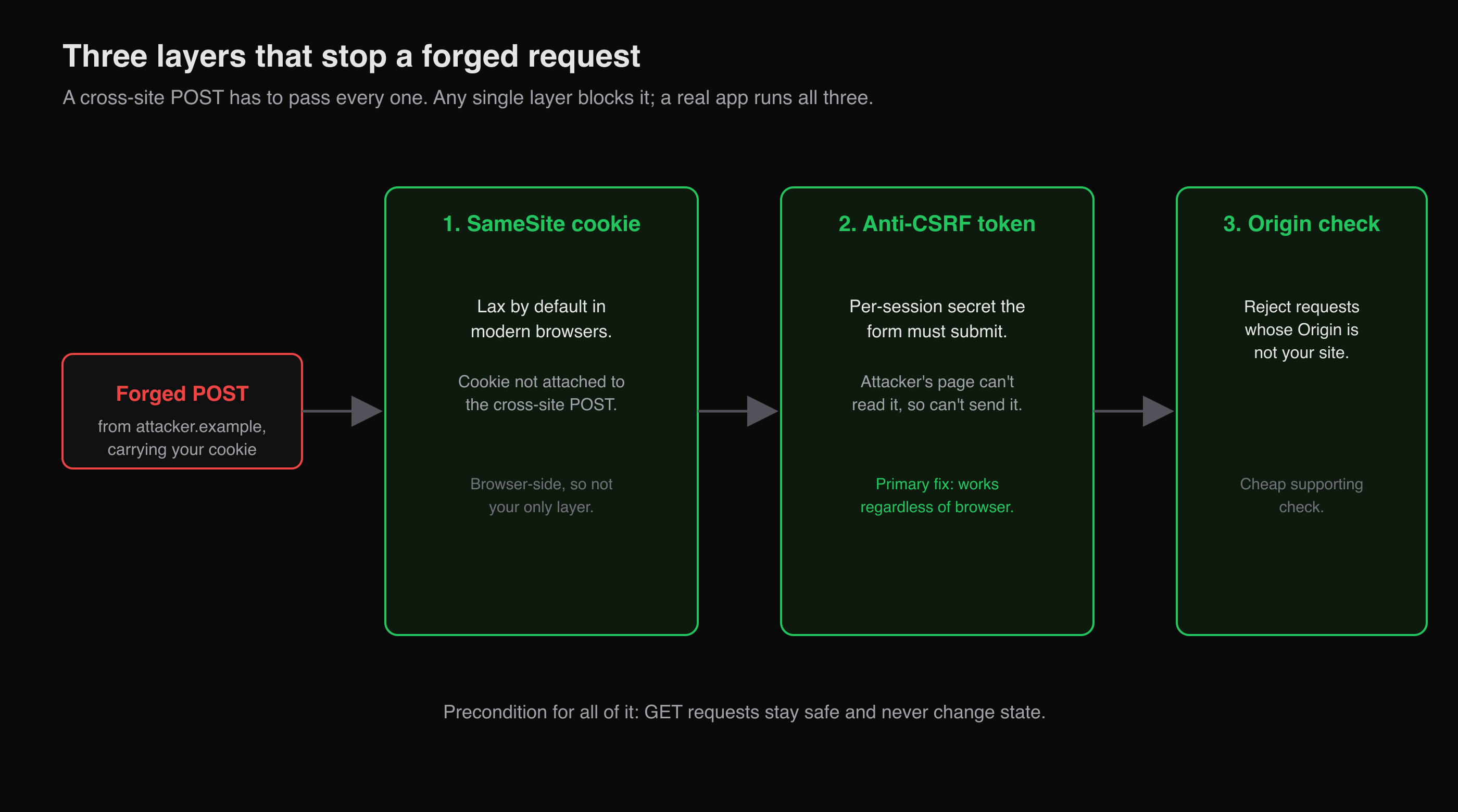
Three independent checks, any one of which stops the forged request. A real app layers them.
- Anti-CSRF tokens (the primary fix). Issue a random, per-session (or per-request) token, embed it in every state-changing form or send it in a header, and reject any request whose token is missing or wrong. The attacker's page cannot read it — the same-origin policy stops them — so they cannot include it. The synchronizer-token pattern and the signed double-submit cookie are the two standard shapes; most frameworks ship one, so use the framework's rather than rolling your own.
SameSitecookies (defence-in-depth). SetSameSite=Laxon session cookies at minimum,Strictwhere no cross-site navigation needs the session. This stops the cross-sitePOSTin current browsers. It is a second layer, not the only one, because it depends on the browser and becauseLaxstill allows some top-level requests.- Verify the
Origin/Refererheader. On state-changing requests, reject any whoseOrigin(orReferer, as a fallback) is not your own site. It is cheap and catches forged cross-site requests, but treat it as a supporting check — headers can be absent, and this alone does not cover same-site attacks. - Do not change state on
GET. KeepGETsafe and idempotent so an<img>or a link can never trigger an action. This is a precondition for the rest to hold.
For Juice Shop's form specifically, the real-world fix is the first two together: a token the profile form must submit, plus a SameSite attribute on the session cookie (the app sets its token cookie with no SameSite, which is why the attack was ever in scope). Neither is a product you buy; both are a few lines in the framework you already use.
Key takeaways
- CSRF exploits the gap between who you are (the session cookie the browser sends automatically) and what you meant to do (which nothing verifies). Close that gap and the bug is gone.
- The vulnerable shape is a state-changing request authenticated only by an auto-sent credential, with predictable parameters and no unguessable token. Check every such endpoint.
- Find it by replaying a sensitive request from a foreign
Originwith only the session cookie — on an account you own. Success with no token in the request is the finding. SameSite=Laxby default in modern browsers blocks the classic cross-sitePOST, which is real protection but browser-dependent — never your only layer.- Fix it with anti-CSRF tokens as the primary control, plus
SameSitecookies, anOrigincheck, and safeGETs. Use your framework's built-in token rather than writing your own.
FAQ
What is a simple example of cross-site request forgery?
A banking site has a transfer endpoint, POST /transfer, that trusts the session cookie and takes to and amount fields with no anti-CSRF token. An attacker puts a hidden, self-submitting form on a page and emails the link to a logged-in customer. When the customer opens the page, their browser submits the form to the bank, attaching their session cookie, and the bank processes the transfer. The customer never clicked "send".
Is CSRF still a risk now that browsers default to SameSite=Lax?
Partly mitigated, not gone. Since Chrome 80 and equivalents, a cookie with no SameSite attribute is treated as Lax, which blocks the classic cross-site POST. But it is the browser enforcing this, so old or embedded clients can still be exploited; Lax still allows some top-level GET requests; and any cookie set to SameSite=None opts out entirely. Server-side anti-CSRF tokens remain the primary defence.
What is the difference between CSRF and XSS?
They attack opposite trusts. CSRF abuses the site's trust in the user's browser — it makes an authenticated request the user did not intend, without reading any response. XSS abuses the user's trust in the site — it runs attacker script in your origin, where it can read the page, steal tokens and act with full access. XSS can defeat many CSRF defences (it can read the token), so a stored XSS is usually the more severe of the two.
How do I test my own app for CSRF?
For each endpoint that changes state, replay the request against your own account from a foreign Origin header, sending only the session cookie and no CSRF token. If the action succeeds, the endpoint is forgeable. If it is rejected for a missing or invalid token, the defence is working. Keep the test to accounts and targets you own or have written permission to test.
Which fix should I implement first?
Anti-CSRF tokens, because they defend regardless of the browser. Use the one your web framework ships — Django, Rails, Spring, Laravel and Express middleware all have one — rather than writing your own. Then add SameSite=Lax (or Strict) to session cookies and an Origin check as additional layers, and make sure no GET request changes state.
Sources
- CWE-352: Cross-Site Request Forgery (CSRF) — MITRE
- OWASP Top 10:2025 — A01 Broken Access Control
- OWASP Cross-Site Request Forgery Prevention Cheat Sheet
- SameSite cookie changes in February 2020 — Chromium Blog
- SameSite FAQ — Chromium
- OWASP Juice Shop CSRF challenge definition (v19.1.1)
Want to try this on a legal target? Practise on CyberGym, or point HackerGPT at your own site at hackergpt.app and let it walk you through what changes state and what checks it.