TL;DR: An open redirect is an endpoint that sends the browser to whatever URL a request parameter names, such as /redirect?to=…. A phishing link built on it shows your real domain, and your own server then forwards the victim to the attacker's page. You find it by sending a foreign URL to every redirect parameter and reading the Location header. You fix it by parsing the target and allowing only hosts you list, never by searching the string for an allowed value.
This article is for learners who want to understand the open redirect vulnerability well enough to spot it, and for developers who have a next, returnUrl or to parameter somewhere in their own app. It shows the bug on CyberGym, HackerGPT's hosted OWASP Juice Shop and a legal practice target, through its two redirect challenges, then turns to your own code. Run these checks only against systems you own or have written permission to test.
What is an open redirect vulnerability?
An open redirect is a URL on a trusted site that forwards the visitor to an untrusted one, chosen by whoever wrote the link. MITRE catalogues it as CWE-601: URL Redirection to Untrusted Site ('Open Redirect'): the application "accepts a user-controlled input that specifies a link to an external site, and uses that link in a redirect." In the OWASP Top 10:2025 CWE-601 is one of the weaknesses mapped to A01, Broken Access Control.
Redirect parameters exist for ordinary reasons. The OAuth 2.0 Security Best Current Practice (RFC 9700, January 2025) names two: showing a message before sending the user to an external site, and returning users to the page they wanted after a login prompt interrupted them. The bug is not the redirect. It is that the destination is not checked, or is checked badly.
On its own an open redirect does not read data or run code, so it is often rated low. What it lends an attacker is your domain's reputation, and in some flows more than that (see the OAuth question below).
How does an open redirect help phishing?
It lets a phishing link start on your domain. The OWASP Unvalidated Redirects and Forwards Cheat Sheet puts it plainly: because the server name in the modified link is identical to the original site, the phishing attempt looks more trustworthy.
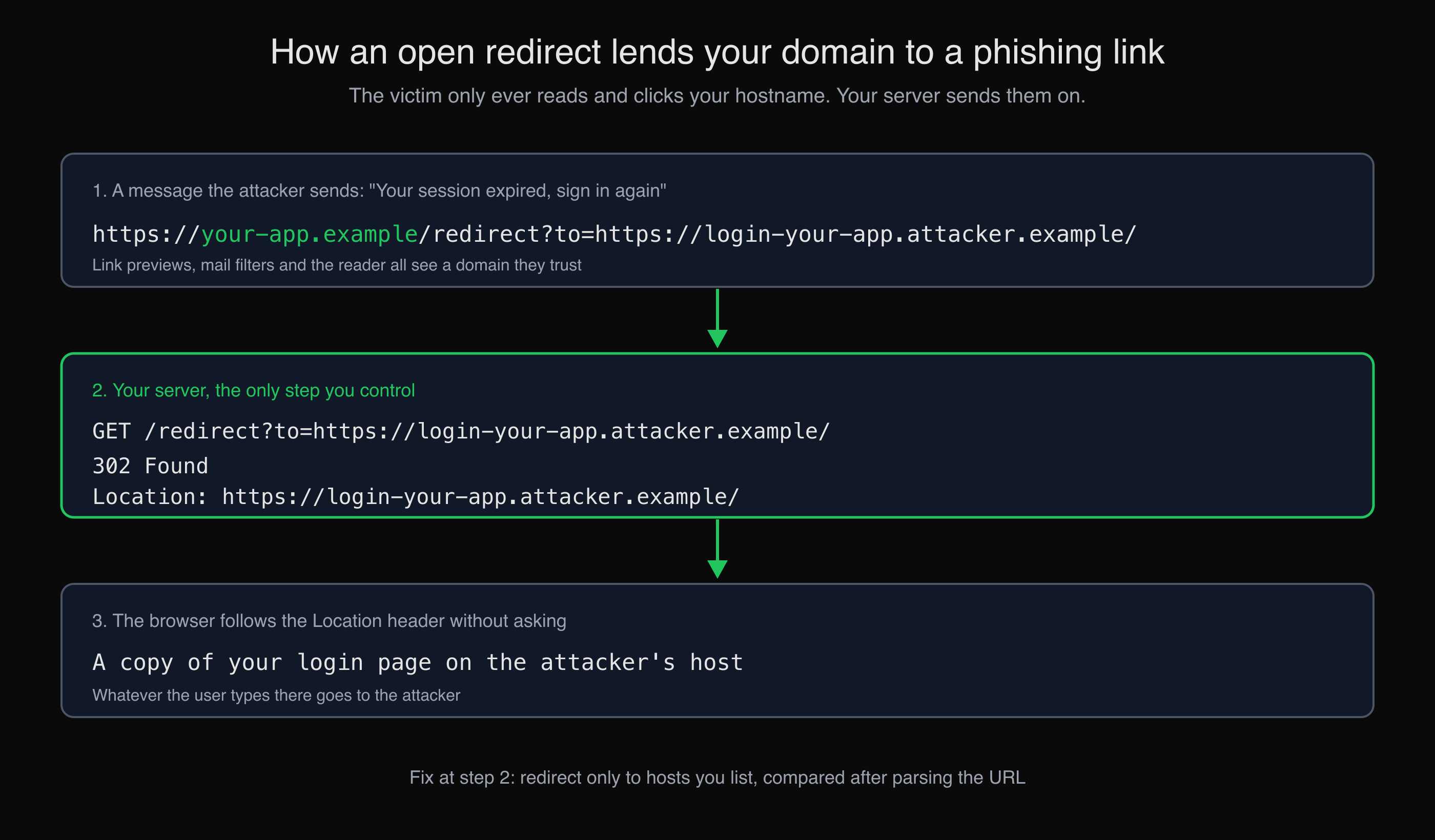
The victim reads and clicks your hostname; the redirect on your server does the rest.
Three things happen, and only the middle one is yours:
- The attacker sends a message ("your session expired, sign in again") with a link that begins
https://your-app.example/redirect?to=. A person hovering over it, and a filter that judges links by their domain, see your hostname. - Your server receives the request and answers
302 FoundwithLocation:set to the attacker's URL. - The browser follows the header without asking and shows a copy of your login page on the attacker's host. The address bar has changed, but the user has little reason to look again after clicking a link they already trusted.
RFC 9700, section 4.11.1 describes the same abuse for OAuth clients: URLs "that appear to point to the client" and "might trick users into trusting the URL". Older advisories show the pattern is long-standing; CWE-601 lists, for example, CVE-2008-2951, an open redirect in a search script used to "conduct phishing attacks".
What does an open redirect look like on CyberGym?
CyberGym has one redirect endpoint, GET /redirect?to=<url>, and two challenges built on it. Everything below was run on 12 November 2026 against CyberGym, which reported {"version":"19.1.1"} from /rest/admin/application-version. No account was needed, and no request was followed: curl without -L shows the redirect without visiting it.
Step 1: find the redirect parameter
The parameter is in the front-end code. Juice Shop is a single-page app, so its links ship in main.js:
curl -s https://cybergym.hackergpt.app/main.js | grep -o 'redirect?to=[^"]*' | sort -u
redirect?to=http://leanpub.com/juice-shop
redirect?to=http://shop.spreadshirt.com/juiceshop
redirect?to=http://shop.spreadshirt.de/juiceshop
redirect?to=https://blockchain.info/address/1AbKfgvw9psQ41NbLi8kufDQTezwG8DRZm
redirect?to=https://etherscan.io/address/0x0f933ab9fcaaa782d0279c300d73750e1311eae6
redirect?to=https://explorer.dash.org/address/Xr556RzuwX6hg5EGpkybbv5RanJoZN17kW
redirect?to=https://www.stickeryou.com/products/owasp-juice-shop/794
Seven links. Three of them point at cryptocurrency addresses that the shop no longer shows anywhere on its pages. That is the one-star Outdated Allowlist challenge: the developers removed the donation buttons but left the links in the compiled bundle and the addresses on the server's allowlist. Requesting one of them through /redirect solves it:
curl -s -o /dev/null -w '%{http_code} %{redirect_url}\n' \
  'https://cybergym.hackergpt.app/redirect?to=https://blockchain.info/address/1AbKfgvw9psQ41NbLi8kufDQTezwG8DRZm'
302 https://blockchain.info/address/1AbKfgvw9psQ41NbLi8kufDQTezwG8DRZm
The lesson for your own app is broader than the challenge: an allowlist is code, and an entry nobody remembers adding is a destination you still vouch for.
Step 2: test the allowlist with a foreign host
Next, a destination that is not on the list. We used our own domain, hackergpt.org, so that nothing here points at anyone else's site:
curl -s -o /dev/null -w '%{http_code}\n' \
  'https://cybergym.hackergpt.app/redirect?to=https://hackergpt.org/'
406
The server refused, and the error page carried a full Express stack trace, starting at /home/admin/juice-shop/build/routes/redirect.js:45:18. That trace is a separate finding, a security misconfiguration, and it is also a hint: there is a check in routes/redirect.js, and a refusal message that tells you so.
Step 3: find out what the check compares
Juice Shop is open source, so the check can be read rather than guessed. In lib/insecurity.ts at tag v19.1.1 the allowlist is a set of URL strings, and the test is:
export const isRedirectAllowed = (url: string) => {
  let allowed = false
  for (const allowedUrl of redirectAllowlist) {
    allowed = allowed || url.includes(allowedUrl)
  }
  return allowed
}
includes is true if the allowed string appears anywhere in the target. The check never asks which host the browser will go to. That is the four-star Allowlist Bypass challenge, whose description in challenges.yml is "Enforce a redirect to a page you are not supposed to redirect to."
Step 4: put the allowed string where the host does not look
We sent six values and recorded each answer:
for to in \
  'https://github.com/juice-shop/juice-shop' \
  'https://hackergpt.org/' \
  '//hackergpt.org/' \
  'https://github.com/juice-shop/juice-shop@hackergpt.org/' \
  'https://hackergpt.org/?x=https://github.com/juice-shop/juice-shop' \
  'https://hackergpt.org/#https://github.com/juice-shop/juice-shop'
do
  curl -s -o /dev/null -w "%{http_code} %{redirect_url}\n" \
    --get --data-urlencode "to=$to" https://cybergym.hackergpt.app/redirect
done
302 https://github.com/juice-shop/juice-shop
406
406
302 https://github.com/juice-shop/juice-shop@hackergpt.org/
302 https://hackergpt.org/?x=https://github.com/juice-shop/juice-shop
302 https://hackergpt.org/#https://github.com/juice-shop/juice-shop
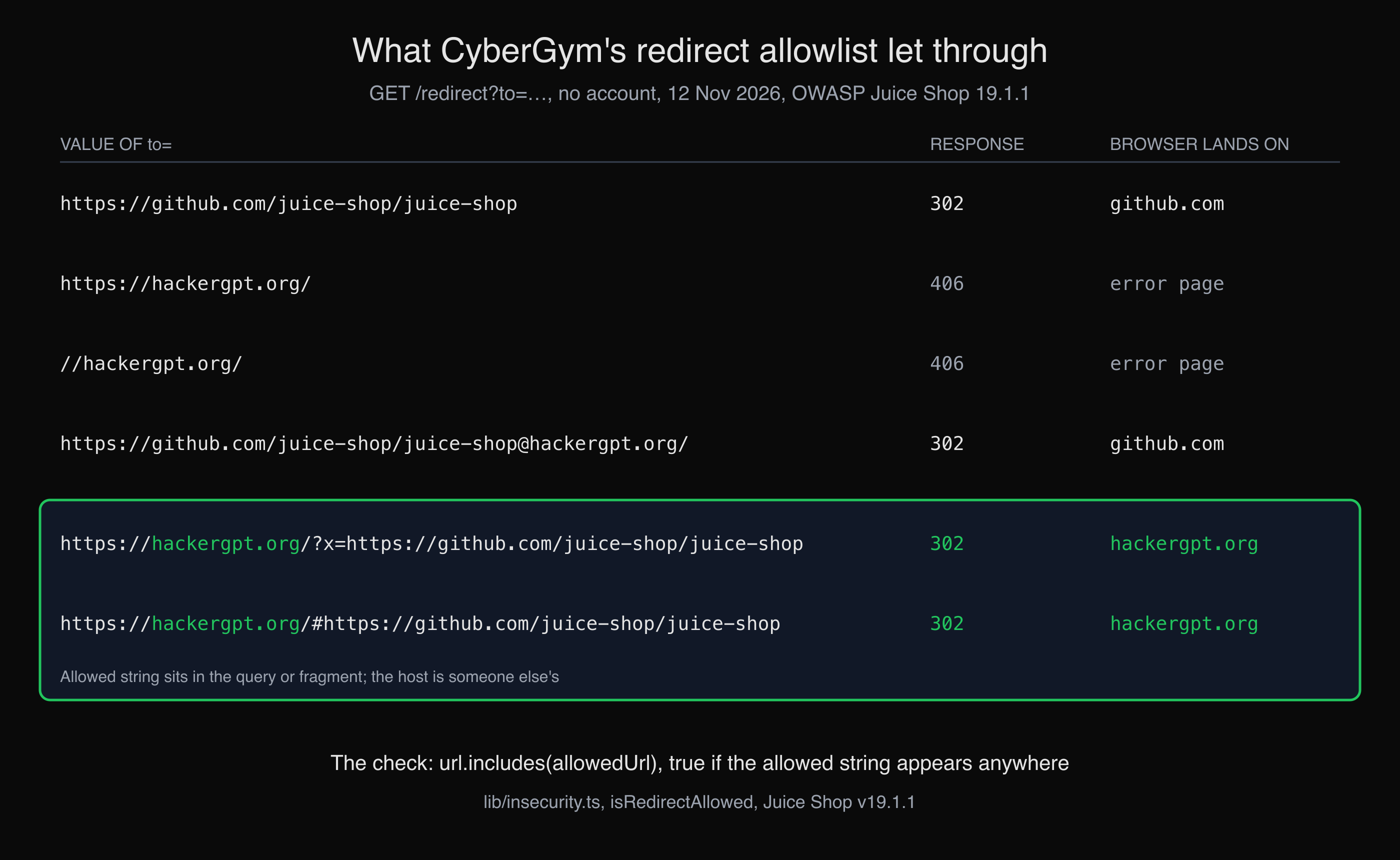
Six values of to= sent to CyberGym. The two in the green box passed the allowlist and left the site.
The last two are the bypass: the allowed string rides in the query string or the fragment, and the host is hackergpt.org. Swap our domain for an attacker's and you have the phishing link from the diagram above, starting at a domain that was supposed to vouch for it.
One result surprised us. The @ value passed the check too, but it is not a bypass: in that URL @ comes after the first / of the path, so the browser still parses the host as github.com. It is a reminder that the only answer that matters is how the URL is parsed, which is the basis of the fix.
How do I find open redirects on my own site?
Look for every parameter whose value becomes a URL, then send each one a host you own and read the response without following it. The OWASP Web Security Testing Guide has the client-side variant of the same test.
List the candidates. Common names are
next,return,returnUrl,redirect,redirect_uri,url,to,continue,dest. Search your routes and front-end bundle for them, and the login, logout, signup and "you are leaving this site" flows first. A map of the app helps here: AppMap lists every API endpoint it finds with its parameters and auth requirement, which is where redirect parameters hide. Our guide to mapping a web app's attack surface covers doing it by hand.Send a foreign host you control and read the status and
Locationheader:curl -s -o /dev/null -w '%{http_code} %{redirect_url}\n' \ --get --data-urlencode 'to=https://your-other-domain.example/' \ https://your-app.example/redirectIf it is refused, try the shapes a weak check misses: your own domain in the query or fragment of a foreign URL, your domain as a prefix of a longer host (
your-app.example.your-other-domain.example), protocol-relative//host, and a backslash after the slash (/\host), which browsers treat as//hostforhttpsURLs under the WHATWG URL Standard.Check client-side redirects too. Code that copies a parameter into
location.hrefnever shows a302. If it acceptsjavascript:URLs, it is no longer just a redirect; that is the DOM-based case in our XSS examples.
Record each one as a finding: the parameter, the value sent, the Location you got back. Whether it matters depends on where the redirect sits; one on a login or OAuth flow deserves more attention than one on a marketing link.
How do I fix an open redirect?
The OWASP cheat sheet gives the options: avoid user-supplied destinations altogether; where possible, have the user send a short name or ID (?to=docs) that the server maps to a full URL; and where an external URL must be accepted, allow only approved destinations, compared using the parsed URL components.
When you validate, parse first and compare the parsed parts. This Node function uses the URL constructor, which parses the way the WHATWG standard says browsers do:
const ALLOWED_HOSTS = new Set(['your-app.example', 'docs.your-app.example']);

export function safeRedirectTarget(raw, base = 'https://your-app.example') {
  let url;
  try {
    url = new URL(raw, base);
  } catch {
    return '/';
  }
  if (url.protocol !== 'https:') return '/';
  if (!ALLOWED_HOSTS.has(url.hostname)) return '/';
  return url.href;
}
We ran it on Node 26 against the inputs that matter:
"/account"                                          -> https://your-app.example/account
"https://docs.your-app.example/start"               -> https://docs.your-app.example/start
"https://evil.example/?x=https://your-app.example"  -> /
"//evil.example/"                                   -> /
"https://your-app.example.evil.example/"            -> /
"https://your-app.example@evil.example/"            -> /
"javascript:alert(1)"                               -> /
"/\\evil.example"                                   -> /
For comparison, the same hostile inputs against the two string checks people usually write first, with https://your-app.example as the only allowed value:
| Input | includes |
startsWith |
Host the browser uses |
|---|---|---|---|
https://evil.example/?x=https://your-app.example |
allowed | refused | evil.example |
https://your-app.example.evil.example/ |
allowed | allowed | your-app.example.evil.example |
https://your-app.example@evil.example/ |
allowed | allowed | evil.example |
/\evil.example (as "relative") |
refused | refused | evil.example |
startsWith is better than includes and still lets two through, because a URL's host is not a prefix of its string. A "must start with /" rule, meant to allow only relative paths, would accept both //evil.example and /\evil.example.
Three more habits help. Keep the allowlist short and review it like code, which is what CyberGym's Outdated Allowlist challenge is about. Fall back to a fixed page (/) rather than an error that echoes the input. And for OAuth, follow RFC 9700, section 2.1: authorization servers compare redirect URIs by exact string match, and neither clients nor servers may expose open redirectors.
Key takeaways
- Search your routes and bundle for
next,returnUrl,redirect,toandurlparameters, and test each with a host you own. - Read the
Locationheader withcurland no-L; a302to your foreign host is the finding. - Replace any
includes,startsWithor regex check on the raw string withnew URL()and an exact host comparison. - Prefer server-side identifiers (
?to=docs) to URLs in the parameter, and prune the allowlist when a link leaves the page. - Treat a redirect on a login or OAuth flow as higher priority than one on a marketing link.
FAQ
What is an example of an open redirect?
A link such as https://your-app.example/redirect?to=https://attacker.example/ that your server answers with a 302 to the attacker's site. On CyberGym, /redirect?to=https://hackergpt.org/?x=https://github.com/juice-shop/juice-shop passed the allowlist because the allowed URL appeared in the query string, and the server redirected to hackergpt.org.
Is an open redirect a serious vulnerability?
On its own it is usually rated low, because it does not read data or run code. It becomes more serious on login and OAuth flows, where RFC 9700 notes it can be used to exfiltrate authorization codes and access tokens, and when the redirect is client-side and accepts javascript: URLs.
How is an open redirect different from SSRF?
An open redirect sends the user's browser somewhere. Server-side request forgery makes your server fetch a URL itself. The parameter can look the same; what differs is who makes the request to the attacker's destination.
Why does an allowlist with startsWith not stop open redirects?
Because the host of a URL is not a prefix of the string. https://your-app.example.evil.example/ and https://your-app.example@evil.example/ both start with https://your-app.example and lead to other hosts. Parse the URL and compare its hostname with an exact list instead.
Which CWE and OWASP category cover open redirects?
MITRE's CWE-601, "URL Redirection to Untrusted Site ('Open Redirect')". In the OWASP Top 10:2025 it is mapped to A01, Broken Access Control, and OWASP's Unvalidated Redirects and Forwards Cheat Sheet covers prevention.
Sources
- CWE-601: URL Redirection to Untrusted Site ('Open Redirect'), MITRE
- A01:2025 Broken Access Control, OWASP Top 10:2025
- Unvalidated Redirects and Forwards Cheat Sheet, OWASP
- Testing for Client-side URL Redirect, OWASP Web Security Testing Guide
- RFC 9700: Best Current Practice for OAuth 2.0 Security, IETF, January 2025
- URL Standard, WHATWG
- URL() constructor, MDN
- OWASP Juice Shop v19.1.1 source:
lib/insecurity.ts,routes/redirect.ts,data/static/challenges.yml
Practise both redirect challenges on CyberGym, or map your own app's parameters with HackerGPT.