TL;DR: To test rate limiting, send a small, bounded series of requests to one endpoint — five or ten failed logins, a repeated password reset, a reused coupon — and read the status codes. If every request returns 200 or 401 at full speed and none ever becomes 429 Too Many Requests, nothing throttles that endpoint, and an attacker can brute-force it as fast as they can send. You do not need to flood anything to learn this; a handful of requests is the whole proof.
This is for a site or app owner who wants to know whether their login resists password guessing, and for a learner who wants to see what "no rate limit" looks like on the wire. Only test targets you own or have written permission to test. Everything below was run against CyberGym, a legal, deliberately vulnerable practice target, on 12 November 2026.
What is a rate limiting test?
A rate limiting test checks whether an endpoint caps how many requests one client can make in a window of time. It is the defence that turns an unlimited guessing game into a bounded one: without it, a login form will check every password an attacker sends; with it, the form answers the first few and then rejects the rest with 429 Too Many Requests until the window resets.
The OWASP API Security Top 10 2023 files this under API4:2023, Unrestricted Resource Consumption: an API that serves requests "without bandwidth, CPU, memory... limits" lets an attacker exhaust resources or, on an authentication endpoint, run brute-force and credential-stuffing attacks. The companion weakness on the authentication side is OWASP Top 10:2025 A07, Authentication Failures, which names "permits brute force or other automated attacks" as a direct symptom. The matching MITRE entry is CWE-307, Improper Restriction of Excessive Authentication Attempts.
The diagram below is the whole idea: the same flood of guesses, two servers, one outcome each.
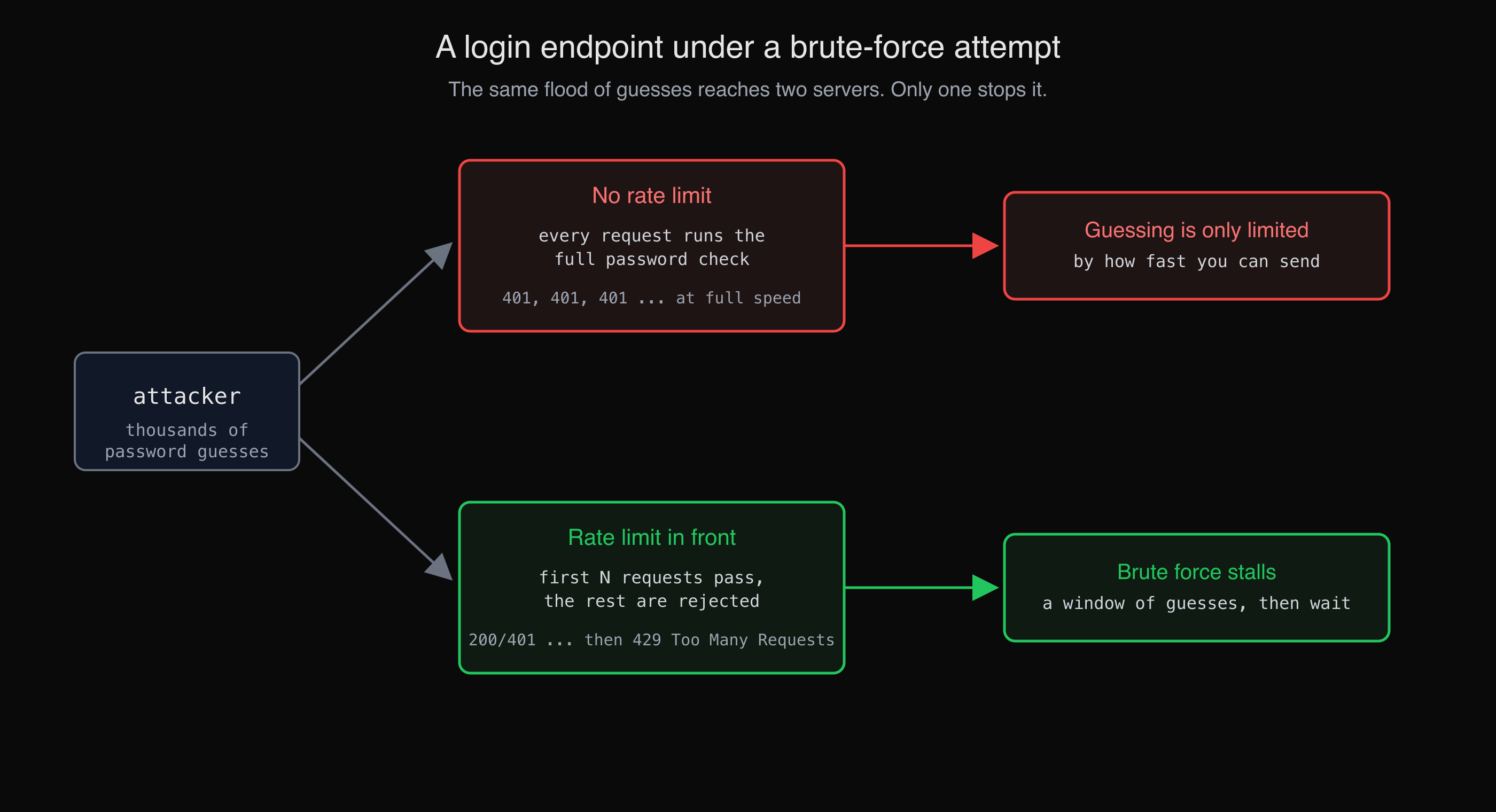
Without a limit, every guess reaches the password check. With one, the window fills and the rest are rejected.
How do I test my login against brute force?
Send a few deliberately wrong logins to your own login endpoint and watch the status codes and timing. You are not trying to guess a password — you are checking whether the server would ever stop you if you did. A handful of requests answers that.
First find the endpoint. In the browser's network tab, submit the login form once and read where the request goes; on an app you own, AppMap lists every endpoint with the auth it requires, so the login and password-reset routes are named for you. CyberGym's login is a POST to /rest/user/login. We sent five wrong passwords for an account that does not exist, and recorded the response line and the time of each:
TARGET=https://cybergym.hackergpt.app
for i in 1 2 3 4 5; do
  curl -s -o /dev/null -X POST "$TARGET/rest/user/login" \
    -H 'Content-Type: application/json' \
    -d '{"email":"rate-test@your-app.example","password":"wrong-'"$i"'"}' \
    -w "attempt $i -> %{http_code} in %{time_total}s\n"
done
attempt 1 -> 401 in 0.094132s
attempt 2 -> 401 in 0.082416s
attempt 3 -> 401 in 0.083010s
attempt 4 -> 401 in 0.078417s
attempt 5 -> 401 in 0.107184s
Every attempt returned 401 Unauthorized in under a tenth of a second, and none carried a Retry-After header or became a 429. That is the finding: this endpoint applies no per-client cap. Five requests show it as clearly as five thousand would, which is why you stop at five.
CyberGym runs OWASP Juice Shop 19.1.1, and its source confirms what the requests showed. The login route is registered with no limiter middleware in front of it, while the project reserves rate limiting for a few other routes (server.ts):
// The login route — no rate limiter:
app.post('/rest/user/login', login())

// Reset-password and 2FA routes do get one:
app.use('/rest/user/reset-password', rateLimit({ windowMs: 5 * 60 * 1000, max: 100, /* ... */ }))
app.post('/rest/2fa/verify', rateLimit({ windowMs: 5 * 60 * 1000, max: 100, validate: false }), twoFactorAuth.verify)
Reading the behaviour and the source together is the point: the test tells you that an endpoint is unprotected, and the code — on an app you own — tells you why, so you know exactly where the fix goes.
Why a handful of requests is enough
Because the test is about the policy, not the password. A rate limit is present or it is absent, and the first request that should have been throttled but was not is your evidence. Sending more requests does not make a missing limit more missing; it only turns a safe, obvious check into traffic that looks like a real attack and that you have no business sending to anything but your own target.
OWASP frames the risk as resource consumption for a reason: flooding an endpoint, even your own in production, is the denial-of-service behaviour you are supposedly guarding against. So cap yourself. Five to ten requests to see whether a 429 ever appears, run against a staging copy or a practice target, is the responsible shape of this test. If you need to confirm where the limit kicks in on your own system, read the configuration rather than hammering the endpoint until it trips.
How do I test CAPTCHA and anti-automation?
Check two things: whether the CAPTCHA is actually verified on the server, and whether the server notices a machine solving it far faster than a person could. A control that only runs in the browser, or one that hands the client the answer, stops no script.
CyberGym's feedback form is guarded by a math CAPTCHA. Each call to /rest/captcha mints a fresh puzzle — and returns the answer in the same JSON:
curl -s https://cybergym.hackergpt.app/rest/captcha
{"captchaId":0,"captcha":"10-3-7","answer":"0"}
A CAPTCHA whose response includes its own answer is decoration: a script reads answer, posts it straight back, and passes the check every time. We walked through exactly that leak, and solving the "Zero Stars" challenge off the back of it, in How to learn hacking on a real target — worth reading alongside this, because it shows the same endpoint from the input-validation angle.
The more interesting control is the one layered on top. Juice Shop ships a "CAPTCHA Bypass" challenge (category Broken Anti Automation) that is solved by posting feedback ten times within twenty seconds — the server watches the gap between the first and tenth request and flags the burst as automated. That is the behaviour your own anti-automation should have: not just "was the CAPTCHA answered", but "is this client answering at a rate no human could". A test for it is the same shape as the login test — a short, bounded burst of valid submissions — and the signal you want to see is the server slowing you down or demanding a fresh challenge, not accepting all ten.
Can a rate limit be there and still fail?
Yes — a limit on the wrong key protects nothing. The usual mistake is keying the counter on a value the client controls, so an attacker rotates that value and resets their own budget. CyberGym's password-reset route is the textbook case. It does carry a limiter, but the counter is keyed on the X-Forwarded-For header (server.ts):
app.use('/rest/user/reset-password', rateLimit({
  windowMs: 5 * 60 * 1000,
  max: 100,
  keyGenerator ({ headers, ip }) { return headers['X-Forwarded-For'] ?? ip }
}))
X-Forwarded-For is a request header. Anyone can set it to anything, so an attacker changes it on each request and every attempt counts against a different bucket — the limit is present, enforced, and bypassed. (Juice Shop makes this a scored challenge, "Reset Morty's Password", whose own hint says the reset is "protected by a rate limiting mechanism... You need to beat this somehow.") The lesson for your own code: a limiter is only as good as its key. Trust a header the client sends and you have built a counter the client can reset.
So a complete rate-limiting test has three questions, not one: Is there a limit at all? Is it keyed on something the client cannot forge (the authenticated user, or a trusted proxy's real client IP)? And does it cover the sensitive endpoints — login, reset, token verification, coupon redemption — rather than one of them while the rest run free?
What do I do about it?
Put a limit in front of every endpoint that authenticates, resets, or spends something, and key it on something trustworthy.
- Add a per-identifier limit to login, password reset, 2FA verification, and any "redeem/apply" endpoint. The OWASP Authentication Cheat Sheet recommends throttling or temporary lockout after a small number of failed attempts.
- Key it on what the client cannot change. The authenticated account where there is one; otherwise the real client IP from your trusted proxy, configured deliberately — not whatever arrives in
X-Forwarded-For. - Return
429 Too Many Requestswith aRetry-Afterheader when the window is full, so legitimate clients can back off and you can see the throttle working in your own tests. - Verify CAPTCHAs and tokens server-side, and never return the solution to the client. Add rate-based anti-automation on top, because a solved CAPTCHA is not proof of a human.
- Watch for the bypass. After you add a limit, re-run the test rotating the header or the account and confirm the counter does not reset.
A rate limit slows brute force; it does not make weak passwords safe or replace multi-factor authentication. Treat it as one layer. What happens after a correct password — sessions, logout, 2FA — is its own subject, covered in Broken authentication examples, and finding every endpoint that needs a limit in the first place is the job of mapping your attack surface.
You can practise all of these checks on CyberGym, or point HackerGPT at your own app to find the endpoints that answer without limit.
Key takeaways
- A rate-limiting test reads status codes, not passwords: send a small, bounded series of failed logins and watch whether a
429ever appears. Five to ten requests prove it. - Never flood anything. OWASP frames missing limits as Unrestricted Resource Consumption; a flood is the denial of service you are testing for. Cap yourself, and test staging or a practice target.
- A CAPTCHA that is not verified server-side — or that returns its own answer — stops no script. Add rate-based anti-automation on top and verify both.
- A limit keyed on a client-controlled value like
X-Forwarded-Foris bypassed by rotating that value. Key the counter on the authenticated user or a trusted proxy's client IP. - Cover every sensitive endpoint — login, reset, token verification, redemption — not just one. Rate limiting is one layer, alongside strong passwords and MFA.
FAQ
How do I test if an API has rate limiting?
Pick one endpoint and send a short, bounded series of identical requests — five or ten — reading the HTTP status and any Retry-After header of each. If every request succeeds or fails at full speed and you never receive 429 Too Many Requests, that endpoint has no per-client limit. Do this only against a target you own or have written permission to test, and stop as soon as you have the answer; you do not need to flood it.
What status code means rate limiting is working?
429 Too Many Requests, usually with a Retry-After header telling the client how long to wait. When your test starts getting 429 after a few requests, the limit is active. If you only ever see 200 or 401 no matter how many requests you send in the window, nothing is throttling that endpoint.
How many requests should I send when testing rate limits?
As few as possible — enough to see whether a limit exists, not enough to stress the service. Five to ten requests to a single endpoint is usually plenty to tell "no limit" from "limited after N". Sending more risks behaving like a real brute-force or denial-of-service attack, which is the exact thing rate limiting is meant to stop, so keep the test bounded and run it against staging or a legal practice target.
Why is rate limiting important for login forms?
Because a login form without a limit will check every password an attacker sends, turning password guessing and credential stuffing into a matter of how fast they can make requests. A rate limit caps the number of attempts per client per window, so an online brute-force attack stalls. It does not replace strong passwords or multi-factor authentication; it is the layer that buys those defences time.
Can a rate limit be bypassed?
Yes, if it counts requests using a value the client controls. A common flaw is keying the limiter on the X-Forwarded-For header, which any client can set: the attacker changes it on each request so every attempt lands in a fresh bucket and the limit never trips. Key the counter on the authenticated account, or on the real client IP taken from a proxy you trust, rather than on a header the request supplies.