TL;DR: SQL injection is a bug where user input is pasted into a database query as code instead of being passed as a value, so the input can change what the query does — read other users' records, dump a schema, or bypass a login. You confirm it by sending a single quote and watching for a database error, and you prevent it with parameterized queries, where the query's structure is fixed in code and input can only ever fill a value slot.
This is for learners and CTF players who want to understand SQL injection from the mechanism rather than from a list of payloads. We work the SQL injection challenges in CyberGym, our deliberately vulnerable training app, confirm the bug from a real error, see how UNION-based enumeration and the classic login bypass actually work, and fix the query. Every request here targets CyberGym; only run payloads against apps you own or have written permission to test.
The video solves four SQL injection challenges on CyberGym twice — by hand in Burp Suite, and with HackerGPT in CTF mode, where "prompt chaining" lets you steer one engagement from the schema to the credentials to the logins without restarting. This article pulls out the reasoning each step depends on, and shows the one request that proves the bug is there.
What is SQL injection?
SQL injection is user input changing the meaning of a database query. MITRE tracks it as CWE-89, and it is part of A05, Injection, in the OWASP Top 10:2025. The bug class is decades old and still common, because building a query by joining strings is the shortest code to write, and because even modern stacks keep a few raw queries — a search filter, a sort parameter, a reporting endpoint an ORM does not cover.
A vulnerable search usually looks like the first line below, and the fix like the second:
// Vulnerable: input concatenated into the SQL text
db.query("SELECT * FROM products WHERE name LIKE '%" + q + "%'");

// Fixed: a parameterized query; q is only ever a value
db.query("SELECT * FROM products WHERE name LIKE ?", ["%" + q + "%"]);
In the first version a quote inside q ends the string early and whatever follows is read as SQL. That single fact is the whole vulnerability, and the diagram below is the whole exploit.
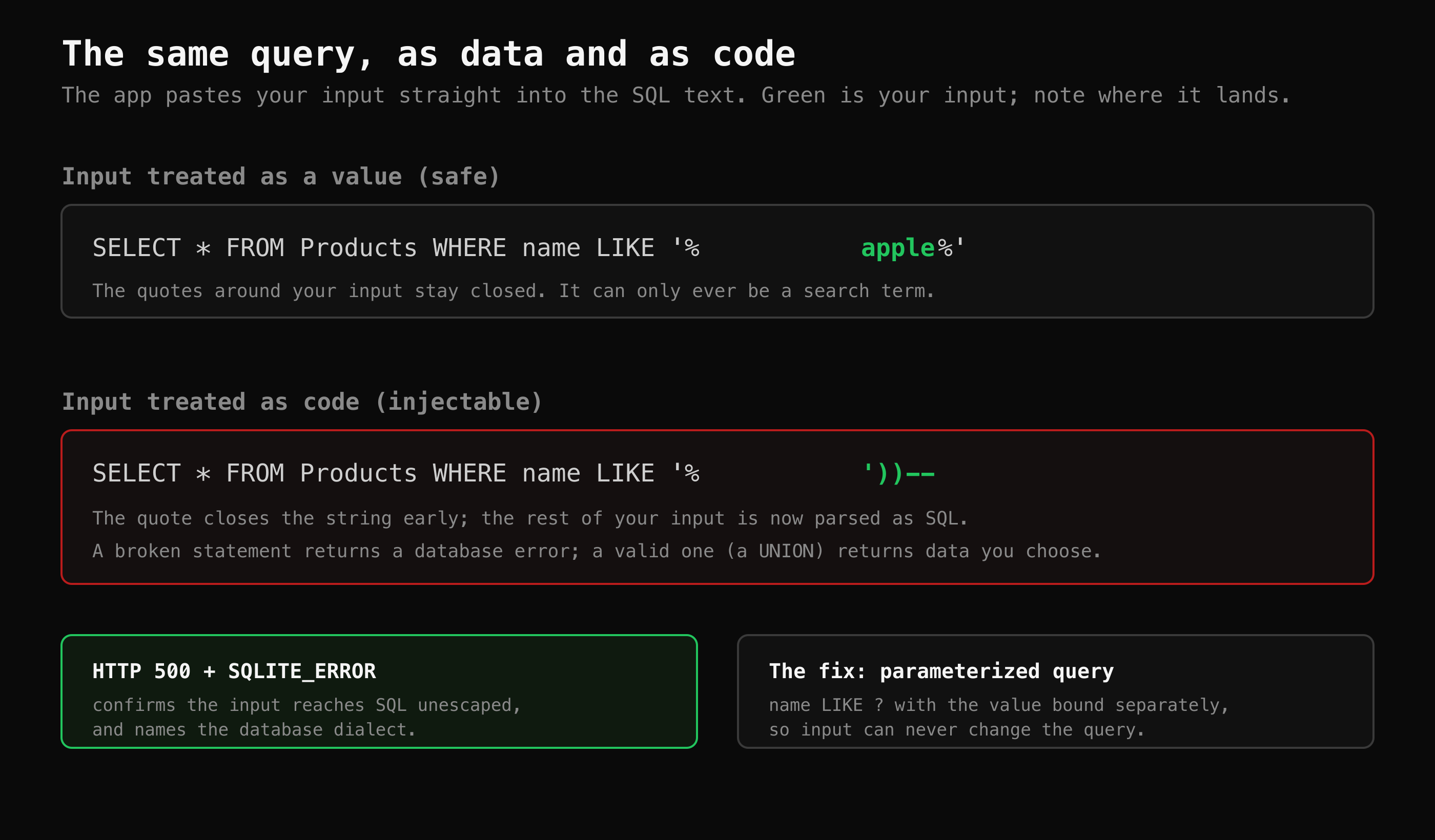 The whole bug in one picture: a quote in your input closes the string early, so the rest is parsed as SQL.
Where does SQL injection usually hide?
Anywhere user input reaches a query: login forms, search boxes, filters, sort parameters, product lookups and some API endpoints. The video's first move is to find which one, and CyberGym's product search is the candidate because it clearly runs a query against your input. The reader-first habit is to understand the normal request before attacking it:
$ curl -s "https://cybergym.hackergpt.app/rest/products/search?q=Cyber"
That returns the catalogue entries whose name or description matches "Cyber" — proof the parameter reaches a WHERE ... LIKE query. Now the question is whether the input is parsed as code.
How do I confirm a SQL injection vulnerability?
Send a single quote and look for a database error. If the input is concatenated into the query, one unbalanced quote breaks the SQL syntax, and a server that does not hide its errors tells you so. Here is a real run against CyberGym on 2 November 2026:
$ curl -s "https://cybergym.hackergpt.app/rest/products/search?q=test'" \
    | grep -o '<title>[^<]*</title>'
<title>Error: SQLITE_ERROR: near "'%'": syntax error</title>
That response — an HTTP 500 carrying SQLITE_ERROR — is worth more than it looks. It confirms two things at once: the input reaches SQL unescaped (so the app is injectable), and the database is SQLite (so you know which dialect's syntax and system tables apply). A well-formed payload that balances the quotes, by contrast, returns HTTP 200 — which is how you know your syntax is now valid and you can start appending clauses. The video makes exactly this distinction: a 500 means broken syntax, a 200 means you have successfully escaped the original query.
A note on what you will see in a proxy: payloads sent in a URL show spaces as %20, because the browser URL-encodes them. The server decodes %20 back to a space before running the query, so %20 in a captured request is just a space.
How does UNION-based SQL injection read the database?
Once your input is parsed as SQL, a UNION SELECT lets you append a second query whose results are returned alongside the first. It has one firm rule: the two SELECTs must return the same number of columns, or the database rejects the whole query. So the first job is to find that column count, by trying one column, then two, and so on until the error stops — in CyberGym's search it is nine.
From there, the standard target in SQLite is the built-in sqlite_master table, which stores the CREATE TABLE statement for every table — a map of the entire schema in one request. Reading it reveals the Users table, and a follow-up UNION against that table returns the stored emails and password hashes. This is the "dump the schema, then the credentials" arc the video walks, and it is the same methodology recorded against this target in our CTF walkthrough docs. The point for a learner is that none of it is guessed: each step reads what the last one revealed, which is why the video frames it as detective work rather than payload memorization.
Why does ' OR 1=1-- log you in without a password?
Because it rewrites the login query's logic so the password check never runs. Imagine the app builds its login query like this:
SELECT * FROM Users WHERE email = '<input>' AND password = '<input>'
Put ' OR 1=1-- in the email field and the query becomes:
SELECT * FROM Users WHERE email = '' OR 1=1--' AND password = '...'
The quote closes the email string, OR 1=1 adds a condition that is always true, and -- comments out the rest of the line — including the entire password comparison. The database returns every row; the app takes the first one and treats you as logged in. Nothing was cracked and no hash was decrypted — the password was simply never checked. That is why SQL injection is a logic vulnerability, not a password-guessing one: you convinced the database to run a different query than the developer intended. (Appending a specific email before the OR is how the video logs in as a chosen user rather than whoever happens to be first.)
How do I prevent SQL injection?
Use parameterized queries, so the query's structure is fixed in code and user input can only ever fill a value slot. This is the first and strongest control in the OWASP SQL Injection Prevention Cheat Sheet, and it is the fix on the right of the diagram above. A handful of patterns cover the rest:
- Parameterize every value.
WHERE name LIKE ?with the value bound separately. Do this even for queries that "only" read, and even behind an ORM — raw-query helpers and string-built filters inside an ORM are injectable too. - Allow-list identifiers. Table names, column names and
ORDER BYdirections cannot be bound as parameters. Map them through a fixed allow-list rather than concatenating them. - Do not hand-roll escaping. Manual quote-escaping misses encodings and numeric contexts; let the driver parameterize.
- Hide errors, but do not call that a fix. A generic error page makes the bug harder to see — it would have hidden the
SQLITE_ERRORabove — but the input still reaches the query. Fix the query; suppressing the message only removes your own early-warning signal.
To check your own app, send a single quote into each input that reaches a query and watch for a database error, a 500, or a result that changes in a way the input should not explain — then confirm in the code and fix it there rather than going further. The short version is in our glossary entry on SQL injection; for finding every endpoint that takes input in the first place, mapping a web app's attack surface is the companion, and the same read-first loop is laid out for newcomers in CTF for beginners.
Working the challenge with HackerGPT's CTF Mode in the video is useful for the method: it confirmed the SQLite backend from the error, matched the column count, enumerated the schema through sqlite_master, and kept each working request — including the ones that returned 401 — so you can see what worked and what did not. Seeing the failed attempts is half the lesson.
Key takeaways
- SQL injection is input parsed as query code; a single quote that triggers a database error is enough to confirm it.
- An HTTP 500 with a SQL error means broken syntax; an HTTP 200 after you balance the quotes means your injected syntax is now valid.
UNION SELECTneeds a matching column count, after whichsqlite_master(in SQLite) maps the whole schema in one request.' OR 1=1--logs you in by making theWHEREclause always true and commenting out the password check — it is a logic flaw, not password cracking.- Prevent it with parameterized queries for every value, an allow-list for identifiers, and no hand-rolled escaping; hiding errors is not a fix.
FAQ
What is a simple example of SQL injection?
A product search that builds its query as ... WHERE name LIKE '%" + input + "%' is injectable: if you search for a single quote, the quote closes the string early and the database tries to parse the rest as SQL, producing a syntax error. That error confirms your input is reaching the query as code. The fix is to pass the input as a bound parameter instead of concatenating it.
How does SQL injection bypass a login?
By rewriting the query's logic rather than guessing a password. Supplying ' OR 1=1-- in the email field closes the email string, adds an always-true OR 1=1, and comments out the password check with --, so the database returns a user row and the app logs you in. No hash is cracked; the password comparison simply never executes.
What is UNION-based SQL injection?
It appends a UNION SELECT to the original query so your chosen columns are returned alongside the app's results. It requires the injected SELECT to return the same number of columns as the original, which you find by incrementing the count until the error stops. Once matched, you can read system tables — sqlite_master in SQLite — to map the schema and then extract data.
How do I prevent SQL injection in my own app?
Use parameterized (prepared) queries everywhere a value goes into SQL, so input can never change the query's structure. Allow-list any identifiers you must build dynamically, such as sort columns, since those cannot be bound as parameters. Do not rely on hand-written escaping or on hiding error messages — the first is error-prone and the second only hides the symptom.
Is it legal to practise SQL injection?
Only against systems you own or have explicit written permission to test, such as a deliberately vulnerable training app. CyberGym is published for exactly this, so every example here runs against it. Running these payloads against a site you do not own is unlawful in most jurisdictions.
Sources
- CWE-89: Improper Neutralization of Special Elements used in an SQL Command (MITRE)
- OWASP Top 10:2025 — A05 Injection
- OWASP SQL Injection Prevention Cheat Sheet
- OWASP Juice Shop (the app CyberGym runs)
- Pwning OWASP Juice Shop
Try the single-quote check on your own site with HackerGPT, or practise the full SQL injection chain on CyberGym.