TL;DR: A security misconfiguration is a setting, not a bug in your code: a stack trace shown to visitors, an admin or metrics endpoint that answers without a login, a debug or sample feature left on, or a missing security header. You find them by asking each layer of your stack the questions an outsider would — what do the headers say, what does an error page show, which default and admin paths answer — and you fix them in configuration. On CyberGym, a dozen read-only requests without an account turned up an example at every layer.
This article is for developers and site owners who want to know what "security misconfiguration" looks like in real responses, and how to check their own site for it in an afternoon. Every request below was sent to CyberGym, our deliberately vulnerable practice target, and every one was a plain GET with no account. Run these checks only on a site you own or have written permission to test.
What is security misconfiguration?
Security misconfiguration is a weakness that comes from how software is set up rather than how it is written: insecure defaults, features that should be off, and settings that were never hardened. The OWASP Top 10:2025 lists it as A02, up from fifth place in the 2021 edition, and says an application might be vulnerable when, among other things:
- unnecessary features are enabled or installed — ports, services, pages, accounts, testing frameworks;
- default accounts and their passwords are still enabled and unchanged;
- error handling reveals stack traces or other overly informative error messages to users;
- security settings in servers, frameworks, libraries and databases are not set to secure values;
- the server does not send security headers or directives, or they are not set to secure values.
It is common in OWASP's own data: in the dataset behind the 2025 edition, 100% of the applications tested had some form of misconfiguration, with over 719,000 occurrences of the weaknesses mapped to this category. The category is broad on purpose. It maps 16 weaknesses, from the catch-all CWE-16, Configuration, to CWE-942, a permissive cross-domain policy, and missing Secure or HttpOnly flags on cookies.
What makes it different from an injection or an access-control bug is where the fix lives. The code can be correct and the app still exposed, because the framework is in development mode, the reverse proxy forwards a path nobody meant to publish, or a library's default was never changed.
What are common security misconfiguration examples?
The common examples fall into five layers, and a site can be clean in one and wide open in the next. This is what each layer looked like on CyberGym, which runs OWASP Juice Shop 19.1.1 and is misconfigured on purpose:
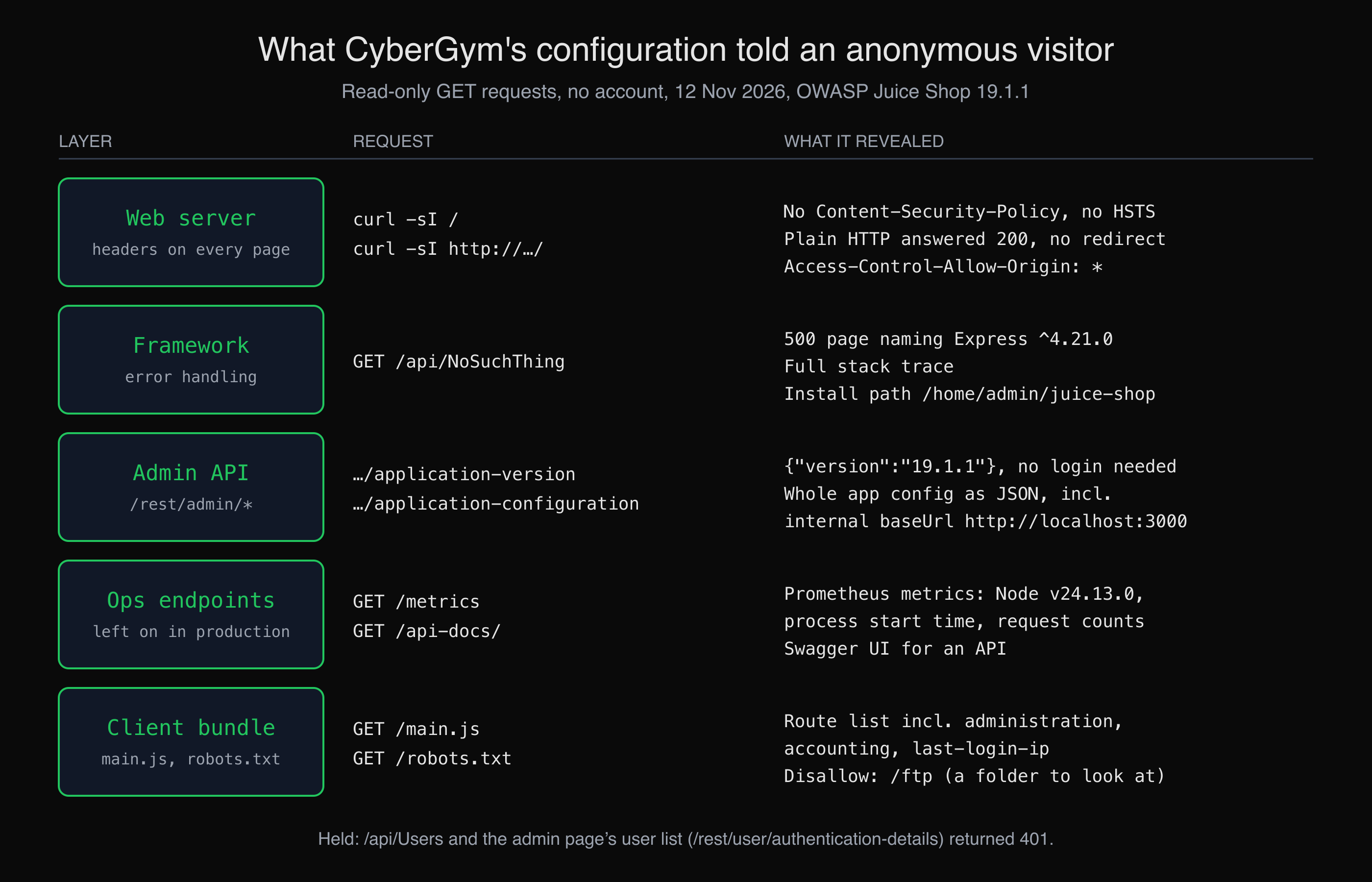 What a handful of read-only requests to CyberGym returned, by layer. Each line is a response we received on 12 November 2026.
| Layer | Example | What it gives an attacker |
|---|---|---|
| Web server | Missing Content-Security-Policy and HSTS; plain HTTP served without a redirect |
No browser-side limit on injected scripts; traffic that can be downgraded |
| Framework | Stack traces on error pages | Framework, versions, file paths and code structure |
| Admin API | Admin endpoints that answer without a login | Version numbers and configuration, for free |
| Ops endpoints | Metrics, health checks and API docs left public | Runtime versions, internal names, a map of the API |
| Client bundle | Every route, including admin ones, in the JavaScript | A list of what to try next |
Two more belong to the same family and have their own articles here: directory listing left on, which OWASP uses as one of its A02 attack scenarios, and backup files left in the web root.
What did we find on CyberGym?
We sent each request once, a couple of seconds apart, and kept the raw output. CyberGym is shared with other learners, so a light touch is part of the method.
The headers: what every page says about the server
$ curl -sI https://cybergym.hackergpt.app/
HTTP/1.1 200 OK
Server: nginx
Content-Type: text/html; charset=UTF-8
Access-Control-Allow-Origin: *
X-Content-Type-Options: nosniff
X-Frame-Options: SAMEORIGIN
Feature-Policy: payment 'self'
X-Recruiting: /#/jobs
Cache-Control: public, max-age=0
# Date, length, ETag and similar headers trimmed
Two protections are on (nosniff and a same-origin frame rule) and two are missing: no Content-Security-Policy and no Strict-Transport-Security. The same request over plain HTTP returned 200 OK with the page, not a redirect to HTTPS, so nothing stops a visitor's first request from travelling unencrypted. Access-Control-Allow-Origin: * lets any website read responses that need no credentials, which is harmless for a public catalogue and a finding for anything private. What each header does, and how to choose values, is in our security headers guide.
The error page: a 500 with a stack trace
Asking for an API route that does not exist should return a short 404. CyberGym returns this:
$ curl -s -i https://cybergym.hackergpt.app/api/NoSuchThing
HTTP/1.1 500 Internal Server Error
Server: nginx
Content-Type: text/html; charset=utf-8
# other headers, the inline CSS and the remaining stack frames trimmed
<title>Error: Unexpected path: /api/NoSuchThing</title>
<h1>CyberGym (Express ^4.21.0)</h1>
<h2><em>500</em> Error: Unexpected path: /api/NoSuchThing</h2>
<ul id="stacktrace"><li> at /home/admin/juice-shop/build/routes/angular.js:42:18</li><li> at Layer.handle [as handle_request] (/home/admin/juice-shop/node_modules/express/lib/router/layer.js:95:5)</li>
One request names the framework and its version range, the install path on disk and the file and line that handles unknown routes. None of it is a vulnerability by itself; all of it saves an attacker time, which is exactly OWASP's third A02 scenario: detailed errors that expose "component versions with known vulnerabilities". In Juice Shop this is a scored challenge, Error Handling, described in the official companion guide as provoking "an error that is neither very gracefully nor consistently handled".
The admin API: endpoints that answer anyone
Two routes under /rest/admin/ answered without a token:
$ curl -s https://cybergym.hackergpt.app/rest/admin/application-version
{"version":"19.1.1"}
$ curl -s https://cybergym.hackergpt.app/rest/admin/application-configuration | jq -c '.config | keys'
["application","challenges","ctf","hackingInstructor","memories","products","server"]
$ curl -s https://cybergym.hackergpt.app/rest/admin/application-configuration | jq -c '.config.server'
{"port":3000,"basePath":"","baseUrl":"http://localhost:3000"}
The second returns the application's whole configuration, roughly 20 KB of JSON, including the internal address the app listens on behind the proxy. By contrast, the data that matters held: /api/Users and /rest/user/authentication-details/, the user list the admin page loads, both returned 401 without a token. That is the usual shape of this finding — the sensitive endpoint is protected, and the ones someone filed as "harmless" next to it are not.
Ops endpoints: metrics and API docs left on
$ curl -s https://cybergym.hackergpt.app/metrics | grep -E '^(nodejs_version_info|process_start|http_requests_count)'
process_start_time_seconds{app="cybergym"} 1794511596
nodejs_version_info{version="v24.13.0",major="24",minor="13",patch="0",app="cybergym"} 1
http_requests_count{status_code="2XX",app="cybergym"} 16
http_requests_count{status_code="4XX",app="cybergym"} 2
$ curl -s https://cybergym.hackergpt.app/api-docs/ | grep -o '<title>[^<]*</title>'
<title>Swagger UI</title>
/metrics is a Prometheus endpoint meant for a monitoring server, and here it tells anyone the exact Node.js version, when the process last started and how much traffic it sees. /api-docs/ is interactive documentation for an API. Whether public API docs are a misconfiguration depends on whether you meant them to be public; metrics almost never are.
The client bundle: a map of every page
$ curl -s https://cybergym.hackergpt.app/main.js | grep -oE 'path:"[a-zA-Z-]+"' | sort -u | tr '\n' ' '
path:"about" path:"accounting" path:"administration" path:"basket" (30 routes, trimmed) path:"last-login-ip" path:"wallet"
$ curl -s https://cybergym.hackergpt.app/robots.txt
User-agent: *
Disallow: /ftp
The single-page app ships its full route table to every visitor, including administration and accounting. That is normal for a front-end framework, and it is why hiding a link is not access control: the server has to check every request those pages make. robots.txt lists /ftp to keep crawlers out, which also tells a person where to look; the directory listing article follows that folder.
One result surprised us. /administration and /server-status both returned 200 OK with 75,294 bytes — the same as the home page. The single-page app answers every unknown path with its shell, so a status code alone would have called both "found". Compare the size or the body before you count a path as exposed.
How do I check my own site for security misconfiguration?
Check each layer with a few read-only requests, and compare what comes back with what you meant to publish. Replace your-app.example with your own domain, and repeat for every subdomain and API host, because hardening is often done on the main site and forgotten on the others. Our article on mapping your web app's attack surface covers how to list them.
1. Headers, on HTTPS and plain HTTP.
curl -sI https://your-app.example/
curl -sI http://your-app.example/ | head -3
Look for Content-Security-Policy and Strict-Transport-Security on the first, a 301 or 308 to https:// on the second, and for headers that name software versions (Server: nginx/1.x, X-Powered-By) on both.
2. An error page.
curl -s -i https://your-app.example/api/this-route-does-not-exist | head -40
A good answer is a short 404 with a generic message. A stack trace, a framework banner, a file path or an SQL fragment is a finding. Try one malformed request to a real endpoint too, such as a letter where it expects a number, and stop there: you are checking what an error looks like, not fuzzing your own server.
3. Default, admin and ops paths.
home=$(curl -s -o /dev/null -w '%{size_download}' https://your-app.example/)
for p in /admin/ /metrics /api-docs/ /swagger-ui/ /actuator/health /server-status /phpinfo.php; do
  printf '%s %s (home is %s bytes)\n' "$(curl -s -o /dev/null -w '%{http_code} %{size_download}' "https://your-app.example$p")" "$p" "$home"
done
Adjust the list to your stack: Spring Boot Actuator endpoints on Java, Apache's mod_status page, a forgotten phpinfo() file on PHP. A 200 whose size matches the home page is usually your single-page app's shell, not the endpoint; open it to be sure.
4. Admin API routes without a token. Take the routes your own admin UI calls (your browser's network tab shows them) and request each one logged out. Every one should return 401 or 403, including the ones that "only" return a version or a setting. Listing every endpoint with whether it requires authentication is what AppMap does when it crawls an app, which makes the odd unauthenticated one easy to spot.
5. The client bundle. Search your own built JavaScript for routes and hostnames you did not expect to ship:
curl -s https://your-app.example/ | grep -oE 'src="[^"]+\.js"'
curl -s https://your-app.example/assets/index-abc123.js | grep -oE '(admin|internal|staging|debug)[a-zA-Z/_-]*' | sort -u
Replace the second URL with a script path the first command printed. Keys and passwords in bundles are a related finding with an article of its own.
How do I fix security misconfiguration?
Fix it in configuration, in a way that every environment gets the same hardened settings, and check it again after each deploy. OWASP's own prevention list starts with "a repeatable hardening process" and "a minimal platform without any unnecessary features, components, documentation, or samples" (A02:2025). Per layer:
- Web server. Redirect HTTP to HTTPS, then send
Strict-Transport-Security(MDN). Start aContent-Security-Policyin report-only mode. Hide version numbers:server_tokens off;on nginx. The OWASP Secure Headers Project keeps the list of headers to add and to remove. - Framework errors. Run production in production mode and put one generic error handler in front of everything. Express, for example, writes the stack trace to the client by default and leaves it out only when
NODE_ENVisproduction(Express error handling); its security best practices also say to disable theX-Powered-Byheader. Log the detail on the server, where you can read it and an attacker cannot (CWE-209). - Admin and ops endpoints. Require authentication on every admin route on the server, not only on the page that links to it. Serve metrics and health details on an internal port or network that the public proxy does not forward, and decide deliberately whether API docs are public.
- Defaults. Change or remove default accounts and passwords, remove sample apps and test pages, and switch off features you do not use.
- Cross-origin rules. Send
Access-Control-Allow-Origin: *only on resources that are public anyway, and never reflect arbitrary origins on endpoints that use cookies.
None of these checks shows that a site is free of misconfiguration; they show what your site says about itself today. Settings drift with every deploy, new subdomain and dependency upgrade, which is why OWASP recommends an automated check of the configuration in all environments rather than a one-off review.
How do I practise finding misconfigurations legally?
Practise on a target built for it. On CyberGym the requests above are all fair game, and Juice Shop's Security Misconfiguration category has further challenges — Deprecated Interface, Misplaced IaC Files, Login Support Team — listed in the companion guide. Try them before reading the solutions. Our guide to OWASP Top 10 places this category next to the other nine, so you can see which findings belong elsewhere: an admin page that loads for any user is broken access control (A01), not misconfiguration.
Key takeaways
- Request one route that does not exist on each of your hosts; if the answer contains a stack trace, a version or a file path, turn on production mode and a generic error handler.
- Call every admin and ops route your app has without a token, including the "harmless" ones that only return a version or a setting.
- Compare response sizes, not only status codes: single-page apps answer unknown paths with
200. - Check plain HTTP as well as HTTPS, and every subdomain, not only the main site.
- Put the checks in your deploy pipeline; a hardened setting that nobody re-checks drifts back.
FAQ
What is an example of security misconfiguration?
A common example is an error page that shows a stack trace to visitors. On CyberGym, requesting a route that does not exist returns a 500 page naming the framework version and the install path on the server. Others are admin endpoints that answer without a login, monitoring endpoints left public, default passwords and missing security headers.
Where is security misconfiguration in the OWASP Top 10?
It is A02 in the OWASP Top 10:2025, up from A05 in the 2021 edition. The category covers insecure defaults, unnecessary features left enabled, verbose error messages, unchanged default accounts and missing security headers. OWASP also lists XML external entities (CWE-611) under it.
Are missing security headers a security misconfiguration?
Yes. OWASP names a server that "does not send security headers or directives, or they are not set to secure values" as one of the conditions for A02. Missing headers rarely give an attacker access on their own, but they remove browser defences such as HSTS and Content-Security-Policy that would limit another bug.
Is it a vulnerability if my server shows its version number?
On its own it is an information disclosure and is usually treated as low severity. It matters because it tells an attacker which known vulnerabilities to try, so hiding versions and keeping software patched go together. Turning off the banner does not fix an outdated version; updating does.
How do I test for security misconfiguration without breaking my site?
Use read-only requests: fetch headers, request a path that does not exist, and call your admin and ops routes without a token, a few seconds apart. Send one malformed value to see an error page rather than many, and run anything heavier against a staging copy. Test only sites you own or have written permission to test.
Sources
- OWASP Top 10:2025, A02 Security Misconfiguration
- CWE-16: Configuration
- CWE-209: Generation of Error Message Containing Sensitive Information
- CWE-942: Permissive Cross-domain Policy with Untrusted Domains
- OWASP Juice Shop and its companion guide: Security Misconfiguration
- Express: Error handling and Security best practices
- nginx: server_tokens
- MDN: Strict-Transport-Security
- OWASP Secure Headers Project
- Spring Boot Actuator endpoints, Apache mod_status, PHP phpinfo()
Want to see what your own site says about itself? HackerGPT maps and tests your own app, and CyberGym is there to practise on first.