TL;DR: Cross-site scripting (XSS) is a bug where an app puts untrusted input into a page without encoding it, so the browser runs it as script. The three kinds differ only in how far the input travels: DOM-based XSS never leaves the browser, reflected XSS bounces off the server in one response, and stored XSS is saved and served to every later visitor. All three are fixed the same way — encode output for the context it is written into, and treat data from your own database as untrusted too.
This is for learners and CTF players who want to see the three XSS types on a real application rather than in a definition. We walk through the DOM, reflected and stored XSS challenges in CyberGym, our deliberately vulnerable training app built on OWASP Juice Shop, reproduce a harmless reflection with curl so you can see the unencoded output yourself, and fix each one. Only test apps you own or have written permission to test; CyberGym exists for exactly this practice.
The video above solves the DOM challenge by hand in the browser and then with HackerGPT, hands the reflected challenge to HackerGPT, and solves the stored one with HackerGPT first and then by hand in Burp Suite, replaying the request HackerGPT found — explaining along the way why each payload runs. This article restructures that walkthrough around the one idea the three types share, and adds a reproduction you can run without any tooling.
What is cross-site scripting?
XSS is untrusted input that the browser ends up executing as script. MITRE files it as CWE-79, Improper Neutralization of Input During Web Page Generation: user-controllable input is placed into a page served to other users without being neutralized first. OWASP's description is shorter — the attacker "uses a web application to send malicious code, generally in the form of a browser side script, to a different end user". In the current OWASP Top 10:2025, XSS is counted under A05, Injection.
The reason it matters is that the injected script runs as the victim, on the vulnerable site's own origin. The browser cannot tell the injected script from the site's own: both arrived from the same domain, so the injected code can read the page, use the victim's session, submit forms as them, or replace what they see with a fake login. An alert() box, the classic proof in a CTF, only shows that script executed — a real attacker swaps it for something that does damage.
What is the difference between DOM, reflected and stored XSS?
They are the same bug — unencoded output — distinguished only by where the payload lives and how far it travels before the browser runs it. The diagram below is the whole distinction; the rest of the article is three worked examples of it.
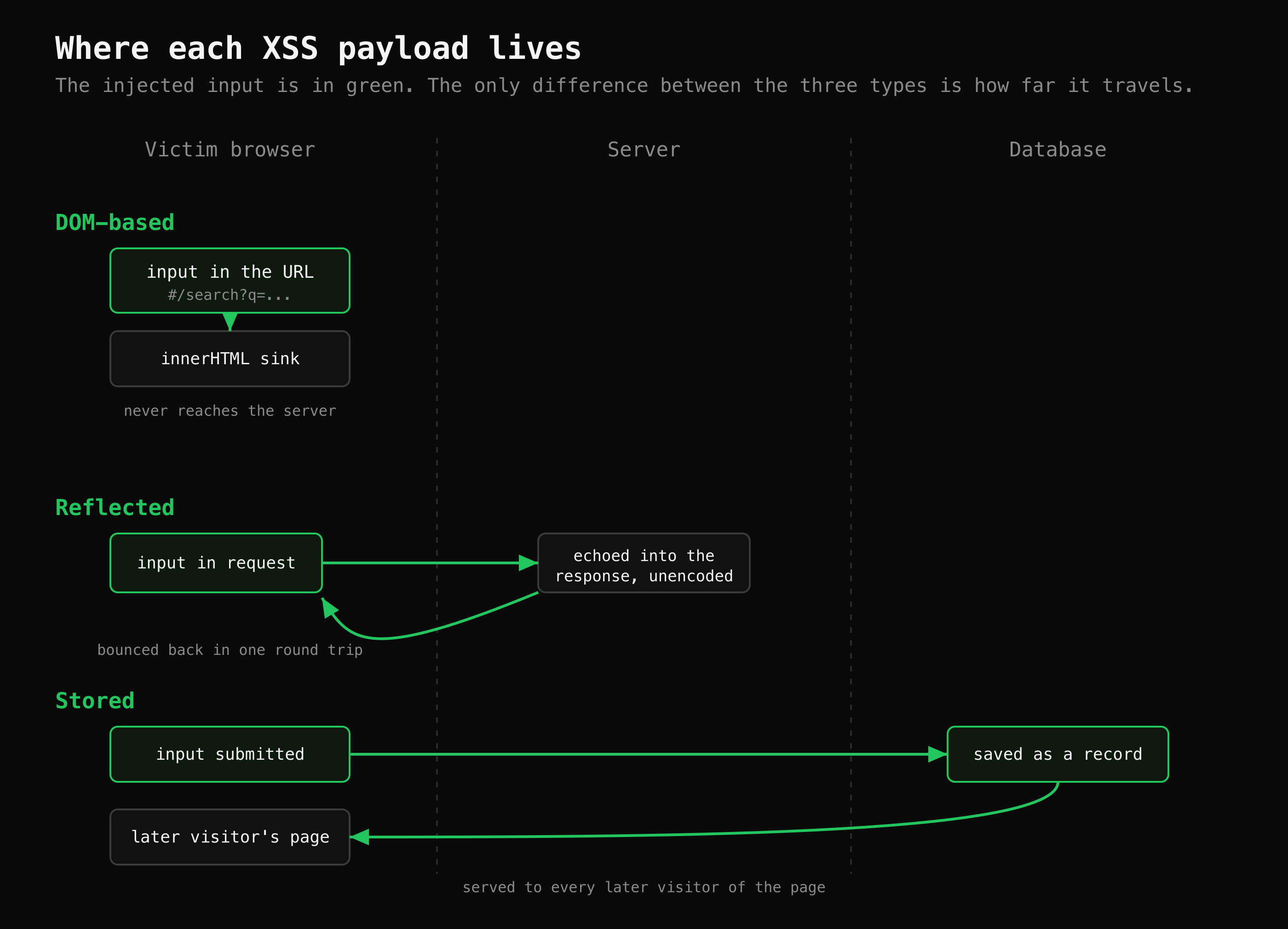 The only thing that changes between the three types is how far the injected input travels before it runs.
- DOM-based XSS happens entirely in the browser. Front-end JavaScript reads a value — often from the URL — and writes it into the page with an unsafe sink such as
innerHTML. The server may never see the payload at all. OWASP documents it separately in the DOM-based XSS prevention cheat sheet. - Reflected XSS travels to the server and comes straight back in the response for that one request. Nothing is stored, so the attacker has to get the victim to open a crafted link — which is why reflected XSS shows up in phishing.
- Stored XSS is saved by the application — in a review, a profile name, a product description — and served to everyone who later loads the affected page. It is usually treated as the most serious of the three, because the victim does not have to do anything unusual; they just visit a normal page.
DOM XSS: the search box that renders your input
In CyberGym, the DOM XSS challenge asks you to pop an alert through the search box. The giveaway, as the video shows, is that your search term appears in the URL (/#/search?q=...) and the page updates without a round trip to the server. That is the signature of front-end code reading a value and writing it into the DOM.
The challenge payload is the one the lab asks for:
<iframe src="javascript:alert(`xss`)">
Typed into the search field, it is written into the page as HTML rather than as text, the browser parses the <iframe>, and the javascript: URL runs. The search box is not the vulnerability — it is just where the data enters. The bug is the sink: front-end code inserting that value as HTML instead of as text — in CyberGym, an Angular [innerHTML] binding with the HTML-trust bypass (bypassSecurityTrustHtml), the same escape hatch the reflected challenge uses. The video pushes this further with CyberGym's bonus challenge, which HackerGPT solves by embedding a whole SoundCloud player through the same field, which makes the point that XSS is not limited to alert boxes: anything the browser will render as HTML can be injected, including a fake login form.
Reflected XSS: input echoed straight back
CyberGym's reflected XSS challenge lives on order tracking. The order id from the URL is sent to an API endpoint, reflected into the JSON response unchanged, and then rendered unsafely by the front end. You can see the reflection itself — the root cause — with a single harmless request, no payload required. Here is a real run against CyberGym on 2 November 2026:
$ curl -s https://cybergym.hackergpt.app/rest/track-order/mark'<b>'x
{"status":"success","data":[{"orderId":"mark<b>x"}]}
The <b> went in and came back verbatim. The server did no HTML-encoding: it did not turn < into <, so the characters that start an HTML tag survive into the response. That is the entire precondition for reflected XSS. Whether it then executes depends on how the front end renders orderId — in CyberGym it is rendered with Angular's HTML-trust bypass (bypassSecurityTrustHtml), so the browser treats the reflected value as markup. Send the <iframe> payload as the order id (/#/track-result?id=...) and the browser runs it; the CTF walkthrough in our docs records HackerGPT solving the challenge exactly that way.
The video takes a different route, and it is worth seeing why. There, HackerGPT reports the reflected challenge solved through the search link, /#/search?q=<iframe ...>, and confirms it with the verifyLocalXssChallenge event. That is the DOM sink from the previous section delivered as a crafted link: front-end code writes the search term into the page without it ever coming back in a server response, and verifyLocalXssChallenge is the event CyberGym's DOM challenge listens for. In the Juice Shop source the reflected challenge is checked on the server, in the order-tracking route. It is the confusion the challenge hint warns about: DOM and reflected XSS look the same from the outside until you check whether the input actually went to the server and came back.
Reflected XSS is dangerous precisely because it is delivered in a link. An email that looks like it comes from a bank, on the real domain, carrying a crafted order id (/#/track-result?id=...), runs the attacker's script the moment the victim clicks — the URL looks legitimate because it is.
Stored XSS: saved once, served to everyone
The stored (or "persisted") challenge in CyberGym has an extra constraint: solve it through the REST API, with no browser form. That forces you to find an endpoint that saves user input without sanitizing it. In the video, the feedback endpoint turns out to strip HTML — a dead end — while the product-creation endpoint does not sanitize the description field. A product is created via the API with the <iframe> payload in its description, and from then on the payload is in the database. Anyone who views that product in the catalogue is served the stored script.
That is the shape of every stored XSS: the input is accepted once and replayed to every future visitor, so the fix is not only "reject bad input on the way in" but "encode on the way out", because the data is already past the front door. The OWASP XSS prevention cheat sheet is explicit that data retrieved from your own database is still untrusted.
Watching HackerGPT work this challenge in the video is instructive for the method rather than the payload: in CTF Mode it authenticated, probed several endpoints, discarded the feedback endpoint once it saw the input sanitized, and found the unsanitized product field. The working request was then saved to the Payloads panel, and the manual solve that follows replays it in Burp Suite's Repeater. That probe-and-adjust loop — rule out what is protected, keep what is not — is the same one the CTF walkthrough in our docs records for the reflected and SQL-injection challenges on the same target.
How do I fix XSS in my own app?
Encode output for the context it is written into, and do it on the server and the client both. The single most useful change is to stop building HTML by concatenation:
// Unsafe: the value is parsed as HTML, so markup in it becomes part of the page
el.innerHTML = "Hello, " + userName;

// Safe: the value is inserted as text; the browser shows the characters and runs nothing
el.textContent = "Hello, " + userName;
Beyond that one swap, the patterns that cover most code are:
- Encode for the context, not just "HTML". A value written into an attribute, a URL or a
<script>block needs a different encoding from one written into element text. Frameworks such as React and Angular escape text by default, which is why XSS in them usually comes from the escape hatches:dangerouslySetInnerHTML, Angular's HTML-trust bypass (the exact sink in CyberGym's order tracking), or rendering Markdown to HTML without sanitizing it. - Treat stored data as untrusted. Encode when you render a database value, not only when you accept it. Stored XSS is the case that a "validate on input" rule alone misses.
- Restrict URL schemes. A link whose
hrefcomes from a user can carry ajavascript:URL. Allow onlyhttpandhttps. - Add a Content Security Policy as depth, not as the fix. A strict CSP limits what injected script can do, but the bug is still the missing encoding; CSP is a second line.
To check your own app, search the code for the sinks above, then enter a harmless marker with angle brackets — <b>test</b> — into each field that is shown back to users. Check it twice: in the raw response, as we did with curl against CyberGym's order tracking, where <b> means the server encoded it and a literal <b> means it did not; and in the rendered page, where bold text means the front end inserted it as HTML. The short version lives in our glossary entry on cross-site scripting; for the wider habit of finding every input that reaches a sink, mapping a web app's attack surface scales it to a whole application, and where to practise hacking legally covers why CyberGym is a safe place to try all of this.
Key takeaways
- The three XSS types are one bug — unencoded output — differing only in how far the input travels: browser-only (DOM), one round trip (reflected), or saved and replayed (stored).
- You can confirm the precondition for reflected XSS without a payload: send a harmless
<b>marker and check whether it comes back encoded. - Fix XSS by encoding output for its context; prefer
textContentoverinnerHTML, and audit framework escape hatches likedangerouslySetInnerHTML. - Data from your own database is untrusted — stored XSS is the case that input validation alone leaves behind.
- Treat a Content Security Policy and allow-listing URL schemes as extra layers, never as the fix for missing encoding.
FAQ
What is an XSS attack in simple terms?
It is when a website shows text a user supplied without escaping it, so the browser runs part of that text as code instead of displaying it. The code runs as the victim, on the site's own origin, which lets it read the page, use the victim's session, or change what they see. MITRE classifies it as CWE-79, and the OWASP Top 10:2025 counts it under A05, Injection.
What is the difference between reflected and stored XSS?
Reflected XSS is echoed back in the response to a single request and is not saved, so the attacker has to trick the victim into opening a crafted link. Stored XSS is saved by the application and served to everyone who later views the affected page, so the victim only has to visit a normal page. Stored XSS is generally the more serious of the two for that reason.
What is DOM-based XSS?
DOM-based XSS happens entirely in the browser: front-end JavaScript reads a value, often from the URL, and writes it into the page with an unsafe sink such as innerHTML, so the payload may never reach the server. Because it is a client-side bug, server-side output encoding does not catch it — you fix it where the JavaScript writes to the DOM. OWASP keeps a separate prevention cheat sheet for it.
How do I test my own site for XSS safely?
Enter a harmless marker containing angle brackets, such as <b>test</b>, into each field or URL parameter that is shown back to users, and check whether it renders as bold anywhere. If it does, that output is not encoded. Do this only on applications you own or are permitted to test; CyberGym is published for practice.
Does a Content Security Policy stop XSS?
A strict CSP limits what injected script can do — for example by blocking inline script — so it reduces the impact, but it does not remove the underlying bug, which is the missing output encoding. Treat CSP as a second line of defence behind contextual encoding, not as a replacement for it.
Sources
- CWE-79: Improper Neutralization of Input During Web Page Generation (MITRE)
- OWASP: Cross Site Scripting (XSS)
- OWASP Top 10:2025 — A05 Injection
- OWASP Cross Site Scripting Prevention Cheat Sheet
- OWASP DOM based XSS Prevention Cheat Sheet
- OWASP Juice Shop (the app CyberGym runs)
- OWASP Juice Shop source: the order-tracking route that checks the reflected XSS challenge
- Pwning OWASP Juice Shop
Try the harmless marker test on your own site with HackerGPT, or practise the three XSS types on CyberGym.