TL;DR: A business logic vulnerability is a flaw in the rules an app enforces, not in its code syntax: every request is well-formed and the server does exactly what it was asked, but it was never asked the right question. On CyberGym we added a basket item with a quantity of -5, and the shop accepted it — the negative line subtracts from the order total instead of adding to it. It also accepted a fractional quantity of 2.5. You find flaws like these not with a scanner but by asking what the business rule should be ("a quantity is a whole number, one or more") and testing whether the app actually holds the line.
This article is for learners who want a concrete business logic vulnerability example to try, and for developers who run a web shop and want to check their own basket and checkout. Everything below was run against CyberGym, our deliberately vulnerable practice target, with an account we registered for the purpose. Run these checks only on an app you own or have written permission to test.
What is a business logic vulnerability?
A business logic vulnerability is a flaw in what the application is allowed to do, rather than in how it parses input. The code runs correctly; the problem is that the rules it enforces do not match the rules the business actually has. PortSwigger's Web Security Academy describes them as flaws that "allow an attacker to elicit unintended behavior," arising "because the design and development teams make flawed assumptions about how users will interact with the application."
That makes them different from the injection-style bugs that have their own articles here. A SQL injection is malformed input breaking out of its context; a business logic flaw is perfectly valid input the app should have refused. A quantity of -5 is a legal integer. The HTTP request carrying it is well-formed. Nothing is injected. The shop simply never decided that a quantity below one makes no sense for a thing you are buying.
This is why automated tools miss them. The OWASP Web Security Testing Guide puts it plainly: business logic tests are "unique to the application being tested" and "automated tools find it hard to understand context," so these checks are the part of a test a human has to drive. A scanner fuzzing the quantity field sees 200 OK for -5 and moves on, because from its point of view the request succeeded. It did — that is the whole problem. CWE-840, Business Logic Errors, is the weakness class.
What are examples of business logic vulnerabilities?
The common examples all share one shape: a value or a sequence the app trusts but never validates against its own rules. Each row below is a pattern, with where it shows up in a shop and what we observed on CyberGym on 12 November 2026.
| Example | The rule that is missing | Observed on CyberGym |
|---|---|---|
| Negative quantity | A quantity is at least 1 | quantity: -5 accepted into the basket |
| Fractional quantity | A quantity is a whole number | quantity: 2.5 accepted |
| Client-set price trusted | The server, not the client, sets the price | Not applicable here — price is server-side |
| Coupon not validated server-side | A coupon must exist and be in date | Held: an unknown coupon was rejected |
| Acting on another user's basket | You may only change your own basket | Held: a cross-basket write was refused |
Two of these are flaws we could reproduce; two are checks the current CyberGym build held, and those matter as much. A test that only reports what broke, and never what resisted, tells you nothing about whether a fix worked. The negative and fractional quantities are the first-hand finding; the coupon and cross-basket results are the control.
Beyond a shop, the same class covers skipping a step in a multi-stage checkout, redeeming a one-time reward twice, or excessive trust in client-side controls where the browser is allowed to set a value the server should own. The question is always the same: what rule does the business assume, and does the server enforce it, or only the UI?
How do I test business logic on CyberGym?
Register your own account, add something to the basket through the normal flow, then send the requests the UI would never let you send. CyberGym runs OWASP Juice Shop (version 19.1.1 on the day of our run, from /rest/admin/application-version), so the routes below are Juice Shop's. The browser's quantity box is an <input type="number" min="1">, so you cannot type -5 into it — but the field is only advice to an honest user. The API behind it is where the rule has to live.
Set a couple of variables first. $TOKEN is the token your own login returns, and $BID is your basket id (the bid field in the login response).
CYBERGYM=https://cybergym.hackergpt.app
TOKEN='your-own-login-token'
BID='your-basket-id'
Does the basket accept a negative quantity?
Yes. We added one normal item, then posted a second item with a negative quantity, straight to the API:
# a normal item: one CyberGym T-shirt (product 7, 22.49)
curl -s -X POST "$CYBERGYM/api/BasketItems" \
  -H "Authorization: Bearer $TOKEN" -H 'Content-Type: application/json' \
  -d "{\"ProductId\":7,\"BasketId\":\"$BID\",\"quantity\":1}"

# the logic test: a negative quantity
curl -s -X POST "$CYBERGYM/api/BasketItems" \
  -H "Authorization: Bearer $TOKEN" -H 'Content-Type: application/json' \
  -d "{\"ProductId\":1,\"BasketId\":\"$BID\",\"quantity\":-5}"
The second request answered 201 Created, not an error:
{"status":"success","data":{"id":10,"ProductId":1,"BasketId":6,"quantity":-5}}
Reading the basket back confirmed both lines were stored, a T-shirt at quantity 1 and a Recon Energy Drink (1.99) at quantity -5. Multiply price by quantity and sum, and the negative line does not add to the total — it subtracts from it: 22.49 + (1.99 × -5) = 12.54. The item you "bought" five negative units of discounts the rest of the order. This is the Juice Shop Negative Order challenge: an order whose total comes out in the customer's favour, built entirely from a quantity the server should have rejected. We stopped at demonstrating that the basket stores the value and how it moves the total; we did not place the order.
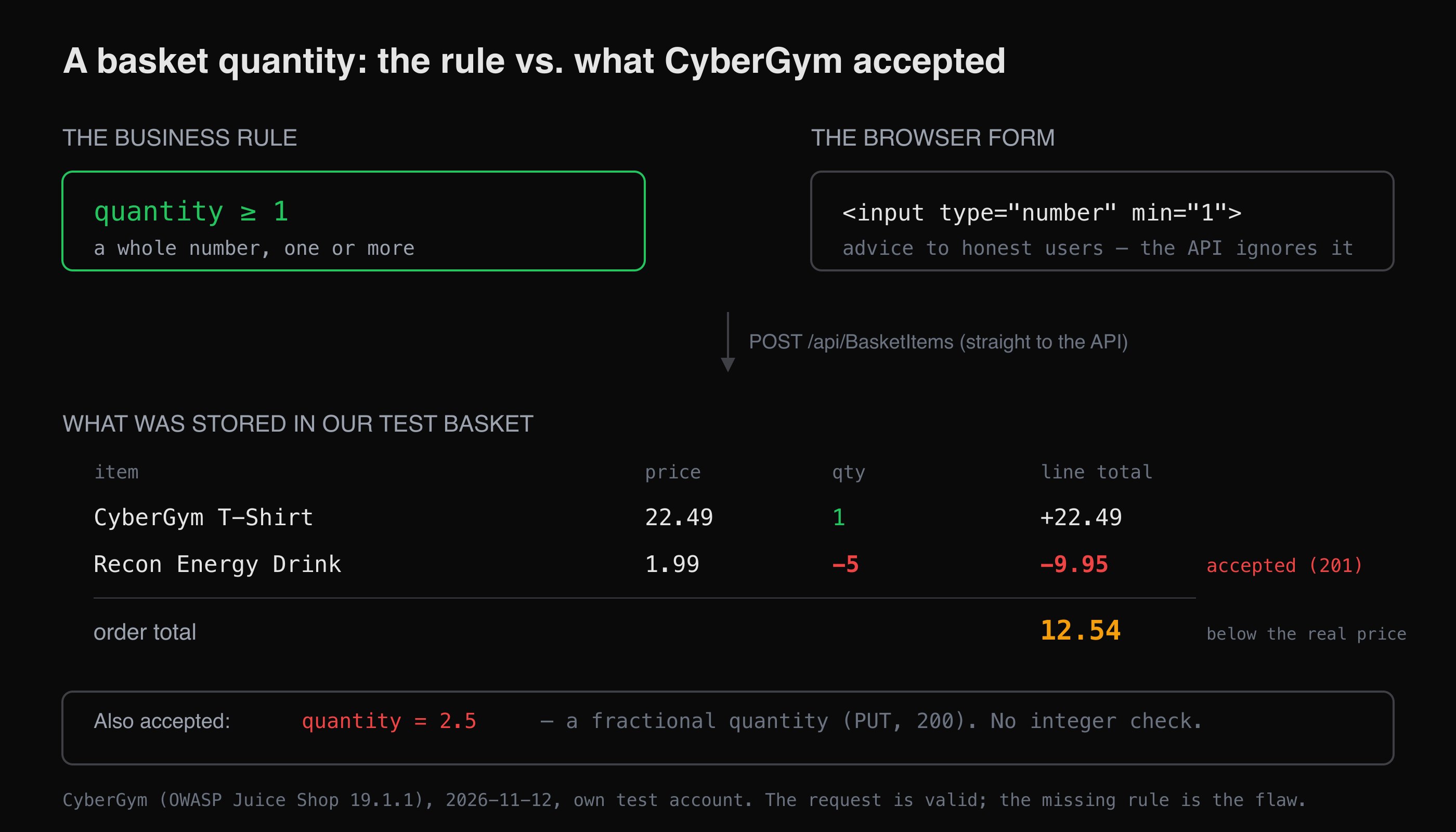 What the shop should enforce, and what CyberGym accepted from our own test account. The negative line subtracts from the total.
Does it validate that a quantity is a whole number?
No. We changed an existing line to a fractional quantity:
curl -s -X PUT "$CYBERGYM/api/BasketItems/9" \
  -H "Authorization: Bearer $TOKEN" -H 'Content-Type: application/json' \
  -d '{"quantity":2.5}'
It answered 200 and stored 2.5. Half a T-shirt is not a thing anyone can ship, so the number is meaningless as a quantity; the shop took it anyway. On its own, a fractional quantity is mostly a sign that validation is absent rather than a payout, but absent validation is exactly the condition the negative-quantity flaw needs, and the two travel together. We set the line back to 1 afterwards.
What held, and why that is worth knowing
Two checks resisted, and a good test records them so a later fix has a baseline:
Coupons are validated server-side. Applying an invented code returned
404 Invalid coupon.:curl -s -X PUT "$CYBERGYM/rest/basket/$BID/coupon/INVALID123" \ -H "Authorization: Bearer $TOKEN"The discount is not something the client can assert; the server checks the code exists and is in date. (Juice Shop's own coupon challenges are about forging a validly-formatted code, a separate flaw from the server simply trusting any string — which it does not.)
You can only write to your own basket. Posting an item to a basket id that was not ours returned
401 Invalid BasketId, and trying to repoint one of our own items to another basket returned400with a`BasketId` cannot be updatedconstraint. Acting on another user's basket is refused in this build. That is an access-control rule holding; when it does not hold, you are in IDOR territory, where the object reference, not the quantity, is the flaw.
The lesson from the pair of failures and the pair of holds: the shop guards the fields it was told to guard (the coupon, the basket owner) and ignores the one nobody wrote a rule for (the quantity). Business logic testing is the work of finding that unguarded field.
How do I check my own web shop?
Run the same questions against a test account on your own app, on staging if you have one, and write down the request and the response for each. The browser form is not the test; the API behind it is.
| Check | Send | A safe result |
|---|---|---|
| Negative quantity | A cart or order line with quantity: -1 |
Rejected before it reaches the total |
| Fractional quantity | quantity: 1.5 on a unit item |
Rejected, or rounded by an explicit rule |
| Zero and huge quantities | 0, and a number larger than stock |
Rejected or capped against inventory |
| Client-set price | Re-send the add-to-cart request with a lower price |
Ignored; the server prices the item |
| Coupon reuse and stacking | Apply the same single-use coupon twice; stack two | Second application refused |
| Totals recomputed server-side | Change a line, re-read the total from the server | The server's total, never the client's, is charged |
| Another user's order | Reference an order or basket id that is not yours | 401/403 |
The hard part in a real app is not any single check — it is finding every endpoint that touches a price, a quantity, a balance or a status, including the ones the current UI no longer calls but the server still answers. AppMap crawls the app into a map of its pages and lists every API endpoint with its auth requirement, which gives you the inventory of routes to run these checks against. The security checklist for vibe-coded apps covers what to test next to business logic once you have that list, and the walkthrough on how to pentest your own website sets the scope for a full pass.
How do I fix business logic flaws?
The fixes are not clever; they are the rules written down and enforced on the server. Following the OWASP Business Logic Testing guidance:
- Validate every value against its real-world meaning, server-side. A quantity is an integer of at least one and at most the stock on hand. A price is read from the catalogue, never from the request. Improper input validation is the generic root cause; the business rule is what tells you what "valid" means here.
- Recompute money on the server. Totals, discounts and shipping are derived from server-held prices and validated quantities at checkout, so a tampered line or a stale client total cannot set the amount charged.
- Enforce the workflow, not just the fields. Reject an order that skipped a required step, a coupon used past its limit, a reward redeemed twice. State belongs on the server.
- Check ownership on every object. Every basket, order and address write confirms the object belongs to the caller — the control that held on CyberGym above.
- Re-run the checks after each change. A rule added to the API is easy to bypass from an older endpoint that never got it; the table above is a regression test, not a one-off.
None of this makes a shop safe in the abstract. It closes the specific gaps you found. Business logic is where tools hand off to a person who understands what the application is for, so the test is only ever as good as the questions you thought to ask.
Key takeaways
- A business logic vulnerability is valid input the app should have refused, not malformed input it mishandled — which is why scanners miss it.
- Test the API, not the browser form: the
min="1"on a number box is advice to honest users, and the server is where the rule has to live. - On CyberGym, a basket accepted a quantity of
-5and of2.5; the negative line subtracts from the order total. - Record what held as well as what broke — the coupon and cross-basket checks that resisted are the baseline a fix is measured against.
- Fix it by validating every value against its real meaning server-side and recomputing all money from server-held data.
FAQ
What is a business logic vulnerability example?
A shopping basket that accepts a negative quantity is a classic one. On CyberGym, posting a basket line with quantity: -5 was accepted, and because the line's price times its quantity is negative, it subtracts from the order total instead of adding to it. The request is perfectly valid HTTP; the flaw is that the shop never enforced the rule that a quantity must be a positive whole number.
How is a business logic flaw different from SQL injection?
SQL injection is malformed input that breaks out of its intended context to run as code. A business logic flaw is well-formed, legal input the application should have rejected on its own rules but did not. A quantity of -5 injects nothing; it is a valid integer the shop simply agreed to store.
Why don't scanners find business logic vulnerabilities?
Because the request succeeds. A scanner sending quantity: -5 sees a 201 Created response and records a success, since it has no idea that a negative quantity is nonsensical for this business. OWASP's testing guide notes that these flaws are unique to each application and that automated tools "find it hard to understand context," so a human who knows what the app is for has to drive the test.
How do I test my own shop for these flaws safely?
Create a test account, ideally on staging, and send the requests the UI will not let you send: a negative quantity, a fractional one, a coupon applied twice, a lower client-set price. Read the total back from the server after each. Only test an app you own or have written permission to test, and never place a fraudulent order against a live shop.
What should I fix first?
Validate quantities and prices on the server against their real-world meaning — a quantity is a whole number of at least one, a price comes from your catalogue — and recompute every total server-side at checkout. Those two changes close the negative-quantity and client-price paths at once, which are the flaws with a direct financial payoff.
Sources
- OWASP Web Security Testing Guide — Business Logic Testing
- PortSwigger Web Security Academy — Business logic vulnerabilities
- PortSwigger Web Security Academy — Examples of business logic vulnerabilities
- CWE-840 Business Logic Errors
- CWE-20 Improper Input Validation
- Pwning OWASP Juice Shop — companion guide
Try these checks on CyberGym, or point HackerGPT at your own shop.