TL;DR: Retrieve Blueprint is solved by reading the shop's own product data: a product described as 3D printed has a photo served from a public images folder, and the 3D model it was printed from sits in that same folder under a guessable name with an .stl extension. The lesson is that a public static folder serves every file in it, linked or not, so source files must never be stored there.
This walkthrough is for learners working through OWASP Juice Shop and for developers who serve files from a public folder. You will see how product context narrows a guess down to a few requests, why the server hands over a file no page links to, and how to check your own deployment for the same leak. Test only applications you own or have written permission to test; CyberGym, our hosted Juice Shop instance, exists for practice.
What is the Retrieve Blueprint challenge?
It is a five-star challenge in the Sensitive Data Exposure category of OWASP Juice Shop. The companion guide states the goal as "Deprive the shop of earnings by downloading the blueprint for one of its products." CyberGym runs the same application, re-branded, so the challenge works the same way there.
The three hints are a method in miniature:
- Look for products that "seem like a natural fit for being based on a blueprint."
- Pay attention to the images of those products.
- The blueprint is not in the same place as the other forgotten files in this category. Searching the usual leaked-files location is a dead end.
Five stars sounds hard, but the challenge needs no exploit. It needs you to read what the shop already shows you and to think about where a developer would drop one more file.
How do you pick the right product?
Look for a product whose description implies a design file exists. In the video, the tester browsed the catalogue and ruled items out by what they are: shirts and drinks are not made from a blueprint, and a mobile game is not either. One item, a logo described as 3D printed, a rare and expensive collectible, fit both halves of the challenge. A 3D print starts from a 3D model, and an expensive product ties the model to the shop's earnings.
This is reconnaissance in its plainest form: the product text is public, and it tells you what kind of file to look for. The same habit, reading what is public before guessing, runs through our guide to OSINT on your own company.
Where did the image point?
Opening the product photo in a new tab showed its path: /assets/public/images/products/ followed by the image's file name. That one URL tells you three things. The folder is public. It is served as static files. And the product's files are named after the product.
The tester then filtered Burp Suite's proxy history for assets to see every request the shop made into that folder, and sent the product image request to Repeater. From there the question was simple: will the same path return a different file?
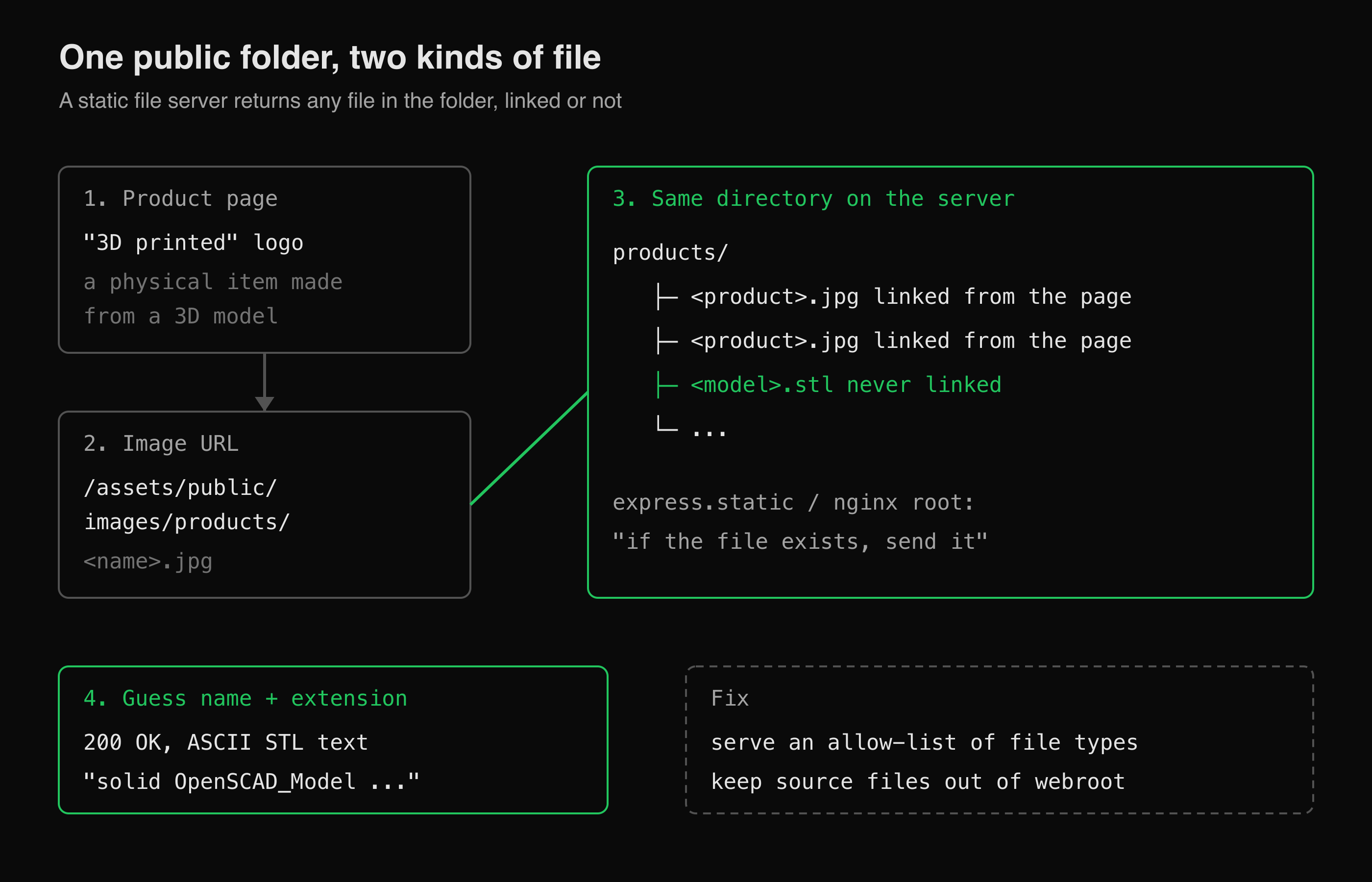 The page links only the photos. The server serves whatever sits next to them.
How do you guess a file that is not linked anywhere?
Narrow the guess down with what you know, then confirm by reading the body, not the status code.
- The extension. A quick search for 3D printing file formats gives STL first. The Library of Congress format description defines STL as a format "describing the surface of an object as a triangular mesh". Other candidates are 3MF and STEP.
- The name. Keep the image's base name and change only the extension. If that misses, try names the developers of this particular shop would use. On CyberGym, a Juice Shop derivative, the name that worked came from the original project's brand, not from the product's image name.
- The proof. The response that solved the challenge was text beginning
solid OpenSCAD_Model, followed byfacet normal,outer loop,vertex,endloopandendfacetlines. That is the ASCII form of STL, andOpenSCADis the code-based CAD tool that exported it. A blueprint, delivered by the image folder.
One caution from the run: a 200 OK alone proves little. Many single-page apps and CDNs answer unknown paths with 200 and an HTML page, so check the content type and the first bytes of the body before you call it a hit. In the video, the body is what settled it.
The video then hands the same challenge to HackerGPT, which also solves it. Working a target like this, step by step in a headless browser with the reasoning shown, is what CTF Mode is for; the CTF Mode field guide walks through it on Juice Shop.
What is the weakness behind it?
The blueprint was a sensitive file stored in a web-accessible folder. MITRE calls this CWE-552, Files or Directories Accessible to External Parties, and the more specific case, a sensitive file placed where the web server will serve it, CWE-538, Insertion of Sensitive Information into Externally-Accessible File or Directory.
Static file handlers are built to serve every file under their root. The Express documentation for express.static shows exactly that: point it at a directory and the files in it are reachable by path. Nobody needs a link. A file is "hidden" only until someone guesses its name, and product names, brand names and standard extensions make that guess short.
The OWASP Web Security Testing Guide covers how testers look for these in WSTG-CONF-04, Review Old Backup and Unreferenced Files for Sensitive Information: guessing names from what the application already reveals is one of the techniques it describes.
How do I check my own app for unlinked files?
List what is actually deployed, compare it to what pages reference, and treat every difference as a question.
Inventory the public folders. From your build output or server, list every file under each static root:
# Run in your own project. Adjust the folder to your build output.
find dist/ -type f | sed 's|^dist||' | sort > deployed.txt
wc -l deployed.txt
Look for file types that do not belong. Source and design files have no business in a web root:
grep -Ei '\.(stl|3mf|step|scad|psd|ai|sketch|fig|zip|bak|old|sql|env|log|md)$' deployed.txtCheck what the server does with them. For anything that turns up, request it on your own site and read the response:
curl -sI https://your-app.example/assets/public/images/products/example.stlA
404is what you want. A200with a non-HTML body means it is public.Map the rest. A crawl that records every path your app loads gives you the "referenced" list to diff against. Our guide to mapping a web app's attack surface shows how.
How do I fix exposed files in a static folder?
Keep source material out of the deployable tree, and make the server refuse what it should not serve:
- Separate source from output. Design files, models and originals live in a repository or private bucket. The build copies only the derived assets (the
.jpg,.webp) into the public folder. - Serve an allow-list. Configure the static handler, CDN or bucket policy to serve only the extensions the site uses, and return 404 for the rest.
- Deliver paid or sensitive files through an authorised route. If customers are meant to download a model after purchase, serve it from an endpoint that checks the order, with a short-lived signed URL, not from a public path.
- Fail the build on a stray file. Add the
grepfrom step 2 to CI so a design file in the web root stops the deploy.
Key takeaways
- A public static folder publishes every file in it. Being unlinked does not make a file private.
- Read the product: descriptions and image paths tell you what file types and names to expect.
- Confirm a hit by the response body and content type, not by
200 OKalone. - Keep design and source files out of the build output, and allow-list what the static server may return.
- Diff what is deployed against what pages load. Every file that is deployed but never loaded needs a reason to be there.
FAQ
What file is the Juice Shop blueprint?
It is a 3D model in ASCII STL format, exported from OpenSCAD, for the 3D-printed logo product. It sits in the same public folder as the product images, under a name tied to the shop's brand. The companion guide's solutions appendix gives the exact path if you are stuck.
Why does the server return a file that no page links to?
Static file servers map URL paths to files on disk and serve anything that exists under their root. Links only help people find files. They do not control access, so a file whose name can be guessed is effectively public.
Is Retrieve Blueprint an OSINT challenge?
Partly. The key information is public: the product description says 3D printed, and the image URL reveals the folder. The rest is a guess about file names and extensions, which is forced browsing. It sits in Juice Shop's Sensitive Data Exposure category.
How do I stop design files from being served?
Do not put them in the web root. Build only derived images into the public folder, configure the server or CDN to serve an allow-list of extensions, and deliver any downloadable originals through an authorised route.
Where can I try Juice Shop challenges without installing anything?
CyberGym at cybergym.hackergpt.app is a hosted OWASP Juice Shop instance for practice. Our CTF for beginners guide is a good place to start if this is your first web challenge.
Sources
- Pwning OWASP Juice Shop: Sensitive Data Exposure (Retrieve Blueprint)
- OWASP Juice Shop project
- OWASP WSTG-CONF-04: Review Old Backup and Unreferenced Files for Sensitive Information
- CWE-552: Files or Directories Accessible to External Parties
- CWE-538: Insertion of Sensitive Information into Externally-Accessible File or Directory
- Express: Serving static files
- Library of Congress: STL (STereoLithography) File Format Family
Practise on CyberGym, or try the same method on your own site with HackerGPT.