TL;DR: Anything in your front-end code, including a test username and password someone left "for later", ships to every visitor and can be read in the browser's developer tools. Check by searching your built JavaScript and any public source maps for credential-like names and values, and by scanning your repository with a secret scanner. Then delete the credential, disable or rotate the account it belongs to, and keep secrets in server-side code only.
This is for founders and small teams who ship a single-page app, often built quickly or with AI coding tools, and want to know whether their bundle gives away more than it should. You will learn why credentials end up in client code, see the weakness on CyberGym (HackerGPT's hosted OWASP Juice Shop, a legal practice target), and get commands to check your own build. Run them only against apps you own or have written permission to test.
The video is our run of CyberGym's "Exposed Credentials" challenge, first by hand in Chrome's developer tools and then with HackerGPT.
What are hardcoded credentials in client-side code?
They are usernames, passwords, API keys or tokens written directly into code that runs in the browser. MITRE files them under CWE-798: Use of Hard-coded Credentials, which the OWASP Top 10:2025 maps to A07 Authentication Failures, and under CWE-540: Inclusion of Sensitive Information in Source Code.
The point that makes this worse in front-end code: the browser has to download the code to run it. Minification renames variables and strips whitespace, but string values stay as they are. There is no build setting that makes a value usable by the browser and unreadable to the person using that browser.
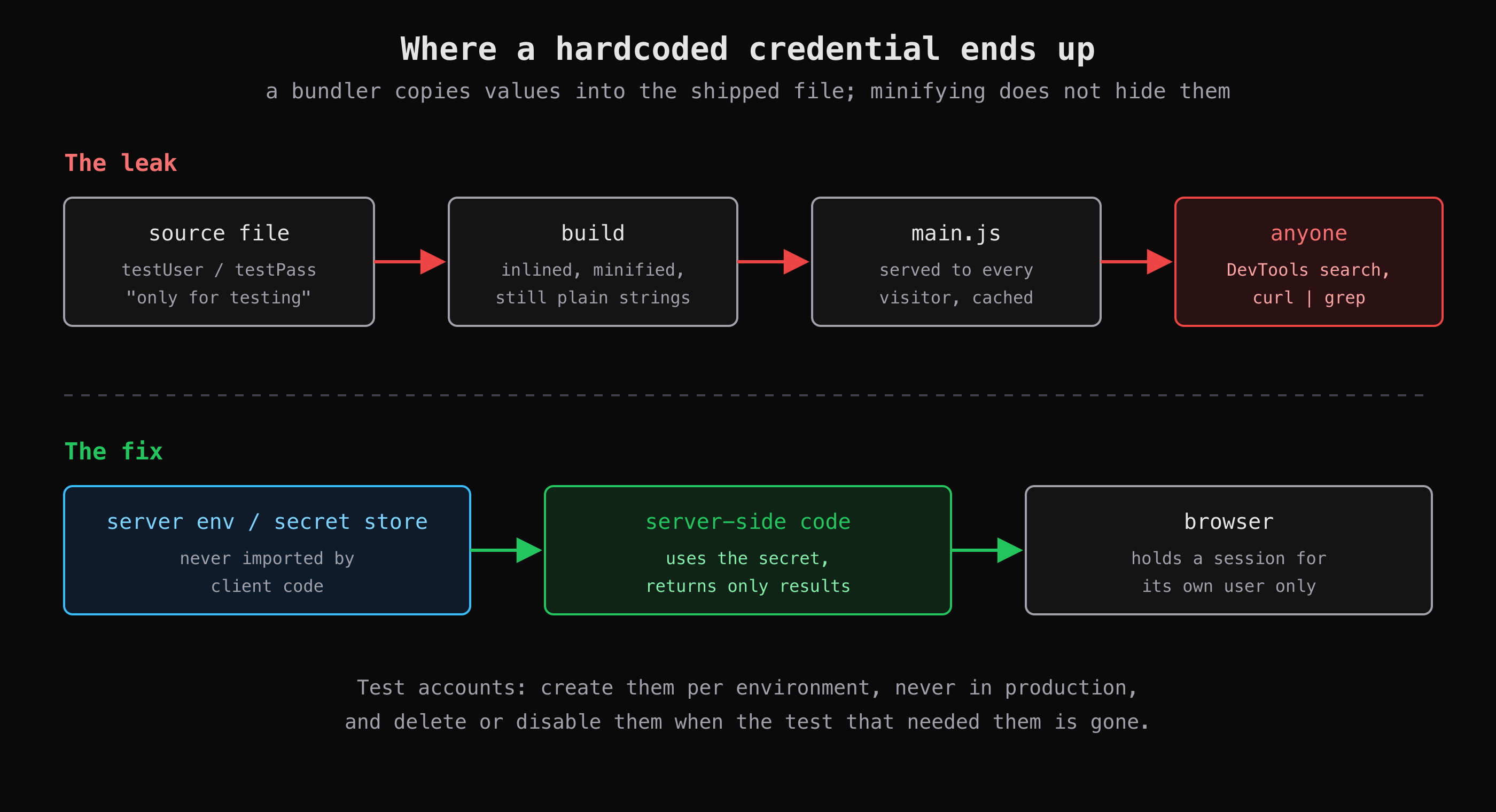 A bundler copies what the code imports. Whatever reaches the bundle reaches every visitor, so secrets stay on the server.
Why do credentials end up in the bundle?
In our experience it is rarely a deliberate choice. The common routes are:
- A test or demo account wired into the UI. A developer pre-fills a login form or adds an auto-login for local testing, and the code ships. The account was "unused", but it still exists in production, and it still accepts the password.
- Environment variables exposed by prefix. Build tools inline some environment variables into client code by design. Vite exposes only variables prefixed with
VITE_to the client (Vite docs); Next.js inlinesNEXT_PUBLIC_variables into the browser bundle at build time (Next.js docs). Put a secret behind one of those prefixes and it is public. - A config object shared between server and client. One
config.tsimported on both sides drags server values into the browser build. - Source maps published with the build. A
.mapfile can contain the original, unminified source, comments included. Vite does not generate production source maps unless you turn onbuild.sourcemap, but many setups do, and upload them alongside the bundle.
Not every value that looks secret is a problem. OAuth client IDs, Supabase anon keys and Stripe publishable keys are meant to be public; our security checklist for vibe-coded apps explains that split. A password for an account that can log in is never in that category.
How did the CyberGym challenge expose the test account?
The challenge says a developer left credentials for an unused test account in the client, and the tester reasons from there: if the browser received them, the browser can show them. In the video the tester opens Chrome's developer tools, goes to the Sources panel, and instead of reading every loaded file, opens main.js and searches it for the word the challenge suggests, "test". The search lands on a username and password pair sitting in the shipped JavaScript. The tester logs in with them, and the account works. Its order history, saved addresses and wallet are empty, but the login alone completes the challenge. No proxy, no injection: the whole finding came from reading what the server had already sent.
HackerGPT then takes the same challenge in CTF Mode, and its route is close to the manual one. It mirrors the site and pulls main.js, greps the bundle for test- and QA-related terms, and finds the username and password as two properties of the login component. It then logs in through the login API, POST /rest/user/login. The response carries a valid token and shows that the "unused" test account has the admin role. Last, it queries the app's challenge list, which reports the challenge as solved. The reconnaissance chapter of the CTF Mode field guide shows a similar run, where a scan of the mirrored bundle lists the test credentials alongside other values embedded in the code. If you want the challenge solution itself, it is in the OWASP Juice Shop companion guide; this article does not repeat the credentials.
What we saw on CyberGym
We repeated the search in a way that prints only the names of credential-like fields, not their values. CyberGym's home page loads four scripts of its own (runtime.js, polyfills.js, vendor.js, main.js); the application code is in main.js, which was 457,473 bytes on 2 November 2026:
curl -s https://cybergym.hackergpt.app/main.js \
  | grep -oiE '[A-Za-z_]*(password|passwd|secret|apikey|api_key)[A-Za-z_]*\s*[:=]\s*"' \
  | sed 's/[:= "]*$//' | sort | uniq -c | sort -rn
#    2 password
#    1 testingPassword
#    1 passwordComponent
Three names are assigned a string literal somewhere in the bundle. Each is a lead to read in context, not a finding by itself; testingPassword is the one this challenge is about.
We also checked for a public source map, and the first answer was misleading:
curl -s https://cybergym.hackergpt.app/main.js | grep -c sourceMappingURL
# 0
curl -s -o /dev/null -w '%{http_code} %{content_type}\n' https://cybergym.hackergpt.app/main.js.map
# 200 text/html; charset=UTF-8
A 200 looks like an exposed map, but the content type is HTML: the single-page app returns its index page for any unknown path. A real source map comes back as JSON. When you run this on your own site, read the content type, not just the status code.
How do I check my own app for hardcoded credentials?
Search what you ship, then search what you store. Each check below runs on your own build, your own domain (your-app.example) or your own repository.
1. Search the production build. Build the app as you deploy it, then grep the output for credential-like assignments. This prints values, which is what you want on your own code:
npm run build
grep -rnoiE '[A-Za-z_]*(password|passwd|secret|apikey|api_key|token)[A-Za-z_]*\s*[:=]\s*"[^"]{4,}"' dist/ \
  | cut -c1-200
Use build/, .next/static/ or out/ instead of dist/ if that is where your framework writes. Also search for words specific to your app, as the tester did with "test": demo, admin, staging, seed, your test domain.
2. Search what the live site serves. The deployed bundle can differ from your local build. List the scripts the page loads, then fetch and search each one:
curl -s https://your-app.example/ | grep -oE 'src="[^"]+\.js"'
curl -s https://your-app.example/assets/index-abc123.js | grep -oiE 'test[A-Za-z_]*\s*[:=]\s*"[^"]+"'
Replace assets/index-abc123.js with each path the first command prints.
3. Check for public source maps. For each script, request the same path with .map appended and look at the content type. application/json means the original source is public; read it as an outsider would, comments included.
4. Scan the repository and its history. A credential deleted from the current code is still in old commits. Gitleaks scans a git history (gitleaks git -v .) or a folder (gitleaks dir -v dist/); TruffleHog does the same with trufflehog filesystem ..
5. Look for the accounts, not only the strings. In your production database, list users whose email or name looks like a test, demo or seed account, and confirm each one should exist there.
How do I fix it and keep it from coming back?
Remove the credential, then make the account it belonged to useless, because the old bundle may be cached or saved anywhere.
- Delete or disable the account in production, or change its password and remove whatever it can reach. Rotate any key or token that was in the bundle; assume it has been copied.
- Move the logic server-side. If the front end needed a secret to call a service, call that service from your own API instead and return only the result. The browser should hold a session for its own user, nothing more.
- Keep test accounts in test environments. Create them per environment from seed scripts that do not run in production.
- Stop the next one in CI. Run a secret scanner on every pull request and fail the build on a hit; add a grep of the build output for your own app-specific words.
- Decide on source maps. Either do not publish them, or upload them privately to your error tracker.
These checks show what is in your bundle today; they do not prove nothing else is exposed. Pair them with the endpoint and access-control checks in how to pentest your own website.
Key takeaways
- Treat every byte of your front-end bundle as public; minification hides nothing.
- Grep your production build and live scripts for credential names and your own test words before every release.
- Check whether
.mapfiles are served, and judge by content type, not status code. - When a credential has shipped, disable the account or rotate the key; deleting the line is not enough.
- Run a secret scanner on your repository history and in CI.
To see how an outsider reads a bundle step by step, try CTF Mode on your own site or on CyberGym.
FAQ
Can people see my JavaScript source code?
Yes. The browser must download your JavaScript to run it, and developer tools show every loaded file with a search box. Minified code is harder to read but its strings are unchanged, so any credential in it can be found with a text search.
Is it safe to put API keys in front-end code?
Only keys designed to be public, such as OAuth client IDs, Supabase anon keys or Stripe publishable keys, whose safety depends on server-side rules. Secret keys, database credentials and passwords for real accounts must stay on the server.
Does minification or obfuscation protect credentials?
No. Both make code harder for a person to read, but the browser still needs the original values to run it, so they remain in the file or are reconstructed at runtime. A search or a debugger recovers them.
What should I do if a password was in my production bundle?
Change the password or disable the account immediately, and rotate any keys in the same file. Then remove the value from the code, check your repository history with a secret scanner, and look at your logs for logins to that account.
Sources
- CWE-798: Use of Hard-coded Credentials, MITRE
- CWE-540: Inclusion of Sensitive Information in Source Code, MITRE
- A07:2025 Authentication Failures, OWASP Top 10:2025
- Env variables and modes and build options, Vite documentation
- Environment variables, Next.js documentation
- Secrets Management Cheat Sheet, OWASP
- Gitleaks and TruffleHog
- OWASP Juice Shop companion guide: Sensitive Data Exposure