TL;DR: Most JWT bugs are the server trusting a token it never properly verified. The four to test for: the verifier accepts alg: none (an unsigned token), it accepts a weak or guessable HMAC secret, it can be tricked into verifying an RS256 token as HS256 using the public key as the secret (key confusion), or it never checks exp, so an old token lives forever. The fix is always on the server: pin the exact algorithm you expect, verify the signature with a strong key you keep secret, and check expiry — never trust a claim just because it decoded.
This article is for developers and learners who want to see JWT auth break in real code, not just read a definition. We read the JWT checks in CyberGym, our deliberately vulnerable training app, and then run a small Node test locally to prove whether a verifier rejects a forged token. Only test apps you own or have written permission to test; CyberGym and your own localhost are the safe places to practise.
What is a JWT, and why do so many apps get it wrong?
A JSON Web Token (JWT) is a signed, self-contained credential: the server hands it to you at login, your client sends it back on every request, and the server trusts the claims inside it instead of looking you up in a session store. The format is set by RFC 7519: three base64url parts joined by dots — a header naming the algorithm, a payload of claims (sub, email, role, exp), and a signature over the first two.
The thing that trips people up: the header and payload are encoded, not encrypted. Anyone holding the token can read every claim; telling encoding from encryption is the first skill in beginner crypto CTF challenges for the same reason. The only thing stopping an attacker from editing "role":"user" to "role":"admin" and sending it back is that the signature would no longer match — if the server checks it, with the right algorithm and key. Every classic JWT vulnerability is a way to make a tampered or forged token pass that check anyway, which MITRE files under CWE-347, Improper Verification of Cryptographic Signature. The IETF wrote up the known attacks and the defences as a Best Current Practice, RFC 8725; it is the shortest useful thing to read on the subject.
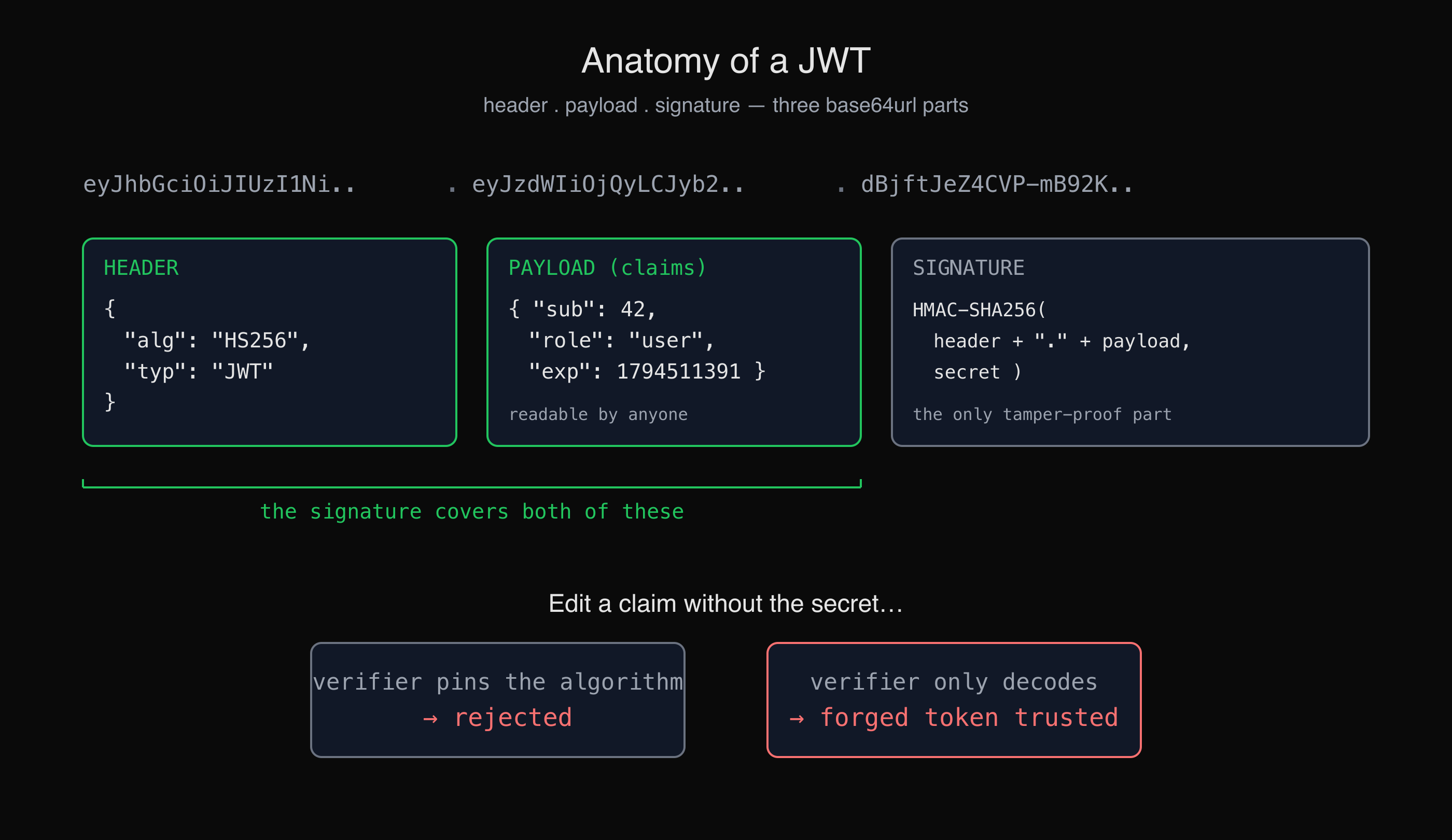
A JWT carries its claims in plain, readable base64url. Only the signature stops someone from rewriting them.
What are the main JWT vulnerabilities to test for?
Four failures account for most broken JWT auth, and each maps to one missing check on the server.
alg: noneaccepted (unsigned token). The JWT spec allows an algorithm ofnone, meaning "no signature". It exists for tokens that are already protected some other way, but if your verifier accepts it on a normal request, an attacker drops the signature, setsalgtonone, edits the payload freely, and the server takes it. RFC 8725 calls this out directly and tells verifiers to reject unsecured JWTs.- Weak or guessable HMAC secret. With
HS256, the signature is an HMAC keyed by a shared secret. If that secret issecret,password, a dictionary word, or a leaked value, an attacker who has one valid token can brute-force the key offline and then sign any token they like. The signature check passes because they are using your real key. - Algorithm confusion (RS256 → HS256). With
RS256, tokens are signed with a private key and verified with a public one. If the verifier lets the token's own header pick the algorithm, an attacker switches it toHS256and signs with the public key as the HMAC secret. A naive verifier then HMACs with that same public value and the check passes — no private key ever needed. This is the subtler cousin ofalg: none. - No expiry (or no signature verification at all). If the server decodes the token without verifying, or never checks the
expclaim, then a stolen or old token works indefinitely and tampering is free. "Decode" and "verify" are different operations, and mixing them up is a common root cause.
The place these land in the OWASP taxonomy is A07:2025 Authentication Failures — the 2025 edition shortened the old "Identification and Authentication Failures" name — with the cryptographic side sitting in A04:2025 Cryptographic Failures. The practical defences are collected in the OWASP JSON Web Token Cheat Sheet.
How does the alg:none and key-confusion attack look on CyberGym?
CyberGym — an OWASP Juice Shop instance, which our legal practice target runs — ships two JWT challenges that are exactly these classes, and reading how it checks a solve is the clearest way to see what the attack has to achieve. You can reach them from CTF Mode or by hand.
The two challenges are "Unsigned JWT" (impersonate a non-existent user with an alg: none token) and "Forged Signed JWT" (impersonate another non-existent user by abusing the signing libraries). CyberGym's server-side check for both is a single function — paraphrasing its routes/verify.ts:
// Paraphrased from CyberGym (OWASP Juice Shop) routes/verify.ts
function jwtChallenge (challenge, req, algorithm, email) {
  const token = jwtFrom(req)
  const decoded = jws.decode(token) ? jwt.decode(token) : null
  if (decoded === null) return
  jwt.verify(token, publicKey, (err) => {
    if (err === null) {               // the token "verified"
      solveIf(challenge, () =>
        hasAlgorithm(token, algorithm) &&   // header.alg is 'none' or 'HS256'
        hasEmail(decoded, email))           // payload carries the target email
    }
  })
}
Read it as a spec for the attack: the solve counts when the server's own jwt.verify returns no error and the token's header algorithm is the weak one and the payload claims the target identity. In other words, the goal is a token the server accepts whose claims you chose. The reason this is even possible here is that CyberGym pins a deliberately ancient jsonwebtoken (version 0.4.0, published in 2014) whose defaults do not pin the algorithm — the same lax behaviour RFC 8725 was written to kill. That is the whole point of a training target: the bug is real and the library is old on purpose.
We are not going to publish a turnkey token-forging script here — against a modern, patched library it would not work anyway, and that is the healthy state. The challenge pages and the Juice Shop companion material walk the solve step by step if you want to practise it on CyberGym. What is worth carrying to your own app is the check the attacker is trying to pass, and whether your verifier would pass it. So let us test that directly.
How do I test my own app's JWT verification?
Run the forged tokens against your own verifier and watch what it does — a safe token that should pass, then the three that should all be rejected. Here is that test as a self-contained Node script using the current jsonwebtoken (9.x), against a fake local user. It contacts nothing; it only exercises your verification settings.
// npm i jsonwebtoken   — run against a local fake user only
import jwt from 'jsonwebtoken'

const SECRET = 'correct-horse-battery-staple-a-long-random-value'
const user = { sub: 42, email: 'alice@your-app.example', role: 'user' }

// A genuine token your app would issue
const token = jwt.sign(user, SECRET, { algorithm: 'HS256', expiresIn: '15m' })

// 1. Genuine token: should verify
const ok = jwt.verify(token, SECRET, { algorithms: ['HS256'] })
console.log('verify genuine token  -> OK, role =', ok.role)

// 2. Tampered payload (role -> admin), signature left as-is
const [h, , s] = token.split('.')
const tampered = `${h}.${Buffer.from(
  JSON.stringify({ ...user, role: 'admin' })).toString('base64url')}.${s}`

// 3. Unsigned token: alg:none, no signature
const unsigned =
  `${Buffer.from(JSON.stringify({ alg: 'none', typ: 'JWT' })).toString('base64url')}.` +
  `${Buffer.from(JSON.stringify({ ...user, role: 'admin' })).toString('base64url')}.`

// 4. Expired token
const expired = jwt.sign(user, SECRET, { algorithm: 'HS256', expiresIn: '-1s' })

for (const [name, t] of [['tampered', tampered], ['alg:none', unsigned], ['expired', expired]]) {
  try { jwt.verify(t, SECRET, { algorithms: ['HS256'] }); console.log(name, 'ACCEPTED - bug!') }
  catch (e) { console.log(name, '->', e.message) }
}
Running it locally, a correctly configured verifier rejects all three:
verify genuine token  -> OK, role = user
tampered -> invalid signature
alg:none -> jwt signature is required
expired -> jwt expired
The one line doing the work is { algorithms: ['HS256'] }. Pin the algorithm and the alg: none token and the key-confusion trick both die, because the verifier no longer lets the token choose how it is checked. Drop that option, or call jwt.decode() (which never checks the signature) where you meant jwt.verify(), and the tampered and alg:none lines flip to ACCEPTED. That flip is the whole vulnerability, and this script is how you tell which side your code is on. Point the same four tokens at a real endpoint on an app you own and watch the status codes: a safe server answers 401 to all three forgeries and 200 only to the genuine token.
If you want this run as part of a broader look at your own app — endpoints, auth, and what each one trusts — that is the kind of thing an AI agent can drive end to end; see how to pentest your own website.
What should I fix in my own app?
Server-side, in order of impact:
- Pin the algorithm. Pass an explicit allow-list (
algorithms: ['HS256']or['RS256']) to every verify call. Never let the token's header decide. This closesalg: noneand RS256→HS256 confusion at once. - Use a strong, secret key. For HS256, a long random secret (not a word, not a reused app secret) kept out of the client bundle and out of source control. A JWT secret sitting in client-side JavaScript is game over. For RS256, keep the private key private and distribute only the public key.
- Verify, do not decode.
decode()reads claims without checking anything; onlyverify()validates the signature. Audit for every place you read a claim and make sure a real verification happened first. - Check expiry, and keep it short. Set
expand enforce it. Short-lived access tokens plus a revocable refresh token limit the damage from a stolen token, since JWTs are not individually revocable by default. - Scope claims to the server's trust, not the client's. Treat
roleand similar claims as true only because the signature is valid and you issued them — never because the client sent them.
This does not make authentication with JWTs "done" — session fixation, token theft via XSS, and OAuth flow bugs live next door — but it closes the forged-token path, which is the one most JWT write-ups are about. What happens to a genuine token after login (logout, password changes, 2FA) is tested in broken authentication examples.
Key takeaways
- A JWT's claims are readable by anyone; only signature verification stops them being rewritten, so the server's verify step is the entire security boundary.
- Test four things against your own verifier:
alg: none, a weak HMAC secret, RS256→HS256 key confusion, and a missing expiry check. - Pinning the algorithm on every
verifycall closes bothalg: noneand key confusion in one line. decode()is notverify(); reading a claim without verifying the signature is trusting the attacker.- Practise the forging on CyberGym or a local app you own — never on a system you do not have written permission to test.
FAQ
Can you read the data inside a JWT without the secret?
Yes. The header and payload are base64url-encoded, not encrypted, so anyone holding the token can decode and read every claim. The secret only protects the signature, which is what stops the claims from being changed. Never put anything sensitive — passwords, full personal records — in a JWT payload, and never rely on it being hidden.
What is the JWT "alg: none" attack?
The JWT standard defines an algorithm value of none, meaning the token carries no signature. If a server's verifier accepts it, an attacker can strip the signature, set the header algorithm to none, edit the payload to claim any identity or role, and the server will trust it. The fix is to pin the expected algorithm in the verify call so unsigned tokens are rejected, as RFC 8725 recommends.
Is HS256 or RS256 safer for JWTs?
Neither is inherently safer; the risks differ. HS256 uses one shared secret, which is simple but dangerous if the secret is weak or leaks. RS256 uses a private signing key and a public verification key, which suits distributed verifiers, but it enables the algorithm-confusion attack if the verifier does not pin the algorithm. Whichever you choose, pin it explicitly and keep the signing key secret.
How do I test my own app for JWT vulnerabilities safely?
Run forged tokens against your own verifier or a local copy: a genuine token, a tampered one, an alg: none one, and an expired one. A correct verifier accepts only the genuine token and rejects the rest. The Node script in this article does exactly that locally. Only ever do this against an app you own or have written permission to test, such as CyberGym or localhost.
Sources
- RFC 7519 — JSON Web Token (JWT)
- RFC 8725 — JSON Web Token Best Current Practices
- CWE-347 — Improper Verification of Cryptographic Signature
- OWASP Top 10:2025 — A07 Authentication Failures
- OWASP Top 10:2025 — A04 Cryptographic Failures
- OWASP JSON Web Token Cheat Sheet
- OWASP Juice Shop
- jsonwebtoken on npm
Want to try it on your own app? Run the token test above against a localhost build, or practise the full solve on CyberGym. HackerGPT can drive the same checks against a site you own at hackergpt.app.