TL;DR: Most beginner crypto CTF challenges are not real cryptography: they are encodings (base64, hex, ROT13) stacked in layers, weak hashes like unsalted MD5, or XOR with a short key. Solve them by recognising the format from its alphabet and length, undoing one layer at a time until you see readable text, cracking hashes against a wordlist, and using the known flag prefix to recover an XOR key.
This is for CTF players and students who have opened a cryptography challenge, seen a wall of characters and not known where to begin. You will learn to tell an encoding from a hash from a cipher at a glance, then watch three challenges solved with real commands and real output: a two-layer puzzle on CyberGym, HackerGPT's hosted OWASP Juice Shop and a legal practice target, plus a hash and an XOR flag built locally for this article. Run these steps only on challenges you are entered in, on CyberGym, or on systems you own or have written permission to test.
What are crypto CTF challenges for beginners?
A beginner crypto challenge hands you data that hides a flag and asks you to get the flag back, usually without any key. At the easy end of the board they fall into three families, and the first question is always which one you are looking at:
| Family | What it is | Key? | How you undo it |
|---|---|---|---|
| Encoding (base64, hex, base32, Z85) | A way to write bytes with a limited alphabet. Defined by public specs such as RFC 4648 | None | Decode it. Anyone can |
| Hash (MD5, SHA-1, SHA-256) | A one-way fingerprint of the input, always the same length | None | You cannot reverse it. You guess inputs and compare |
| Cipher (ROT13, Caesar, XOR) | Encryption with a key, which in easy challenges is tiny or guessable | Yes, but small | Find or brute-force the key, then decrypt |
The distinction matters outside CTFs too. Encoding hides nothing: the JWT in your browser is base64url that anyone can read, and the challenge setters use encodings for the same reason, because they look scrambled and are not. MITRE files the real-world version of these mistakes as CWE-327, Use of a Broken or Risky Cryptographic Algorithm and CWE-916, Use of Password Hash With Insufficient Computational Effort.
How do I recognise which encoding or cipher I am looking at?
Look at the alphabet, the length and the ending before you run any tool. Each format leaves a shape, and the shape usually names it. These samples were all produced on the command line for this article:
| You see | Shape | Likely format |
|---|---|---|
4354467b6261736536345f… |
Only 0-9a-f, even length |
Hex: two characters per byte |
Q1RGe2Jhc2U2NF9pc19ub3RfZW5jcnlwdGlvbn0= |
A-Z a-z 0-9 + /, length a multiple of 4, = padding |
Base64 (RFC 4648, section 4) |
INKEM63CGMZH2=== |
Upper-case A-Z and 2-7 only, = padding |
Base32 (RFC 4648, section 6) |
lSuK4Dn)^g |
Letters, digits and punctuation like ) ^ # $ }, length a multiple of 5 |
Z85 (ZeroMQ spec 32) |
PGS{ebg13_vf_n_fuvsg_bs_13} |
Letters scrambled, but {, _ and word lengths survive |
ROT13 / Caesar: a letter shift |
0571749e2ac330a7455809c6b0e7af90 |
32 hex characters | MD5, a 128-bit hash (RFC 1321) |
| 40 / 64 hex characters | Fixed length, no padding | SHA-1 / SHA-256 (FIPS 180-4) |
| Random-looking bytes, often given as hex | No pattern, length close to a flag's | XOR or another real cipher |
Two habits save time. First, a hash has a fixed length whatever went in, so 32 hex characters is a fingerprint, not a message. Second, the ROT13 row is the easiest to spot: PGS{ has the same shape as CTF{, which tells you the letters moved but the structure did not.
Decoding each of those takes one command:
echo 'Q1RGe2Jhc2U2NF9pc19ub3RfZW5jcnlwdGlvbn0=' | base64 -d     # base64
echo '4354467b6261736536345f69735f6e6f745f656e6372797074696f6e7d' | xxd -r -p   # hex
echo 'PGS{ebg13_vf_n_fuvsg_bs_13}' | tr 'A-Za-z' 'N-ZA-Mn-za-m'  # ROT13
python3 -c "import base64; print(base64.z85decode('lSuK4Dn)^g'))"   # Z85, Python 3.13+
CTF{base64_is_not_encryption}
CTF{base64_is_not_encryption}
CTF{rot13_is_a_shift_of_13}
b'CTF{z85}'
Python's base64 module gained z85decode in version 3.13. If you would rather click than type, CyberChef, GCHQ's browser tool, has every one of these as a recipe step, and its Magic operation tries likely decodings for you.
A worked crypto challenge on CyberGym: the nested easter egg
CyberGym runs OWASP Juice Shop 19.1.1, and its /ftp/ directory holds a file called eastere.gg. The Juice Shop companion guide files the puzzle inside it under cryptographic issues as "Apply some advanced cryptanalysis to find the real easter egg". It is two encodings deep, which makes it a good first crypto challenge.
Step 1: get the file
A plain request is refused:
curl -s https://cybergym.hackergpt.app/ftp/eastere.gg
403 Error: Only .md and .pdf files are allowed!
The file server allows only two extensions. Getting past that check is a separate CyberGym challenge, Poison Null Byte, covered in the same companion guide. Here it is enough to know that an encoded null byte before a fake .md ending gets the file:
curl -s "https://cybergym.hackergpt.app/ftp/eastere.gg%2500.md"
"Congratulations, you found the easter egg!"
- The incredibly funny developers
...
Oh' wait, this isn't an easter egg at all! It's just a boring text file! The real easter egg can be found here:

L2d1ci9xcmlmL25lci9mYi9zaGFhbC9ndXJsL3V2cS9uYS9ybmZncmUvcnR0L2p2Z3V2YS9ndXIvcm5mZ3JlL3J0dA==

Good luck, egg hunter!
Step 2: name the layer, undo it
The string uses only letters, digits and /, it is 92 characters long (a multiple of 4), and it ends in ==. That is base64:
echo 'L2d1ci9xcmlmL25lci9mYi9zaGFhbC9ndXJsL3V2cS9uYS9ybmZncmUvcnR0L2p2Z3V2YS9ndXIvcm5mZ3JlL3J0dA==' | base64 -d
/gur/qrif/ner/fb/shaal/gurl/uvq/na/rnfgre/rtt/jvguva/gur/rnfgre/rtt
This is where beginners often stop and think the decode failed. It did not: the output is clean text, just not English. Read its shape instead. It is a path, the words have normal English lengths, and gur appears three times, which is what the most common English word looks like after a letter shift. "the" shifted by 13 is "gur".
Step 3: the next layer
echo '/gur/qrif/ner/fb/shaal/gurl/uvq/na/rnfgre/rtt/jvguva/gur/rnfgre/rtt' | tr 'A-Za-z' 'N-ZA-Mn-za-m'
/the/devs/are/so/funny/they/hid/an/easter/egg/within/the/easter/egg
Readable English means you are done decoding. The result is a path, so request it:
curl -s -o /dev/null -w "%{http_code}\n" \
  https://cybergym.hackergpt.app/the/devs/are/so/funny/they/hid/an/easter/egg/within/the/easter/egg
200
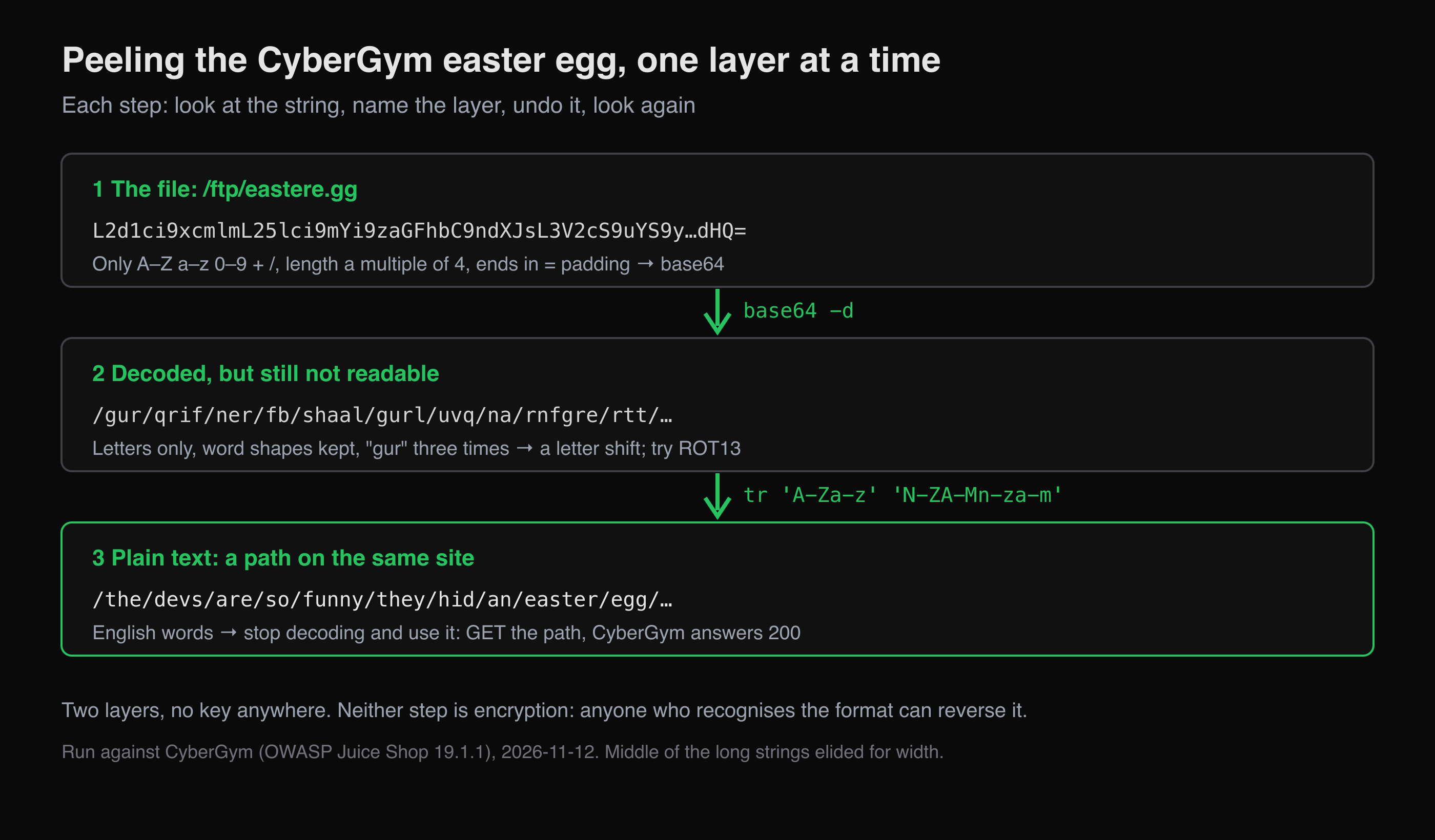 The CyberGym easter egg: two layers, no key. Each step starts by naming what the string looks like.
The page that answers is the easter egg itself. On CyberGym's score board this is Nested Easter Egg, rated 4 of 6 in the Cryptographic Issues category; reaching the file is a separate Broken Access Control challenge, and most of the rating is for finding it. CyberGym is shared, so on 2026-11-12 the board already showed both as solved, and our run did not change that. The method is the part to keep: look, name, undo, look again, and stop as soon as the text is readable. Real challenges stack five or six layers instead of two, but the loop is the same.
How do I crack a hash in a CTF?
You do not reverse a hash; you guess the input, hash each guess, and compare. That works in CTFs because challenge hashes are made from guessable inputs: a short or common password, a dictionary word, or a flag with a known format and a few unknown characters.
The 32-character value in the table above is the MD5 of a password chosen for this article. A six-word list is enough to show the method:
import hashlib, sys

target = sys.argv[1]
for word in ["password", "123456", "qwerty", "letmein", "sunshine", "dragon"]:
    if hashlib.md5(word.encode()).hexdigest() == target:
        print("found:", word)
        break
else:
    print("not in list")
python3 crack_md5.py 0571749e2ac330a7455809c6b0e7af90
found: sunshine
For bigger lists, hashcat does the same thing on a GPU: mode -m 0 is raw MD5, so hashcat -m 0 -a 0 hash.txt words.txt tries every word in words.txt against the hash in hash.txt. Use the wordlist a challenge provides, or one you build yourself from the challenge's theme. Wordlists made from leaked password dumps are common in tutorials; you do not need them to learn the technique.
The same weakness appears in real apps. CyberGym stores user passwords as unsalted MD5, and its session token carries that hash, which our broken authentication walkthrough shows on a test account. RFC 6151 (2011) already said MD5 "is no longer acceptable where collision resistance is required", and a fast, unsalted hash lets a guess-and-compare loop like the one above run at full speed. The OWASP Password Storage Cheat Sheet recommends slow, salted algorithms such as Argon2id, specified in RFC 9106, instead.
How do I solve an XOR challenge?
Use what you already know about the plaintext. XOR undoes itself: if ciphertext = plaintext XOR key, then key = ciphertext XOR plaintext. Every flag on a board starts with the same prefix, such as CTF{ or flag{, so you already know the first few bytes of plaintext, and that gives you the first few bytes of the key.
To show it, this article built its own challenge. The script XORs a flag with a one-byte key and prints hex, which is what a challenge would hand you:
# make_xor.py
flag = b"CTF{xor_with_one_byte_is_a_caesar_cipher}"
key = 0x5a
print(bytes(b ^ key for b in flag).hex())
190e1c21223528052d332e320535343f0538232e3f053329053b05393b3f293b280539332a323f2827
Now solve it as if you had only that hex string. XOR the first four bytes with CTF{:
python3 -c "ct=bytes.fromhex('190e1c21'); print([hex(a^b) for a,b in zip(ct, b'CTF{')])"
['0x5a', '0x5a', '0x5a', '0x5a']
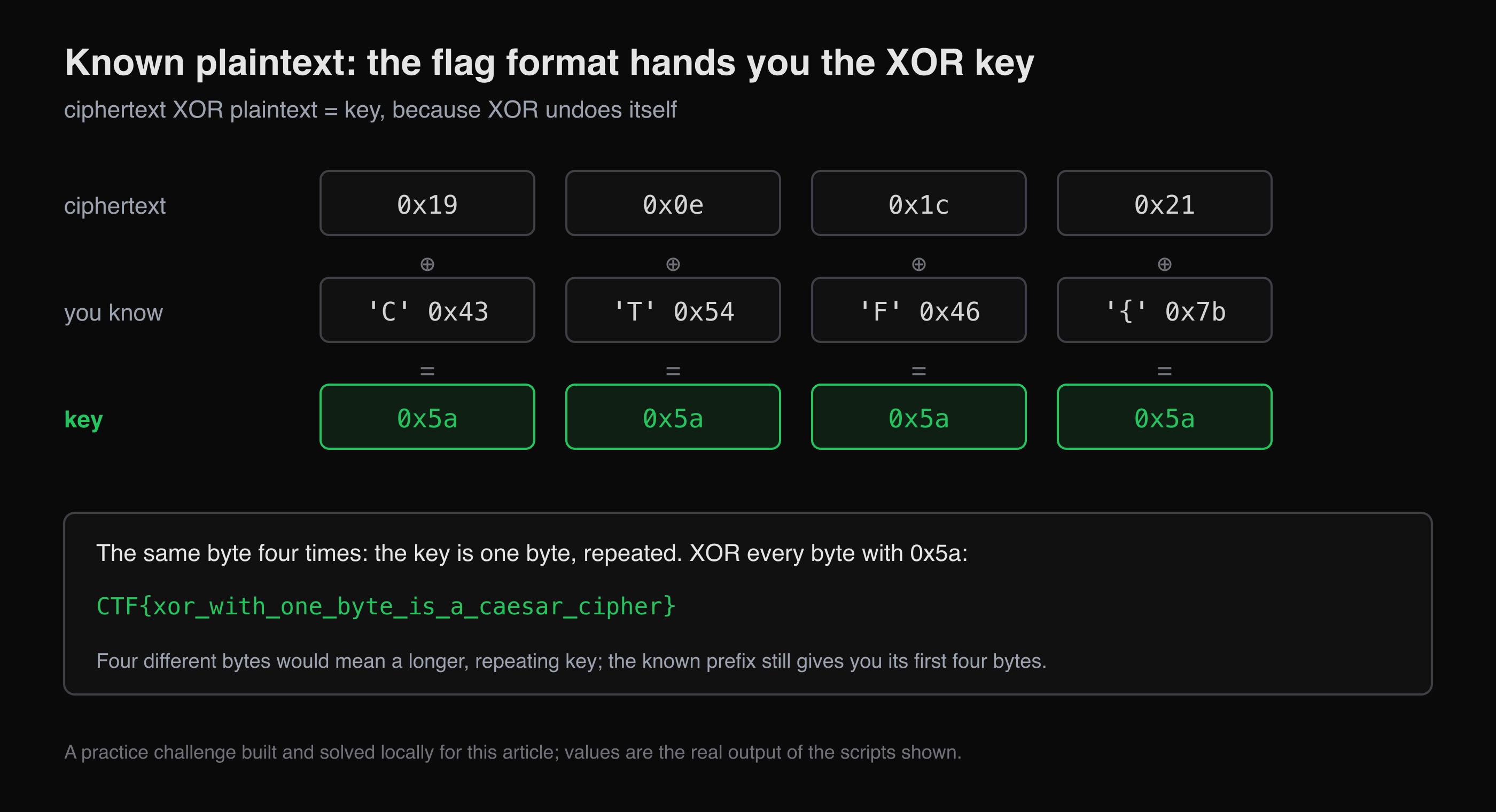 XOR the bytes you know against the bytes you have, and the key falls out.
The same value four times means a single-byte key, repeated. With only 256 possible keys you can also skip the reasoning and try them all, keeping the one that produces the flag prefix:
# solve_xor.py
import sys

ct = bytes.fromhex(sys.argv[1])
for key in range(256):
    pt = bytes(b ^ key for b in ct)
    if pt.startswith(b"CTF{"):
        print(f"key=0x{key:02x} {pt.decode()}")
python3 solve_xor.py 190e1c21223528052d332e320535343f0538232e3f053329053b05393b3f293b280539332a323f2827
key=0x5a CTF{xor_with_one_byte_is_a_caesar_cipher}
If the four key bytes had come out different, the key is longer than one byte and repeats. The known prefix still gives you its first bytes. Guessing the length and checking which length makes the rest of the output readable is the next step, and the subject of harder challenges.
What tools do I need for crypto CTF challenges?
A shell and Python cover everything in this article. That is a deliberately short list:
base64,xxd,tr: already on macOS and Linux. They decode base64, hex and letter shifts.- Python 3:
base64,hashliband plain loops cover encodings, hashes and XOR. Writing the loop yourself is how you learn what the tool would hide. - CyberChef: in the browser, for chaining decodings quickly and trying "Magic" when you cannot name a format.
- hashcat: when a wordlist is too large for a Python loop. Its example-hashes page also helps identify a hash by its format.
If you are new to CTFs in general, start with CTF for beginners: web challenges first, which covers formats, categories and the solve-and-verify loop this article reuses. CTF Mode can work through a challenge you bring and explain why each step makes sense. That suits crypto challenges, where knowing why a string looks like base64 is the skill that carries over.
Key takeaways
- Before you run any tool, read the string's alphabet, length and ending, then write down which format you think it is.
- Decode one layer at a time, and treat clean but unreadable output as the next layer, not as a failed decode.
- A fixed-length hex string is a hash: guess its input from the challenge's theme, don't try to decode it.
- On any XOR challenge, XOR the known flag prefix against the ciphertext first. It often hands you the key outright.
- In your own code, use a slow, salted algorithm such as Argon2id for passwords, and never treat encoding as protection.
FAQ
What is cryptography in a CTF?
It is a challenge category where a flag is hidden by encoding, hashing or encryption, and you recover it. Beginner challenges usually use encodings like base64, weak hashes like MD5, or classical ciphers and XOR with a tiny key. Advanced ones test real cryptanalysis, such as RSA with bad parameters.
How do I start with crypto CTF challenges as a beginner?
Learn to recognise the common formats by their shape: hex, base64, base32, ROT13 and the fixed lengths of MD5 and SHA hashes. Then solve easy challenges with a shell, Python and CyberChef, decoding one layer at a time. Practise on legal targets such as CyberGym or the practice section of a CTF platform.
Is base64 encryption?
No. Base64 is an encoding defined in RFC 4648: it rewrites bytes using 64 printable characters so they survive text-only channels. It has no key, and anyone can decode it with one command. Data that is only base64-encoded is not protected.
Can you decrypt an MD5 hash?
Not directly. MD5 is a one-way hash, so there is nothing to decrypt. What you can do is guess the input, hash the guess, and compare. That succeeds quickly when the input is a common or short password, which is why MD5 should not be used to store passwords.
How do you solve a single-byte XOR challenge?
XOR the start of the ciphertext with the known flag prefix, such as CTF{. If every result is the same byte, that byte is the key. Alternatively, try all 256 possible keys and keep the output that starts with the flag prefix or reads as text.
Sources
- RFC 4648 — The Base16, Base32, and Base64 Data Encodings
- ZeroMQ RFC 32 — Z85 encoding
- RFC 1321 — The MD5 Message-Digest Algorithm
- RFC 6151 — Updated Security Considerations for MD5 (2011)
- NIST FIPS 180-4 — Secure Hash Standard
- RFC 9106 — Argon2
- OWASP Password Storage Cheat Sheet
- CWE-327 — Use of a Broken or Risky Cryptographic Algorithm
- CWE-916 — Use of Password Hash With Insufficient Computational Effort
- Pwning OWASP Juice Shop — Cryptographic issues
- Python documentation — base64 module
- CyberChef
- hashcat — example hashes
Practise the decode loop on CyberGym, or bring a challenge to HackerGPT at hackergpt.app.