TL;DR: Map your app's attack surface in three layers before you test it: the page states a visitor and a logged-in user can reach, every API endpoint behind those pages, and the authentication each endpoint actually checks. The crawl has to hold a session to see past the login, and the most valuable column is the last one — every endpoint that takes an object id needs an ownership check, and the map tells you which ones to test.
If you are about to test your own web app, the first question is not "what is broken" but "what is even here". You cannot test an endpoint you never found, or reason about an authorization bug on a page you did not know existed. This article is for the technical owner of a small app — an indie founder or a small SaaS team — who wants to see the whole attack surface before testing it: the page states behind each login, every API endpoint, and the auth each one expects. Everything here is demonstrated on CyberGym, a legal, deliberately vulnerable practice target, so you can reproduce it without touching anyone else's app.
One rule before anything else: only map and test targets you own or have written permission to test. CyberGym exists so you can practise legally; your own staging environment is the other safe place. Pointing any of this at a third-party site you do not control is not testing, it is trespassing.
Why map the attack surface before testing?
The OWASP Web Security Testing Guide puts attack surface mapping at the very start of its method, in the Information Gathering phase, because enumerating the application and its entry points is treated as a prerequisite for thorough testing — it is what tells you where the weak spots are likely to be (OWASP WSTG, Information Gathering). Skip it and you test what you happened to click on, which is rarely the whole app.
A map is not a vulnerability report. It will not tell you your app is secure, and it does not find everything — unlinked pages, endpoints reachable only after a specific action, and admin-only functions can all hide from a first pass. What a good map gives you is a complete-enough inventory to test against deliberately, and a record of which parts you have not reached yet.
What is in a web app's attack surface?
Three layers — page states, API endpoints and the auth each endpoint checks — and it pays to map them separately, because they fail in different ways.
- Page states. A modern app is not a set of URLs; it is a set of states. The same route renders differently depending on whether you are logged out, logged in, or an admin. "The basket page" is really three pages. Treat each state as its own surface.
- API endpoints. Behind the pages sit the endpoints that actually move data: the REST or GraphQL calls the front end makes, plus the ones it does not make but that still answer. These are where most authorization logic lives, and where it most often leaks.
- Auth requirements. For each endpoint, record what it demands: nothing, a valid session, a specific role, or ownership of the specific object being addressed. The gap between what an endpoint should demand and what it actually checks is where the interesting bugs are.
The map that matters is the relationship between these three: which states lead to which endpoints, and what auth stands between a visitor and each one.
How a state graph gets built
A crawler that only follows links sees the logged-out surface and stops at the login wall. To see the rest, the crawl has to hold state: authenticate, keep the session, and keep exploring from there, treating each distinct post-login view as a new node. The result is a graph — nodes are states (pages, modals, logged-in vs. logged-out), edges are the actions that move between them (a click, a form submit, a login), and the login is drawn as an explicit boundary.
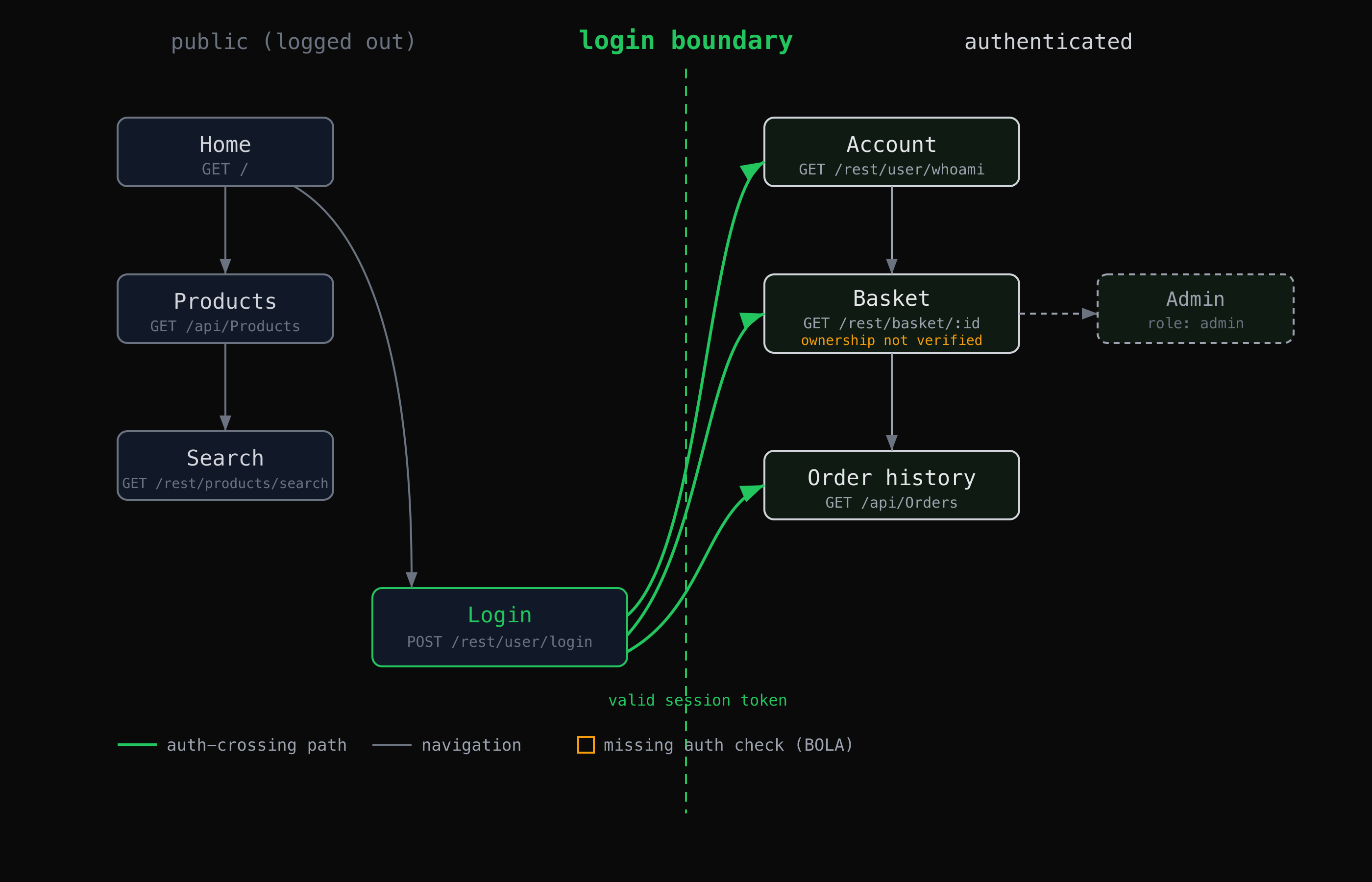
A state graph separates what a visitor can reach from what only a logged-in user can, and names the boundary between them.
The value of drawing it this way is that the boundary becomes visible. Every edge that crosses from the public side to the authenticated side should pass through an auth check. An endpoint that answers from the public side when it sits logically behind the boundary is exactly the kind of thing the map surfaces.
Walk through it on CyberGym
CyberGym is an instance of OWASP Juice Shop, a deliberately insecure app built for training. Everything below is reproducible against https://cybergym.hackergpt.app. Substitute your own staging host to do the same on your app.
Enumerate the endpoints
Start with the calls the front end makes. Open the browser's network panel, use the app normally, and watch what it requests. The product catalogue, for instance, is a plain unauthenticated endpoint:
curl -s "https://cybergym.hackergpt.app/api/Products" | head -c 200
# {"status":"success","data":[{"id":1,"name":"Recon Energy Drink (1000ml)", ...
Search is its own endpoint, taking a query parameter:
curl -s "https://cybergym.hackergpt.app/rest/products/search?q=apple"
# {"status":"success","data":[]}
Record each one as you find it: method, path, parameters, and the auth it required. The WSTG method is exactly this — note every HTTP request and each parameter or form field, paying attention to GET versus POST (WSTG, Identify Application Entry Points). A link-following spider misses endpoints the UI never calls, which is why source-aware tools like OWASP's Attack Surface Detector exist — they read the code to find endpoints and parameters a crawler would not reach.
Cross the login boundary
Authenticating turns the logged-out graph into the logged-in one. The login endpoint returns a token on success and a flat refusal on failure:
curl -s -X POST "https://cybergym.hackergpt.app/rest/user/login" \
  -H 'Content-Type: application/json' \
  -d '{"email":"your-test-account@example.com","password":"$PASSWORD"}'
# success -> {"authentication":{"token":"eyJ...","umail":"..."}}
# failure -> Invalid email or password.
Create your own test account on CyberGym for this rather than guessing at anyone else's credentials. Keep the token; every authenticated endpoint wants it as Authorization: Bearer $TOKEN. Now re-crawl from the logged-in state and add the new nodes and endpoints to the map.
Record the auth each endpoint checks
This is the column that matters most. For each endpoint, the map should answer: does it require a session at all, and if so, does it check that this user may touch this object? The basket endpoint makes the point. Unauthenticated, it refuses:
curl -s -o /dev/null -w "%{http_code}\n" "https://cybergym.hackergpt.app/rest/basket/1"
# 401
So it checks for a session — but on a deliberately vulnerable app like CyberGym, the documented training challenge is that it does not check whether the authenticated user owns basket 1 versus basket 2. Requesting a basket id that is not yours returns someone else's basket. That class of flaw — an endpoint that takes an object id and acts on it without confirming the caller is allowed that object — is Broken Object Level Authorization (BOLA), ranked API1 on the OWASP API Security Top 10 (2023) as the top API risk.
The reason mapping finds this and casual clicking does not: BOLA rarely shows up in a single request/response pair. It shows up when you compare two requests that differ only by an id and notice both succeed. A map that records "/rest/basket/:id — authenticated, ownership not verified" turns an invisible bug into a line item. The methodology stops there — the point of the map is to flag the endpoint and its missing check, not to walk off with another user's data.
Export the map
Once you have the endpoints and their auth, export the inventory into a form your other tools can use — a Postman collection to replay requests, or an OpenAPI description to diff against your intended API. OWASP's Attack Surface Detector, for example, has a command-line mode that exports JSON for exactly this hand-off. The export is the artefact you actually test against, and the thing you re-generate after each release to see what changed.
Let the crawl hold state for you
Holding a session across a crawl, enumerating endpoints, and recording the auth on each is mechanical work, and it is what AppMap automates. It crawls your app into a state graph of pages, login screens and dead ends, lists every API endpoint with the auth it requires, and exports the result to Postman or OpenAPI in one click — the same inventory described above, built for you rather than by hand. The web security tools reference shows how the browser's network log, which this inventory starts from, captures the calls a page makes. It does not replace the deliberate testing that follows; it gives you the map to test against.
What do I do with the map?
The map is the input to testing, not the end of it. With it in hand:
- Test every authenticated endpoint for ownership, not just for a session. The basket example generalises: anywhere an endpoint takes an id, confirm it checks that the caller owns that object. This is the single highest-value thing the map sets up.
- Diff the map against your intent. Endpoints that answer but that your front end never calls, or that expose more than their page does, are the ones worth a hard look. Comparing two versions of the attack surface is a documented use of the WSTG tooling and catches surface that creeps in between releases.
- Fix at the right layer. Object-level authorization belongs in the server's handler for each object, checked on every request — not in the UI that hides a button, and not in a gateway that only knows about routes. Findings are findings: the map tells you where to look, your fixes and your judgement decide what to change.
- Re-map after changes. A new feature adds nodes and endpoints. The map is only as good as its last run, so regenerate it each release.
If you do not have an app of your own to practise on yet, CyberGym is built for exactly this — and once you have the map, CTF Mode is one way to turn it into structured practice on the same target. If you do have an app, point your testing at your own staging environment and nowhere else.
Key takeaways
- Map before you test: you cannot test an endpoint you never found or reason about auth on a state you did not know existed.
- Map three layers separately — page states, API endpoints, and the auth each endpoint actually checks — because they fail in different ways.
- A state graph has to hold a session to see past the login wall; a link-following crawler stops at the boundary.
- The auth column is where the value is: an endpoint that takes an object id without verifying ownership is Broken Object Level Authorization, the top API risk in the OWASP API Security Top 10 (2023).
- Export the map (Postman or OpenAPI), test against it, and regenerate it after every release.
FAQ
What is the difference between an attack surface and a state graph?
The attack surface is everything an app exposes that could be interacted with — pages, parameters, endpoints, headers. A state graph is one way to represent part of it: nodes are the distinct states the app can be in (logged out, logged in, admin), and edges are the actions that move between them. The graph makes the login boundary and the authenticated-only surface explicit, which a flat list of URLs does not.
Why isn't a normal web crawler enough?
A link-following crawler sees only what is reachable by following links from where it starts, so it stops at the login wall and misses everything behind it. It also misses endpoints the UI never calls but that still answer. Mapping needs a crawl that authenticates and holds the session, plus a way to find endpoints that no page links to — which is why source-aware tools like OWASP's Attack Surface Detector exist.
What is Broken Object Level Authorization (BOLA)?
BOLA is an access-control flaw where an endpoint accepts an object identifier and acts on it without confirming the caller is allowed that specific object. It is ranked API1 on the OWASP API Security Top 10 (2023), the top API risk. It is hard to spot because it usually shows only when you compare two requests that differ by an id and find both succeed, not in any single request on its own.
Is it legal to map an app this way?
Only on a target you own or have written permission to test. CyberGym is published as a legal, deliberately vulnerable practice target, and your own staging environment is the other safe place. Running any of this against a third-party app you do not control is unauthorised access regardless of intent.
How often should I re-map?
Every release that adds or changes features. A new feature adds page states and endpoints, and a map is only accurate as of its last run. Re-mapping and diffing against the previous version is also how you catch surface that was added without anyone deciding it should be public.
Sources
- OWASP Web Security Testing Guide — Information Gathering
- OWASP WSTG — Identify Application Entry Points
- OWASP API Security Top 10 (2023) — API1:2023 Broken Object Level Authorization
- OWASP Attack Surface Detector
- OWASP Juice Shop
Want to map your own app rather than do it by hand? Point HackerGPT at your site, or practise the whole method on CyberGym first.