TL;DR: To pentest your own website with an AI agent, first confirm you own the target or have written permission to test it, then let the agent work the loop: recon the public surface, map every page state and API endpoint with the auth each expects, probe those endpoints against their auth, and report findings with evidence and fixes. The agent handles the mechanical breadth; a human still owns authorising the scope and judging which findings actually matter, so an automated pass is a strong first pass, not a replacement for a manual pentest.
This is for the technical owner of a small app — an indie founder or a small SaaS team — who wants to test their own site but cannot yet justify a full manual engagement. After reading, you will know the order the work happens in, what an AI agent can do at each step, where a person still has to step in, and how to read what comes back. Everything here is demonstrated on CyberGym, a legal, deliberately vulnerable practice target, so you can follow along without touching anyone else's app.
One rule comes before any tooling: only test a target you own or have written permission to test. Pointing a scanner, an agent, or a single curl at a third-party site you do not control is unauthorised access, whatever your intent. CyberGym exists so you can practise legally; your own staging environment is the other safe place.
Can an AI agent really pentest my website?
An AI agent can run the repeatable breadth of a pentest on your website — reconnaissance, mapping the attack surface, and probing each endpoint against the access control it should enforce — and report what it found with evidence and a suggested fix. What it does not do is replace a skilled human's judgement about which findings matter, how they chain together, and whether a quirk of your business logic is actually a bug. The honest framing is that the feasibility and cost of a first pass have changed, not that autonomous testing has reached parity with a human engagement.
That distinction is the whole article, so it is worth being precise. The security industry already draws a line between automated scanning and manual testing: a quote under roughly a few thousand dollars is usually an automated scan rather than human-led testing (Startup Defense, penetration testing cost). An AI agent sits in an interesting place on that line. It is more than a signature-matching scanner — it can hold a session, reason about what an endpoint is for, and decide what to try next — but it is not a human pentester. Treat its output as a thorough first pass that tells you where to look.
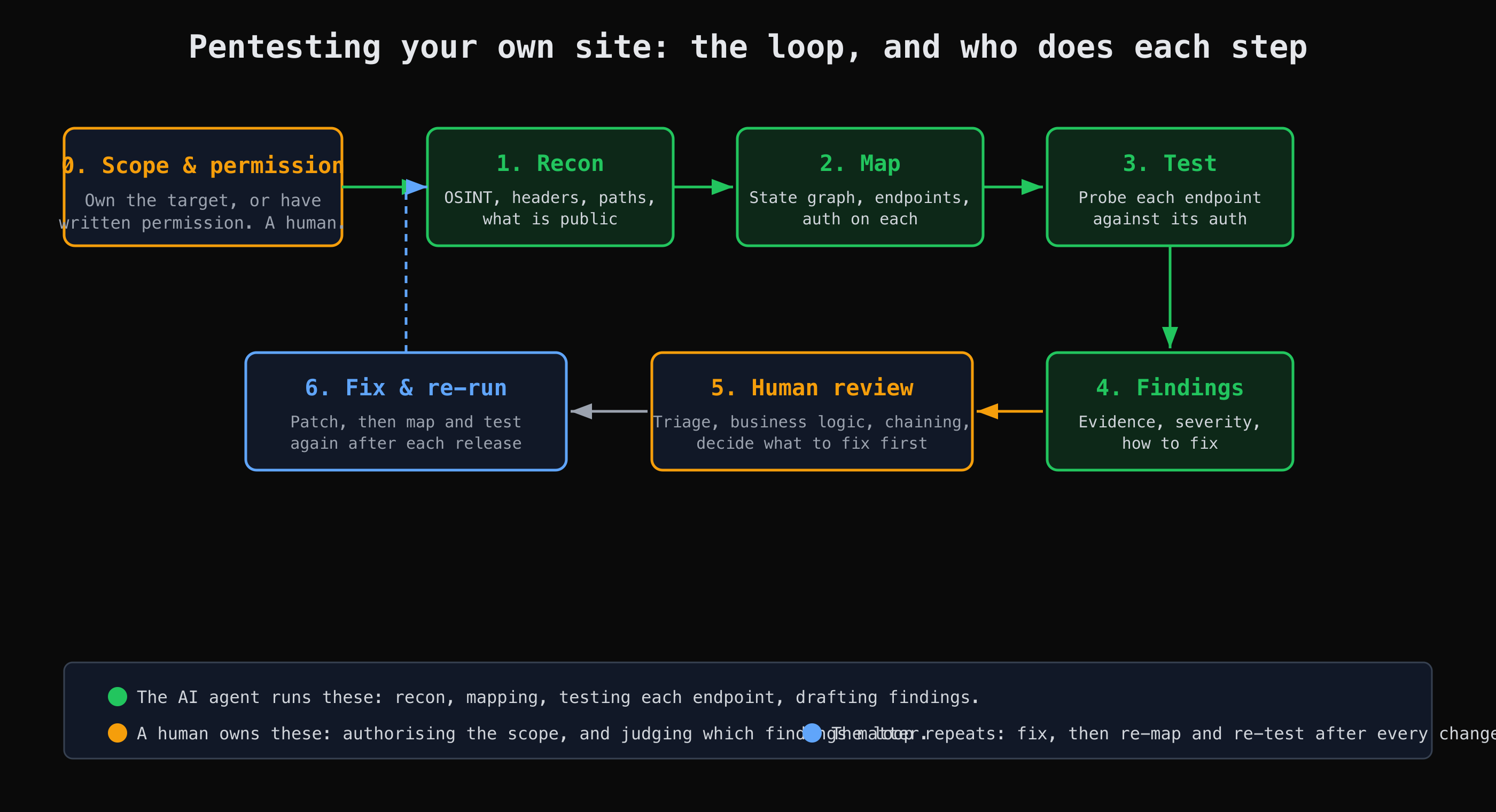
The loop an AI agent runs, and the two steps that stay a human's — authorising the scope, and judging which findings matter.
Step 0: scope and permission come first
Before anything runs, decide what is in scope and confirm you are allowed to test it. This step is not automatable, and it is not optional. Write down the exact hosts and paths you are authorising — app.your-company.example but not the marketing site, staging but not production, the API but not a third-party payment widget embedded in it. An AI agent will test what you point it at; pointing it at something you do not own moves the whole exercise from testing into trespassing.
For practice with no site of your own, use CyberGym. It is published as a legal target for exactly this, so the scope question is already answered: the whole of cybergym.hackergpt.app is fair game.
How does the recon step work?
Recon gathers what is public about the target before any testing: response headers, exposed paths, technology fingerprints, and anything a search engine or OSINT source already indexes. It is the cheapest step and it often turns up the first finding on its own. The point is to see your app the way an outsider does — OSINT is one half of this, and inspecting what the server volunteers is the other.
Here is the real output from a few read-only checks against CyberGym. The response headers alone tell a story:
curl -s -D - -o /dev/null https://cybergym.hackergpt.app/ \
  | grep -iE '^(content-security-policy|strict-transport-security|x-frame-options|x-content-type-options|server)'
# X-Content-Type-Options: nosniff
# X-Frame-Options: SAMEORIGIN
# Server: nginx
Two headers are present; two that matter are not. There is no Content-Security-Policy, so the browser has no app-supplied allowlist for scripts, and no Strict-Transport-Security, so there is nothing instructing browsers to refuse plain-HTTP connections to the host. Those are not exploits, they are missing defences — exactly the kind of low-effort, real finding recon surfaces. (OWASP maintains the reference list of these headers and what each one does.)
robots.txt is worth a look too, because it often points straight at the things someone did not want indexed:
curl -s https://cybergym.hackergpt.app/robots.txt
# User-agent: *
# Disallow: /ftp
A Disallow is not an access control; it is a signpost. Requesting that path directly returns a full directory listing:
curl -s https://cybergym.hackergpt.app/ftp | grep -oE 'href="[^"]+"' | head
# href="ftp/acquisitions.md"
# href="ftp/coupons_2013.md.bak"
# href="ftp/announcement_encrypted.md"
# ...
An exposed directory with a backup file and what looks like internal documents is sensitive-data exposure a human would want to confirm and triage — on CyberGym it is a deliberate training challenge, but the shape of the finding is one you will meet on real apps.
How does the agent map the attack surface?
Mapping turns recon into an inventory: every page state, every API endpoint, and the authentication each endpoint actually enforces. You cannot test an endpoint you never found, so this is the step that decides how complete the test is. We cover the mechanics in depth in Map a web app's attack surface before you test it; the short version is that a link-following crawler stops at the login wall, so the crawl has to hold a session and keep exploring from the authenticated side.
On CyberGym, the catalogue is a plain unauthenticated endpoint, while the basket requires a session:
curl -s "https://cybergym.hackergpt.app/api/Products" | head -c 120
# {"status":"success","data":[{"id":1,"name":"Recon Energy Drink (1000ml)", ...

curl -s -o /dev/null -w "%{http_code}\n" "https://cybergym.hackergpt.app/rest/basket/1"
# 401
The map records each endpoint with its method, its parameters, and that auth column — nothing, session, session + ownership — because the gap between what an endpoint should check and what it does check is where the interesting bugs live. Holding a session across a crawl, enumerating endpoints and recording the auth on each is mechanical, repeatable work, which is why it is the part an agent automates well. In HackerGPT this step is AppMap: it crawls your app into a state graph of pages, logins and dead ends, lists the API endpoints it reaches with the auth each requires, and exports the result to Postman or OpenAPI. The map is not a vulnerability report; it is the thing you test against.
How does the testing step read the findings?
Testing probes each mapped endpoint against the access control it should enforce, and a finding is where the two disagree. The classic example on CyberGym is the basket: it requires a session (the 401 above), but the documented training flaw is that it does not check whether the authenticated user owns basket 1 versus basket 2. An endpoint that takes an object id and acts on it without confirming the caller is entitled to that object is Broken Object Level Authorization (BOLA), ranked API1 — the top risk — on the OWASP API Security Top 10 (2023).
This is the step where an agent's value and its limits both show clearly. BOLA rarely appears in a single request; it shows up when you compare two requests that differ only by an id and notice both succeed. An agent is well suited to generating and comparing those request pairs across every id-bearing endpoint in the map — breadth a human would find tedious. But deciding that a particular object should have been private, or that two low-severity findings chain into something serious, is judgement. The methodology stops at demonstrating the missing check; it does not walk off with another user's data.
A good finding, however it is produced, has four parts: what the issue is, evidence that reproduces it, a severity in context, and how to fix it. When you read the output of an AI pass, check those four. A finding with no reproduction is a lead, not a result; a severity with no context ("high" on an endpoint behind three other controls) is noise. This is the same discipline the shift from automated to agentic testing is built on, which we trace in AI-driven penetration testing: the shift from automation to agentic workflows.
What does an automated pass not replace?
An automated or AI-led pass does not replace human review of business logic, finding triage, or the creative chaining of small issues into a real attack path. A scanner or an agent tests what it can recognise and enumerate; it does not know that your "export invoice" endpoint should never be reachable by a trial-tier account, because that rule lives in your head and your billing code, not in any standard. It also tends to over- or under-rate severity without the context of how your app is deployed and who can reach what.
So the right mental model is division of labour, drawn in the diagram above. The agent runs the loop — recon, map, test, draft findings — fast and broadly, and re-runs it after every release without complaint. A human sets the scope at the start and judges the findings at the end. Used that way, an AI agent raises the floor: it catches the missing headers, the exposed directory, the endpoint that forgot its ownership check, so that human attention, when you can afford it, goes to the problems only a human finds. It does not make your site secure, and no single pass of anything does — findings are findings, and the fixes and the judgement are still yours.
What to do with the results
- Fix at the right layer, then re-test. Object-level authorization belongs in the server's handler for each object, checked on every request. Missing headers belong in your server or framework config. After each fix, re-map and re-test, because a patch can move the surface.
- Triage by reachability, not just by label. A "medium" on an endpoint any anonymous user can hit usually beats a "high" buried behind authentication and a role check. Re-rank the agent's severities against how your app is actually deployed.
- Keep the map. Re-generating the attack surface each release and diffing it is how you catch surface that crept in without anyone deciding it should be public.
- Know when to bring in a human. When money, personal data, or compliance is on the line, an automated first pass is the start of the budget conversation, not the end of it.
Key takeaways
- Testing starts with permission: only pentest a site you own or are explicitly authorised to test, and write the scope down before anything runs.
- An AI agent automates the broad, repeatable loop — recon, mapping, probing endpoints against their auth, and drafting findings with evidence and fixes.
- Recon alone often finds real issues: on CyberGym, missing
Content-Security-PolicyandStrict-Transport-Securityheaders and an exposed/ftpdirectory all showed up in read-only requests. - The highest-value test is access control: an endpoint that takes an object id without verifying ownership is BOLA, the top risk in the OWASP API Security Top 10 (2023).
- An AI pass does not replace a human pentest — business logic, triage and attack chaining stay human — but it raises the floor and makes a first pass cheap enough to run often.
FAQ
Is it legal to pentest my own website?
Yes — testing a website you own is legal, and so is testing one you have written permission to test. What is not legal is testing a site you neither own nor have permission for, regardless of intent; in most jurisdictions that is unauthorised access. If your app runs on third-party infrastructure, check the provider's terms too, since some require notice before testing. To practise without a target of your own, use a published legal target such as CyberGym at cybergym.hackergpt.app.
Is an AI pentest as good as a manual one?
No, and it is worth being clear about it. An AI agent is strong at breadth — running recon, mapping the full attack surface, and probing every endpoint against its expected auth — and it can do that quickly and repeatedly. A skilled human pentester is better at business-logic flaws, chaining small issues into a serious attack path, and judging which findings actually matter in your context. The useful framing is that an AI pass is a strong, cheap first pass that raises the floor, not a replacement for a manual engagement when the stakes are high.
How much does a pentest cost?
It varies widely and depends on scope, so treat any single number with caution. Security vendors' own pricing pages commonly put a small single-web-app engagement at roughly $5,000–$15,000, with broader or more complex web apps cited as high as $30,000–$50,000 (Startup Defense, Qualysec). These are vendor estimates, not an independent benchmark, and quotes under a few thousand dollars are usually automated scans rather than manual testing. For a real figure, get two or three scoped bids from firms that include manual testing and a retest.
What can an AI agent test that I should check first?
Start with the cheap, high-signal checks: response security headers, exposed paths listed in robots.txt or left in directories, and access control on every endpoint that takes an object id. Those three cover a lot of real-world ground and an agent can enumerate them far faster than you can by hand. Then test authentication flows and anything that touches money or personal data, because those are the findings that cost the most if missed.
Can I pentest my website for free?
You can run the mechanical parts yourself at no cost with open tools — curl, a browser's network panel, and the OWASP guides — which is exactly what the CyberGym examples in this article use. The trade-off is time and expertise: free means you do the mapping, testing and triage by hand. A tool or agent automates that breadth, and a human pentest buys judgement. For practice specifically, CyberGym is free and legal, so you can learn the whole method before pointing anything at your own app.
Sources
- OWASP API Security Top 10 (2023) — API1:2023 Broken Object Level Authorization
- OWASP Secure Headers Project
- OWASP Juice Shop (the project CyberGym is built on)
- Startup Defense — penetration testing cost
- Qualysec — cost of a penetration test in the United States
Want an agent to run this loop on your own app? Point HackerGPT at a site you own, or practise the whole method on CyberGym first.