TL;DR: Work through seven checks before you take real users: no secret keys in your shipped JavaScript, every API endpoint requires the login it should, each endpoint confirms the caller owns the object it returns, Supabase row-level security is enabled on every exposed table, webhooks verify their signature, security headers are set, and dependencies are patched. Each item below has a check you can run against your own app today — most with curl and your browser's network panel — demonstrated on a legal practice target so you can see what a real finding looks like first.
This is for the founder or small team who built an app fast — often with AI coding tools, on a Next.js / Supabase / Vercel-style stack — and is about to let real users in. You do not need a security background. After reading you will have a concrete, ordered checklist and, for each item, a way to check your own app without specialist tooling.
One rule comes before any of it: only test a target you own or have written permission to test. Running these checks against a site you do not control is unauthorised access, whatever your intent. Every example below runs against CyberGym, a legal, deliberately vulnerable practice target, so you can learn the method safely before pointing anything at your own staging environment.
What are the most common security holes in vibe-coded apps?
The holes that show up most in fast-built apps are not exotic — they are the checks that get skipped when the goal is shipping a working feature. An AI coding assistant will happily wire up a Supabase table, a Stripe webhook, and a dozen API routes that work, without enabling row-level security, verifying the webhook signature, or confirming that one user cannot read another user's rows. The code runs and the demo looks right, so the gap is invisible until someone looks for it.
That is the pattern behind every item on this checklist: the feature works, but an access-control or secret-handling step was never added. None of these are advanced attacks. They are the first things an outsider checks, which is exactly why they belong on a pre-launch list. The order below is rough priority — secrets and authentication first, because they fail hardest.
1. Are there secret keys in your shipped JavaScript?
Open your app's JavaScript bundle and search it, because everything you ship to the browser is readable by anyone who opens developer tools. A bundler does not hide values; it concatenates and minifies them. If a real secret — a database password, a private API key, a service_role key — was imported into front-end code, it is now public.
The check is to fetch your main bundle and grep it. On CyberGym:
curl -s https://cybergym.hackergpt.app/main.js \
  | grep -oE 'clientId="[^"]+"' | head -1
# clientId="1005568560502-6hm16lef8oh46hr2d98vf2ohlnj4nfhq.apps.googleusercontent.com"
That is a real value sitting in the shipped code. But here is the judgement the check demands: not everything that looks like a secret is one. A Google OAuth client ID is designed to be public — it identifies your app in the OAuth redirect and is safe in the browser. The same is true of a Supabase anon key or a Stripe publishable key (pk_live_…): they are meant to ship to the client, and Supabase states its anon key is safe to expose in a browser precisely because row-level security is what actually guards the data (item 4).
What must never appear in a bundle is a Supabase service_role key, a Stripe secret key (sk_live_…), a database connection string, or any private API token. So the check has two parts:
# On your own app, from the built client bundle:
grep -roE '(sk_live_|service_role|postgres://|AKIA)[A-Za-z0-9_/-]*' dist/ public/ build/
Any hit there is a finding — rotate that credential immediately, because it has to be assumed compromised. The fix is to move every secret to a server-side environment variable that is never imported into client code. On Next.js, that means no secret behind a NEXT_PUBLIC_ prefix, and on Vite, nothing secret in a VITE_-prefixed variable, because both are inlined into the browser bundle by design.
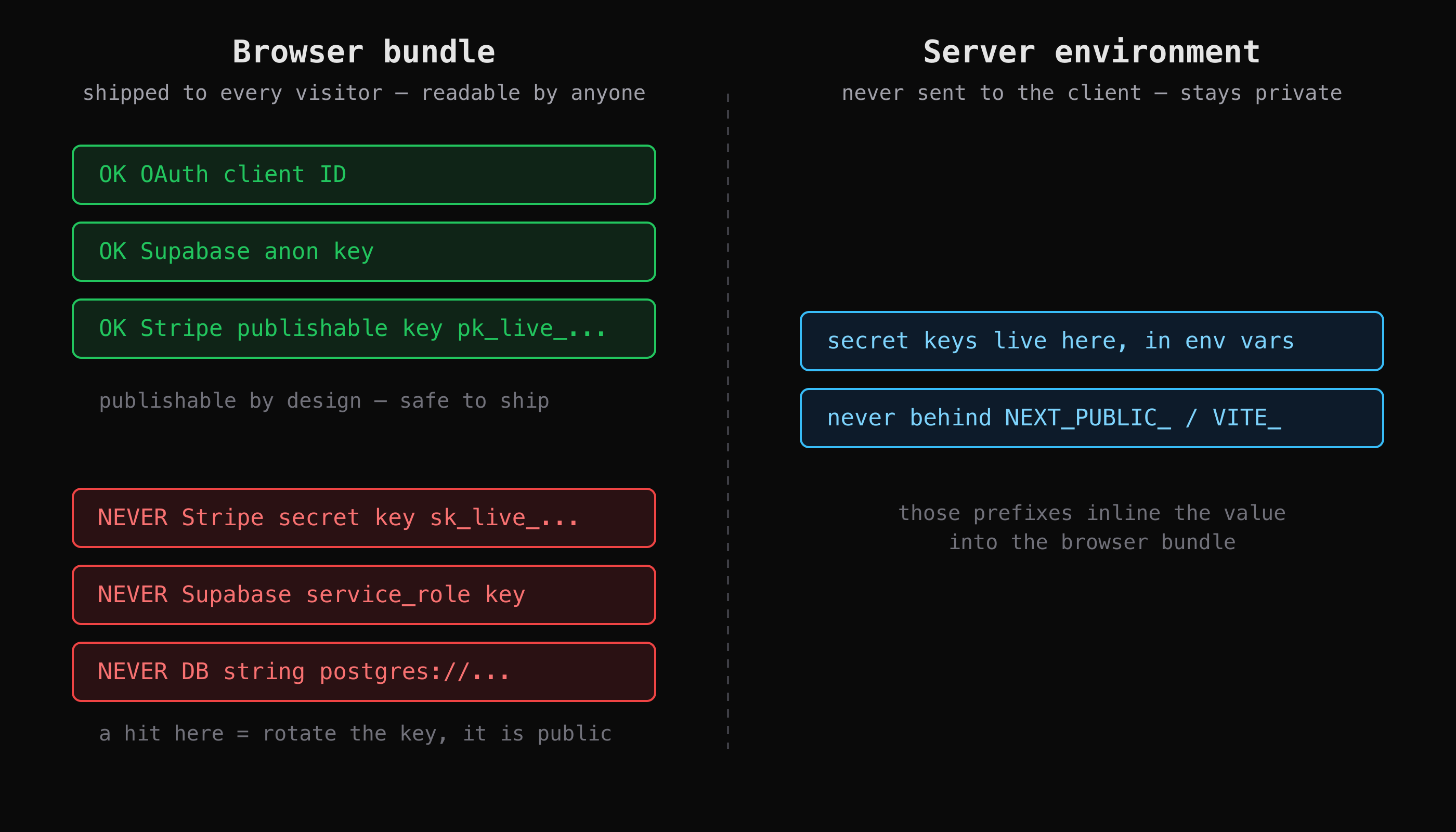
What ships to the browser is readable by anyone, so only publishable keys belong there. Secret keys stay in server-side environment.
2. Which API endpoints answer without a login?
List your API endpoints and check what each one requires, because the most common serious bug in a fast-built app is an endpoint that returns data to anyone who asks. You cannot reason about this without an inventory — this is why mapping the attack surface comes before testing it. For each endpoint, you need one column: does it require a session, and should it?
Open your browser's network panel, use the app normally, and note every request the front end makes. Then replay each one with no credentials and record the status. On CyberGym, the contrast is immediate:
B=https://cybergym.hackergpt.app
curl -s -o /dev/null -w "%{http_code}  /api/Products\n"  "$B/api/Products"
curl -s -o /dev/null -w "%{http_code}  /api/Feedbacks\n" "$B/api/Feedbacks"
curl -s -o /dev/null -w "%{http_code}  /rest/user/whoami\n" "$B/rest/user/whoami"
curl -s -o /dev/null -w "%{http_code}  /api/Users\n"     "$B/api/Users"
curl -s -o /dev/null -w "%{http_code}  /rest/basket/1\n" "$B/rest/basket/1"
# 200  /api/Products
# 200  /api/Feedbacks
# 200  /rest/user/whoami
# 401  /api/Users
# 401  /rest/basket/1
The product catalogue answering 200 without a login is fine — it is public by design. /api/Users and the basket returning 401 is correct too. The one to stop on is /api/Feedbacks: it answers 200 with no session and returns a list of user feedback, including comment text tied to user ids:
curl -s "$B/api/Feedbacks" | head -c 160
# {"status":"success","data":[{"UserId":2,"id":2,"comment":"Great shop! ...
On a deliberately vulnerable app that is a training challenge; on a real app, an endpoint that returns data belonging to users without checking for a session is the finding. Go through your own list and mark each endpoint nothing / session / session + role, then ask, for every one marked nothing, whether that is deliberate. Holding a session across a crawl and recording this auth column for every endpoint is the mechanical work that AppMap automates — it lists each endpoint it reaches with the authentication it requires, which is the inventory this check needs.
3. Does each endpoint check that this user owns the object?
For every endpoint that takes an id, confirm it verifies the caller is allowed that specific object, because requiring a login is not the same as checking ownership. An endpoint can correctly demand a session and still hand user A the data for user B's id. That class of flaw is Broken Object Level Authorization (BOLA), ranked the number-one API risk in the OWASP API Security Top 10 (2023).
The check is to log in as one test user and request an object id that belongs to a different account — an order, an invoice, a profile, a basket. If it comes back, authentication passed but authorization failed. On CyberGym the basket endpoint requires a session (the 401 above) but the documented training flaw is that it does not confirm the authenticated user owns the basket id they ask for. We walk through that comparison in detail in mapping a web app's attack surface, so this article does not repeat it — the point for your checklist is the method: compare two requests that differ only by an id, as two different users. If both succeed, you have a finding. Create your own two test accounts for this rather than touching anyone else's data, and stop at demonstrating the missing check.
The fix lives in the server handler for each object: on every request, confirm the object's owner matches the authenticated user before returning it. A where user_id = :currentUser on the query, enforced server-side, is the shape of it.
4. Is your Supabase row-level security actually enabled?
If you use Supabase (or any Postgres exposed to the browser), check that row-level security is enabled on every table in an exposed schema, because without it the anon key that ships to your front end can read and write the whole table. Supabase's own guidance is blunt: it allows data access straight from the browser as long as you enable RLS (Supabase, Row Level Security). The trap for fast-built apps is the gap the docs call out — tables created in the dashboard Table Editor get RLS switched on for you, but tables created with raw SQL or the SQL editor do not, and an AI assistant that generates create table statements leaves them unprotected.
Check it in the SQL editor:
-- Every table in the public schema and whether RLS is on:
select relname, relrowsecurity
from pg_class
where relnamespace = 'public'::regnamespace and relkind = 'r';
-- relrowsecurity = false on any row is a finding
Enabling RLS is one statement per table, but note the second trap: enabling RLS with no policy denies all access by default, so you must then add policies that say who may do what. The official guide gives the authoritative syntax; the common per-user pattern is:
alter table profiles enable row level security;

create policy "Users read their own profile"
  on profiles for select
  using ( (select auth.uid()) = user_id );
Then re-run your check as an anonymous client and as a logged-in user to confirm each sees only what it should. Enabling RLS and writing a policy are two separate steps; doing only the first locks everyone out, and doing neither leaves the table open.
5. Do your webhooks verify their signature?
If your app receives webhooks — Stripe, GitHub, Clerk, anything — confirm the handler verifies the signature before it trusts the payload, because a webhook URL is a public endpoint and anyone who finds it can POST a fake event to it. Without verification, a forged checkout.session.completed can mark an order paid that never was.
Stripe signs every event with a Stripe-Signature header, and its webhook signature docs give the verification helper. The check is to read your handler and confirm it calls the verification step before acting on the event:
// Stripe (Node). The three inputs: raw body, the signature header, your endpoint secret.
const event = stripe.webhooks.constructEvent(
  req.rawBody,                       // the UNMODIFIED body bytes
  req.headers["stripe-signature"],
  process.env.STRIPE_WEBHOOK_SECRET, // whsec_... — a server secret, never in the client
);
Two mistakes the Stripe docs flag are the ones fast-built apps hit. First, the body must be the raw bytes Stripe sent — a framework that parses JSON before your handler runs (Express's express.json(), Next.js's default body parsing) changes the body and verification fails, so the route needs the raw body. Second, the endpoint secret from a Dashboard-created endpoint and the one the Stripe CLI issues are different and not interchangeable. The quick test: send a POST to your webhook URL with a junk or missing signature and confirm it is rejected (a 400), not accepted.
6. Are your security headers set?
Check the response headers your app returns, because a few missing headers are a cheap, real finding an outsider sees on the first request. Fetch your site and look at what comes back:
curl -s -D - -o /dev/null https://cybergym.hackergpt.app/ \
  | grep -iE '^(content-security-policy|strict-transport-security|x-frame-options|x-content-type-options)'
# x-content-type-options: nosniff
# x-frame-options: SAMEORIGIN
Two useful headers are present; two that matter are missing. There is no Content-Security-Policy, so the browser has no app-supplied allowlist for what scripts may run — the main defence-in-depth control against cross-site scripting. And there is no Strict-Transport-Security, so nothing tells browsers to refuse plain-HTTP connections to the host. These are not exploits; they are missing defences, and the OWASP Secure Headers Project is the reference for which headers to set and what each does. Run the same curl against your own app and compare. Most frameworks and hosts (Vercel, Netlify, a reverse proxy) let you add these in config in a few lines; a strict CSP takes the most tuning, so start it in report-only mode.
7. Are your dependencies patched?
Run your package manager's audit, because a vibe-coded app often pulls in dozens of dependencies you never chose directly, and a known vulnerability in one of them is a known vulnerability in your app. This is the one check that needs no target at all — it reads your lockfile:
npm audit                 # or: pnpm audit / yarn audit
npm audit --production    # only deps that ship, filtering out dev-only noise
Read the output by severity and reachability, not just the total count — a critical in a package your production code actually calls matters more than a moderate in a build tool. Patch with npm audit fix where it is safe, and turn on automated dependency updates (GitHub's Dependabot, or Renovate) so new advisories surface as pull requests instead of waiting for you to remember. Dependency hygiene is a whole discipline on its own; we go deeper in software supply chain security.
How do I check it's secure before launch?
Work the seven items in order and fix as you go, because the early ones fail hardest: a leaked secret key or an endpoint that returns everyone's data is worse than a missing header. A realistic pre-launch pass looks like this:
- Secrets and keys — grep the shipped bundle; rotate anything secret that is in it.
- Authentication — list every endpoint, replay each logged out, question every
200. - Object ownership — as two test users, request each other's ids; fix any that leak.
- Database rules — confirm RLS is on for every exposed table, with policies that match.
- Webhooks — confirm each handler verifies its signature on the raw body.
- Headers — add CSP (report-only first) and HSTS.
- Dependencies — run the audit, patch, and automate future updates.
This is a floor, not a ceiling. It catches the common, high-impact mistakes; it does not cover business-logic flaws, authentication-flow edge cases, or how small issues chain together — those still need a careful human look, and when money or personal data is involved, a real penetration test is worth the budget conversation. What the checklist buys you is that the obvious doors are shut before you open to real users. A finding is a finding: completing this list tells you these specific checks passed, not that your app is secure in every respect.
Key takeaways
- Everything in your browser bundle is public — grep it for secrets, but know that publishable keys (OAuth client IDs, Supabase anon, Stripe
pk_live) belong there and only private keys are findings. - The highest-value checks are access control: every endpoint should require the login it needs, and every object-by-id endpoint should confirm the caller owns that object (BOLA, the top OWASP API risk).
- Supabase RLS is not automatic for tables made with raw SQL, and enabling it without a policy denies everyone — do both, then test as anon and as a user.
- Webhooks are public endpoints; verify the signature on the raw body before trusting any event, and POST a junk signature to confirm rejection.
- Missing security headers and unpatched dependencies are cheap, real findings — set CSP and HSTS, run
npm audit, and automate updates.
FAQ
How do I check my Supabase row-level security is actually working?
First confirm RLS is enabled on every table in the exposed schema: query pg_class for relrowsecurity, or check each table in the dashboard. Tables created with raw SQL do not get RLS automatically, so this is where gaps hide. Then test behaviourally — query a table with the anonymous key and as a logged-in user, and confirm each sees only the rows its policy allows. Remember that enabling RLS with no policy blocks all access, so you need both the enable row level security statement and policies that grant the intended access.
What are the most common security holes in vibe-coded apps?
The recurring ones are access-control and secret-handling steps that were skipped while shipping a working feature: secret keys left in the client bundle, API endpoints that return data without checking for a login, endpoints that check for a login but not object ownership, Supabase tables without row-level security, and webhooks that never verify their signature. None are advanced attacks — they are the first things an outsider checks, which is why they make up this checklist.
Is there a free way to test my web app's security before launch?
Yes — the mechanical parts of this checklist use only curl, your browser's network panel, your package manager's audit command, and your database console, all free. The cost is time and judgement: you do the mapping, the request comparisons, and the triage by hand. A tool or an AI agent automates that breadth so you can run it on every release, and for practice there is CyberGym, a free and legal deliberately vulnerable target to learn the method on before pointing anything at your own app.
Do I need a penetration test for my startup?
A checklist like this one is the right first step and catches the common, high-impact mistakes cheaply. A full penetration test adds human judgement — business-logic flaws, chaining small issues into a real attack path, and context on which findings actually matter — which automated checks do not provide. The practical trigger is stakes: once you handle payments, personal data, or have compliance obligations, a scoped manual test with a retest is worth budgeting for. Before that, work the checklist and fix what it surfaces.
Is it legal to run these checks on my own site?
Testing a site you own is legal, and so is testing one you have written permission to test. Running the same checks against a site you neither own nor are authorised to test is unauthorised access in most jurisdictions, regardless of intent. If your app runs on third-party infrastructure, check the provider's terms, since some ask for notice before testing. To practise safely, use a published legal target such as CyberGym at cybergym.hackergpt.app.
Sources
- OWASP API Security Top 10 (2023) — API1:2023 Broken Object Level Authorization
- Supabase — Row Level Security
- Stripe — Verify webhook signatures
- OWASP Secure Headers Project
- OWASP Juice Shop (the project CyberGym is built on)
Want an agent to run the mapping and endpoint checks on your own app? Point HackerGPT at a site you own, or practise the whole method on CyberGym first.