TL;DR: Server-side request forgery (SSRF) happens when your app fetches a URL that a user supplied, so the user can point your server at addresses only it can reach: an admin service on 127.0.0.1, a database on the private network, or the cloud metadata service. A typical SSRF example is a link-preview endpoint that calls fetch(req.query.url). You fix it by allowing only the destinations you mean to reach, checking the address the connection actually uses, and not following redirects.
This article is for developers and site owners whose app fetches anything from a URL: link previews, "import from URL", avatars by URL, webhooks. It explains how the request flows, shows a vulnerable endpoint and its fix in a small Node app we ran on our own machine, and shows what an attempt leaves in your logs. It covers concepts and defence only; run any check against systems you own or have written permission to test.
What is SSRF?
SSRF is a bug in which your server makes an outbound request to a destination that someone else chose. MITRE catalogues it as CWE-918: Server-Side Request Forgery (SSRF): the web server "receives a URL or similar request from an upstream component and retrieves the contents of this URL, but it does not sufficiently ensure that the request is being sent to the expected destination."
It had a category of its own in the OWASP Top 10:2021, A10. In the OWASP Top 10:2025 CWE-918 is listed under A01, Broken Access Control, which is a useful way to think about it: the server has access the user does not, and the bug lends it to them.
The feature itself is usually legitimate. The OWASP SSRF Prevention Cheat Sheet gives the common shapes: an avatar the user names by URL for the app to download, and webhooks or callback URLs the user configures. The bug is that the destination is not checked, or is checked on the wrong thing.
How does a server-side request forgery attack work?
The attacker asks your server to fetch a URL, and your server does it from inside your network, with the trust its neighbours give it. A firewall that stops the attacker from reaching an internal service does nothing about a request your own server makes.
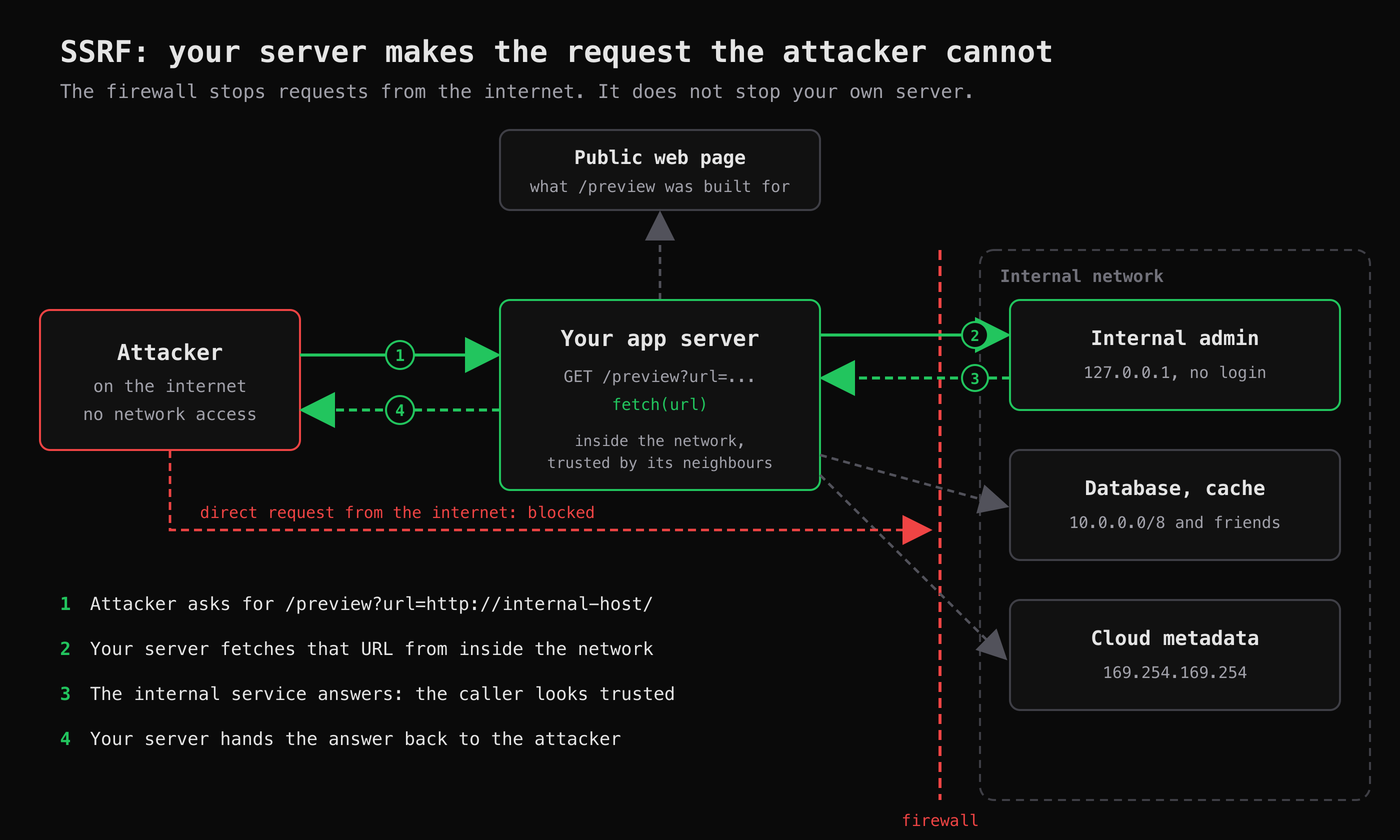
The attacker never touches the internal network. Your server does it for them.
- The attacker calls a feature such as
/preview?url=with a URL that names an internal host instead of a public page. - Your server fetches it. The request leaves from your server's own address, inside the network.
- The internal service answers. Many internal services trust any caller on the private network or on
127.0.0.1, and ask for no login. - Your server returns what it got. If the feature shows the response, the attacker reads it; if it does not, they may still learn from status codes, timings or error messages, which is usually called blind SSRF.
Three kinds of destination make this worth an attacker's time:
- Services on the same machine, bound to
127.0.0.1on the assumption that nothing outside can call them. - Services on the private network: databases, caches, internal dashboards, other microservices. The private ranges are defined in RFC 1918.
- The cloud metadata service. On EC2 it answers at
169.254.169.254(AWS documentation), in the link-local range of RFC 3927, and Google Cloud and Azure run their own. The OWASP cheat sheet notes that in cloud environments SSRF is often used to steal credentials and access tokens from these services.
SSRF is not limited to HTTP either. The same cheat sheet points out that the server's request can use other schemes, such as file:// or gopher://, if the HTTP client accepts them.
Where does SSRF hide in my own app?
Anywhere the server takes a URL, a hostname or an IP address from a request and connects to it. In our experience the usual places are:
- link previews and "unfurling" in chat or comments;
- "import from URL" for files, feeds, calendars or spreadsheets;
- avatar or image upload by URL, and image resizing proxies;
- webhook and callback URLs that users set in their settings;
- HTML-to-PDF and screenshot services, which fetch every resource the page references;
- integrations that take a "server URL" for a self-hosted instance.
Start from a list of your endpoints and their parameters, and look for anything named url, uri, link, src, callback, webhook, feed or host. AppMap lists every API endpoint it finds with its auth requirement, which is a place to start that search; our guide to mapping a web app's attack surface covers doing it by hand. Then read the handler: does the value reach fetch, axios, got, requests, curl or a headless browser?
Do not stop at the parameter. A URL saved today (a webhook, a feed) is fetched later by a background job, often on a different machine with different network access.
What does an SSRF example look like in code?
Here is the pattern at its smallest: an Express endpoint that previews a link by fetching it. We ran it on Node 26.7 and Express 5 on our own machine, next to a stand-in "internal admin" service that listens only on 127.0.0.1:9000 and asks for no login.
// vulnerable.mjs: a link-preview endpoint that fetches whatever URL it is given.
import express from 'express';
const app = express();

app.get('/preview', async (req, res) => {
  const target = req.query.url;
  console.log(`${new Date().toISOString()} preview url=${target}`);
  try {
    const r = await fetch(target);              // follows redirects by default
    const body = await r.text();
    res.json({ status: r.status, snippet: body.slice(0, 200) });
  } catch (err) {
    res.status(502).json({ error: 'fetch failed' });
  }
});

app.listen(3000, '127.0.0.1');
Nothing in it looks wrong at a glance, which is why the bug is common. One request from outside is enough to show the problem:
curl -s --get --data-urlencode 'url=http://127.0.0.1:9000/admin' \
  http://127.0.0.1:3000/preview
{"status":200,"snippet":"{\"service\":\"internal-admin\",\"note\":\"not meant for the internet\"}"}
The internal service, which no outside client can reach, answered the preview endpoint and its response came back to the caller. On a real deployment the same line of code reaches whatever your server can reach.
Two details in that handler matter beyond the missing check. fetch follows redirects by default: the redirect option is follow unless you say otherwise, and in our run fetch('https://hackergpt.org/blog') returned 200 from https://hackergpt.org/blog/ with redirected: true. So a check on the first URL alone does not decide where the request ends up. And returning the body, status and distinct errors to the caller is what turns a blind request into a readable one.
What does SSRF look like in server logs?
It shows up in three places, and the most useful one is the log most apps do not keep. Here is what our run wrote:
2026-11-16T03:21:58.627Z preview url=http://127.0.0.1:9000/admin
2026-11-16T03:21:58.666Z internal-admin 127.0.0.1 "GET /admin" ua="node"
- The access log of the public app records the inbound request. With a
GETparameter, the internal address is visible in the query string; with a JSON body it is not, which is the same gap our guide to detecting attacks in web server logs describes for injection. - The app's own log of outbound fetches is the one that answers the question "where did my server connect?". The first line above is that log. Record the URL, the resolved IP address, the status and the size for every fetch made on a user's behalf.
- The internal service's log shows a request from your app server's own address, with your HTTP client's user agent (
nodehere), at a path no internal caller uses. If an internal service normally only hears from a handful of known clients, a request from the web tier is worth an alert.
What to look for: user-supplied URLs whose host is an IP address, localhost, an internal hostname, or a link-local address; bursts of preview or import requests that walk through hosts or ports; and responses from internal services to the public-facing tier. None of these proves an attack on its own. Each is a lead to a handler you should read.
How do I fix SSRF in my app?
Decide where the server is allowed to connect, and enforce it on the connection itself, not on the string the user sent. The OWASP cheat sheet splits this into two cases: when the destinations are known, an allow-list; when the feature must reach arbitrary public URLs, as a link preview must, blocking internal destinations at the address level and doing so on the addresses actually used.
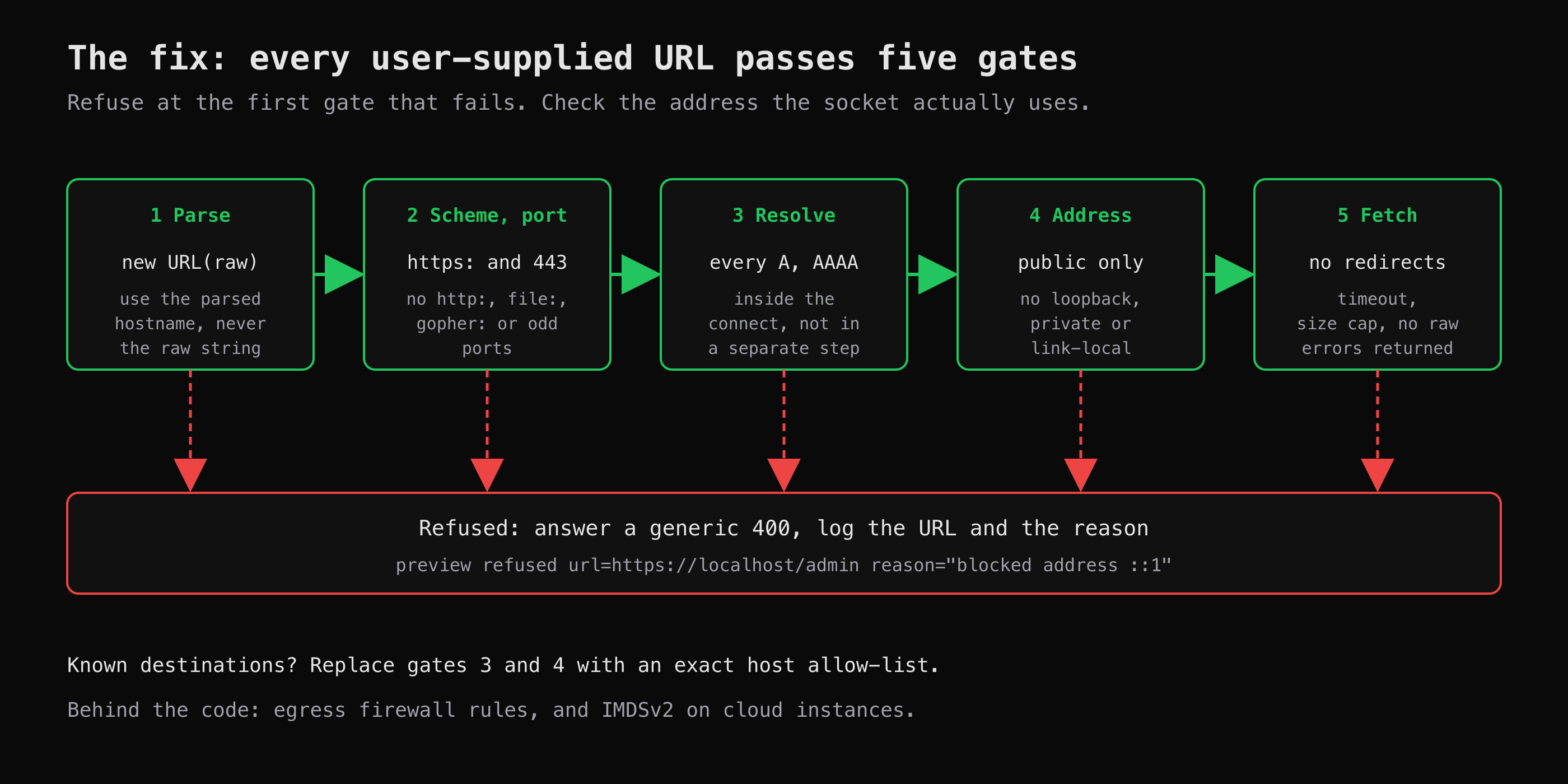
The fixed endpoint refuses at the first gate that fails, and logs why.
When you know the destinations: an allow-list
If the feature only ever talks to your CDN, a partner API or a fixed set of hosts, parse the URL and compare the hostname with an exact list, then build the request yourself. The OWASP cheat sheet adds the detail that matters: do not carry the rest of the user's URL across; rebuild it from parts you control.
const ALLOWED_HOSTS = new Set(['cdn.your-app.example', 'api.partner.example']);

export function allowedUrl(raw) {
  let url;
  try { url = new URL(raw); } catch { return null; }
  if (url.protocol !== 'https:' || !ALLOWED_HOSTS.has(url.hostname)) return null;
  return new URL(url.pathname, `https://${url.hostname}`);
}
Compare url.hostname, never the raw string with includes or startsWith; our open redirect example shows how string checks on URLs fail in practice.
When the URL can be any public page: block internal addresses at connect time
A link preview cannot use an allow-list. This is the fixed version of our endpoint. It accepts only https on port 443, blocks loopback, private, carrier-grade NAT and link-local ranges with Node's net.BlockList, checks the addresses in a custom lookup so the check runs on the address the socket will use, follows no redirects, and caps time and size:
// fixed.mjs: the same link preview, but the server only fetches public HTTPS URLs.
import express from 'express';
import https from 'node:https';
import dns from 'node:dns';
import net from 'node:net';

// Addresses a user-supplied URL must never reach.
const blocked = new net.BlockList();
blocked.addSubnet('0.0.0.0', 8);
blocked.addSubnet('10.0.0.0', 8);
blocked.addSubnet('100.64.0.0', 10);
blocked.addSubnet('127.0.0.0', 8);
blocked.addSubnet('169.254.0.0', 16);   // link-local, includes cloud metadata
blocked.addSubnet('172.16.0.0', 12);
blocked.addSubnet('192.168.0.0', 16);
blocked.addAddress('::', 'ipv6');
blocked.addAddress('::1', 'ipv6');
blocked.addSubnet('fc00::', 7, 'ipv6');
blocked.addSubnet('fe80::', 10, 'ipv6');

const isBlocked = (ip) => blocked.check(ip, net.isIPv6(ip) ? 'ipv6' : 'ipv4');

// Runs at connect time, on the addresses the socket will actually use.
function safeLookup(hostname, options, callback) {
  dns.lookup(hostname, { ...options, all: true }, (err, addresses) => {
    if (err) return callback(err);
    const bad = addresses.find((a) => isBlocked(a.address));
    if (bad) return callback(new Error(`blocked address ${bad.address}`));
    if (options.all) return callback(null, addresses);
    callback(null, addresses[0].address, addresses[0].family);
  });
}

function fetchPublic(raw) {
  return new Promise((resolve, reject) => {
    let url;
    try { url = new URL(raw); } catch { return reject(new Error('not a URL')); }
    if (url.protocol !== 'https:') return reject(new Error('https only'));
    if (url.port && url.port !== '443') return reject(new Error('port not allowed'));
    const host = url.hostname.replace(/^\[|\]$/g, '');
    if (net.isIP(host) && isBlocked(host)) return reject(new Error(`blocked address ${host}`));

    const req = https.get(url, { lookup: safeLookup, timeout: 5000 }, (res) => {
      const ip = res.socket.remoteAddress;
      if (res.statusCode >= 300 && res.statusCode < 400) {
        res.resume();
        return reject(new Error(`redirect not followed (${res.statusCode})`));
      }
      let body = '';
      res.setEncoding('utf8');
      res.on('data', (chunk) => {
        body += chunk;
        if (body.length > 65536) req.destroy(new Error('response too large'));
      });
      res.on('end', () => resolve({ status: res.statusCode, ip, body }));
    });
    req.on('timeout', () => req.destroy(new Error('timeout')));
    req.on('error', reject);
  });
}

const app = express();

app.get('/preview', async (req, res) => {
  const target = String(req.query.url ?? '');
  try {
    const r = await fetchPublic(target);
    console.log(`${new Date().toISOString()} preview ok url=${target} ip=${r.ip} status=${r.status}`);
    res.json({ status: r.status, snippet: r.body.slice(0, 200) });
  } catch (err) {
    console.log(`${new Date().toISOString()} preview refused url=${target} reason="${err.message}"`);
    res.status(400).json({ error: 'URL not allowed' });
  }
});

app.listen(3001, '127.0.0.1');
We sent it the internal URL from before, the same service over https, localhost, the metadata address, a page on our own site that redirects, and a page that does not. Every refused request got the same 400 {"error":"URL not allowed"}; the log says why:
preview refused url=http://127.0.0.1:9000/admin reason="https only"
preview refused url=https://127.0.0.1/admin reason="blocked address 127.0.0.1"
preview refused url=https://localhost/admin reason="blocked address ::1"
preview refused url=https://169.254.169.254/latest/meta-data/ reason="blocked address 169.254.169.254"
preview refused url=https://hackergpt.org/blog reason="redirect not followed (302)"
preview ok url=https://hackergpt.org/ ip=3.170.19.50 status=200
The internal service's log had no new line: the fixed endpoint never connected to it. The metadata address was refused before any connection was attempted.
Three things we learned building it:
- The explicit IP check is not optional. Node does not call a custom
lookupwhen the hostname is already an IP address. We confirmed it: with an IP-literal URL ourlookupwas never called. Without the line that checksnet.isIP(host),https://127.0.0.1/would connect. - Check inside the connection, not before it. Resolving the name in a separate step and then letting the HTTP client resolve it again leaves a window in which the answer can change. The OWASP cheat sheet calls this out: domain allow-listing alone does not prevent DNS rebinding, and the client must connect only to the addresses that were validated.
- Parse first. The checks run on
url.hostnamefrom the WHATWG URL parser, which normalises the many ways an address can be written. A regular expression on the raw string sees none of that.net.BlockListalso matched an IPv4-mapped IPv6 form of127.0.0.1against the IPv4 rule in our test.
The block list is a minimum, not a complete list. The IANA special-purpose address registries list more ranges; add the ones your environment uses, including your own VPC ranges if they differ from RFC 1918. If you need to follow redirects, follow them yourself, a fixed small number of times, and run every hop through the same checks.
Behind the code: the network and the cloud
Code is one layer. Two more make a missed handler less costly:
- Egress rules. The web tier rarely needs to open connections to every internal service. Firewall or security-group rules that limit what it can reach outbound narrow what any SSRF can touch; the OWASP cheat sheet describes this as the network layer of the defence.
- IMDSv2 on AWS. Instance Metadata Service version 2 requires a session token obtained with a
PUTrequest, rejectsPUTrequests that carry anX-Forwarded-Forheader, and by default limits the token response to one network hop (how IMDSv2 works). AWS introduced it as defence in depth against open firewalls, reverse proxies and SSRF. Require it and turn IMDSv1 off. On Google Cloud, the metadata server requires theMetadata-Flavor: Googleheader on every request.
These reduce the impact of an SSRF; they do not remove the bug. Fix the handler as well.
Key takeaways
- List every endpoint and background job that fetches a URL a user supplied, including webhooks and "import from URL" features.
- Log every outbound fetch made on a user's behalf with the URL, resolved IP and status, and alert when the web tier talks to internal services it never calls.
- Use an exact host allow-list where the destinations are known, and rebuild the URL from parts you control.
- Where any public URL must work, block internal ranges in the connection's own address lookup, check IP-literal hosts separately, and do not follow redirects without re-checking each hop.
- Require IMDSv2 on AWS instances and limit outbound traffic from the web tier, so a missed handler reaches less.
FAQ
What is an example of SSRF?
A link-preview endpoint that runs fetch(req.query.url) and returns the result. Asked for http://127.0.0.1:9000/admin, it fetches an internal service that no outside client can reach and hands the response back. The same pattern appears in "import from URL", avatar-by-URL and webhook features.
How is SSRF different from an open redirect?
An open redirect sends the user's browser to another site; the request comes from the user. SSRF makes your server send the request, from inside your network and with its access. An open redirect on a trusted host can still feed an SSRF if your server follows redirects after checking only the first URL.
How is SSRF different from CSRF?
Cross-site request forgery tricks a user's browser into sending a request to your app with the user's cookies. Server-side request forgery tricks your server into sending a request to somewhere else. Both lend the attacker someone else's access: the user's session in CSRF, the server's network position in SSRF.
Is SSRF still in the OWASP Top 10?
Yes, though no longer as its own category. It was A10 in the OWASP Top 10:2021; in the 2025 edition CWE-918 is one of the weaknesses listed under A01, Broken Access Control.
What is blind SSRF?
SSRF where your server makes the request but does not return the response to the caller. The attacker cannot read the internal service's answer directly, but the request still reaches it, and differences in status codes, error messages or timing can reveal what exists. Returning one generic error for every refused or failed fetch removes most of those signals.
Does a firewall or WAF stop SSRF?
A perimeter firewall does not, because the request comes from your own server inside it. Egress rules on the web tier help by limiting where that server can connect. A WAF that inspects the incoming URL can catch obvious cases, but it cannot see what a hostname resolves to at the moment your server connects, so the check belongs in your code.
Sources
- CWE-918: Server-Side Request Forgery (SSRF), MITRE
- A10:2021 Server-Side Request Forgery (SSRF), OWASP Top 10:2021
- A01:2025 Broken Access Control, OWASP Top 10:2025
- Server-Side Request Forgery Prevention Cheat Sheet, OWASP
- Testing for Server-Side Request Forgery, OWASP Web Security Testing Guide
- RFC 1918: Address Allocation for Private Internets, IETF
- RFC 3927: Dynamic Configuration of IPv4 Link-Local Addresses, IETF
- IANA IPv4 Special-Purpose Address Registry
- Retrieve instance metadata and How Instance Metadata Service Version 2 works, AWS
- Add defense in depth against open firewalls, reverse proxies, and SSRF vulnerabilities with enhancements to the EC2 Instance Metadata Service, AWS Security Blog
- Query VM metadata, Google Cloud
- RequestInit:
redirect, MDN net.BlockList, Node.js documentation- URL Standard, WHATWG
Find the endpoints that fetch URLs in your own app with HackerGPT, or practise other web vulnerability classes on CyberGym.