TL;DR: Path traversal (directory traversal) happens when an app builds a file path from user input, so a name like ../config/secrets.env climbs out of the folder the app meant to serve and reads whatever the process can read. The fix is to stop using names at all where you can, and otherwise to resolve the full path and refuse it unless it sits inside the base folder plus a separator, checked again after symlinks are resolved. Removing ../ from the input is not a fix.
This is for developers and site owners who serve or store files by name: downloads, invoices, avatars, export files, uploaded archives. We look at how CyberGym, our deliberately vulnerable practice app, answers traversal attempts on its file server, then run four versions of one download handler against the same six file names on 127.0.0.1, and keep the one that held. Only test apps you own or have written permission to test; CyberGym and your own localhost are the places to practise.
What is path traversal?
Path traversal is reading or writing a file outside the directory an application meant to restrict itself to, by putting path syntax into a value the application turns into a file path. MITRE files it as CWE-22, Improper Limitation of a Pathname to a Restricted Directory: the software builds a path from external input to reach a file under a restricted parent directory, but does not neutralise elements such as .. that resolve to a location outside it.
The OWASP Top 10:2025 maps CWE-22 into A01, Broken Access Control, which is the right way to think about it: the app has a rule ("this endpoint serves files from invoices/") and nothing enforces it. OWASP's attack page lists the usual disguises: ../ and ..\, URL-encoded forms such as %2e%2e%2f, double encoding, and absolute paths.
What it reaches depends on the process. A web server account can usually read the app's own source, its .env or config files, backups next to the web root, and anything world-readable on the host. If the same flaw sits in a write path, such as an upload or an archive extraction, it can overwrite files instead.
What does a path traversal example look like?
Here is the smallest version. A download endpoint takes a file name and joins it onto a folder:
import path from 'node:path'
import fs from 'node:fs/promises'

const FILES = path.resolve(import.meta.dirname, 'files')

// GET /vulnerable?file=invoice-1001.txt
async function vulnerable (name) {
  return fs.readFile(path.join(FILES, name), 'utf8')
}
path.join does exactly what the Node.js documentation says: it joins the segments and normalises the result, which includes resolving ... So files/ + ../config/secrets.env normalises to config/secrets.env, one level up, and the handler reads it. Nothing about join is broken; the code never asked whether the result was still inside files/.
We built this handler in a small lab: a folder lab/ containing files/ (the one folder meant to be public, with invoice-1001.txt and a symlink latest.txt pointing at ../config/secrets.env), a sibling files-backup/db.sql, and config/secrets.env. All of it is fake data and the server listens on 127.0.0.1 only. A normal request and a traversal request, on Node.js 26:
curl -s --get --data-urlencode "file=invoice-1001.txt" http://127.0.0.1:3129/vulnerable
# Invoice 1001 Total: 42.00 EUR

curl -s --get --data-urlencode "file=../config/secrets.env" http://127.0.0.1:3129/vulnerable
# DB_PASSWORD=lab-only-not-a-real-secret
The second request is the whole vulnerability. The status code was 200 for both, so nothing in an access log looks like an error.
How does CyberGym handle ../ in its file server?
CyberGym's /ftp/ folder is the classic Juice Shop file share, and the traversal-shaped requests we sent to it were all refused. We sent only harmless GET requests for files that are already public in the Juice Shop repository, on 17 November 2026; --path-as-is stops curl from normalising ../ itself before sending:
T=https://cybergym.hackergpt.app
for p in ftp/legal.md ftp/..%2fpackage.json ftp/..%5cpackage.json \
         ftp/..%252fpackage.json.md ftp/..%2f..%2fetc%2fpasswd ftp/../package.json; do
  printf '%-30s ' "/$p"
  curl -s --path-as-is -o /dev/null -w '%{http_code}\n' "$T/$p"
done
| Request | Status | Who answered |
|---|---|---|
/ftp/legal.md |
200 | the file server, a normal file |
/ftp/..%2fpackage.json |
403 ForbiddenError: Forbidden |
serve-index, before Juice Shop's own route |
/ftp/../package.json |
403 ForbiddenError: Forbidden |
serve-index |
/ftp/..%5cpackage.json |
403 Only .md and .pdf files are allowed! |
Juice Shop's file route |
/ftp/..%252fpackage.json.md |
404 Not Found |
decoded once, then treated as a plain file name |
/ftp/..%2f..%2fetc%2fpasswd |
400 Bad Request |
the nginx proxy in front of CyberGym |
Reading the source explains each line, and it is more useful than the status codes:
- The directory listing middleware checks containment. Juice Shop mounts
serve-indexon/ftpbefore its file route. In serve-index (Juice Shop depends on^1.9.1), every request is URL-decoded, joined onto the root and normalised, then refused with 403 unless the result still starts with the root folder plus a separator. That is the correct check, and it is why..%2fdies before Juice Shop's code sees it. - The file route refuses slashes and checks the suffix. Juice Shop's
fileServer.tsanswers 403 to any name containing/, then allows only names ending in.mdor.pdf. A backslash is not a separator on Linux, so..\package.jsonis just an odd file name, and the suffix check refused it. - Double encoding did not help, because nothing decodes twice.
%252fbecame the literal text%2f, a file name that does not exist: 404.
Two things are worth taking from this. First, the protection here came from a library (serve-index) and a proxy, not from the route itself: Juice Shop's file route would be one framework change away from trouble, and the same is true in plenty of real apps. Second, the slash check and suffix allow-list are filters on the name, and filters on names have a history of being bypassed. The Juice Shop file-access challenges on this folder are about exactly that: Forgotten Developer Backup, Forgotten Sales Backup and Poison Null Byte get past the suffix check rather than climbing out with ../. We covered why that works, without the solution, in backup files exposed on a web server, and how the folder is found in the first place in exposed directory listings.
Where CyberGym does have a traversal
The traversal that works in Juice Shop is on the write side. Its fileUpload.ts extracts uploaded .zip files into uploads/complaints/ by joining each entry's name onto that folder, and its only check is that the resolved path contains the app's root directory. That keeps writes inside the application, but anywhere inside it, so an entry whose name climbs out of uploads/complaints/ can overwrite other files of the app. This class has a name, Zip Slip, from Snyk's research disclosed in June 2018 across many archive libraries.
It is the 6-star Arbitrary File Write challenge (category Vulnerable Components, tagged Danger Zone), and its goal is to overwrite /ftp/legal.md. We read the code and did not run it: on a shared instance it replaces a file every other learner reads. Run it on a local copy of Juice Shop if you want the solve; the order we suggest for the whole set is in OWASP Juice Shop challenges.
Why does removing ../ not fix path traversal?
Because the attacker writes the input after you write the filter. We added two common "fixes" to the lab and sent the same names to all four handlers. One strips ../ from the name; the other resolves the path and checks that it starts with the folder name:
// Flawed fix 1: remove "../" once
async function stripDots (name) {
  return fs.readFile(path.join(FILES, name.replaceAll('../', '')), 'utf8')
}

// Flawed fix 2: prefix check without a trailing separator
async function prefixCheck (name) {
  const full = path.resolve(FILES, name)
  if (!full.startsWith(FILES)) throw Object.assign(new Error('blocked'), { status: 403 })
  return fs.readFile(full, 'utf8')
}
What each handler returned, from our run on 17 November 2026. Only the first row should ever return 200; every other 200 is a leak:
| Name sent | vulnerable |
strip-dots |
prefix-check |
fixed |
|---|---|---|---|---|
invoice-1001.txt |
200 | 200 | 200 | 200 |
../config/secrets.env |
200, leak | 404 | 403 | 403 |
....//config/secrets.env |
404 | 200, leak | 404 | 404 |
../files-backup/db.sql |
200, leak | 404 | 200, leak | 403 |
latest.txt (symlink out) |
200, leak | 200, leak | 200, leak | 403 |
/etc/hosts |
404 | 404 | 403 | 403 |
Each leak has a plain cause:
....//defeats the strip. Removing../from....//configleaves../config. The filter produced the attack. Any one-pass replacement has this shape; a loop that strips until nothing changes is better, but it is still a filter on text that the file system will interpret differently.files-backupstarts withfiles./lab/files-backup/db.sqlpassesstartsWith('/lab/files'). The check has to compare against/lab/files/, with the separator.- A symlink is inside the folder by name and outside it on disk.
path.resolveworks on text and never touches the file system, sofiles/latest.txtlooks fine untilreadFilefollows the link toconfig/secrets.env. Only resolving the real path catches that. /etc/hostswas a 404 only by accident.path.joinglued it on asfiles/etc/hosts;path.resolvewould have read the real one if the check were missing. Do not rely on which of the two your code happened to use.
How do I fix path traversal in my own code?
Prefer not to put user input into a path at all; where you must, resolve the full path and require it to be inside the base folder plus a separator, then do the same after resolving symlinks. In order of strength:
- Use an indirect reference. Store files under names your app generates (a UUID, a database id) and keep the user-facing name in the database. The request carries
?id=1001, the server looks up the stored path, and no user text ever reaches the file system. Check that the caller may see that record, too: an id the user can change is the IDOR problem in a different coat. The same advice applies to uploads, where we covered it in file upload vulnerabilities. - If names are unavoidable, allow-list them. A fixed set of files, or a strict pattern such as
^[a-z0-9-]+\.pdf$checked on the decoded value, leaves no room for separators or dots. - Contain the resolved path. This is the handler that held in the lab:
async function fixed (name) {
  if (name.includes('\0')) throw Object.assign(new Error('blocked'), { status: 400 })
  const full = path.resolve(FILES, name)
  if (!full.startsWith(FILES + path.sep)) throw Object.assign(new Error('blocked'), { status: 403 })
  const real = await fs.realpath(full)
  if (!real.startsWith(FILES + path.sep)) throw Object.assign(new Error('blocked'), { status: 403 })
  return fs.readFile(real, 'utf8')
}
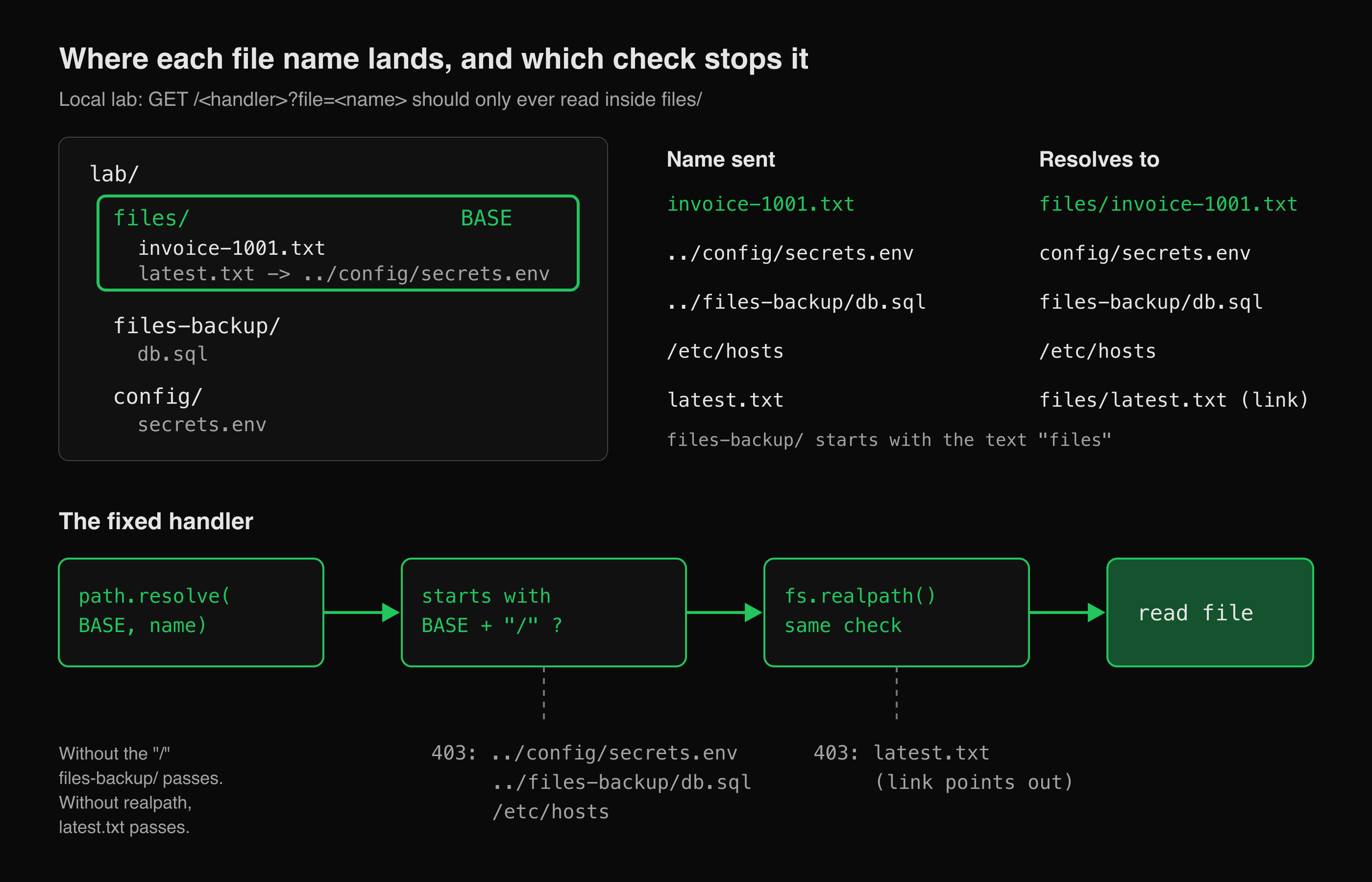 The fixed handler from the lab: resolve the name, require the result to sit inside files/ plus a separator, then resolve links and check again.
FILES must itself be an absolute, resolved path, which path.resolve guarantees. fs.realpath follows symlinks to the real location, so a link pointing out of the folder fails the second check. The null byte line is belt and braces: current Node.js refuses paths containing \0 on its own, but the explicit check documents the intent and survives a refactor to another library.
The same rule in Python, where Path.resolve() follows symlinks and is_relative_to (Python 3.9+) compares whole path components, so files-backup does not match files:
from pathlib import Path

BASE = Path("files").resolve()

def safe_path(name: str) -> Path:
    target = (BASE / name).resolve()
    if not target.is_relative_to(BASE) or target == BASE:
        raise PermissionError(name)
    return target
If your framework has a "serve from this root" option, use it rather than building the path yourself: send, which sits under Express's static file serving, refuses any path with a .. segment with 403 when a root is set, and rejects null bytes with 400. For archives, apply the containment check to every entry name before writing it, as the OWASP File Upload Cheat Sheet and Snyk's Zip Slip write-up describe; Juice Shop's includes(root) check is the version that does not work.
Two limits worth saying plainly. Containment decides where a file may be read from, not who may read it; an invoice folder still needs a per-user check. And the process account should not be able to read what it does not need: a web server that cannot read config/ turns a traversal into a 403 even when the code is wrong.
How do I find path traversal in my own app?
Look for every place where a request value reaches a file-system call, then send traversal-shaped names to each one on a copy you control. In practice:
- Search the code for sinks. In Node.js:
fs.readFile,fs.createReadStream,res.sendFile,res.download,path.join(withreq.nearby; in Python:open(,send_file,send_from_directory; and every archive extraction. Each hit that takes a value from the request needs one of the three fixes above. - List the endpoints that take a name. Parameters called
file,path,name,template,lang,downloadorexportare the usual suspects. On a larger app, an endpoint inventory helps; HackerGPT's AppMap lists every API endpoint it reaches with its auth requirement, which gives you the list to work through. - Probe on your own copy with harmless targets. Ask for a file you created yourself one level up (
../canary.txt), in the encoded forms from the CyberGym table, and with a symlink. A file you planted proves the escape without reading anything sensitive. - Watch the logs.
..,%2e%2e,%2fand%5cin query strings or paths on a production log are worth an alert; a 200 next to one is worth a look the same day.
Key takeaways
- Treat every file name that comes from a request as untrusted path syntax, including names inside uploaded archives.
- Prefer generated names or database ids over user-supplied file names; then nothing user-controlled reaches the file system.
- When you must accept a name, resolve it and require the result to start with the base folder plus a separator, then check again after
realpath. - Do not "fix" traversal by deleting
../: in our lab,....//walked straight through that filter. - Test with a canary file you planted one level up, on your own copy, and keep that request as a regression test.
FAQ
What is a simple path traversal example?
A download link such as /download?file=invoice-1001.txt where the server joins the name onto a folder and reads it. Sending file=../config/secrets.env makes the joined path climb one folder up and read the config file instead. In our local lab that request returned the fake secret with a 200 status.
Is directory traversal the same as path traversal?
Yes. Both names describe the same weakness, which MITRE files as CWE-22, and you will also see "dot-dot-slash" used for it. "Local file inclusion" is a related but different bug, where the file is not just read but executed or included as code.
Does URL encoding bypass path traversal filters?
It can, when the filter checks the text before the last decoding step. A filter that looks for ../ misses ..%2f if decoding happens afterwards, and misses ..%252f if something decodes twice. The fix is to check the final, resolved path just before it is used, not the raw input.
Is Zip Slip a path traversal?
Yes, on the write side. An archive entry whose name contains ../ is written outside the extraction folder when the code joins entry names onto the target without a containment check. Check every entry's resolved path against the target folder plus a separator before writing it.
Does a web application firewall stop path traversal?
A WAF rule can catch common encodings of ../ in requests, and it is a reasonable extra layer. It cannot see a traversal that arrives inside a file, such as an archive entry, and it cannot know which folder each endpoint is meant to stay in. The containment check in your code is the control that knows.
Sources
- CWE-22: Improper Limitation of a Pathname to a Restricted Directory, MITRE
- OWASP Top 10:2025, A01 Broken Access Control
- Path Traversal, OWASP
- File Upload Cheat Sheet, OWASP Cheat Sheet Series
- Zip Slip vulnerability, Snyk (2018)
- Juice Shop source:
server.ts,routes/fileServer.ts,routes/fileUpload.ts - serve-index 1.9.2
index.jsand send 0.19.0index.js - Node.js documentation:
path.join,fs.promises.realpath - Python documentation:
pathlib
Practise the file-access challenges on CyberGym, and test the same handlers in your own app with HackerGPT.