TL;DR: To test your mobile app's API, route the app through an intercepting proxy such as OWASP ZAP or Burp Suite, and make a debug build trust the proxy's root CA. Every request the app makes then appears in the proxy's history. Replay each one without its token, then with another user's IDs, and read the responses for fields the app never shows.
This is for founders and developers who ship a mobile app and want to know what its API really answers, and for learners who want to see how mobile API testing works. A web front-end shows you its requests in the browser's developer tools. A mobile app shows you nothing, so it is easy to assume that only the app will ever call its API. You will set up the interception, see why Android and certificate pinning block it, and work through a run we did against CyberGym, a legal practice target. Point this only at apps and APIs you own or have written permission to test.
How do I intercept my mobile app's traffic?
Run an intercepting proxy on your laptop, set the phone's Wi-Fi proxy to the laptop's address and port, and install the proxy's root CA certificate on the phone. The proxy then sits between the app and the server, and it decrypts, records and lets you edit every HTTPS request.
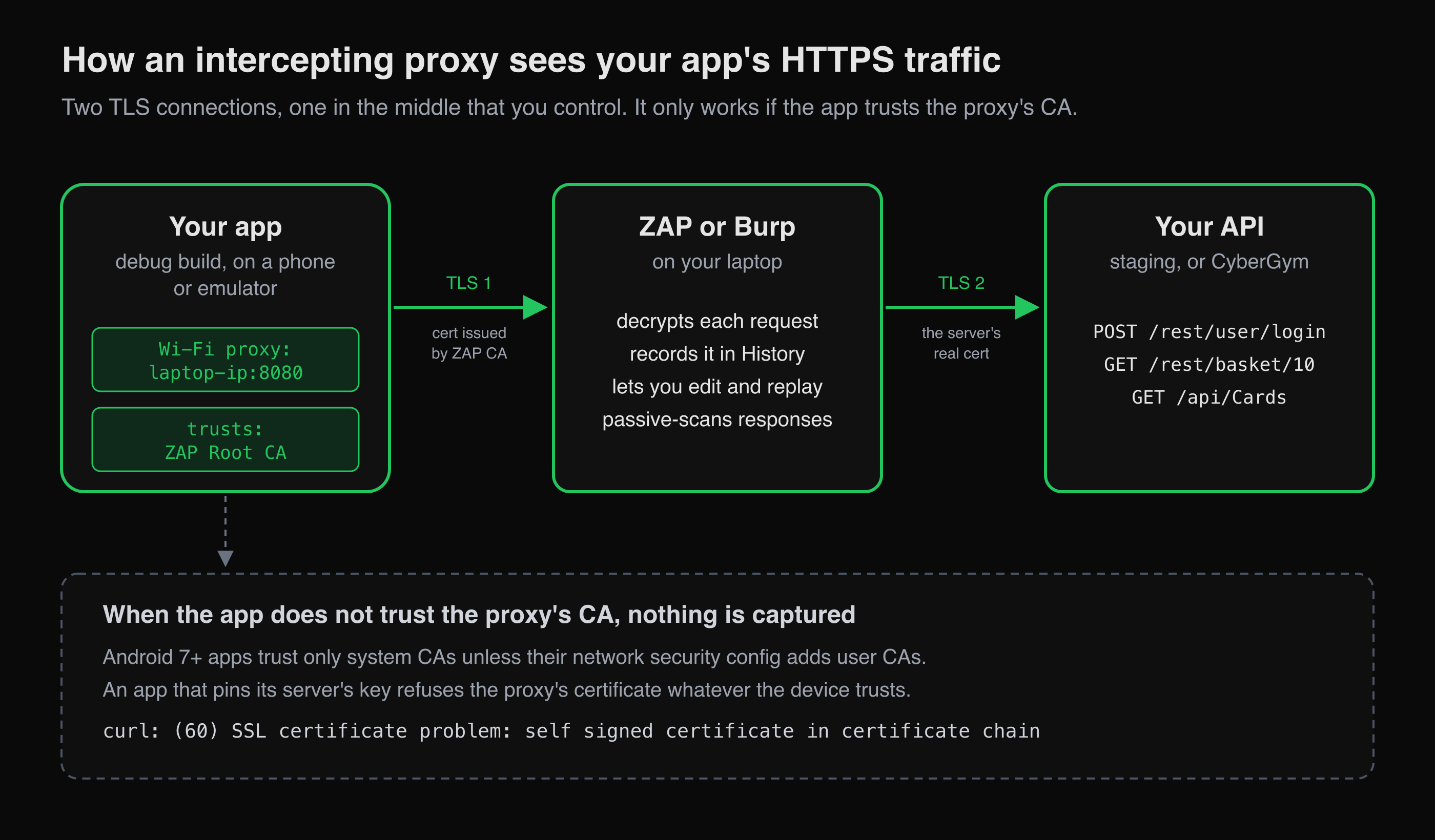 The proxy terminates the app's TLS connection with a certificate from its own CA and opens a second one to the real server.
The mechanism is two TLS connections. The app connects to the proxy, which presents a certificate for your API's hostname, signed by the proxy's own root CA. The proxy then opens its own connection to the real server. If the app accepts that certificate, the proxy can read the traffic. If it does not, the handshake fails and nothing is captured. Everything below is about getting the app to accept the certificate, and only in a build you control.
With OWASP ZAP, which is free and open source:
- Listen on the network. ZAP listens on
localhost:8080by default (ZAP, Proxies). For a phone on the same Wi-Fi, set the address to your laptop's LAN IP under Options > Network > Local Servers/Proxies. An Android emulator can reach the host's loopback as10.0.2.2, solocalhostis enough there (Android, emulator networking). - Export the root CA. ZAP generates its own root CA on first run, valid for one year by default. You save it from Options > Network > Server Certificates (ZAP, Server Certificates). Anyone holding that CA's private key can intercept traffic on a device that trusts it, so keep it to test devices.
- Point the phone at the proxy. In the Wi-Fi network's settings, set a manual proxy: the laptop's IP and port
8080. - Install the CA on the phone. On iOS, install the profile, then turn on full trust under Settings > General > About > Certificate Trust Settings, because a manually installed certificate is not trusted for TLS until you do (Apple Support). On Android, install it as a CA certificate from the security settings. The exact path varies by version and manufacturer.
Burp Suite works the same way. You add a proxy listener bound to all interfaces and export Burp's CA certificate in DER format (PortSwigger, Android). Pick whichever tool you already know. The rest of the method does not change.
Why does my Android app ignore the proxy's certificate?
Because apps that target Android 7.0 (API level 24) or later trust only the system CA store by default, not certificates a user installs (Android, Network security configuration). Installing ZAP's CA on the phone is enough for the browser and for older apps, but not for a current app. The fix for your own app is a debug-only override, not a change to the release build:
<!-- res/xml/network_security_config.xml -->
<network-security-config>
    <debug-overrides>
        <trust-anchors>
            <certificates src="user" />
        </trust-anchors>
    </debug-overrides>
</network-security-config>
Reference it from the manifest with android:networkSecurityConfig="@xml/network_security_config" on the <application> element. Anchors inside debug-overrides apply only when the build is debuggable, which app stores do not accept, and pinning is skipped for chains that end in one of them. That makes it the safer route compared with code that switches on a flag.
Certificate pinning is the other reason an app refuses the proxy. A pinned app accepts only its server's own certificate or key, whatever CAs the device trusts. OWASP's mobile standard asks apps to pin the endpoints the developer controls (MASVS-NETWORK-2). Its testing guide counts it as a failed test when first-party traffic can be intercepted at all (MASTG-TEST-0244). For your own app, test a debug build in which you turned pinning off yourself, and keep a release build to confirm that pinning holds. On iOS, there is no system switch for this, so the debug configuration lives in your own networking code.
A third, quieter case: in our experience, some cross-platform HTTP clients do not read the system proxy setting at all. The app works normally and nothing appears in the proxy's history. If that happens, configure the proxy inside the client in debug builds.
What does the captured traffic look like? A run on CyberGym
We did not have an Android device or emulator on the test machine. So we stood in for the app with curl and an app-like User-Agent, against CyberGym's REST API (OWASP Juice Shop 19.1.1), through OWASP ZAP 2.17.0 in Docker. Below the TLS layer, the traffic looks the same as a real app's, and the proxy steps are the same.
docker run -d --name zap -p 127.0.0.1:8080:8080 zaproxy/zap-stable \
  zap.sh -daemon -host 0.0.0.0 -port 8080 \
  -config 'api.addrs.addr.name=.*' -config api.addrs.addr.regex=true \
  -config api.key=$ZAP_KEY
First, the case every mobile tester meets: a client that does not trust the proxy's CA.
curl -sS -x http://127.0.0.1:8080 https://cybergym.hackergpt.app/rest/admin/application-version
curl: (60) SSL certificate problem: self signed certificate in certificate chain
An app in the same position fails its network calls, often with a generic "no connection" message. Then we fetched ZAP's root CA through its API, the scripted equivalent of step 2 above, and trusted it in the client:
curl -s "http://127.0.0.1:8080/OTHER/core/other/rootcert/?apikey=$ZAP_KEY" -o zap-root-ca.cer
curl -sS -x http://127.0.0.1:8080 --cacert zap-root-ca.cer -A "ShopApp/1.0 (Android 14)" \
  https://cybergym.hackergpt.app/rest/admin/application-version
{"version":"19.1.1"}
The certificate the client now saw for cybergym.hackergpt.app was issued by CN=Zed Attack Proxy Root CA, which is the interception at work. Then we did what an app does: we signed up a throwaway account, logged in, and loaded the user, basket and saved cards. ZAP's history recorded each call:
| Request the "app" made | Response | Sent a token |
|---|---|---|
POST /api/Users (sign-up) |
201 | no |
POST /rest/user/login |
200, a JWT and basket id 10 |
no |
GET /rest/user/whoami |
200 | yes |
GET /rest/basket/10 |
200 | yes |
GET /api/Cards |
200, {"status":"success","data":[]} |
yes |
This list is the reason to intercept. It is the app's API surface as the app itself uses it, with the auth each call carries. That is the input every test below needs.
Replay without the token
Next, we sent the same calls again with the Authorization header removed. That is the first thing to check on any captured API:
GET /rest/basket/10   (no token) -> 401  CyberGym (Express ^4.21.0) 401 UnauthorizedError: No Authorization header was found
GET /api/Cards        (no token) -> 401  {"status":"error","message":{}}
GET /rest/user/whoami (no token) -> 200  {"user":{}}
Two things stood out. The basket and cards endpoints refuse an anonymous caller, which is right. But the basket's refusal is an HTML error page that names the framework and its version range, information a JSON 401 would not give away. And whoami answers 200 with or without a token. It returned an empty user even when we sent a valid Bearer token, because this endpoint reads the session from the token cookie instead. With the cookie, it returned our account. So a status code alone does not tell you whether an endpoint checked anything: read the body, and send the credential the way the app sends it.
What the proxy flagged on its own
ZAP passive-scans everything it relays without sending any extra requests. On these few calls it raised no high-risk alerts. At medium it flagged Access-Control-Allow-Origin: * on seven API responses ("Cross-Domain Misconfiguration") and a missing Content Security Policy, and at low a missing Strict-Transport-Security header. It also marked the login and sign-up as authentication requests. Read these in context. CORS restricts browsers, not native apps, so a wildcard on an API that only your app calls is low priority. On an API your web front-end also uses, it matters more. The alerts are leads to triage, not a verdict.
What should I test in my app's API once I can see it?
Test what the app assumes the server checks. Taking each captured request in turn:
- No token. Replay without the session, as above. Anything that returns data is either meant to be public or is a finding.
- Someone else's IDs. Log in as a second test account and replay the first account's requests with the second account's token. IDs in paths, such as
/rest/basket/10, are where broken object level authorization lives, and our IDOR example walks through the fix. - Fields the app does not show. Responses built for an app often carry the whole database row, and the app quietly ignores most of it. OWASP lists this as Broken Object Property Level Authorization (API3:2023).
- Secrets in the requests. API keys or third-party tokens that the app sends in a header are in the app package too. Anyone who installs the app can read them, just as they can in a JavaScript bundle.
- Session handling. Check whether logging out in the app makes the old token stop working on the server. The checks in broken authentication examples apply to a mobile session unchanged.
- Cleartext and old versions. Any
http://request in the history is unencrypted on the network (MASTG-TEST-0236). A/v1/path next to the/v2/one the app uses is worth trying directly.
Then save the history. ZAP and Burp both keep it, and their requests can be exported for repeat runs. Turning such a list into a repeatable auth test plan is covered in Export your API endpoints to Postman or OpenAPI, then test them.
What does intercepting not show me?
It shows only what the app actually called while you used it. Screens you never opened, admin-only features and endpoints the app no longer calls but the server still answers never reach the history. If your app shares its API with a web front-end, AppMap maps that side by crawling it into a state graph and lists every endpoint with its auth requirement. Merging the two lists gets you closer to the whole surface, and the attack surface mapping guide covers the method. Interception also says nothing about what the app stores on the device, which the OWASP MASTG treats separately.
Key takeaways
- Intercept a debug build of your own app: add
<certificates src="user" />insidedebug-overrideson Android, and leave the release build untouched. - When nothing shows up in the proxy, the cause is usually CA trust, pinning or a client that ignores the system proxy. Check them in that order.
- Replay every captured request without its token, and read the body as well as the status code.
- Replay with a second account's token against the first account's IDs. That is where API authorization most often breaks.
- Treat the proxy's passive alerts as leads, and judge each one by who actually calls the API.
FAQ
Is it legal to intercept a mobile app's traffic?
Intercepting your own app talking to your own API is ordinary development and testing. Doing it to someone else's app or servers may break the app's terms or the law, depending on where you are and what you do with it. Get written permission first, or practise against a target built for it, such as CyberGym.
Should I use Burp Suite or OWASP ZAP for mobile testing?
Either works for intercepting and replaying mobile API traffic, since both are intercepting proxies with their own CA. ZAP is free and open source. Burp Suite Community Edition is free and Professional is paid. Use the one you already know: the method in this article is the same in both.
Why does my app say "no connection" when the proxy is on?
The app most likely rejected the proxy's certificate. Apps targeting Android 7.0 and later ignore user-installed CAs unless their network security config adds them. iOS needs full trust turned on for a manually installed CA. A pinned app refuses the proxy whatever the device trusts.
Do I need a rooted or jailbroken phone?
Not for your own app. A debug build that trusts user CAs, plus the proxy's CA installed as a user certificate, is enough on a stock device or emulator. Rooting is a technique for testing apps whose code you cannot change, and it weakens the device's security model.
Does certificate pinning make my API safe?
No. Pinning protects your users' traffic from interception on the network. It does not stop anyone from calling your API directly with their own client, so the server must still check auth and object ownership on every request.
Sources
- ZAP: Proxies
- ZAP: Server Certificates
- PortSwigger: Configuring an Android device to work with Burp Suite
- Android Developers: Network security configuration
- Android Developers: Set up Android Emulator networking
- Apple Support: Trust manually installed certificate profiles
- OWASP MASVS-NETWORK-2
- OWASP MASTG-TEST-0244: Missing Certificate Pinning in Network Traffic
- OWASP MASTG-TEST-0236: Cleartext Traffic Observed on the Network
- OWASP API Security Top 10 2023: API1 Broken Object Level Authorization
- OWASP API Security Top 10 2023: API3 Broken Object Property Level Authorization
Practise the replay steps on CyberGym, or let HackerGPT map the web side of your own app.