TL;DR: Request https://your-app.example/.git/HEAD and https://your-app.example/.env and read the body, not the status code. A real exposure returns ref: refs/heads/main or KEY=value lines; a single-page app returns 200 with its own HTML for every path, which is not a leak. If either file is really served, block it, rotate every secret it or the git history holds, then change the deploy so only build output reaches the web root.
This is for the owner of a small site or SaaS who deploys by copying a project folder, pulling a repository on the server, or running a hand-rolled Node or Python server. In ten minutes you will know whether your site hands out its repository or its secrets, and what to do if it does. Only test sites you own or have written permission to test. Every command below was run on 12 November 2026 against CyberGym, a legal deliberately vulnerable practice target, against hackergpt.org, and against a throwaway site on localhost.
What does an exposed .git folder or .env file give away?
An exposed .git folder can give away your source code and its whole history; an exposed .env file gives away the secrets your app runs with. They are different leaks with the same cause: a file that belongs to the project, not to the website, ended up where the web server serves it. MITRE catalogues the first as CWE-527, exposure of a version-control repository, and the general case as CWE-538. The OWASP Web Security Testing Guide lists .git/ and .env among the paths a tester checks.
The .git folder is the repository itself. Its layout is documented by Git, and each file answers a question:
| Path | What it holds |
|---|---|
.git/HEAD |
the branch currently checked out |
.git/config |
the remote URL, sometimes with a token pasted into it |
.git/logs/HEAD |
every commit and checkout, with author names and emails |
.git/index |
the list of tracked files and their paths |
.git/objects/ |
every version of every file, compressed with zlib |
Because each object is named by its hash and the hashes chain from HEAD to commits to trees to files, anyone who can read individual files under .git/ can walk the chain and rebuild the source, with no directory listing needed. That includes every file that was ever committed and later deleted: a .env committed once in 2024 and removed the next day is still in the objects.
The .env file holds configuration the app reads at start-up. The Twelve-Factor App recommends keeping config in environment variables precisely so it is never checked in, and the dotenv README answers "Should I commit my .env file?" with "No." In practice it holds the database URL, payment and email API keys, and session signing secrets: the keys to everything the code alone would not open. The same secrets compiled into a front-end bundle are a related leak, covered in hardcoded credentials in your JavaScript bundle.
How do .git and .env files end up on a live site?
They arrive when the web root and the project folder are the same folder. The common ways, in our experience:
- Deploying with
git cloneorgit pullon the server, then pointing the web server at the checkout. The.gitfolder comes along by definition. - Uploading the whole project by FTP,
rsyncor a drag-and-drop host, instead of only the build output. The local.envgoes up with it. - A container built with
COPY . .and no.dockerignore, served by a static file server inside the image. - A server that serves dot files. Python's
python3 -m http.serverserves anything in the folder, dot files included, which is exactly how thelocalhostdemo below leaks.
The last one has a subtle case worth knowing if you run Node. We served the same folder with express.static() and default options under two Express versions:
Express 4.22.3 (serve-static 1.16.3)     Express 5.3.0 (serve-static 2.2.1)
/index.html    200                       /index.html    200
/.env          404                       /.env          404
/.git/HEAD     200                       /.git/HEAD     404
/.git/config   200                       /.git/config   404
Express 4 hid the .env file and served the repository. Its serve-static 1.x documentation explains why: the default "will not ignore the files within a directory that begins with a dot". In serve-static 2.x, used by Express 5, the default is plain 'ignore'. A quick check of /.env on an Express 4 app can therefore come back clean while /.git/ is wide open, which is one reason to check both.
How do I check if my site exposes .git or .env?
Request the files and test the body for content that only the real file has. Start with the trap, because it decides how you read every other result.
Step 1: why a 200 does not mean exposed
CyberGym runs OWASP Juice Shop, an Angular single-page app. Here is what it answers for a .git file, a .env file and a path that cannot exist:
$ curl -s -o /dev/null -w '%{http_code} %{content_type} %{size_download}\n' https://cybergym.hackergpt.app/.git/HEAD
200 text/html; charset=UTF-8 75294
$ curl -s -o /dev/null -w '%{http_code} %{content_type} %{size_download}\n' https://cybergym.hackergpt.app/.env
200 text/html; charset=UTF-8 75294
$ curl -s -o /dev/null -w '%{http_code} %{content_type} %{size_download}\n' https://cybergym.hackergpt.app/no-such-page-at-all
200 text/html; charset=UTF-8 75294
Three different paths, the same 200, the same type, the same 75,294 bytes. That is the app's index.html, returned for every unknown path so the browser-side router can decide what to show. A scanner that flags "/.git/HEAD returned 200" reports a finding that is not there. Asking for a path that cannot exist, as the third line does, gives you the baseline to compare against.
Step 2: test the content
.git/HEAD starts with ref: refs/ or a 40-character hash, .git/config starts with [core], and a .env file is KEY=value lines. This script asks for each file once and tests the body for that signature:
#!/usr/bin/env bash
# check-exposed.sh - run it only against a site you own or may test.
# Usage: ./check-exposed.sh https://your-app.example
base="${1%/}"

check() {  # $1 = path, $2 = a pattern only the real file contains
  out=$(curl -s --max-time 10 -w '\n%{http_code}' "$base$1")
  code=${out##*$'\n'}
  body=${out%$'\n'*}
  if printf '%s\n' "$body" | grep -Eq "$2"; then
    echo "EXPOSED  $1  (HTTP $code, content matches)"
  else
    echo "ok       $1  (HTTP $code, not the real file)"
  fi
}

check /.git/HEAD       '^(ref: refs/|[0-9a-f]{40})'
check /.git/config     '^\[core\]'
check /.git/logs/HEAD  '^[0-9a-f]{40} [0-9a-f]{40} '
check /.env            '^[A-Za-z_][A-Za-z0-9_]*='
check /.env.production '^[A-Za-z_][A-Za-z0-9_]*='
Against CyberGym, every path answers 200 and none is the real file:
$ ./check-exposed.sh https://cybergym.hackergpt.app
ok       /.git/HEAD  (HTTP 200, not the real file)
ok       /.git/config  (HTTP 200, not the real file)
ok       /.git/logs/HEAD  (HTTP 200, not the real file)
ok       /.env  (HTTP 200, not the real file)
ok       /.env.production  (HTTP 200, not the real file)
Against hackergpt.org, which is deployed by uploading only the dist/ build output, every path is a plain 404:
$ ./check-exposed.sh https://hackergpt.org
ok       /.git/HEAD  (HTTP 404, not the real file)
ok       /.git/config  (HTTP 404, not the real file)
ok       /.git/logs/HEAD  (HTTP 404, not the real file)
ok       /.env  (HTTP 404, not the real file)
ok       /.env.production  (HTTP 404, not the real file)
Add any other names your stack uses, such as .env.local or .env.staging. Five paths are a starting point, not a complete list; the backup files article covers the .bak and .old copies that leak the same way.
Step 3: what a real exposure looks like
To see a positive, we made a two-file site on localhost: an index.html committed to a fresh git repository, plus a .env with placeholder values, served with python3 -m http.server 8088. The script finds it at once:
$ ./check-exposed.sh http://localhost:8088
EXPOSED  /.git/HEAD  (HTTP 200, content matches)
EXPOSED  /.git/config  (HTTP 200, content matches)
EXPOSED  /.git/logs/HEAD  (HTTP 200, content matches)
EXPOSED  /.env  (HTTP 200, content matches)
ok       /.env.production  (HTTP 404, not the real file)
The files themselves say what a visitor learns. The config gives the author and the remote; the log gives every commit with a name and email:
$ curl -s http://localhost:8088/.git/HEAD
ref: refs/heads/main
$ curl -s http://localhost:8088/.git/config | tail -6
[user]
	email = demo@your-app.example
	name = Demo Dev
[remote "origin"]
	url = https://git.your-app.example/acme/shop.git
	fetch = +refs/heads/*:refs/remotes/origin/*
$ curl -s http://localhost:8088/.git/logs/HEAD
0000000000000000000000000000000000000000 3e5dca2115df4c9bd0ab637dd22299afab5c1104 Demo Dev <demo@your-app.example> 1794513662 -0500	commit (initial): Initial site
And one object fetched over HTTP and decompressed is a commit, pointing at the tree that lists the source files. Following those hashes is all it takes to rebuild the repository:
$ H=$(curl -s http://localhost:8088/.git/refs/heads/main)
$ curl -s "http://localhost:8088/.git/objects/${H:0:2}/${H:2}" \
    | python3 -c 'import sys,zlib; print(zlib.decompress(sys.stdin.buffer.read()).decode())'
commit 177 tree b949b593c91ab6aa19b236502136bcd5ebd19a71
author Demo Dev <demo@your-app.example> 1794513662 -0500
committer Demo Dev <demo@your-app.example> 1794513662 -0500

Initial site
The .env came back whole as well. We never print its values here, and neither should you in a ticket or chat: treat what you see as already leaked.
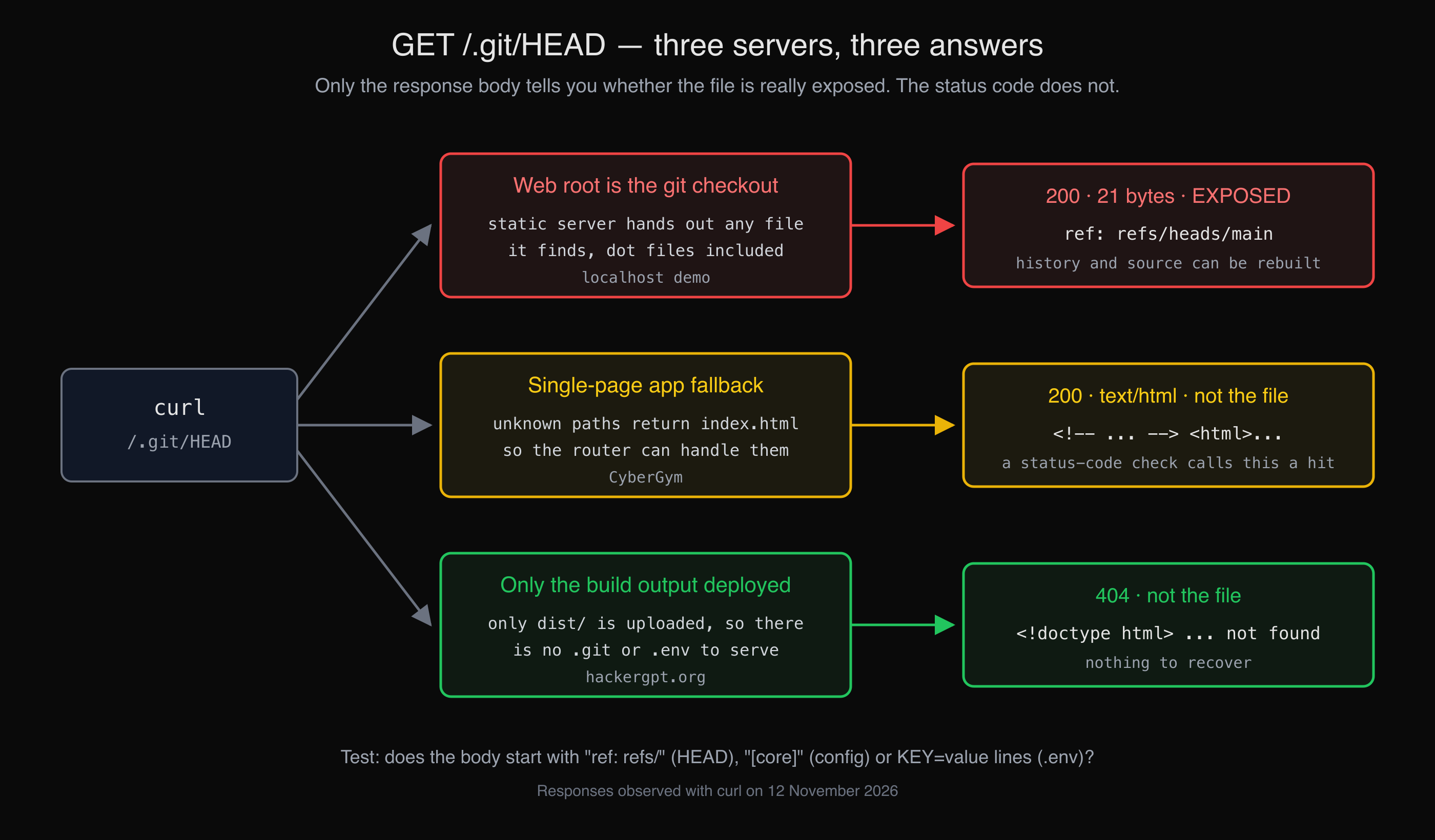 The same request, three servers. Two answer 200, and only one of them is leaking anything.
What do I do if my .git folder or .env file is exposed?
Block the paths first, then rotate the secrets, then fix the deploy, in that order: blocking stops the next download, but anything already fetched stays fetched.
- Block access now. Remove the folder and file from the web root, or add the server rule from the next section. Re-run the script until every line says
ok. - Rotate every secret. Every value in the exposed
.env, every token in.git/config, and every secret that was ever committed to the repository, since the objects carry the whole history. GitHub's guide on removing sensitive data from a repository puts it in the same order: revoke or rotate the secret as the first step. Rewriting history does not un-leak a key someone already copied. - Read your access logs for requests to
/.git/and/.env, and the logs of each rotated service for use you do not recognise, so you know what to investigate. - Change how you deploy so the next release cannot bring them back.
How do I stop it happening again?
Deploy only the build output, and keep a server rule as a backstop. The first removes the files; the second covers the day someone deploys the old way.
Deploy the artefact, not the checkout. Build in CI or locally, then upload only the output folder (dist/, build/, public/). If the server must hold a checkout, point the web root at a subfolder of it that contains no .git. For containers, add .git and .env* to .dockerignore.
Keep .env out of git. Add .env and .env.* to .gitignore. In a Vite project, the docs add a second rule: any variable prefixed VITE_ is compiled into the public bundle, so it must never hold a secret, wherever the file lives.
Deny dot paths at the server. In nginx, a location block with deny refuses them, keeping .well-known for certificates:
location ~ /\.(?!well-known/) {
    deny all;
}
In Apache httpd 2.4, in the server or virtual-host config (DirectoryMatch is not allowed in .htaccess; FilesMatch is):
<DirectoryMatch "/\.git">
    Require all denied
</DirectoryMatch>
<FilesMatch "^\.env">
    Require all denied
</FilesMatch>
We served the localhost demo folder through macOS's bundled Apache with these two blocks: /index.html still returned 200, while /.env, /.git/HEAD and /.git/config returned 403.
In Express, upgrade to Express 5 or pass express.static(dir, { dotfiles: 'deny' }) explicitly, and do not point it at the project root at all.
Add the check to your pipeline. A one-line step that fails the build when the output folder contains a .git or .env stops the next one from shipping:
test -z "$(find dist -name '.git' -o -name '.env*')" || { echo "secret files in dist/"; exit 1; }
Then run the curl script against production after each deploy. It is one check among the many in a security misconfiguration review: a clean result means these five paths are not served, not that nothing else is.
Key takeaways
- Judge an exposure by the body, not the status code:
ref: refs/,[core]orKEY=valuelines mean the real file; a200with HTML on a single-page app does not. - Check
.git/and.envseparately; Express 4's default static settings hide one and serve the other. - If either was served, rotate every secret in the file and in the whole git history before anything else.
- Deploy only build output, and keep a dot-path deny rule on the server as a backstop.
- Put a
findcheck in CI and a curl check after deploy, so the next release cannot reintroduce it.
FAQ
How do I know if my .git folder is publicly accessible?
Request https://your-site/.git/HEAD with curl and read what comes back. If the body is ref: refs/heads/ followed by a branch name, or a 40-character hash, the folder is exposed. If you get your site's HTML page or a 404, it is not, at least for that path.
Why does /.git/HEAD return 200 on my site when there is no .git folder?
Single-page apps and many hosting platforms return index.html for every unknown path, so the browser-side router can handle it. The status is 200, but the body is your page, not the file. Compare it with a request for a path that cannot exist; if both return the same size, it is the fallback page.
Is an exposed .git folder dangerous if the repository is already public on GitHub?
Less, but check what differs. The deployed copy can include local commits, branches or a remote URL with a token that were never pushed, and its config and logs show author emails. If the repository is private, an exposed .git folder can give away its full source and history.
I deleted .env from my repository. Is it still exposed?
If it was ever committed, yes: it stays in the git history until the history is rewritten, and an exposed .git folder serves that history. Rotate every value it held; rewriting history afterwards keeps it from spreading further, but does not take back a copy someone already has.
Does a .gitignore entry protect my .env file on the server?
No. .gitignore only stops git from tracking the file; it does nothing to a web server. If the file is in the web root and the server serves dot files, it is downloadable whether git tracks it or not.
Sources
- CWE-527: Exposure of Version-Control Repository to an Unauthorized Control Sphere, MITRE
- CWE-538: Insertion of Sensitive Information into Externally-Accessible File or Directory, MITRE
- WSTG-CONF-04: Review Old Backup and Unreferenced Files for Sensitive Information, OWASP Web Security Testing Guide
- gitrepository-layout, Git documentation
- Git Internals: Git Objects, Pro Git
- III. Config, The Twelve-Factor App
- dotenv README
- serve-static 1.16.3 README and serve-static 2.2.1 README, Express project
- Removing sensitive data from a repository, GitHub Docs
- Env Variables and Modes, Vite
- ngx_http_core_module: location and ngx_http_access_module: deny, nginx
- core: DirectoryMatch and FilesMatch, Apache HTTP Server 2.4
To see what else your own site shows the outside world, point HackerGPT at it, or practise on CyberGym first.