TL;DR: A CTF (capture the flag) is a security competition where you solve hands-on challenges to recover a hidden string — the flag. The easiest category to start with is web: you work in a browser, and the whole target is in front of you. Start on a legal practice target such as CyberGym, read the application before you attack it, pick the lowest-difficulty challenge that your reading points at, and verify every result against the app's own record.
This is for students, career changers and new CTF players who want a first win on a web challenge without getting lost in a hundred tools. You will learn what a CTF is and the formats it comes in, the main challenge categories, a small starter toolset, and then watch a real difficulty-1 web challenge solved on CyberGym with nothing but curl. Everything here stays on a target whose owner has invited you in — practise only on sites you own or are explicitly permitted to test.
What is a CTF in cybersecurity?
A CTF is "a special kind of information security competitions" where teams or individuals solve challenges to find flags and score points (CTFtime, "What is CTF?"). A flag is a short, unique string — often in a format like flag{...} — that proves you solved the challenge. You submit it to the scoreboard for points; whoever has the most points when the clock runs out wins.
CTFs come in two main formats:
- Jeopardy-style — the beginner-friendly one. There is a board of independent tasks grouped by category, each worth points, and you pick what to solve in any order (CTFtime). Nothing attacks you back. Almost every online practice platform is jeopardy-style, and this article is about jeopardy web challenges.
- Attack-defence — each team runs its own vulnerable services, and you score by exploiting other teams while patching your own (CTFtime). It is live, fast and demanding, and not where you start.
You do not need a live competition to practise. Platforms keep challenges open all year, and events are listed with their dates and formats on CTFtime. Begin with always-on challenges, then enter a timed event once the loop below feels natural.
Why start with web challenges?
Because the target is a website, and you already know how to use one. The categories you will see on a jeopardy board are, roughly:
| Category | What you do | Why web is easier to start |
|---|---|---|
| Web exploitation | Attack a web app: injection, broken access control, XSS, exposed files | The whole target is in your browser; no setup |
| Cryptography | Break or misuse weak crypto to recover a secret | Needs maths and a toolchain before the first win |
| Reverse engineering | Work out what a compiled binary does | Needs a disassembler and assembly reading |
| Binary exploitation (pwn) | Exploit memory bugs in a running program | Steepest curve; crashes before flags |
| Forensics | Recover data from files, memory or network captures | Lots of tool-learning up front |
| OSINT | Find information from public sources | Approachable, but open-ended |
Web challenges give the fastest feedback: you send a request, you read a response, you adjust. The skills transfer directly to testing real applications, which is the same work a penetration tester does. If you want to see how the same reading-first habit scales to a whole application, mapping a web app's attack surface covers it at full size.
What tools do I need to start a web CTF?
Fewer than you think. A beginner web toolset is four things, and two of them you already have:
- A browser with developer tools. The Network and Console tabs (F12 in most browsers) show you every request the page makes and every error it logs. This is your primary instrument.
curl. A command-line HTTP client, pre-installed on macOS and Linux and available on Windows. It lets you send one exact request and read the raw response, without the browser rewriting anything. Every command in this article uses it.jq. A command-line JSON processor, for reading the JSON that modern apps return. Install it from jqlang.github.io/jq or your package manager.- An intercepting proxy, later. Burp Suite Community Edition or OWASP ZAP sit between your browser and the target so you can read and edit requests. You do not need one for your first challenges; add it when the browser and
curlstop being enough.
That is the whole kit for web. The categories above each need their own tools, which is another reason to start with web: you learn the method before you spend a week learning a disassembler.
How do I approach a web CTF challenge?
Read first, probe second, and treat the flag as the last step rather than the first. The loop below is what separates learning from copying a walkthrough: each step is a question you can ask on the next challenge too.
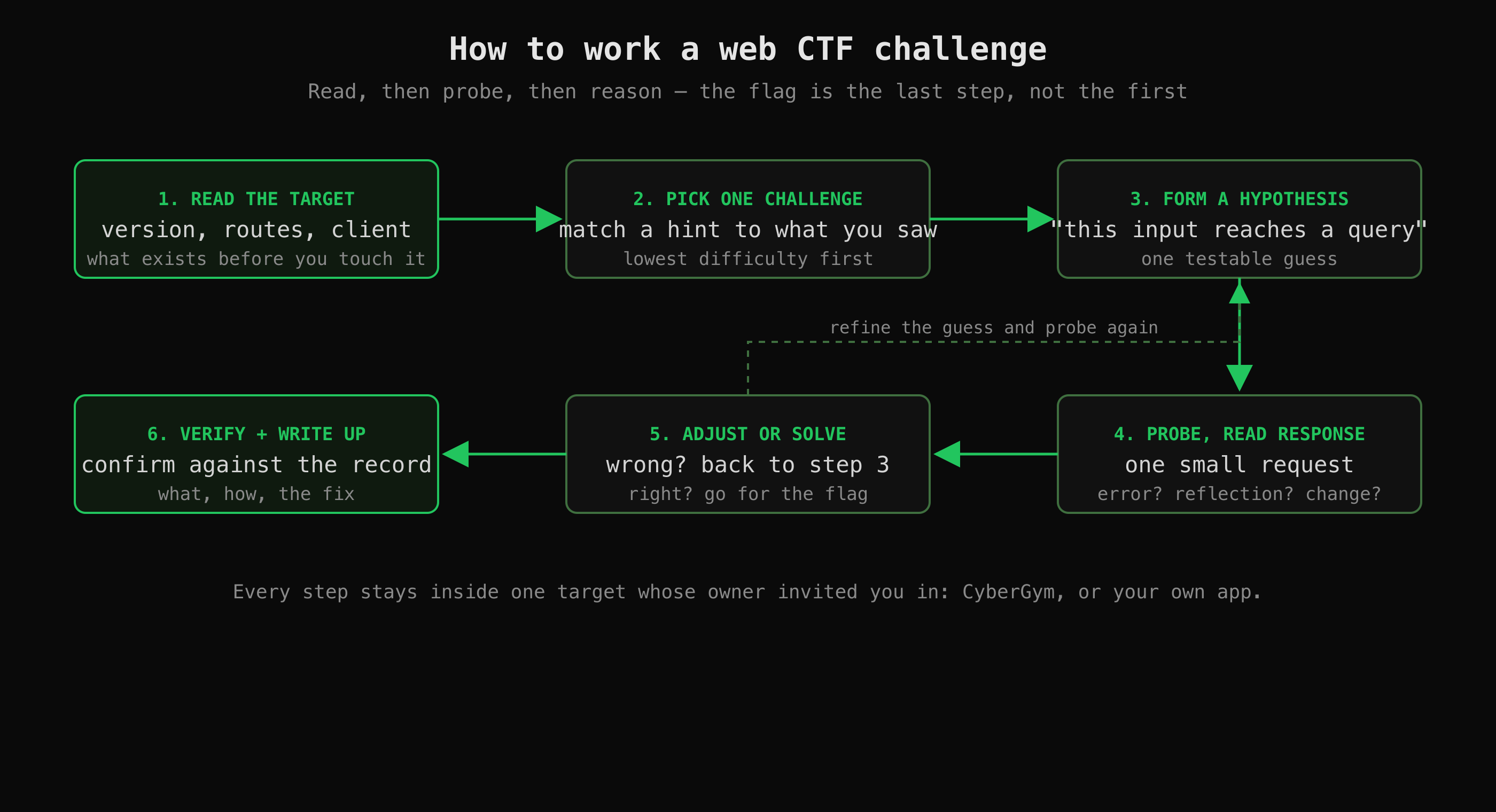 The loop behind the worked example below. Reading comes before probing, and the flag is the last step, not the first.
- Read the target. What software and version is it? What routes does the client know about? What does the app do? You cannot spot a flaw in something you have not understood.
- Pick one challenge at the lowest difficulty, ideally one your reading already pointed at.
- Form one testable hypothesis — a single sentence: "this input reaches a database query", "this file is reachable without logging in".
- Probe with one small request and read the response closely: an error, a reflection of your input, an unexpected status code.
- Adjust or solve. If the response disproves your guess, refine it and probe again. If it confirms it, go for the flag.
- Verify and write up — confirm against the app's own record, then note what you found, how, and the fix.
The next two sections run this loop for real.
A worked web challenge on CyberGym
The target below is CyberGym, a hosted, deliberately vulnerable web application that exists to be attacked — a legal place to practise with no install. It runs OWASP Juice Shop; for the legal background and other practice targets, see where to practise hacking legally. Everything below was run on 24 October 2026 with curl and nothing else.
Step 1: read the target
Start with the single most useful question — what is this, exactly? This app answers it on an endpoint that needs no login:
curl -s https://cybergym.hackergpt.app/rest/admin/application-version
{"version":"19.1.1"}
That tells you which documentation applies. Next, read what the app tells its own browser. A single-page app ships its route list in its JavaScript bundle, so you can read the pages it can render without clicking around:
curl -s https://cybergym.hackergpt.app/main.js \
  | grep -o 'path:"[a-z0-9/-]*"' | sort -u | head
Some of those routes are linked from the menu; a few are not. That gap — a page that exists but nothing points at — is often a challenge waiting to be found.
Step 2 and 3: pick a challenge and form a hypothesis
The scoreboard lists the challenges and their difficulty. Filter it to the easiest ones and read the categories:
curl -s "https://cybergym.hackergpt.app/api/Challenges/?difficulty=1" \
  | jq -r '.data[] | "\(.category)\t\(.name)"' | sort
One difficulty-1 entry is Confidential Document, in the Sensitive Data Exposure category, described as "Access a confidential document." The hypothesis writes itself: a file that was meant to be private is reachable by anyone who knows its path. Juice Shop serves static files from a /ftp folder, so that is where to look.
Note: CyberGym is one shared instance, so the scoreboard shows everyone's progress, not yours — many challenges read as already solved. The challenge is still there to solve; the tick just does not tell you who did it. Why that happens is covered in the practice-targets article.
Step 4 and 5: probe, then solve
Test the hypothesis with one request and read the status code before anything else:
curl -s -o /dev/null -w "%{http_code}\n" \
  https://cybergym.hackergpt.app/ftp/acquisitions.md
200
A 200 means the file is served to an anonymous request. Read it:
curl -s https://cybergym.hackergpt.app/ftp/acquisitions.md | head -5
# Planned Acquisitions

> This document is confidential! Do not distribute!

Our company plans to acquire several competitors within the next year.
That is the solve. The "attack" was a single GET request to a predictable path — no payload, no tooling. The lesson is the category itself: sensitive data exposure is often just a file reachable without the access check that should guard it.
Step 6: verify and write up
A file loading is a good sign, not proof. The scoreboard API is the record:
curl -s "https://cybergym.hackergpt.app/api/Challenges/?name=Confidential%20Document" \
  | jq '.data[0] | {name, category, difficulty, solved}'
{
  "name": "Confidential Document",
  "category": "Sensitive Data Exposure",
  "difficulty": 1,
  "solved": true
}
Then write three lines for yourself: what (a confidential file served to anyone), how (a GET to a guessable path under /ftp, with no authentication), and the fix (serve such files only behind an access check, and keep them out of a web-reachable folder). Those three lines are the shape of a real penetration-test finding, which is the whole point of practising this way.
Where the challenge makes you think
Not every challenge solves in one request, and the harder ones are where an AI assistant is either a crutch or a coach. Take the Injection category. The first move is detection, not exploitation: does your input reach a database query at all? One classic probe is to put a single quote where the app expects text and watch what breaks. On CyberGym's login endpoint:
curl -s -o /dev/null -w "%{http_code}\n" -X POST \
  https://cybergym.hackergpt.app/rest/user/login \
  -H 'Content-Type: application/json' \
  -d '{"email":"nobody@example.com","password":"x"}'
A wrong password returns 401, as expected. Now send a single quote inside the email value instead. The response changes to 500, and the error page leaks a database stack trace:
500 Error
  at Database.<anonymous> (.../node_modules/sequelize/lib/dialects/sqlite/query.js:...)
That 500 is the finding. A quote is a string delimiter in SQL; if a quote in your input can crash the query, your input is being placed into the query without being safely separated from it — the definition of a SQL injection point. The article stops here, at detection, on purpose. Turning a detected injection point into a login bypass is exactly the reasoning step a beginner should work through themselves, because that is where the learning is. A good assistant gives you the next question ("what would a SQL comment do to the rest of the query?"), not the finished payload.
Can an AI help me solve a CTF challenge without just giving me the flag?
Yes — if it is built to explain rather than to answer. That is the design intent of HackerGPT's CTF Mode: it works a target the way a CTF player would, step by step, and "every step comes with the reasoning behind it, so you learn the method, not just the result" (from the feature's own description). It drives a headless browser, watches the HTTP traffic, sends probing requests, and adjusts to how the app actually responds — the same loop as the diagram above, narrated. Inputs that made the app behave unexpectedly are kept in a Payloads section to replay, and what it learned about the target stays in a Memory tab across the session. The deeper mechanics are in the release notes: CTF Mode's introduction and the stateful-engagements update.
Whether you may use it in a given competition is a separate question, and it is not ours to answer: each event sets its own rules, and some allow AI assistants while others ban them. Read the rules of the event you entered first. For always-on practice on CyberGym or your own site, the only limit is the one that applies to any tool — practise on targets you own or are permitted to test.
Key takeaways
- A CTF is a security competition where you solve challenges to find flags; jeopardy-style is the beginner format, and web is the beginner category.
- The whole beginner web toolset is a browser's developer tools,
curlandjq— add an intercepting proxy only when you outgrow them. - Read the target before you attack it: the version endpoint and the client's route list point at challenges before you send a single payload.
- Treat the flag as the last step. Form one testable hypothesis, probe with one small request, read the response, and verify the solve against the app's own record.
- An AI helps most when it explains the next step rather than handing over the answer; whether you may use one in a competition depends entirely on that event's rules.
FAQ
What is a CTF for beginners?
A CTF (capture the flag) is a security competition where you solve hands-on challenges to recover a hidden string called a flag, which you submit for points. For beginners the right format is jeopardy-style, where you pick independent tasks from a board in any order, and the right category to start with is web exploitation, because the target is a website you already know how to use. You can practise on always-on platforms before ever entering a timed event.
What are the main CTF categories?
The common jeopardy categories are web exploitation, cryptography, reverse engineering, binary exploitation (often called pwn), forensics and OSINT. Web exploitation is the most beginner-friendly because the whole target lives in your browser and needs no extra tooling to start. The others each require their own toolchain — a disassembler, a crypto library, a forensics suite — which is why most players get their first flags on web.
What tools do I need for web CTF challenges?
To start, just your browser's developer tools (the Network and Console tabs), the curl command-line HTTP client, and jq for reading JSON responses. Later, an intercepting proxy such as Burp Suite Community Edition or OWASP ZAP lets you read and edit requests between your browser and the target. You do not need the proxy for your first challenges.
Where can I practise web CTF challenges legally?
On targets built to be attacked. CyberGym is a hosted, deliberately vulnerable web app that runs in your browser with no install; picoCTF (now CyLab Security Academy, run by Carnegie Mellon University) and PortSwigger's Web Security Academy are free and browser-based too. The rule that makes it legal is permission: practise only on targets you own or are explicitly allowed to test. See where to practise hacking legally for the full list and the legal background.
Can AI help with CTFs, and is that allowed?
An AI can coach you through a challenge — explaining each step and giving you the next question instead of the finished answer — which is how HackerGPT's CTF Mode is designed to work. Whether you are allowed to use one in a competition depends on that event's rules: some CTFs permit AI assistants and some forbid them, so check the rules of the event you entered before using any tool. For your own practice on CyberGym or a site you own, there is no such restriction.
Sources
- CTFtime: What is CTF? — the formats (jeopardy, attack-defence)
- CTFtime event calendar — upcoming CTFs and their formats
- OWASP Juice Shop project page — the application CyberGym runs
- picoCTF / CyLab Security Academy, Carnegie Mellon University
- PortSwigger Web Security Academy
- Burp Suite Community Edition and OWASP ZAP — intercepting proxies
- jq — command-line JSON processor
Practise on CyberGym, or try HackerGPT's CTF Mode on your own site at hackergpt.app.