TL;DR: The CTF Mode workspace splits a web challenge into five views: the Browser tab shows the target as the agent sees it, Network records every request and response, App Map shows the pages and routes found so far, Payloads keeps the requests worth replaying, and Memory holds findings and next steps across turns. Use them in that order: watch, read the traffic, orient on the map, keep what worked, and check the notes before the next move.
This guide is for CTF players and learners who want to use HackerGPT's CTF Mode as a coach rather than a flag dispenser. You will learn what each tab of the workspace records, the order in which they are useful during a web challenge, and how to read them so you understand why a step worked. The example is a real run on CyberGym, HackerGPT's legal practice target; the video below shows that run from start to finish, after a four-minute introduction to CTFs.
One rule first: only work targets you own, have written permission to test, or a CTF you are entered in. CyberGym exists so you can practise without that question coming up.
What is a web CTF challenge actually asking you to do?
A web CTF challenge asks you to reach a specific objective in a deliberately vulnerable application and prove it, usually by recovering a flag or, on a scoreboard-driven target, by triggering the challenge's solved state. CTFtime describes CTFs as competitions where you solve challenges to find flags and score points (CTFtime). The flag is evidence: the weakness was not only spotted, it was used.
The method under almost every web challenge is the same loop: read the application, form a hypothesis about an assumption it makes, test that assumption with a request, and read the response. If you are new to that loop, start with CTF for beginners: start with web challenges, which works one by hand with curl. The workspace described here is that loop with a record kept of every step.
What does each tab in the CTF Mode workspace do?
Each tab shows one layer of the same run, so you can follow what the agent did without re-running it. The video's description lists the five tabs, and the CTF Mode field guide shows Network, Payloads, Memory and the map in screenshots (the guide labels the map tab "API Map").
| Tab | What it shows | Use it to learn |
|---|---|---|
| Browser | The target application, navigated and interacted with | What a user (or attacker) sees on each page |
| Network | Requests, responses, APIs and traffic flows | Which API call sits behind each page, and what it returns |
| App Map | Pages, routes and the structure of the app | Where you are in the app and what you have not visited yet |
| Payloads | Requests saved for reuse: copy, change, replay | Which inputs made the app behave unexpectedly |
| Memory | Discoveries, notes, credentials and findings, kept across turns | What is already known, and what was a dead end |
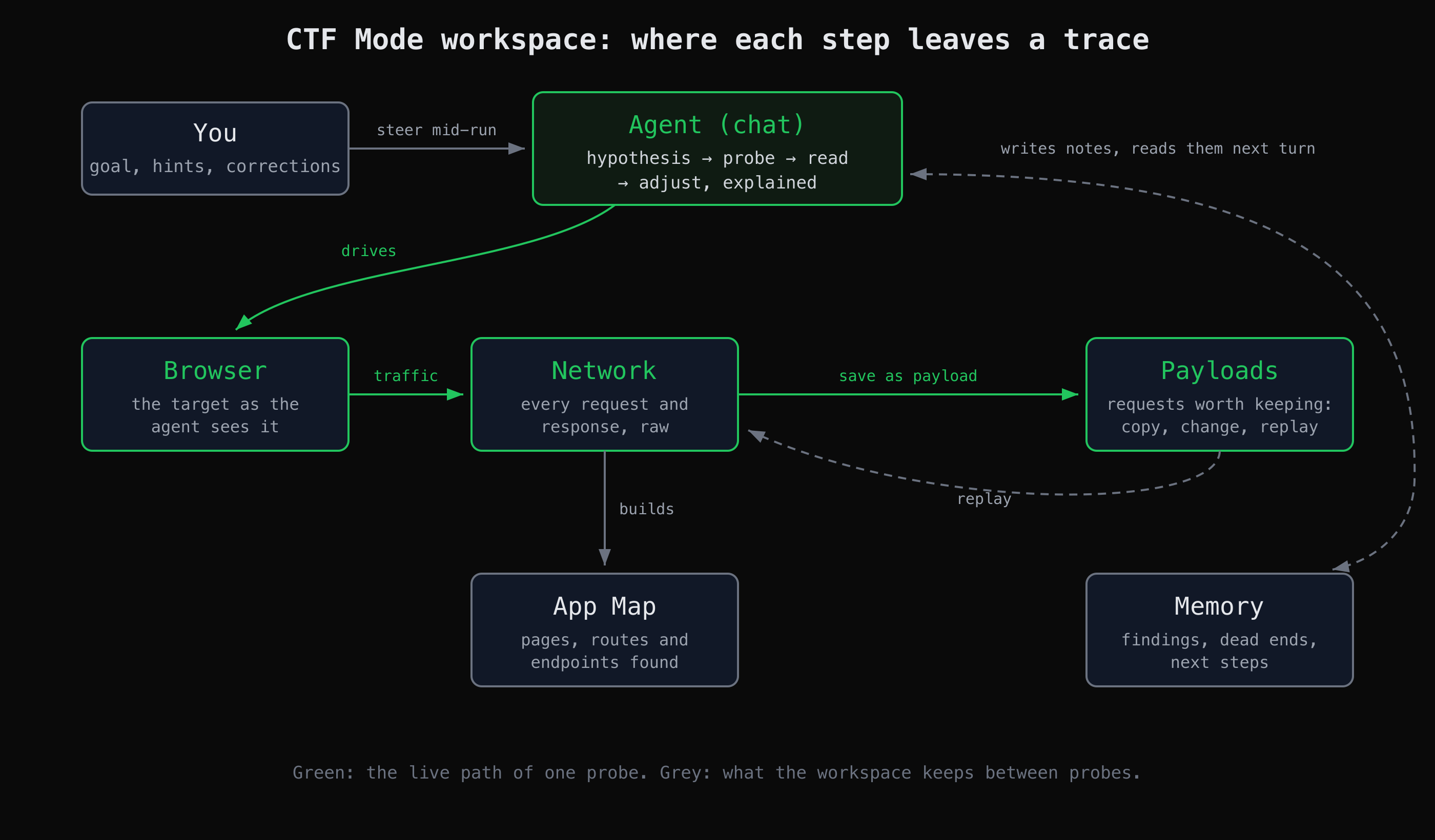
One probe travels the green path. What the workspace keeps between probes (the map, saved requests, notes) is in grey.
The diagram is the reason the tabs exist. The agent drives the browser; the browser's traffic lands in Network; any request in Network can be promoted to a payload; the crawl builds the map; and the agent writes what it learned to Memory and reads it back on the next turn. You can also send a hint or a correction while it works, without stopping the run.
How do I use the workspace on a real challenge?
Pick the challenge, give the agent the target and the objective, then follow the tabs in order instead of only reading the final answer. Here is how that went in the video's run on CyberGym, with what each tab was for.
1. Choose a challenge from the scoreboard
CyberGym runs OWASP Juice Shop, which has a built-in scoreboard of challenges by category and difficulty. The run picks an unsolved one, Visual Geo Stalking. You can read its record yourself without logging in; this is what it returned when we checked on 2 November 2026:
curl -s "https://cybergym.hackergpt.app/api/Challenges/?name=Visual%20Geo%20Stalking" \
  | jq '.data[0] | {name, category, difficulty, solved}'
{
  "name": "Visual Geo Stalking",
  "category": "Sensitive Data Exposure",
  "difficulty": 2,
  "solved": true
}
Its description asks you to work out the answer to a user's security question from a photo she uploaded to the app's Photo Wall, then use it in the Forgot Password flow. CyberGym is one shared instance, so solved: true means someone has solved it, not necessarily you; the challenge still works.
2. Let it map the app first, and watch Browser and Network
In the video, the first prompt only asks HackerGPT to look at the application. While it does, the Browser tab shows the pages it opens and the Network tab fills with the API calls behind them. Before the challenge text was even given, the agent had flagged an exposed /ftp directory, user data returned by an API, an admin section and a session token, and it summarised the issues it had confirmed: exposed user data, the FTP directory listing, SQL injection, mass assignment, an admin API without authorization and a leaking feedback API.
This is the step to slow down on. Open a Network entry and read the response body. The Photo Wall is a good one, because it is the page the challenge is about. We fetched its API anonymously and listed only the field names of the first entry's User object:
curl -s https://cybergym.hackergpt.app/rest/memories | jq '.data | length, (.[0].User | keys)'
10
[
  "createdAt",
  "deletedAt",
  "deluxeToken",
  "email",
  "id",
  "isActive",
  "lastLoginIp",
  "password",
  "profileImage",
  "role",
  "totpSecret",
  "updatedAt",
  "username"
]
The page shows a photo and a caption. The API behind it returns the uploader's whole account record, including fields named password and totpSecret, to an anonymous visitor. That is the "users information exposed" moment in the video, and it is a textbook case of what OWASP now calls Broken Object Property Level Authorization (API3:2023), formerly "Excessive Data Exposure". The Browser tab would never have shown it; the Network tab does.
3. Hand it the challenge, and check App Map and Memory
Then the run pastes in the challenge text. The agent goes back to the Photo Wall, finds Emma's upload, reads its caption ("My old workplace...") and the photo, and connects them to the security question the Forgot Password flow asks. App Map is where you see which part of the app it is working in; Memory is where it records what it has established, so the next turn starts from there rather than from zero.
One honest detail from the video: at this point the agent also searched the web and found published write-ups of this exact Juice Shop challenge. That is efficient, and it is the opposite of practice. If you are learning, steer it: send a message asking it not to use write-ups and to explain each step from the app itself. The steering is there so you can change the plan without restarting.
4. Keep the request that worked, then verify
When the solving request lands, the challenge moves from the unsolved to the solved list on the scoreboard, which is what the video ends on. In the workspace, that request belongs in Payloads: from there you can copy it, change one field and replay it to see which part mattered. Verify against the app's own record, not against the agent's summary.
How do I learn from the run instead of just collecting flags?
Learn from the run by reading the evidence for each step in the tabs before you accept the conclusion. Three habits make the difference:
- Read one Network entry per step. For every claim in the chat, find the request that supports it and read the response yourself. If you cannot find it, ask.
- Replay and vary a payload. Take the saved request, change one thing, replay it, and predict the result first. That is how you learn which part of the input mattered.
- Write the finding in three lines. What was exposed, how it was reached, and the fix. For the Photo Wall: an API returned full user records to anyone; one anonymous GET reached it; the fix is to return only the fields the page needs and check them on the server.
AppMap is the same mapping available outside a challenge. And when you want the agent to run commands on your own machine as part of a run, Secrun covers the setup.
What does the workspace not do?
It does not make a run complete or correct. The map holds what the crawl reached; a page that appears only after a specific action may not be there yet. A summary can overstate what a response shows, which is why the habit above is to check the Network entry. And a solved scoreboard entry on a shared instance like CyberGym tells you nothing about whether you could solve it.
What the workspace does well is keep the evidence next to the reasoning. For more practice targets and the legal ground rules, see where to practise hacking legally.
Key takeaways
- Use the tabs in order: Browser to see the page, Network to read the call behind it, App Map to orient, Payloads to keep what worked, Memory to check what is known.
- The Network tab shows what the Browser hides: on CyberGym's Photo Wall, the API returns whole account records that the page never displays.
- Steer the agent away from published write-ups when you are practising; the point is the method, not the flag.
- Replay a saved payload with one change at a time to learn which part of the input mattered.
- Confirm a solve against the target's own record, and write every finding as what, how and fix.
FAQ
What is CTF Mode in HackerGPT?
CTF Mode is the part of HackerGPT that works through a web target the way a CTF player would, step by step, explaining each move. It drives a browser, watches the HTTP traffic, sends probing requests and keeps a workspace of tabs (Browser, Network, App Map, Payloads and Memory) beside the chat. Use it on your own site, on CyberGym, or on a CTF challenge you are entered in.
Will CTF Mode just give me the flag?
It can solve a challenge end to end, as the video shows, but whether you learn anything depends on how you use it. Read the Network entry behind each step, ask why a request worked, and steer it away from looking up published write-ups when you are practising.
What is the difference between the Network and Payloads tabs?
The Network tab is the raw log of every request and response in the session. The Payloads tab holds only the requests worth keeping, such as the one that triggered an error or solved the challenge, so you can copy, modify and replay them. A request can be saved from Network to Payloads.
Can I use CTF Mode in a CTF competition?
Check the event's rules first. Some competitions allow AI assistants and some forbid them, and the rules of the event you entered decide. For practice on CyberGym or your own site, the only limit is to test targets you own or are permitted to test.
Sources
- CTFtime — What is CTF?
- OWASP Juice Shop
- Pwning OWASP Juice Shop — Sensitive Data Exposure challenges
- OWASP API Security Top 10 2023 — API3:2023 Broken Object Property Level Authorization
- HackerGPT CTF Mode field guide
Practise the workflow on CyberGym, or try CTF Mode at hackergpt.app.