TL;DR: A Supabase app is only as private as its row level security, because the publishable (anon) key in your front end can query every exposed table, view and bucket. Check five things: RLS is on for every table, no policy says using (true) where it should name an owner, views run as the caller, storage policies scope files to their owner, and the secret key exists only on your server. Then test each check as an anonymous visitor and as a second user, not only in the dashboard.
This is for the founder or small team shipping on Supabase who wants to know what a stranger can read before real users arrive. Test only a project you own or have written permission to test. We built a small invoicing app on a local Supabase stack, made four common mistakes on purpose, and ran every check below against it. The output in this article is what those checks printed.
If you have not been through the broader list yet, start with our security checklist for vibe-coded and indie SaaS apps. This article goes deeper on its Supabase item.
Why does the anon key make RLS the whole story?
Because the anon key is meant to be public, row level security is the only thing deciding which rows it gets. Supabase calls publishable keys (sb_publishable_…, and the legacy anon JWT they replace) "safe to expose online" (Supabase, API keys). Anyone can copy that key out of your page and call your Data API and Storage directly, without your UI in the way.
Each request runs as a Postgres role: anon for a visitor, authenticated once they sign in. On the hosted platform, a new table in public on existing projects starts with every privilege granted to those roles (Supabase, Securing your API). Our local stack (Supabase CLI 3.1.0) showed the same:
    table_name     |                        anon_privileges
-------------------+---------------------------------------------------------------
 feedback          | DELETE, INSERT, REFERENCES, SELECT, TRIGGER, TRUNCATE, UPDATE
 invoices          | DELETE, INSERT, REFERENCES, SELECT, TRIGGER, TRUNCATE, UPDATE
 profile_directory | DELETE, INSERT, REFERENCES, SELECT, TRIGGER, TRUNCATE, UPDATE
 profiles          | DELETE, INSERT, REFERENCES, SELECT, TRIGGER, TRUNCATE, UPDATE
So the grants say "yes" to everything, and RLS policies are what narrow that down to the rows a person should see. The secret key works the other way: its service_role has the BYPASSRLS attribute, so policies never apply to it (Supabase, API keys).
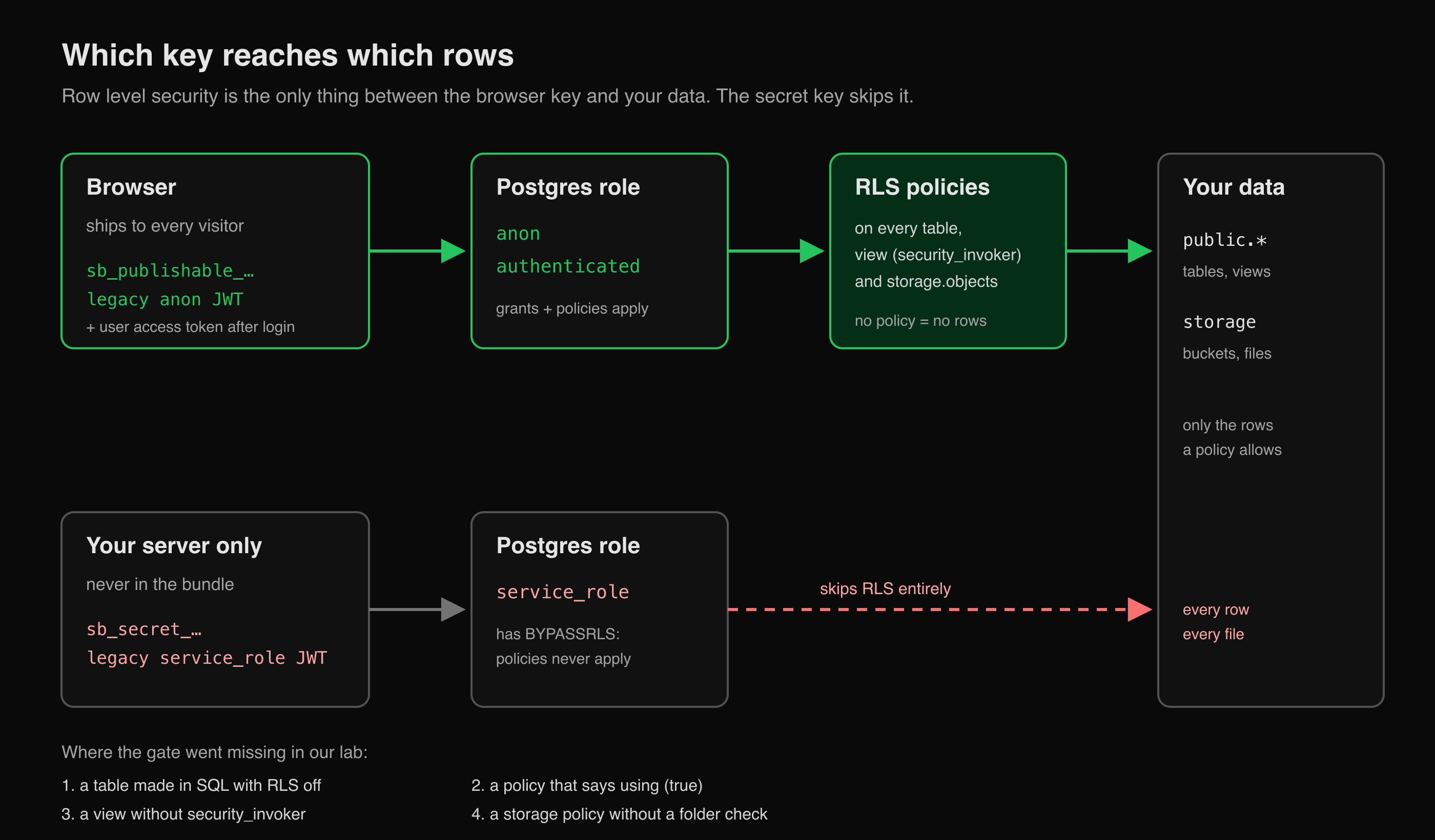 The publishable (anon) key is public by design. What it can reach is decided by RLS policies; the secret key skips them.
The lab: four mistakes in one small app
Our test app has three tables, a view and two buckets, written the way a fast build often writes them:
profiles: RLS on, with a policy that lets a user read only their own row. This is the intended pattern.invoices: created with raw SQL and never given RLS.feedback: RLS on, but its policy isusing (true).profile_directory: a view overprofiles, created withoutsecurity_invoker.- Storage: a public
avatarsbucket, and a privateinvoice-pdfsbucket whose read policy checks the bucket but not the folder.
Two users, Alice and Bob, each own one invoice. To follow along, run supabase init and supabase start in an empty folder (Docker required), then put the API URL and publishable key from supabase status in $SUPABASE_URL and $ANON_KEY. Every command below also works against your own hosted project.
How do I check that RLS is enabled on every table?
Ask Postgres which tables in public have RLS off and how many policies each has. Run this in the SQL editor or with psql:
select c.relname as table,
       c.relrowsecurity as rls_enabled,
       (select count(*) from pg_policies p
         where p.schemaname = 'public' and p.tablename = c.relname) as policies
from pg_class c
where c.relnamespace = 'public'::regnamespace and c.relkind in ('r', 'p')
order by 1;
On our app:
  table   | rls_enabled | policies
----------+-------------+----------
 feedback | t           |        1
 invoices | f           |        0
 profiles | t           |        1
invoices is the finding. Supabase notes that tables created through the dashboard have RLS on by default, and that you must enable it yourself for tables created in the SQL editor or another tool (Supabase, Securing your API). AI coding assistants usually write create table statements, so this gap is common in generated migrations.
A table with RLS on and zero policies is the opposite case: no data is reachable through the API with a publishable key until you add a policy (Supabase, Row Level Security). That fails closed, which is safer, but it also explains why a developer under pressure "fixes" an empty response by writing using (true).
What can the anon key actually read?
Whatever a request with only the anon key returns, which is what you should test rather than infer. Query each table and view the way a visitor's browser could:
for t in profiles invoices feedback profile_directory; do
  echo "--- $t"
  curl -s "$SUPABASE_URL/rest/v1/$t?select=*" -H "apikey: $ANON_KEY"
  echo
done
Our output, with user ids shortened:
--- profiles
[]
--- invoices
[{"id":1,"user_id":"52f4081b-…","customer_email":"client-one@your-app.example","amount_cents":120000},
 {"id":2,"user_id":"2489dfb4-…","customer_email":"client-two@your-app.example","amount_cents":45000}]
--- feedback
[{"id":1,"user_id":"52f4081b-…","message":"Please add CSV export"},
 {"id":2,"user_id":"2489dfb4-…","message":"Export page is slow"}]
--- profile_directory
[{"id":"52f4081b-…","full_name":"Alice Example","plan":"pro"},
 {"id":"2489dfb4-…","full_name":"Bob Example","plan":"free"}]
Three findings in one loop:
invoicesreturns every row because RLS is off. With RLS off, the grants above also allow writes: an anonymousPATCHtoinvoices?id=eq.2returned204and changed Bob's amount in the database.feedbackreturns every row although RLS is on, because a policy ofusing (true)allows every row. A policy that does not name the owner is the most common reason "RLS is on" and data still leaks.profile_directoryreturns every profile whileprofilesitself correctly returns[]. Supabase warns that views bypass RLS by default because they are usually created by thepostgresuser (Supabase, Row Level Security).
To find which names to test, list what the API exposes. On our local stack, the Data API root answered the anon key with its OpenAPI description, which lists every exposed table and view:
curl -s "$SUPABASE_URL/rest/v1/" -H "apikey: $ANON_KEY" \
  | python3 -c 'import sys,json; print(sorted(p for p in json.load(sys.stdin)["paths"] if p != "/"))'
['/feedback', '/invoices', '/profile_directory', '/profiles']
Then repeat the loop with a second user's access token in Authorization: Bearer, because a policy can be right for anon and wrong for authenticated. If your app has its own API routes beyond Supabase, AppMap lists every endpoint with the auth it requires, which gives you the rest of the list to test.
How do I fix RLS policies, views and grants?
Turn RLS on, name the role a policy applies to, and compare the row's owner with auth.uid(). This migration fixed all three findings in our app:
alter table public.invoices enable row level security;

create policy "Owners read their invoices"
  on public.invoices for select to authenticated
  using ((select auth.uid()) = user_id);

create policy "Owners add their invoices"
  on public.invoices for insert to authenticated
  with check ((select auth.uid()) = user_id);

drop policy "Anyone can read feedback" on public.feedback;

create policy "Users read their own feedback"
  on public.feedback for select to authenticated
  using ((select auth.uid()) = user_id);

alter view public.profile_directory set (security_invoker = true);
The details matter:
to authenticatedstops the policy from being evaluated foranonat all; Supabase recommends always naming the role (Supabase, Row Level Security).usingvswith check:usingdecides which existing rows a statement can see or change, andwith checkdecides what a new or updated row may look like. Inserts needwith check, or a user can write rows that claim to belong to someone else. In our app, Bob's attempt to insert an invoice with Alice'suser_idnow fails withnew row violates row-level security policy.(select auth.uid())rather than bareauth.uid()lets Postgres evaluate it once per statement instead of once per row, per the same page.security_invoker = truemakes the view apply the caller's permissions and RLS. It requires Postgres 15 or later (PostgreSQL, CREATE VIEW).
After the migration, the same anon loop returned [] for all four names, and Bob saw only his own invoice and profile.
One result surprised us. After the fix, the anonymous PATCH to invoices still returned 204, yet the row was unchanged: RLS filtered the update down to zero rows, and PostgREST reported success anyway. Asking for the result makes the difference visible: with Prefer: return=representation the same request returned []. Judge a write test by the data, not by the status code.
Are my storage buckets private?
A bucket is private unless you made it public, but a private bucket is only as private as its policies on storage.objects. Supabase's own documentation sets out three rules (Storage access control, bucket fundamentals):
- Buckets are private by default.
- In a public bucket, anyone with a file's URL can read it, while uploads, deletes and moves still go through access control.
- No upload is allowed without a policy.
Our private bucket had this read policy:
create policy "Signed-in users read invoice PDFs"
  on storage.objects for select to authenticated
  using (bucket_id = 'invoice-pdfs');
It looks scoped, but it only scopes the bucket. Signed in as Bob, we listed Alice's folder and downloaded her invoice:
curl -s "$SUPABASE_URL/storage/v1/object/authenticated/invoice-pdfs/$ALICE_ID/2026-11.pdf" \
  -H "apikey: $ANON_KEY" -H "Authorization: Bearer $BOB_TOKEN"
%PDF-1.4 invoice for client-one
The fix ties the first folder of the path to the caller, the pattern Supabase's access-control guide uses:
drop policy "Signed-in users read invoice PDFs" on storage.objects;

create policy "Users read their own invoice PDFs"
  on storage.objects for select to authenticated
  using (
    bucket_id = 'invoice-pdfs'
    and (storage.foldername(name))[1] = (select auth.uid()::text)
  );
After it, Bob's request returned Object not found and Alice's still returned her file. Apply the same folder check to insert, update and delete policies if users upload files.
The public avatars bucket behaved as documented: the public URL served Alice's avatar to anyone, an anonymous upload was refused with new row violates row-level security policy, and an anonymous listing returned []. Then we added a broad select policy on avatars, the kind people add when downloads seem broken. Listing then returned Alice's folder name, which is her user id. Supabase says a select policy is not needed for public buckets (Storage access control), so leave it out. Keep anything you would not hand to a stranger in a private bucket.
Is my service role key exposed?
It is exposed if a secret key (sb_secret_…) or a legacy JWT whose payload says "role":"service_role" appears anywhere a browser can fetch it. Supabase says never to put a secret key "in a browser, a shipped application, or source control" (Supabase, API keys), because it skips every policy above.
Search your production build, not just your source, because the bundler decides what ships. We planted one of each key in a test build and searched it:
grep -rnoE 'sb_secret_[A-Za-z0-9_-]+|sb_publishable_[A-Za-z0-9_-]+|eyJ[A-Za-z0-9_-]+\.eyJ[A-Za-z0-9_-]+\.[A-Za-z0-9_-]+' dist/
dist/assets/admin-def456.js:1:sb_secret_…
dist/assets/index-abc123.js:1:sb_publishable_…
(Values cut here; your terminal prints them in full.) A publishable key in the bundle is expected. A secret key is a finding. Legacy keys are both JWTs starting eyJ, so decode the middle part to tell them apart:
echo "$KEY_FROM_BUNDLE" | cut -d. -f2 | python3 -c 'import sys,base64,json; p=sys.stdin.read().strip(); print(json.loads(base64.urlsafe_b64decode(p+"="*(-len(p)%4)))["role"])'
On our stack the two legacy keys decoded to anon and service_role. Our post on hardcoded credentials in a JavaScript bundle covers source maps and other places where secrets hide in a build.
Supabase adds a safety net on its hosted platform: a secret key sent with a browser User-Agent is refused with 401 (Supabase, API keys). Our local stack did not do this. The same request with a Chrome User-Agent returned 200 and every profile. Do not count on the safety net: it matches a header, and code on your server is not a browser.
If a secret key has shipped, treat it as leaked. Create a new one in the dashboard, deploy the new one to your server, then delete the old one. Note too that Supabase plans to deprecate the legacy anon and service_role keys by the end of 2026 (Supabase, API keys), so moving to publishable and secret keys is due anyway.
Does the Supabase Security Advisor catch all of this?
It caught two of our five findings. The Security Advisor runs Supabase's database lints, and the CLI runs them locally with supabase db advisors. On our app before the fixes:
ERROR security_definer_view - View `public.profile_directory` is defined with the SECURITY DEFINER property
ERROR rls_disabled_in_public - Table `public.invoices` is public, but RLS has not been enabled.
It did not flag the using (true) policy on feedback, the storage policy without a folder check, or the secret key in the bundle. After the fixes it printed No issues found. That is a useful gate for CI (--fail-on error), but a clean advisor run means only that these lints passed. Whether Bob can read Alice's rows is a question about your data model, and only a test as Bob answers it.
What should a Supabase security checklist include?
Here is the list we ran, in the order we would run it:
| Check | How | A finding looks like |
|---|---|---|
| RLS on every exposed table | pg_class.relrowsecurity query |
rls_enabled = f |
| Policies name an owner | read pg_policies.qual |
true, or no auth.uid() where rows belong to users |
| What anon can read | curl each table and view with the anon key |
rows from a table that should be private |
| A second user's view | same curl with another user's token |
another user's rows |
| Writes | PATCH/POST as anon and as another user, then check the data |
the row changed |
| Views | reloptions lacks security_invoker=true |
view returns rows its table hides |
| Storage policies | download another user's file path | the file comes back |
| Public buckets | list them as anon | file names or user ids |
| Secret key | grep dist/, decode JWT role |
sb_secret_ or service_role in the bundle |
| Advisor | supabase db advisors --fail-on error |
any ERROR |
Supabase's production checklist adds account-level items worth doing before launch: MFA on your Supabase account, email confirmations, SSL enforcement and network restrictions.
Key takeaways
- Treat the publishable (anon) key as public and RLS as the only gate: enable RLS yourself on every table you create with SQL.
- Write policies that compare an owner column with
(select auth.uid()), name the role withto authenticated, and addwith checkto every insert and update policy. - Set
security_invoker = trueon views in exposed schemas, and scope storage policies to the caller's folder, not just the bucket. - Test as anon and as a second user with
curl, and judge write tests by the data, since a blockedPATCHcan still return204. - Keep the secret key on the server, grep your built bundle for
sb_secret_andservice_role, and runsupabase db advisorsin CI as a floor, not a verdict.
FAQ
Is it safe to expose the Supabase anon key?
Yes. The anon key and the newer publishable key are designed to ship in the browser. What makes that safe is row level security: with RLS off on a table, the same public key can read, and often change, every row in it. Exposing the secret or service_role key is never safe.
Does Supabase enable RLS by default?
Tables created in the Supabase dashboard have RLS enabled by default. Tables created with SQL, in the SQL editor, in migrations or by other tools do not, and you must run alter table … enable row level security yourself. A table with RLS on and no policies returns nothing through the API until you add one.
How do I test Supabase RLS policies?
Call the Data API the way a browser would: once with only the publishable key, and once with a second test user's access token, and compare what comes back with what that person should see. Test writes too, and check the data afterwards rather than trusting the status code. supabase db advisors catches missing RLS and unsafe views, but it cannot tell whether a policy matches your intent.
Are Supabase storage buckets public?
Buckets are private by default. A public bucket serves any file to anyone who has its URL, while uploads, deletes and moves still need a policy. In a private bucket, access depends entirely on your storage.objects policies, so check that they scope files to the user, usually through the first folder in the path.
What happens if my service_role key leaks?
Anyone with it can read and change every row and every file, because the service_role bypasses RLS. Create a new secret key, move your server to it, delete the old key, and then review your data for changes made while the old key was exposed.
Sources
- Supabase — API keys
- Supabase — Row Level Security
- Supabase — Securing your API
- Supabase — Storage access control
- Supabase — Storage buckets fundamentals
- Supabase — Database advisors
- Supabase — Production checklist
- PostgreSQL — CREATE VIEW
Want to see the same access-control mistakes on a target built for practice? Try them on CyberGym, or point HackerGPT at your own app at hackergpt.app.