TL;DR: To find the subdomains of your own domain, collect candidate names from certificate transparency logs (crt.sh and a second CT search), from the DNS records you publish, and from a short wordlist of common names, then resolve every candidate with dig to see which still exist and where they point. Each live name either belongs in your inventory and your test scope, or it is a leftover to remove; a name that points at a third-party service you no longer use is the one to fix first.
This guide is for the owner of a small site or SaaS who wants to know which hostnames under their domain the rest of the internet can see. You will run each step on your own domain, read real output from one pass on hackergpt.org (ours), and finish with a short list of what each kind of result means. Run these commands only against domains you own or have written permission to test.
What is subdomain enumeration, and why do it on your own domain?
Subdomain enumeration is listing the hostnames that exist under a domain: www, api, staging, status, and whatever else was created over the years. It is the first step of mapping an attack surface, because every subdomain is a separate host that can run separate software, and the OWASP Web Security Testing Guide puts it at the start of a web test: "Discover additional domains and subdomains using passive and active DNS techniques."
The defensive reason to do it yourself is that the list you think you have and the list the internet has are rarely the same. In our experience the gaps are a staging host someone forgot, a marketing tool that was given a CNAME and then cancelled, and old names that only survive in certificate logs. The checks below are free, need no account, and on our own domain they turned up a name that should have worked and did not.
If you only want the wider picture of what is public about your company (registration, mail setup, search engines, breaches), OSINT on your own company covers that. This article goes deep on one part of it: the hostnames.
Where do subdomain names come from?
Subdomain names leak from five places, and no single one has all of them:
| Source | What it shows | Sends traffic to your hosts? |
|---|---|---|
| Certificate transparency logs | Every name that was ever on a publicly trusted TLS certificate | No |
| Your DNS records (MX, TXT, CNAME targets) | Names you published for mail and vendors | Only DNS queries |
| Zone transfer (AXFR) | The whole zone, if the nameserver allows it | Only DNS queries |
| Wordlist guessing | Common names that exist but never had their own certificate | Only DNS queries |
| Passive aggregators (subfinder and similar) | Names collected from many public datasets at once | No |
The most complete list of all is the one you already own: your DNS provider's zone. Export it first if you can. Outside-in enumeration is still worth running, because it shows what a stranger sees, it finds names in zones you forgot you had, and it finds names that are gone from DNS but still recorded elsewhere.
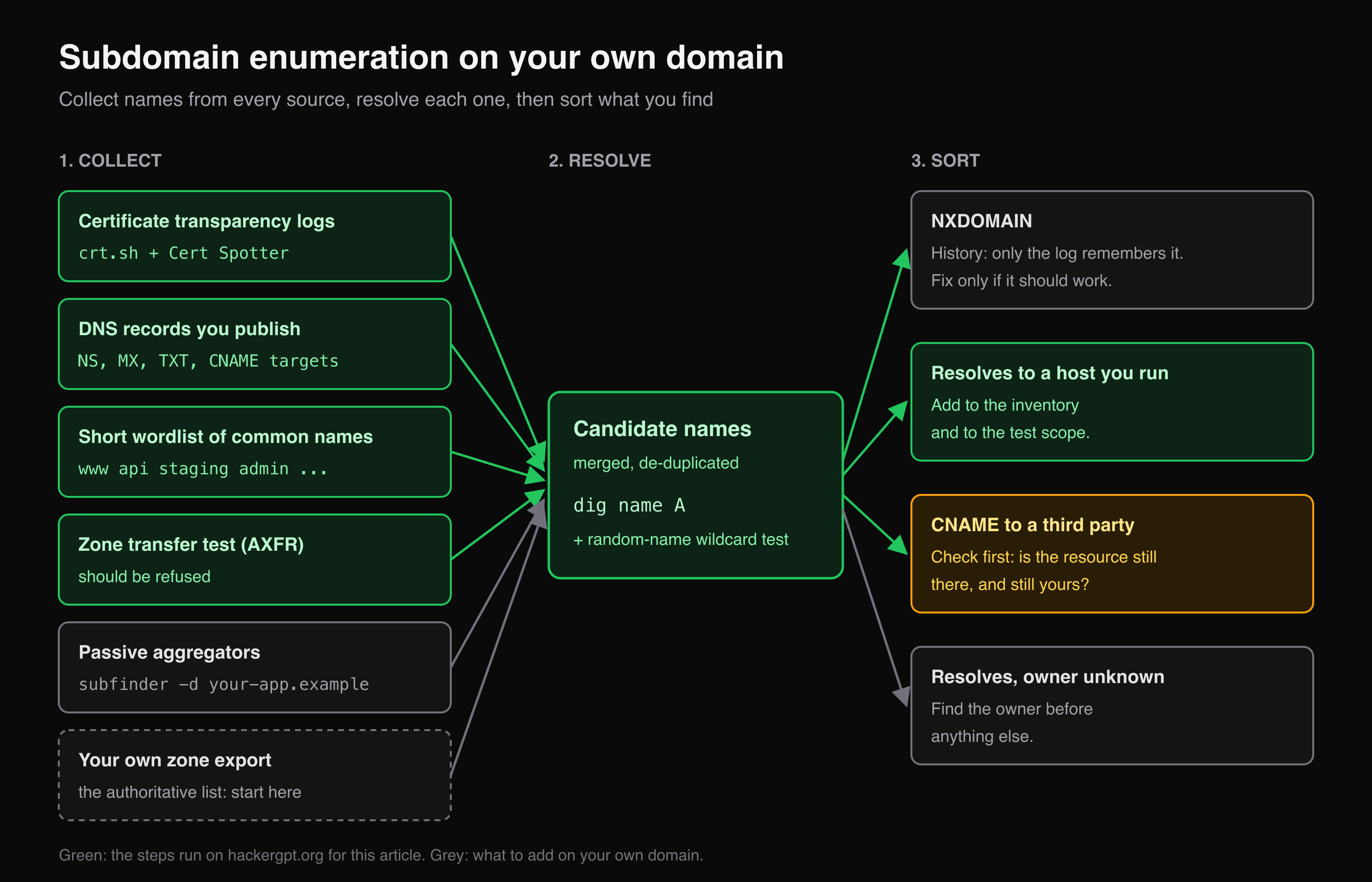 Collect from every source, resolve each candidate, then sort what you find. The green path is what we ran on hackergpt.org for this article.
How do I find subdomains with certificate transparency logs?
Search the certificate transparency logs for %.yourdomain: every publicly trusted TLS certificate is published in append-only logs, so every hostname that ever had its own certificate is listed there, including ones that no longer exist. Browsers enforce this. Chrome's CT policy says "all publicly-trusted TLS certificates are required to be CT Compliant to successfully validate", and Apple's CT policy sets the same rule on its platforms. The log format is defined in RFC 6962, since replaced by RFC 9162.
crt.sh is a free search over those logs. The % is its wildcard, URL-encoded as %25:
curl -s "https://crt.sh/?q=%25.hackergpt.org&output=json" \
  | jq -r '.[].name_value' | tr 'A-Z' 'a-z' | sort -u
What it returned for our domain on 12 November 2026:
*.hackergpt.org
btcpay.hackergpt.org
hackergpt.org
www.hackergpt.org
www.wwww.hackergpt.org
wwww.hackergpt.org
Three things to read in that list:
- 21 log entries, six names. Most certificates appear twice, because the CA logs a precertificate before it issues the final certificate (RFC 6962, section 3.1). Count names, not rows.
*.hackergpt.orghides names. A wildcard certificate covers every first-level name, so any host that was served under it never appears in the logs by itself. Certificate logs list the names that got their own certificate, not every name that exists.wwwwandwww.wwwware typo names that someone requested certificates for in May 2025. They are history now, but they would not be anywhere else.
Why use a second CT search?
Because one search engine over the logs is not the logs. We ran the same query through Cert Spotter's API, which lists "all unexpired certificate issuances for a domain" and allows a limited number of unauthenticated queries per hour:
curl -s "https://api.certspotter.com/v1/issuances?domain=hackergpt.org&include_subdomains=true&expand=dns_names" \
  | jq -r '.[] | .not_before[0:10] + "  " + (.dns_names | join(" "))'
2026-09-06  hackergpt.org www.hackergpt.org
2026-10-13  btcpay.hackergpt.org
2026-11-07  links.hackergpt.org
This was the most useful result of the whole run. links.hackergpt.org, issued five days before we looked, and the October renewal of btcpay were both missing from crt.sh's answer that day. Cert Spotter, in turn, shows nothing that has expired, so it would have missed the old typo names. Run both and merge the lists.
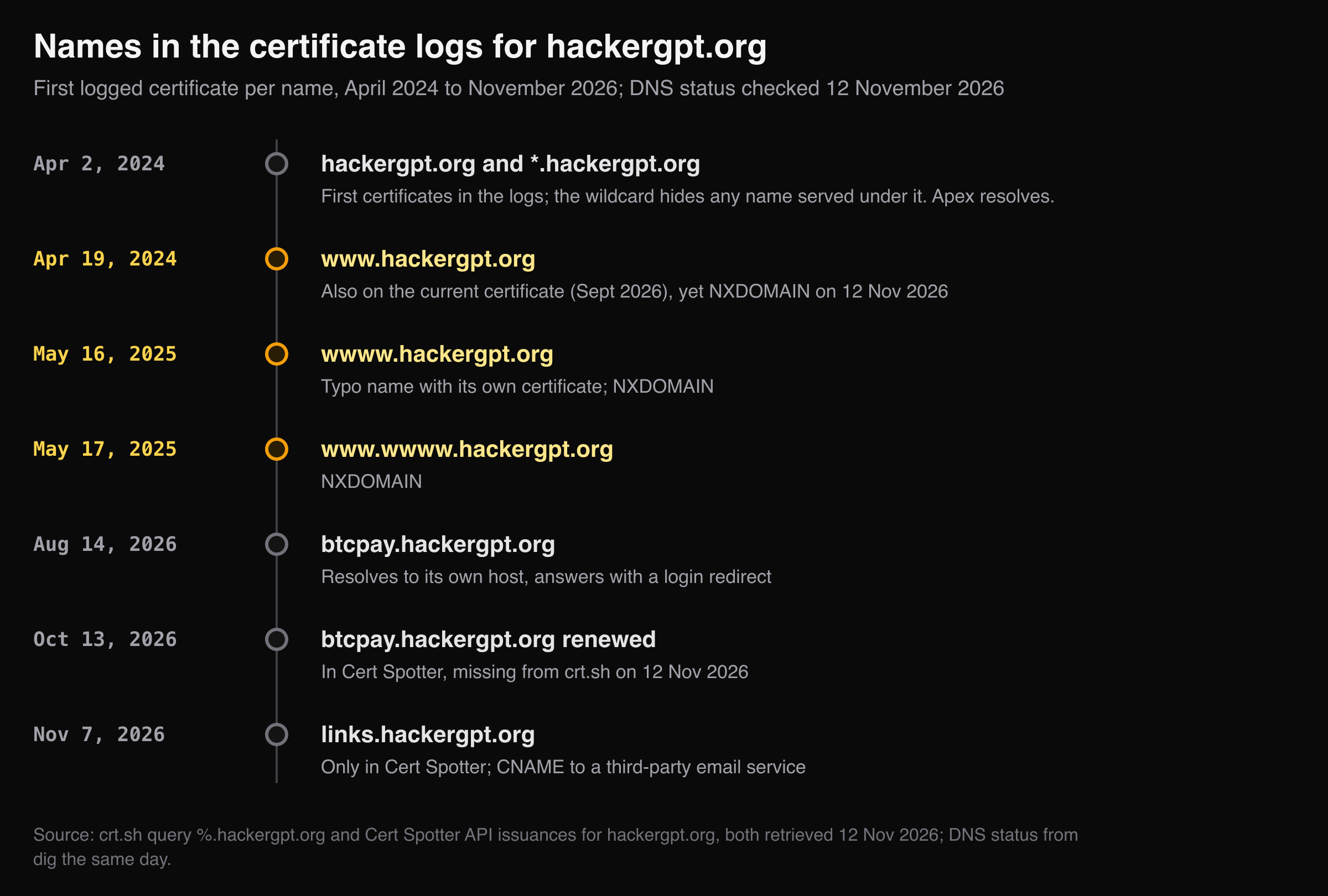 When each name first appeared in the logs. Grey names still resolve; amber ones returned NXDOMAIN on 12 November 2026.
How do I check which subdomains still exist?
Resolve every candidate name with dig and read the response code: NOERROR with an answer means the name exists, NXDOMAIN means the DNS zone has no such name today.
for h in hackergpt.org www.hackergpt.org wwww.hackergpt.org www.wwww.hackergpt.org btcpay.hackergpt.org links.hackergpt.org; do
  rcode=$(dig "$h" A | grep -o 'status: [A-Z]*' | cut -d' ' -f2)
  printf '%-24s %-9s %s\n' "$h" "$rcode" "$(dig +short "$h" A | tr '\n' ' ')"
done
hackergpt.org            NOERROR   99.84.160.46 99.84.160.109 99.84.160.68 99.84.160.59
www.hackergpt.org        NXDOMAIN
wwww.hackergpt.org       NXDOMAIN
www.wwww.hackergpt.org   NXDOMAIN
btcpay.hackergpt.org     NOERROR   18.214.55.77
links.hackergpt.org      NOERROR   links2.resend-dns.com. d36ii0tzkiz19l.cloudfront.net. 3.168.73.51 3.168.73.2 3.168.73.73 3.168.73.123
Each line is a different kind of finding:
www.hackergpt.orgreturns NXDOMAIN, even though it is on the current certificate. On the day we looked, a visitor who typedwww.got no answer at all. That is not a security hole, but it is exactly the kind of gap this exercise exists to catch, and we only noticed it because the certificate log listed a name that DNS did not. It is now on our own fix list.btcpayresolves to a host of its own and answers HTTPS with a redirect to a login page. A separate host with a login form is in the attack surface whether you think of it that way or not, so it goes into the test scope.linksis a CNAME tolinks2.resend-dns.com, a host run by an email service, which in turn points at a CDN. The host is not ours; the name is. Names like this need the question in the next section.
Does the domain have wildcard DNS?
Check before you trust any wordlist result: ask for a name that cannot exist.
dig "nothing-here-$RANDOM.hackergpt.org" A | grep -o 'status: [A-Z]*'
status: NXDOMAIN
NXDOMAIN means there is no wildcard record, so any name that resolves in the next step really exists. If a random name had returned an address, every guess would "resolve" and the wordlist results would be meaningless. Wildcards are defined in RFC 4592; on a domain that has one, compare each answer with the wildcard's address and keep only the names that differ.
How do I find subdomains that never had a certificate?
Guess them: resolve a short list of common names, and use a passive aggregator for names that appear in datasets other than CT. Hosts served under a wildcard certificate, hosts with no publicly trusted certificate, and internal names published in public DNS never show up in certificate logs by name.
for w in www api app admin dev staging test beta blog docs mail vpn status cdn auth login dashboard links btcpay pay shop; do
  ans=$(dig +short "$w.hackergpt.org" A | tr '\n' ' ')
  [ -n "$ans" ] && echo "$w.hackergpt.org -> $ans"
done
links.hackergpt.org -> links2.resend-dns.com. d36ii0tzkiz19l.cloudfront.net. 3.168.73.73 3.168.73.123 3.168.73.51 3.168.73.2
btcpay.hackergpt.org -> 18.214.55.77
Nothing new: on our domain, the 21 common names found only what the certificate logs had already listed. That is a useful result in itself, and it will not be the result on every domain. Twenty names is a sanity check, not a brute force; keep the list short and the rate low even on your own nameservers, because the DNS provider sees the queries too.
For the datasets beyond CT, subfinder "returns valid subdomains for websites, using passive online sources": subfinder -d your-app.example -silent prints one name per line. HackerGPT runs subfinder for you from a prompt such as Find subdomains for your-app.example (docs), and its OSINT tools keep the result in the conversation so you can resolve and question each name next.
Can I ask the nameserver for the whole zone?
You can ask, and a correctly configured nameserver will refuse. A zone transfer (AXFR, RFC 5936) copies a whole zone between nameservers; one that answers anyone hands out every record at once. Testing that your own nameservers refuse it is a quick check:
dig -4 @ns-323.awsdns-40.com hackergpt.org AXFR
;; communications error to 205.251.193.67#53: connection reset
Our nameserver reset the connection (-4 forces IPv4; over IPv6 the result was the same), which is the answer you want. If yours return records, restrict transfers to your secondary nameservers.
What should I do with each subdomain I find?
Sort every name into one of four outcomes, and act on the third first:
| What you see | What it means | What to do |
|---|---|---|
NXDOMAIN |
The name is history: only the certificate remembers it | Nothing, unless you expected it to work (our www) |
| Resolves to a host you run | Part of your attack surface | Add it to your inventory and your test scope |
| CNAME to a third-party service | The name is yours, the resource is someone else's | Confirm the account and resource still exist and are yours |
| Resolves, and nobody knows why | Shadow IT or a leftover | Find the owner before you do anything else |
The CNAME row matters most. A record that still points at a deleted cloud resource is what Microsoft calls "dangling DNS": whoever registers that resource name next can serve content on your subdomain. Can I take over XYZ? is a community list of which services allow that and what the error page looks like. For each CNAME, log in to the vendor and confirm the resource is still there and still in your account; if you stopped using the service, delete the DNS record before you cancel it, not after.
Once you know which hosts are live, the next layer is what each one exposes. How to check the open ports on your own server covers the network side, and Map a web app's attack surface before you test it covers the pages, logins and API endpoints behind each web host. How to pentest your own website puts these steps in order.
None of this proves that a list is complete. Enumeration finds the names that leaked into public sources and the names you guessed; a host that never had a certificate, a public DNS record or a guessable name stays invisible from the outside. That is why your own zone export is the first list, and enumeration is the check against it.
Key takeaways
- Export your DNS zone first; then run outside-in enumeration to see what strangers see and to find what the zone export misses.
- Query at least two certificate transparency searches. On our domain, crt.sh and Cert Spotter each had names the other did not.
- Resolve every candidate and test a random name for wildcard DNS before you trust any wordlist result.
- Treat every CNAME to a third-party service as a question to answer: does that resource still exist, and is it still yours?
- Remove the DNS record before you cancel the service it points to.
FAQ
What is the best way to find all subdomains of a domain?
For a domain you own, export the zone from your DNS provider, because it is the authoritative list. Then compare it with what the outside sees: certificate transparency logs (crt.sh and Cert Spotter), a passive aggregator such as subfinder, and a short wordlist resolved with dig. No outside method finds every subdomain, so treat each one as a cross-check.
Is subdomain enumeration legal?
Enumerating your own domain, or one you have written permission to test, is ordinary security work. Certificate logs and public DNS are public sources, but what you do with the results, and how hard you query someone else's infrastructure, can still cross legal and contractual lines. Keep active steps such as wordlists and zone-transfer tests to domains you own or are authorised to test.
Why does crt.sh show the same certificate twice?
Certificate authorities log a precertificate before they issue the final certificate, and crt.sh lists both entries. Count unique names, not rows: on our domain, 21 entries came down to six names.
What is subdomain takeover?
Subdomain takeover happens when a DNS record still points at a third-party resource, such as a cloud app or storage bucket, that has been deleted. Anyone who can register a resource with the same name on that service can then serve content on your subdomain. The fix is to remove the record when you remove the resource.
Do certificate transparency logs show every subdomain?
No. They show names that appeared on a publicly trusted certificate. A host served under a wildcard certificate, a host without a public certificate, or an internal name never shows up there by name, which is why you add DNS lookups and a wordlist.
Sources
- OWASP Web Security Testing Guide, WSTG-INFO-04: Attack Surface Identification
- Chrome Certificate Transparency policy
- Apple's Certificate Transparency policy
- RFC 6962: Certificate Transparency and RFC 9162: Certificate Transparency Version 2.0
- crt.sh certificate search
- SSLMate Cert Spotter API reference
- RFC 4592: The Role of Wildcards in the Domain Name System
- RFC 5936: DNS Zone Transfer Protocol (AXFR)
- subfinder, ProjectDiscovery
- Microsoft Learn: Prevent dangling DNS entries and avoid subdomain takeover
- Can I take over XYZ?
Want to run the same checks from one conversation? Try HackerGPT on your own domain.