TL;DR: To see which ports your own server exposes, scan it from outside your network with nmap: nmap -sT -Pn --top-ports 1000 your-server.example works as any user, and -sS (a SYN scan) does the same job faster with root privileges. Both report each port as open, closed or filtered from the reply to the first packet; the difference is that a SYN scan never completes the connection, so the service itself does not see one. An AI agent runs the same scans from a prompt and then explains the output.
This page is for the owner of a small site or SaaS who wants to know what their server answers on, and for learners meeting port scanning for the first time. It shows the commands, what each scan type tells you, and the real output of a scan of CyberGym, our deliberately vulnerable practice target. Scan only servers you own or have written permission to test: an unsolicited scan of someone else's network can break their terms of service or the law, as the Nmap book's chapter on legal issues explains.
How do I check which ports are open on my own server?
Run a port scan against your server's public hostname from a machine outside its network, then compare the open ports with the services you meant to expose. Scanning from inside (the server itself, or the same VPC) shows what is listening, not what the internet can reach, because the firewall and the cloud security group sit in between.
Three commands cover most of what an owner needs. Replace your-server.example with your own hostname:
# Any user: full TCP handshake against the 1,000 most common ports
nmap -sT -Pn --top-ports 1000 your-server.example

# The same, but also ask each open port what software answers
nmap -sT -Pn -sV --top-ports 100 your-server.example

# Why nmap decided each state, port by port
nmap -sT -Pn -p 22,80,443 --reason your-server.example
-Pn skips host discovery and scans even if the host does not answer ping, which is common for cloud servers that drop ICMP. --top-ports picks the most frequently open ports from nmap's own frequency data; -p- scans all 65,535, which takes much longer against a host that silently drops packets. -sV is version detection: nmap sends probes to each open port and matches the replies against its database of service signatures.
The result for each port is one of the port states nmap defines:
- open: something accepts connections there. This is the list to check against what you meant to expose.
- closed: the host answered, but nothing is listening. Harmless, but it confirms the host is reachable.
- filtered: nothing came back (or an ICMP error did), so a firewall is most likely dropping the probes. For an owner this is usually the state you want on everything you did not mean to publish.
A real scan of CyberGym
We ran these scans of cybergym.hackergpt.app on 24 October 2026 with nmap 7.991, from a laptop outside AWS, as an unprivileged user. The output is unedited except for the long service fingerprint nmap prints for one port, which is cut and marked.
The top 100 ports, with version detection:
$ nmap -sT -Pn --top-ports 100 -sV cybergym.hackergpt.app
Nmap scan report for cybergym.hackergpt.app (34.231.169.117)
Host is up (0.026s latency).
rDNS record for 34.231.169.117: ec2-34-231-169-117.compute-1.amazonaws.com
Not shown: 98 filtered tcp ports (no-response)
PORT    STATE SERVICE  VERSION
80/tcp  open  http
443/tcp open  ssl/http nginx
1 service unrecognized despite returning data. [fingerprint cut]

Nmap done: 1 IP address (1 host up) scanned in 26.19 seconds
The top 1,000 ports found nothing more:
$ nmap -sT -Pn --top-ports 1000 -T4 cybergym.hackergpt.app
Not shown: 998 filtered tcp ports (no-response)
PORT    STATE SERVICE
80/tcp  open  http
443/tcp open  https

Nmap done: 1 IP address (1 host up) scanned in 111.66 seconds
And --reason shows how each verdict was reached:
$ nmap -sT -Pn -p 22,80,443 --reason cybergym.hackergpt.app
PORT    STATE    SERVICE REASON
22/tcp  filtered ssh     no-response
80/tcp  open     http    syn-ack
443/tcp open     https   syn-ack
What this tells an owner, read line by line:
- Two ports answer, 80 and 443. That is the expected shape for a web app: HTTP (usually a redirect) and HTTPS. Anything else open would be a question to answer: a database port, an admin panel on 8080, a forgotten dev server.
- SSH (22) is filtered from where we stood. The security group drops it rather than refusing it, so the scan cannot even tell whether an SSH daemon runs. That is a firewall decision showing up in the results, not a property of the server.
- The rDNS record names the hosting provider (an EC2 address). Anyone who scans you learns this too.
- Version detection named nginx on 443 but gave no version. The
Server: nginxheader without a number is a configuration choice;curl -sI https://cybergym.hackergpt.appreturned the same header. On port 80 nmap got data back but could not match it to a known service, which is why it printed a fingerprint. - The filtered ports cost time. 998 ports that never answer are why the top-1,000 scan took close to two minutes: nmap waits for replies that never come and retransmits. The performance options (
-T4,--max-retries) trade that time against the risk of missing a slow port.
This scan covers TCP only. UDP services (DNS on 53, SNMP on 161) need -sU, which is slow and needs root, and is worth running once if your server might run any of them.
What does a SYN scan show that a TCP connect scan does not?
In terms of results, mostly nothing: both scans decide open, closed or filtered from the reply to the first SYN packet, so against the same target they normally produce the same port list. What differs is how far the conversation goes, who can run each one, and what the target sees.
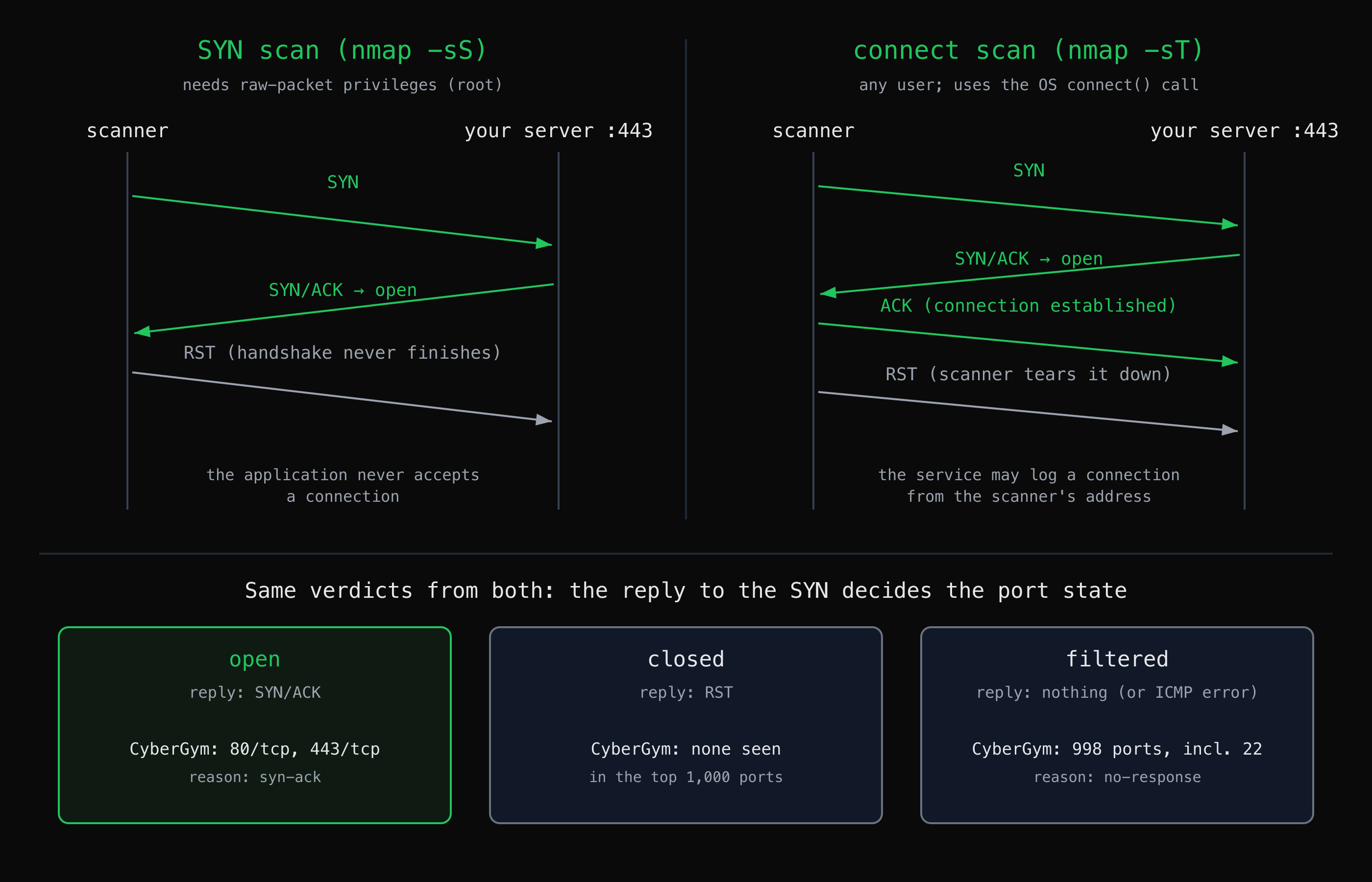
Both scans read the port state from the reply to the first SYN. The bottom row is what the connect scan of CyberGym returned on 24 October 2026.
- A SYN scan (
-sS) sends a SYN, reads the reply, and answers a SYN/ACK with a RST, so the TCP three-way handshake never completes. Nmap writes the raw packets itself, which needs raw-packet privileges: root on Linux and macOS. It is nmap's default scan when run with those privileges, and it is fast because it never sets up or tears down a full connection. - A TCP connect scan (
-sT) asks the operating system to open a real connection with theconnect()call, so the handshake completes and nmap then closes it. Any user can run it, and it is nmap's default when a SYN scan is not possible. Because the connection was established, the listening application can see and log it; the Nmap reference guide notes that the target is more likely to log a connect scan.
We could not run a SYN scan from the same laptop without root, and nmap says so plainly:
$ nmap -sS -Pn -p 80,443 cybergym.hackergpt.app
You requested a scan type which requires root privileges.
QUITTING!
For an owner scanning their own server, the practical choice is simple: use -sT when you cannot or do not want to run as root, -sS when you can and want speed. Neither is invisible: network-level intrusion detection and flow logs record the SYN packets of both. "Stealth scan" is a historical name, not a property to rely on.
The other scan types are what you add to the port list, not alternatives to it: -sV for software versions, -O for OS detection from how the TCP/IP stack answers crafted probes, -sU for UDP, and -A to run version detection, OS detection, default scripts and traceroute together. The scanning and reconnaissance tool reference lists which of these HackerGPT runs for you.
Practical Application: Scanning with Natural Language
An AI agent with a scanning tool runs the same nmap scans from a prompt, then keeps the output in the conversation so you can ask what it means. HackerGPT's network scanning tool covers service discovery, SYN, TCP connect, UDP and comprehensive scans; the tool reference has the full list and example prompts, and hackergpt.app shows which plan includes it.
A prompt for the scan above would read:
Run a TCP connect scan of the top 1000 ports on cybergym.hackergpt.app,
a practice target I'm allowed to test, then tell me which open ports
I should not expect on a web server.
The value is less in starting the scan than in what comes after it: asking why 22 is filtered rather than closed, what an unrecognised fingerprint on port 80 means, or which of the open services to check first, without copying output between a terminal and a chat window. The agent's reading is a starting point to verify, like any scan result: a port reported open is a finding to confirm, not a conclusion.
What is the difference between attack surface mapping and a vulnerability scan?
Attack surface mapping lists what is exposed; a vulnerability scan checks that list for known weaknesses. A port scan is the network-layer part of the map: it tells you that 443 answers and that nginx is behind it, not whether that nginx is misconfigured or what the application on it does.
The next layer is the application itself: the pages, logins and API endpoints behind port 443, and which of them answer without authentication. That is where AppMap works, and Map a web app's attack surface before you test it walks through it on the same CyberGym target. For what is public about your domain before you send a single packet (DNS, certificate logs, subdomains), start with OSINT on your own company. How to pentest your own website with an AI agent puts the three steps in order.
Operational Nuances and Limitations
- Where you scan from changes what you see. A scan from your office network, a VPN or a cloud agent's infrastructure can get different answers if your firewall allows some sources and not others. Scan from where an outsider would stand.
- Filtered is not the same as closed. A filtered port only means the probes went unanswered. A service could still be listening behind a rule that admits other addresses.
- Rate limits and intrusion prevention skew results. An IPS or a cloud provider's protection can start dropping a scanner's packets partway through, which turns open ports into filtered ones. A result that looks wrong is worth re-running more slowly.
- A port list is not a security assessment. It says what answers, not whether the software behind it is patched, configured well or exposing data. Treat it as the inventory the rest of the testing starts from.
What changed since this article was first published
This article was first written in January 2025 as a feature overview. In October 2026 it was rewritten as a how-to: it now shows real scans of CyberGym rather than describing the scans in the abstract, the example target moved from juice-shop.hackergpt.app to CyberGym, and the per-scan tool list moved to the scanning tool reference. We also removed the earlier note about plan availability, because which plan includes the scanning tools is set in the product and can change; check hackergpt.app for the current answer.
Key takeaways
- Scan your own server from outside its network; a scan from inside shows what listens, not what is reachable.
- Compare the open ports with what you meant to expose. Anything you cannot explain is the first thing to look at.
- Use
nmap -sTwithout root and-sSwith it; they report the same states, and neither is invisible to network monitoring. - Add
-sVfor versions and--reasonto see why each port got its state; run-sUonce for UDP. - A port scan is the first layer of your attack surface map; the application behind port 443 needs its own mapping.
FAQ
How do I check which ports are open on my server?
Run nmap -sT -Pn --top-ports 1000 your-server.example from a machine outside the server's network, and read the ports marked open. Add -sV to see which software answers on each. Only scan servers you own or have written permission to test.
What is the difference between a SYN scan and a TCP connect scan?
A SYN scan sends the first packet of the TCP handshake and resets the connection as soon as the server replies, so the handshake never completes; it needs root. A TCP connect scan completes the handshake through the operating system and works as any user. Both report the same open, closed and filtered states.
What does filtered mean in nmap?
Filtered means nmap got no reply, or an ICMP error, so it cannot tell whether the port is open. It usually means a firewall or cloud security group is dropping the probes. A service may still be listening behind a rule that allows other source addresses.
Is it legal to port scan my own server?
Scanning infrastructure you own or are authorised to test is the normal way to check your exposure. Scanning other people's networks without permission can breach their terms of service or computer misuse laws, depending on the country. Check your hosting provider's policy too, since some ask to be told before larger scans.
Can an AI agent run a port scan for me?
Yes, if it has a scanning tool. HackerGPT runs nmap scan types such as service discovery, SYN and TCP connect scans from a prompt and keeps the output in the conversation, so you can ask what each open port means. Treat its reading like any scan result: findings to verify, not conclusions.
Sources
- Nmap Reference Guide: Port Scanning Basics (port states)
- Nmap Reference Guide: Port Scanning Techniques
- Nmap Network Scanning: TCP SYN (Stealth) Scan
- Nmap Network Scanning: TCP Connect Scan
- Nmap Reference Guide: Service and Version Detection
- Nmap Reference Guide: OS Detection
- Nmap Reference Guide: Timing and Performance
- Nmap Network Scanning: Legal Issues
- RFC 9293: Transmission Control Protocol (TCP)