TL;DR: For security work on Linux you need six things from the shell: move around and see hidden files (pwd, cd, ls -la), read files (cat, head, tail), read and set permissions (ls -l, chmod), see what runs and what listens (ps, ss -tlnp), filter text with pipes and grep, and send HTTP requests exactly as you mean them with curl (-i, -X, -H, -d, -b). Learn them on a lab machine and a practice target, where a mistake costs nothing.
This is for learners who are starting out in security and have opened a terminal a few times, but not much more. Everything below was run on 18 November 2026: the shell part in a fresh Ubuntu 24.04 container on our own machine, the HTTP part with curl against CyberGym, our deliberately vulnerable practice app. Point these commands only at machines and sites you own or have written permission to test.
It is item one of Stage 1 on our hacking roadmap, and it is the base the rest of learning hacking from zero stands on.
Why do I need the Linux command line for security?
Because most of what you will test, and most of the tools you will test it with, are driven from a shell. Web servers, containers and cloud machines are commonly administered over a terminal, many scanners and proxies have command-line interfaces, and plenty of CTF challenges hand you a shell rather than a desktop. The skills that matter are not the obscure ones: they are reading what is on a machine, telling who may read it, seeing what is listening on the network, and talking to a web app without a browser in the way.
You do not need to install Linux to start. If you have Docker, this gives you the same disposable machine we used:
docker run -it --rm ubuntu:24.04 bash
apt-get update && apt-get install -y curl iproute2 procps python3 jq file
Our lab had two ordinary users, alice and bob, and a small app in /srv/myapp owned by alice: an index.html, a deploy.sh script, a logs/access.log and a .env file holding two made-up secrets. We created the users with useradd -m -s /bin/bash alice (and the same for bob) and switched between them with su - alice. The versions were curl 8.5.0, iproute2 6.1.0, procps-ng 4.0.4, Python 3.12.3 and jq 1.7.
How do I move around and read files?
You find out where you are with pwd, who you are with whoami and id, move with cd, and list with ls. As alice:
pwd
whoami
id
/home/alice
alice
uid=1001(alice) gid=1001(alice) groups=1001(alice)
id matters more than it looks: the user and groups it prints are exactly what the permission checks below compare against. Now list the app:
cd /srv/myapp
ls
deploy.sh
index.html
logs
The .env file is missing from that list. ls hides every name that starts with a dot, which is also why dotfiles such as .env and .git are so easy to forget on a server. Add -a for all files and -l for the long format:
ls -la
total 24
drwxrwxr-x 3 alice alice 4096 Nov 18 22:23 .
drwxr-xr-x 1 root  root  4096 Nov 18 22:23 ..
-rw-rw-r-- 1 alice alice   47 Nov 18 22:23 .env
-rw-rw-r-- 1 alice alice   27 Nov 18 22:23 deploy.sh
-rw-rw-r-- 1 alice alice   15 Nov 18 22:23 index.html
drwxrwxr-x 2 alice alice 4096 Nov 18 22:23 logs
To read files, use cat for a short file, head -n 2 for the first lines, tail -n 1 for the last ones (tail -f keeps following a log as it grows), wc -l to count lines and file to see what a file is before you open it. less pages through a long file; q quits it.
head -n 2 logs/access.log
wc -l logs/access.log
file deploy.sh
127.0.0.1 - - [18/Nov/2026:21:02:11 +0000] "GET / HTTP/1.1" 200 15
127.0.0.1 - - [18/Nov/2026:21:02:14 +0000] "GET /.env HTTP/1.1" 404 0
6 logs/access.log
deploy.sh: Bourne-Again shell script, ASCII text executable
How do Linux file permissions work?
Every file has an owner, a group, and three sets of permission bits: read (r), write (w) and execute (x) for the owner, for members of the group, and for everyone else ("other"). ls -l prints them as a ten-character string, and chmod changes them, either with letters (u+x, o-r) or with one octal digit per set, where read is 4, write 2 and execute 1.
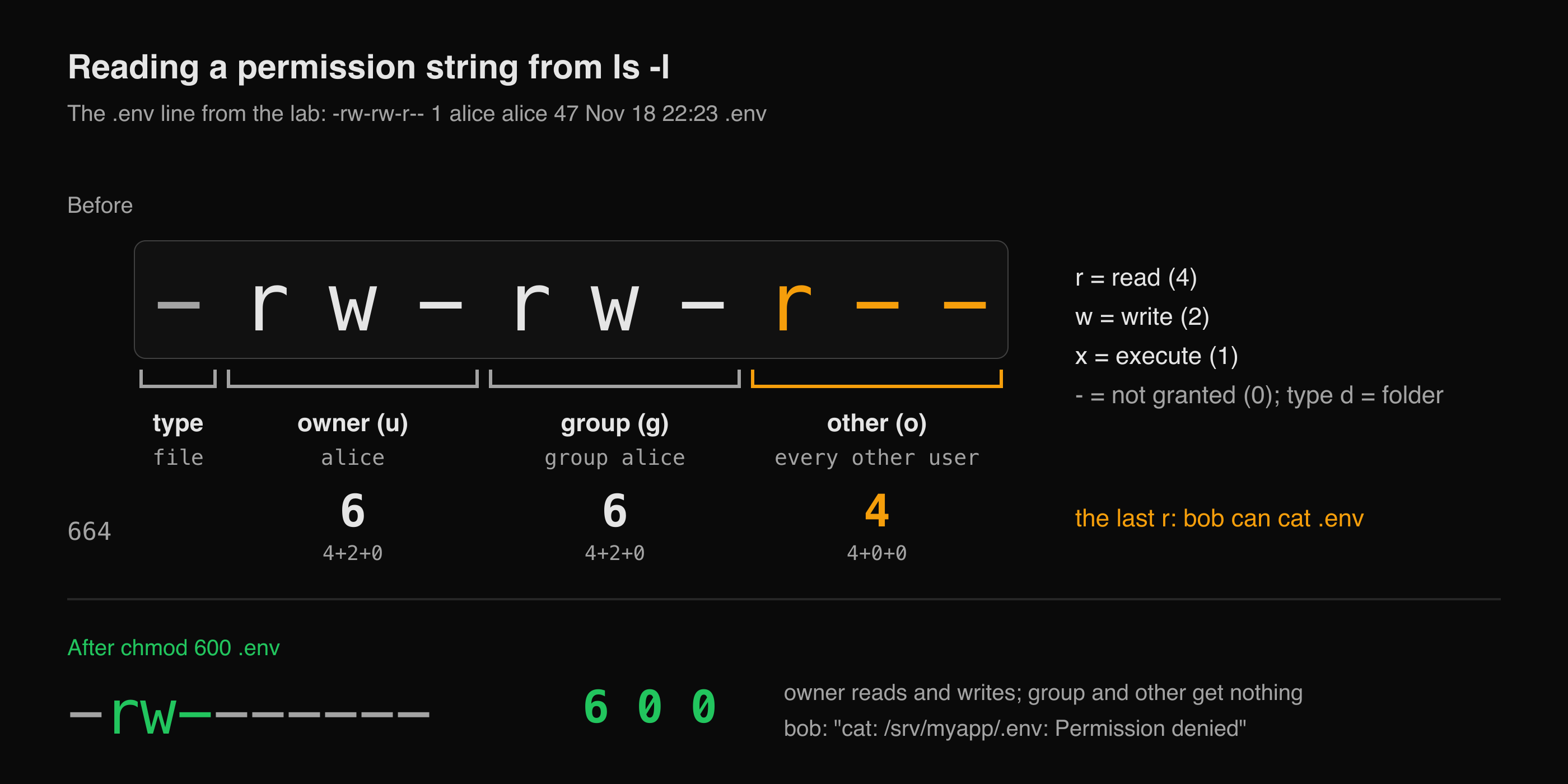
How to read the .env line from the listing above, and what chmod 600 changes.
For a directory the same letters mean something slightly different: r lets you list the names in it, x lets you enter it and reach the files inside. That is why bob, who is not alice, could not even list alice's home folder in our lab:
ls /home/alice
ls: cannot open directory '/home/alice': Permission denied
Ubuntu 24.04 creates home directories as drwxr-x--- (750); its /etc/login.defs sets HOME_MODE 0750. /srv/myapp is not a home directory, though, and it was drwxrwxr-x, so anyone could walk in.
Who may read the .env file?
In our lab, everyone. The .env line reads -rw-rw-r--, which is 664: the final r gives read access to every account on the machine. As bob:
cat /srv/myapp/.env
DB_PASSWORD=change-me
API_KEY=example-not-real
Nobody had done anything unusual to get there. Alice's umask (the bits removed from the default permissions of every new file) was 0002: Ubuntu's /etc/login.defs sets USERGROUPS_ENAB yes, which turns the default 022 into 002 for a user who has a group of their own, so a file she creates comes out as 664, readable by all. A secrets file needs to be readable by its owner only. As alice:
chmod 600 .env
chmod u+x deploy.sh
ls -l .env deploy.sh
-rw------- 1 alice alice 47 Nov 18 22:23 .env
-rwxrw-r-- 1 alice alice 27 Nov 18 22:23 deploy.sh
Bob now gets cat: /srv/myapp/.env: Permission denied. The second line shows the execute bit at work: before chmod u+x, ./deploy.sh failed with Permission denied even for its owner, and afterwards it ran. If a web server runs under a different user and needs to read the file, put that user in the file's group and use 640 (-rw-r-----) instead of opening it to everyone.
To find files that every user can read under a folder, find can match on permission bits:
find /srv/myapp -type f -perm -o=r
/srv/myapp/index.html
/srv/myapp/deploy.sh
/srv/myapp/logs/access.log
.env no longer appears. Whether the other three should be world-readable is a decision per file; the command gives you the list to decide on.
How do I see which processes are running and which ports are open?
ps aux lists every process with its user and command line, pgrep -a finds processes by name, and ss -tlnp lists TCP sockets that are listening, with numeric ports and, where you are allowed to see it, the process that owns each one. We started Python's built-in web server as alice, serving the app folder:
cd /srv/myapp && python3 -m http.server 8000 &
ps aux | grep http.server
alice       2509  2.0  0.2  25764 18604 ?        S    22:27   0:00 python3 -m http.server 8000
alice       2512  0.0  0.0   3700  1888 ?        S    22:27   0:00 grep http.server
The second line is grep finding itself, because its own command line contains the word it is looking for. pgrep -a -f http.server never lists itself, so it avoids that (it still lists any other process whose command line contains the pattern, such as a shell that started the server). Then the port:
ss -tlnp
As alice, who owns the server:
State  Recv-Q Send-Q Local Address:Port Peer Address:PortProcess
LISTEN 0      5            0.0.0.0:8000      0.0.0.0:*    users:(("python3",pid=2509,fd=3))
Two things to read here. 0.0.0.0:8000 means the server listens on every network interface, not only on 127.0.0.1, so anything that can reach the machine can reach the port; python3 -m http.server --bind 127.0.0.1 would have kept it local. And the Process column is only filled in for processes you are allowed to inspect: bob saw the same LISTEN line with the column empty, and so did root inside our unprivileged container, until we ran the command with Docker's --privileged. On a normal server, sudo ss -tlnp is how you see every owner.
Does chmod 600 stop a web server from serving the file?
No, and our lab showed it: this request went out after chmod 600, with ls -l still showing -rw-------. File permissions decide which user may read a file. The web server was running as alice, alice may read her own .env, and the server serves whatever is in its folder:
curl -i http://127.0.0.1:8000/.env
HTTP/1.0 200 OK
Server: SimpleHTTP/0.6 Python/3.12.3
Content-type: application/octet-stream
Content-Length: 47

DB_PASSWORD=change-me
API_KEY=example-not-real
Bob could no longer cat the file, yet anyone on the network could download it. The fix is to keep secrets out of any folder a web server serves, not only to tighten their bits. Python's own documentation says http.server is not recommended for production; the same mistake with a real server is covered in exposed .git folders and .env files.
To stop the server, take its PID from pgrep and run kill 2509. One thing that surprised us: from a script run with bash -c "... pkill -f http.server ...", pkill also matched that shell, whose own command line contained the pattern, and killed the script. Killing by PID avoids that.
How do pipes and grep help with security work?
A pipe (|) sends one command's output into the next command, so small tools combine into a question you can ask of any text: a log, a listing, a server's response. grep keeps the lines that match a pattern, cut and awk pick out fields, sort and uniq -c count. On the lab's access log:
grep "POST /login" logs/access.log
127.0.0.1 - - [18/Nov/2026:21:02:19 +0000] "POST /login HTTP/1.1" 401 32
127.0.0.1 - - [18/Nov/2026:21:02:20 +0000] "POST /login HTTP/1.1" 401 32
127.0.0.1 - - [18/Nov/2026:21:02:22 +0000] "POST /login HTTP/1.1" 200 48
Two failed logins and then a success, three seconds apart. How many requests got each status code:
awk '{print $9}' logs/access.log | sort | uniq -c | sort -rn
      2 404
      2 401
      2 200
And which paths someone asked for that look like probing for secrets:
grep -E "\.(env|git)" logs/access.log | cut -d " " -f 7
/.env
/.git/config
grep -c counts matches instead of printing them, -i ignores case, -v inverts the match and -r searches a whole folder. The same pipelines work on curl's output, which is where the next section goes.
How do I send HTTP requests with curl?
curl sends one HTTP request and prints the response, and every part of the request is a flag: -X sets the method, -H adds a header, -d sends a body, -b sends cookies. -i shows the response headers along with the body, -I sends a HEAD request for headers only, -v prints the request curl actually sent, and -s hides the progress meter that otherwise appears when the output goes into a pipe or file.
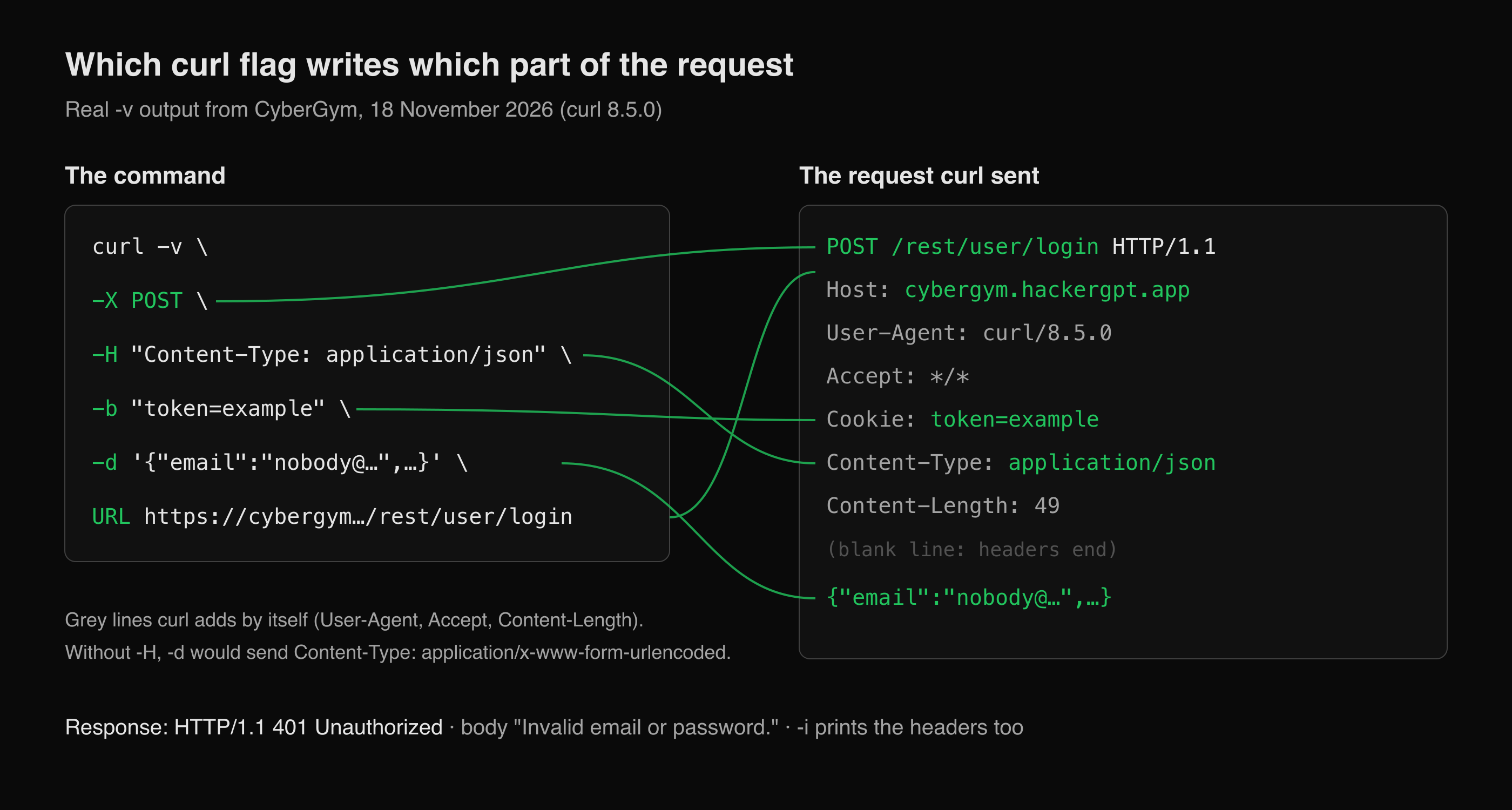
One curl command, run with -v, and the request it put on the wire.
If HTTP itself is new to you, what an API endpoint is explains the request and response this section sends. Everything below went to CyberGym, which runs OWASP Juice Shop; for other legal targets see where to practise hacking legally.
What does a GET request and its response look like?
The simplest request is a URL. CyberGym answers its version endpoint with JSON:
curl -s https://cybergym.hackergpt.app/rest/admin/application-version
{"version":"19.1.1"}
-v shows what curl sent. Lines starting with > are the request, lines starting with < the response:
curl -s -v https://cybergym.hackergpt.app/rest/admin/application-version 2>&1 | grep -E "^[<>] "
> GET /rest/admin/application-version HTTP/1.1
> Host: cybergym.hackergpt.app
> User-Agent: curl/8.5.0
> Accept: */*
>
< HTTP/1.1 200 OK
< Server: nginx
< Content-Type: application/json; charset=utf-8
< Content-Length: 20
curl -sI https://cybergym.hackergpt.app/ returns only the headers, which is where you read security headers: the app sent X-Content-Type-Options: nosniff and X-Frame-Options: SAMEORIGIN, and also Access-Control-Allow-Origin: *.
How do I send a POST request with headers and a JSON body?
Give the method with -X POST, the content type with -H, and the body with -d. A login attempt with a wrong password:
curl -s -i -X POST https://cybergym.hackergpt.app/rest/user/login \
  -H "Content-Type: application/json" \
  -d '{"email":"nobody@example.com","password":"wrong"}'
HTTP/1.1 401 Unauthorized
Server: nginx
Content-Type: text/html; charset=utf-8
Content-Length: 26

Invalid email or password.
Two details from the curl manual. -d on its own already makes the request a POST, and the manual says of -X that "normally you do not need this option"; we keep it for readability. And -d sends Content-Type: application/x-www-form-urlencoded unless you set the header yourself, which is why the -H line is there: an API that expects JSON may reject or misread the body without it.
How do I log in and send a token or a cookie?
Log in, take the token out of the JSON with jq, and send it back on the next request, as a header or as a cookie depending on what the app reads. We registered a throwaway practice account on CyberGym (a POST to /api/Users with an email, a password and a security answer) and logged in with it:
TOKEN=$(curl -s -X POST https://cybergym.hackergpt.app/rest/user/login \
  -H "Content-Type: application/json" \
  -d '{"email":"'"$EMAIL"'","password":"'"$PASSWORD"'"}' | jq -r .authentication.token)
$EMAIL and $PASSWORD are your own practice account's; set them first. The token is a JWT of 761 characters, and it is a live session, so keep it out of screenshots and shared notes. Then ask the app who we are, first with the token in an Authorization header, then as a cookie:
curl -s https://cybergym.hackergpt.app/rest/user/whoami -H "Authorization: Bearer $TOKEN"
curl -s https://cybergym.hackergpt.app/rest/user/whoami -b "token=$TOKEN"
{"user":{}}
{"user":{"id":41,"email":"linux-cli-1795040686@example.com","lastLoginIp":"0.0.0.0","profileImage":"/assets/public/images/uploads/default.svg"}}
The header got an empty user and the cookie got ours: this endpoint reads only the token cookie. The basket endpoint behaved the other way round. With the header, /rest/basket/25 (our own basket id, from the login response's bid) returned our empty basket, and without it, 401. Two endpoints of one app accepted the session in two different places. That is ordinary, and it is the kind of detail you find only by sending the request yourself and changing one thing at a time.
-c jar.txt saves the cookies a server sets, and -b jar.txt sends them back on later requests. Our jar stayed empty after the login: Juice Shop's login sets no cookie at all, and its web page stores the token as a cookie in the browser with JavaScript, which curl does not run.
Last, two flags for scripting: -o /dev/null throws the body away and -w "%{http_code}\n" prints the status, which turns a request into a yes-or-no check:
curl -s -o /dev/null -w "%{http_code}\n" https://cybergym.hackergpt.app/rest/basket/25
401
What should I practise next?
Play OverTheWire Bandit, a free wargame in which each level is a shell puzzle built on the commands above, and read Everything curl when you need a flag this article skipped. Then put the two together on a web target: the web CTF challenges for beginners walkthrough works CyberGym with curl alone. A command line does not show you every problem a machine or an app has. It shows you exactly what you asked about, which is why the asking is the skill.
Key takeaways
- Use
ls -la, notls: dotfiles such as.envand.gitare hidden by default and are the ones that leak. - Read the last three letters of
ls -las "what every user may do", and set secrets to600(or640with a group) withchmod. - File permissions do not stop a process that runs as the owner from serving a file; keep secrets out of folders a web server serves.
- Check
ss -tlnpfor0.0.0.0listeners, and run it withsudoto see every process behind them. - Send requests with
curl -iand change one flag at a time: the method, a header, the body or a cookie.
FAQ
What are the most important Linux commands for hacking beginners?
Learn these first: pwd and cd to move around, ls -la to see every file including hidden ones, cat head and tail to read them, chmod to set who may read them, ps and ss to see what runs and listens, grep to filter output and curl to talk to a web app. Most advanced tools assume you can already do these.
What does chmod 600 mean?
It sets a file's permissions to read and write for its owner and nothing for the group or anyone else, which ls -l shows as -rw------- at the start of the line. Each digit is one set of permissions, owner then group then other, where read is 4, write is 2 and execute is 1. It is the usual setting for a file that holds secrets.
How do I check which ports are open on my Linux machine?
Run ss -tlnp to list the TCP ports your machine is listening on, with numeric port numbers and the process behind each one. Run it with sudo to see processes that belong to other users. A local address of 0.0.0.0 or [::] means the port accepts connections on every network interface, not only from the machine itself.
What is the difference between curl -i and curl -I?
curl -i sends the request you describe and prints the response headers followed by the body. curl -I sends a HEAD request instead and prints only the headers. Use -I to check status codes and headers quickly, and -i when you also need the body.
Do I need to install Linux to learn the command line?
No. A virtual machine, Windows Subsystem for Linux or a container started with docker run -it --rm ubuntu:24.04 bash gives you a real Linux shell to practise in, and a container is thrown away when you exit. curl itself also runs on macOS and Windows.
Sources
- chmod(1), Linux manual page
- ss(8), Linux manual page
- curl manual page
- Everything curl
- Python documentation: http.server
- OWASP Juice Shop
- OverTheWire: Bandit
Practise these on CyberGym, or let HackerGPT walk your own site with you at hackergpt.app.