TL;DR: A good pentest finding answers, in order: what is wrong (title), how urgent it is and why (severity with its vector), where it is, how to see it yourself (steps and redacted evidence), what an attacker could do with it, and how to fix and retest it. Below is one complete finding written up that way, from an unauthenticated API on CyberGym that returns every Photo Wall uploader's account record, password hash included.
This is for learners and junior pentesters writing their first findings, and for site owners who want to know what a useful report looks like before they pay for one. You will see the structure, then a real finding filled in field by field, then the mistakes that turn a true finding into one nobody acts on. Test only targets you own or have written permission to test: everything here was run against CyberGym, HackerGPT's legal, deliberately vulnerable practice target, on 12 November 2026.
What goes in a pentest report?
A pentest report is the written result of the test: who it is for, what was tested, what was found, and what to do about each finding. The OWASP Web Security Testing Guide's reporting chapter lays out the usual sections, and NIST SP 800-115 treats reporting as its own phase of an assessment rather than an afterthought:
| Section | Reader | What it holds |
|---|---|---|
| Executive summary | management, the site owner | the overall picture and the few things that matter most, without jargon |
| Scope and method | everyone | what was in scope, what was not, the dates, the approach, any limits on the test |
| Findings summary | everyone | one line per finding: ID, title, severity |
| Findings details | developers, retesters | one block per finding, written to be reproduced and fixed |
| Appendices | specialists | the rating scale used, cleaned tool output, the checklist of tests run |
In our experience the executive summary gets read the most and the findings details get acted on. This article is about the second, because a report is only as useful as its weakest finding. Agreeing the scope before the test is its own job, covered in this pentest scope template.
What does a well-written pentest finding contain?
A finding contains enough for a developer who was not there to reproduce the issue, understand why it matters and fix it, without asking the tester anything. WSTG's section 3.2 lists the pieces: a reference ID, a title, the likelihood, the impact, the risk level, a description with any sensitive data masked, remediation steps, and further resources. In practice we split them so that each part has exactly one job:
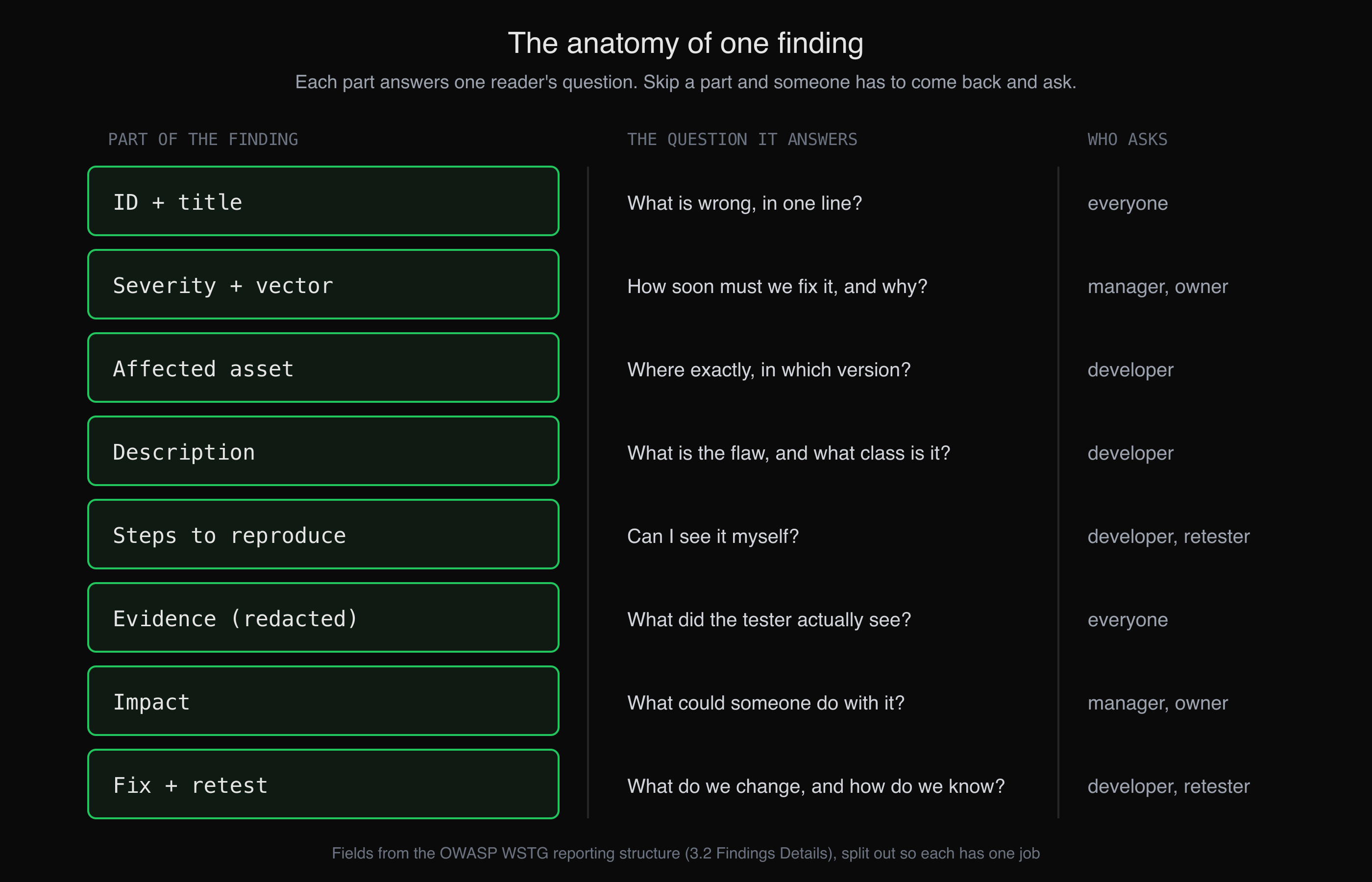 Every part of a finding exists because someone downstream will ask its question.
Two rules hold the structure together. Evidence is redacted: WSTG says to mask passwords, personal information and card details, and a report that leaks the data it is warning about has created a second incident. Severity carries its reasoning: "High" on its own is an opinion; "High, CVSS 4.0 vector such-and-such, because the hashes are unsalted MD5" is something the reader can check and disagree with.
Where did this finding come from?
It started as a one-line lead from an AI agent. In the run shown in How to use the CTF Mode workspace, HackerGPT's CTF Mode was asked only to look at CyberGym, and before any challenge was given it listed "exposed user data" among the issues it had seen. A lead like that is where a finding begins, not where it ends: the write-up below is that lead reproduced by hand, measured, scored and turned into something a developer could act on.
That division of labour is the one described in how to pentest your own website: an agent is good at covering breadth and flagging what looks wrong; turning a flag into a finding still means reproducing it, judging its severity in context and checking the fix.
How do I write up a finding step by step?
Write it in the order a reader needs it, and verify each part as you write it. Here is the finding, field by field, with a note on why each field reads the way it does.
1. ID and title
HGO-01. Unauthenticated Photo Wall API returns full user account records, including password hashes
The title names the asset, the condition and the consequence. "Information disclosure" would be true and useless; a reader skimming the summary table should know what is broken without opening the finding. The ID is what people will say in meetings and commit messages, so it never changes once the report is out.
2. Severity
High. CVSS-B 8.7,
CVSS:4.0/AV:N/AC:L/AT:N/PR:N/UI:N/VC:H/VI:N/VA:N/SC:N/SI:N/SA:N. CVSS 3.1 for teams still on it: 7.5,CVSS:3.1/AV:N/AC:L/PR:N/UI:N/S:U/C:H/I:N/A:N.
We scored it with the cvss Python library; the vector can be pasted into FIRST's CVSS 4.0 calculator to check. Each metric is a claim you should be able to defend:
- AV:N, AC:L, AT:N, PR:N, UI:N: one request over the internet, no login, no conditions, no victim action.
- VC:H, not VC:L: the response includes an admin account's password hash, and the application hashes passwords with plain MD5 (
crypto.createHash('md5')inlib/insecurity.ts), an unsalted fast hash that the OWASP Password Storage Cheat Sheet rules out for passwords. Disclosed data with a direct, serious consequence is what High means for confidentiality. Scored on email addresses alone, VC:L would give 6.9 Medium. - VI:N, VA:N: the request changes and breaks nothing by itself. Anything an attacker does with a cracked password is a further step, described under impact rather than inflated into this score.
The label "CVSS-B" is not decoration. The CVSS 4.0 specification asks that every score say which metric groups produced it, and Base alone (CVSS-B) knows nothing about your environment or whether anyone exploits this in the wild. If the client asks for a risk rating rather than a severity, adjust it in the open and say why.
3. Affected asset
GET https://cybergym.hackergpt.app/rest/memories, OWASP Juice Shop 19.1.1 (GET /rest/admin/application-versionreturns{"version":"19.1.1"}). Route registered without authentication atserver.tsline 623; handler atroutes/memory.tsline 24.
Exact URL, method, version, and when you have the source, the line. "The API" is not an asset.
4. Description
The Photo Wall page displays each uploaded photo with its caption. The API behind it,
GET /rest/memories, loads every memory together with its uploader's full database row (MemoryModel.findAll({ include: [UserModel] })) and returns it unfiltered, to anyone, without a session. The page renders two fields; the response carries 13 more per uploader, includingpassword(an MD5 hash),role,deluxeTokenandtotpSecret. This is the excessive-data-exposure half of OWASP API3:2023 Broken Object Property Level Authorization, CWE-213.
The description says what the developer intended (show a photo), what the code does instead, and the name of the class, so the developer can look up the general fix. The diagram below is the kind of figure that earns a place in a finding: it shows the gap in one look.
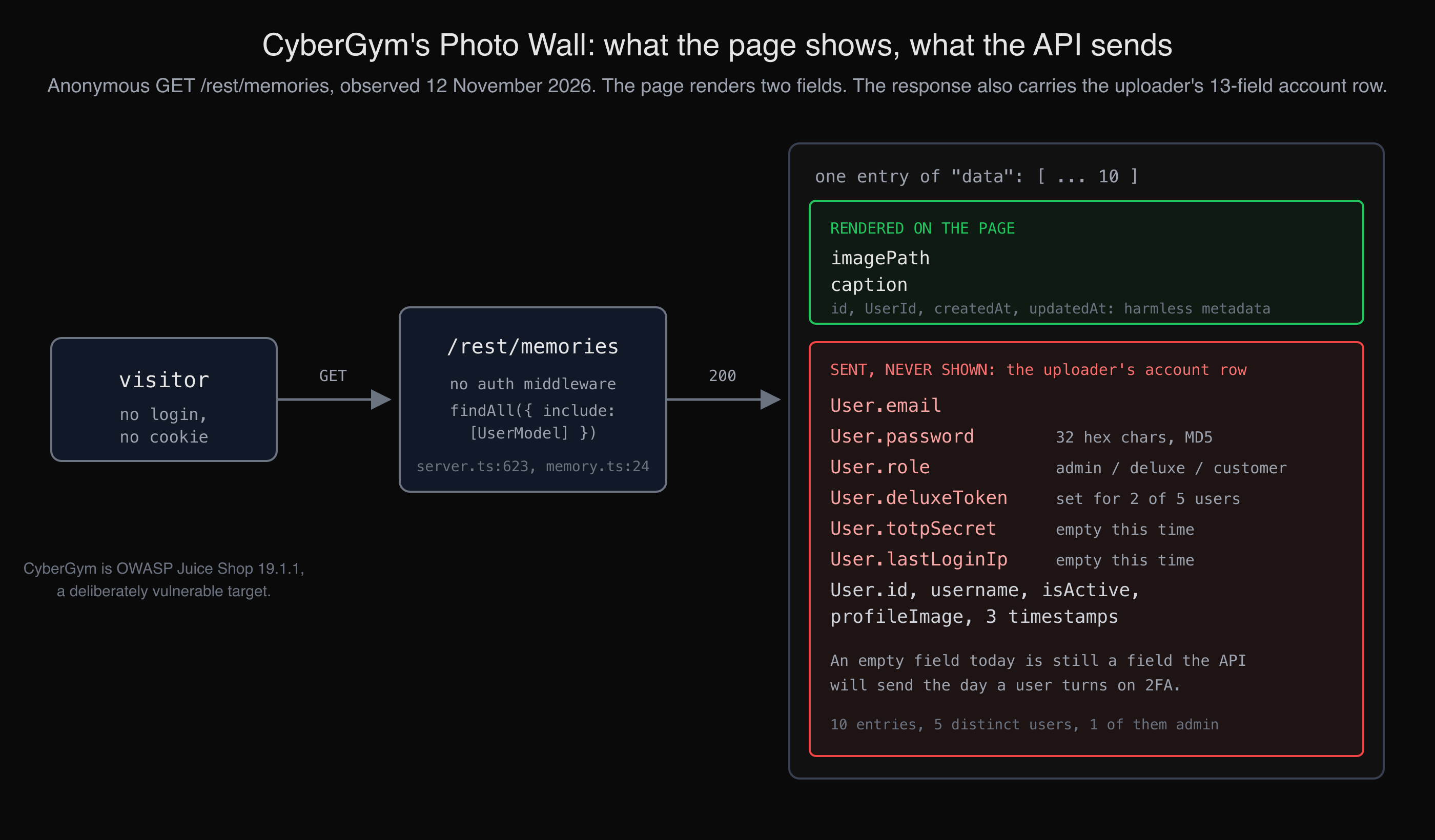 The finding in one picture: the page needs two fields, the API sends the whole account row.
5. Steps to reproduce
- Without logging in, request the Photo Wall's API:
curl -s -i https://cybergym.hackergpt.app/rest/memories | head -1
- Count what came back and which kinds of account it covers:
curl -s https://cybergym.hackergpt.app/rest/memories | jq '{entries: (.data | length), users: ([.data[].User.id] | unique | length), roles: ([.data[].User.role] | unique), passwordLengths: ([.data[].User.password | length] | unique), withDeluxeToken: ([.data[].User | select(.deluxeToken != "") | .id] | unique | length)}'
Steps are commands, not prose. Someone retesting in three months should paste them and get an answer. The second command deliberately reports counts and lengths rather than values: the reproduction proves the issue without printing the data.
6. Evidence
Observed 12 November 2026, 20:10 UTC, no cookies or headers sent:
HTTP/1.1 200 OK{ "entries": 10, "users": 5, "roles": ["admin", "customer", "deluxe"], "passwordLengths": [32], "withDeluxeToken": 2 }The admin uploader's record, with personal values redacted at the source:
curl -s https://cybergym.hackergpt.app/rest/memories | jq '[.data[] | select(.User.role == "admin")][0].User | with_entries(if (.key | IN("username","email","password","deluxeToken","totpSecret")) and .value != "" then .value = "[redacted, \(.value | length) chars]" else . end)'{ "id": 4, "username": "[redacted, 10 chars]", "email": "[redacted, 26 chars]", "password": "[redacted, 32 chars]", "role": "admin", "deluxeToken": "", "lastLoginIp": "", "profileImage": "assets/public/images/uploads/defaultAdmin.png", "totpSecret": "", "isActive": true, "createdAt": "2026-11-12T19:26:38.259Z", "updatedAt": "2026-11-12T19:26:38.259Z", "deletedAt": null }
Note what the evidence does. It has a timestamp, because a live app changes. It redacts in the command, so the raw values never land in your notes, screenshots or the report. And it reports what was not there: totpSecret and lastLoginIp were empty for every user in this response. An honest finding says so, and adds why it still matters: the field is in the response, so the day a user turns on two-factor authentication, their secret goes out with it.
7. Impact
An anonymous visitor can collect the email address, role and password hash of every user who has posted to the Photo Wall, including an administrator. Because the hashes are unsalted MD5, weak passwords among them can be recovered offline, at no cost to the attacker and invisible to the application. The response also carries each deluxe member's
deluxeTokenand is built to carrytotpSecret, a second factor's shared secret. The endpoint sendsAccess-Control-Allow-Origin: *, so any website can read the response from a visitor's browser as well.
Impact describes what an attacker could do, in the client's terms, without performing it. We did not try to crack any hash, and the finding does not need us to: the hashing algorithm is in the source.
8. Remediation and retest
- Return only what the Photo Wall renders. Select the user columns explicitly instead of including the whole model, using Sequelize's
attributesoption:const memories = await MemoryModel.findAll({ attributes: ['id', 'caption', 'imagePath', 'createdAt'], include: [{ model: UserModel, attributes: ['id', 'username'] }] })
- Fix the cause, not only this route: give the user model a default scope that never serialises
password,totpSecretordeluxeToken, so the next endpoint that includes a user cannot leak them by accident.- Store passwords with a slow, salted algorithm such as Argon2id or bcrypt, per the OWASP cheat sheet, and rehash on next login.
- Retest: the first command should still return
200, and this should print only["id","username"]:curl -s https://cybergym.hackergpt.app/rest/memories | jq -c '[.data[].User | keys] | unique[]'
The fix is the shape of a change, not a patch we applied: CyberGym keeps this bug on purpose, so it can be practised. The retest command is part of the finding because "fixed" should be something a developer can check in one line, and a test that fails if password reappears is better still.
What makes a pentest finding hard to act on?
Most findings that stall are true; they just leave the developer to do the tester's work. The patterns we see most often, and the fix for each:
| Weak finding | Why it stalls | Write instead |
|---|---|---|
| "Sensitive data exposure on the API" | no asset, no condition | the endpoint, the method, what it returns and to whom |
| "Severity: High" | an opinion with nothing to check | the vector, and one sentence on the metric that drives the score |
| A screenshot of Burp with the raw hash in it | the report now leaks the data | redacted output, ideally redacted in the command |
| "Exploitable" with no steps | cannot be reproduced or retested | commands that run as written, with their output |
| Pasted scanner output | volume without judgement | the one request that proves it, and the tool output in an appendix |
| "Upgrade to the latest version" | not a fix for a code bug | the change, where it goes, and how to confirm it worked |
The same discipline applies to findings from an AI agent. A lead such as "exposed user data" is valuable because it tells you where to look; it becomes a finding only once it has passed through the eight parts above. For an API with many endpoints, an inventory that lists each endpoint with the authentication it requires, like the one built in exporting your API endpoints to Postman and OpenAPI, shows which public endpoints deserve a look at what they actually return.
Key takeaways
- Write each finding for a developer who was not there: asset, condition, consequence, steps, evidence, fix, retest.
- Put the CVSS vector next to the score and label it (CVSS-B for Base only), then defend the one or two metrics that drive it.
- Redact in the command that collects the evidence, so raw secrets and personal data never reach your notes or the report.
- Say what you did not observe or did not try; it makes the rest of the finding more credible, not less.
- End every finding with a one-line retest the developer can run after the fix.
FAQ
What is the difference between a pentest report and a vulnerability scan report?
A scan report lists what an automated tool matched, usually with generic descriptions and severities. A pentest report records what a tester confirmed, with steps to reproduce, evidence, an impact judged in the context of the application, and a specific fix for each finding. A scan can be one input to a pentest; it is not the report.
Should every finding have a CVSS score?
Not necessarily. The OWASP Web Security Testing Guide notes that some engagements require CVSS and that elsewhere it can add complexity. If you use it, give the vector as well as the number, say which version, and label which metric groups the score includes. If you use your own scale instead, define it in an appendix.
How do I show evidence without leaking sensitive data?
Collect it in a way that never prints the sensitive values: count records, report field names and lengths, or replace values in the command, as the jq redaction above does. Keep timestamps and the exact request. If you must keep raw proof for the client, store it outside the report and hand it over through an agreed secure channel.
Can an AI agent write a pentest report?
An agent can find leads, run the reproduction commands and draft the parts of a finding, and that saves real time. Confirming that the issue is real, judging severity against the client's context, deciding what to redact and checking the fix are still the tester's job. Treat an agent's finding the way you would treat a junior's: check all eight parts before it goes in the report.
How long should a single finding be?
As long as it takes for a developer to reproduce and fix it without asking you anything, and no longer. The finding above runs to about a page, most of it commands and output. Long explanations of the vulnerability class belong in a link to OWASP or CWE, not in every finding.
Sources
- OWASP, Web Security Testing Guide: Reporting Structure
- NIST, SP 800-115, Technical Guide to Information Security Testing and Assessment
- FIRST, CVSS v4.0 Specification Document and CVSS 4.0 calculator
- Red Hat Product Security,
cvssPython library - OWASP, API3:2023 Broken Object Property Level Authorization
- MITRE, CWE-213: Exposure of Sensitive Information Due to Incompatible Policies
- OWASP, Password Storage Cheat Sheet
- OWASP Juice Shop v19.1.1 source:
server.ts,routes/memory.ts,lib/insecurity.ts - Sequelize, Model querying basics: specifying attributes
Practise writing findings on CyberGym, or run HackerGPT on your own site at hackergpt.app.