TL;DR: PHP2Shell is two unauthenticated remote code execution bugs in PHP's own request handling, CVE-2026-109618 and CVE-2026-109619, so no framework, plugin or application check stands in their way. The fix is PHP 8.5.12, 8.4.27, 8.3.36 or 8.2.35 followed by a restart of every PHP worker; PHP 8.1 and older have no official release and need a distribution or LTS backport, or an upgrade to a supported branch.
On 21 October 2026 the PHP project shipped emergency releases for two bugs in PHP itself, and within hours government portals in several countries went dark on purpose rather than risk being hit. This brief is for anyone who runs a PHP site — a WordPress blog, a Laravel app, a shop on shared hosting: what the bugs are, why "just update" is harder than it sounds for a third of PHP sites, how to check your own servers, and what to do if you cannot upgrade today. Every check here is for servers you own or are permitted to test.
What is PHP2Shell?
PHP2Shell is the name given to two vulnerabilities disclosed together: CVE-2026-109618 ("RCE via OOM corruption") and CVE-2026-109619 ("RCE via stale global state"). Both let an unauthenticated attacker run code on a server that serves PHP, both are scored 9.2 under CVSS 4.0, and both affect PHP from 5.4 through 8.5. The PHP security advisory lists fixed releases 8.5.12, 8.4.27, 8.3.36 and 8.2.35, and is blunt about the alternative: "There are no complete mitigations, updating is the only safe choice."
Scale is what turned a patch into an event. PHP runs on 69.3% of websites whose server-side language is known, according to W3Techs, so a pre-authentication bug in PHP's core is a bug in most of the web at once.
How the week unfolded
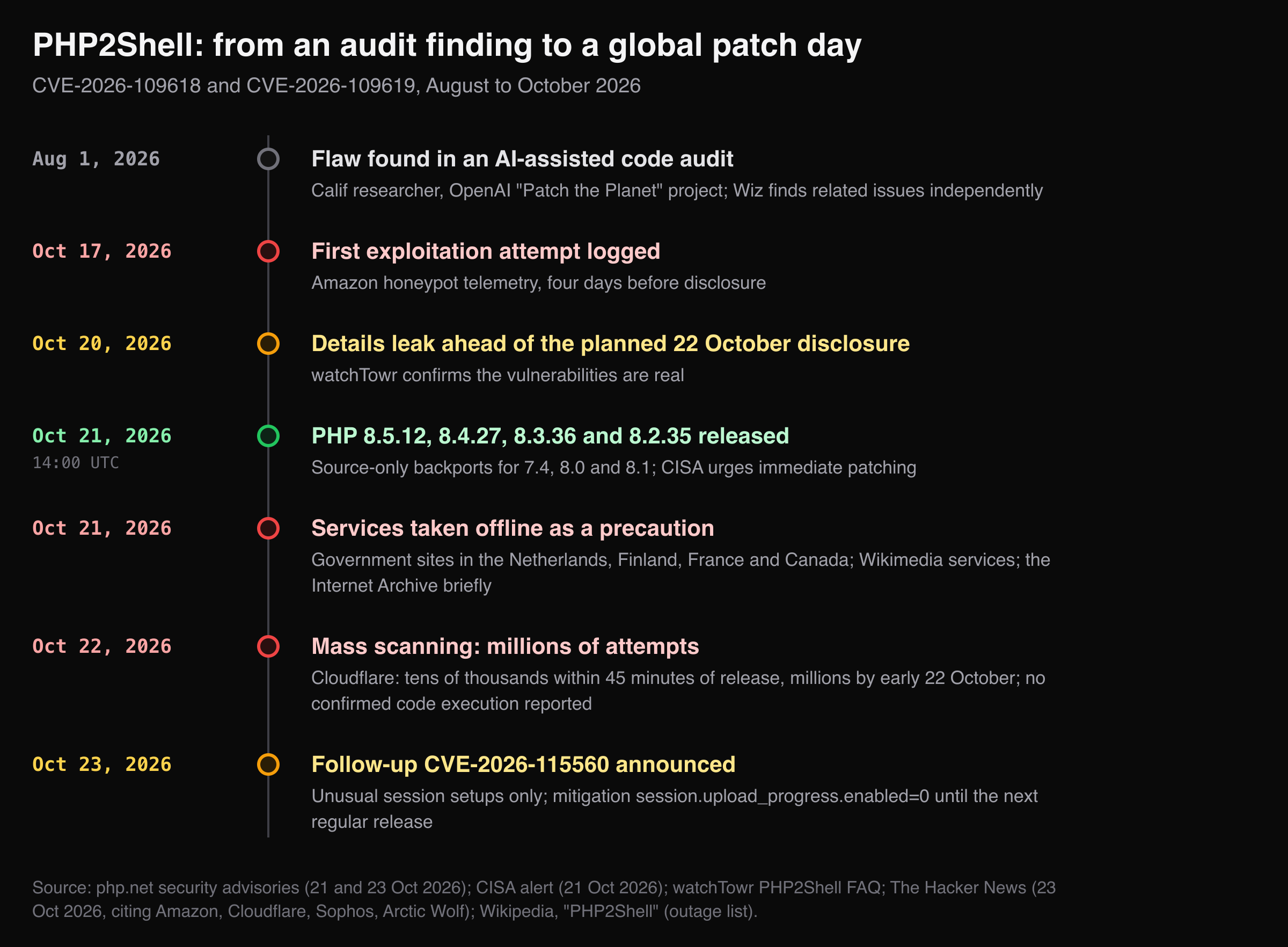
Every event above is dated in the sources listed under the chart; the outage list is the one compiled in the Wikipedia article on PHP2Shell.
Three things in that timeline matter for defenders:
- The disclosure did not go to plan. Coordinated release was set for 22 October; details leaked on 20 October, and watchTowr confirmed the same day that the bugs were real. PHP moved its release forward to 14:00 UTC on 21 October.
- Attackers were early. The Hacker News reports, citing Amazon, an exploitation attempt in honeypot telemetry on 17 October, four days before disclosure. After release, Cloudflare saw attempts climb from tens of thousands within 45 minutes to millions by early 22 October.
- The outages were self-inflicted, and deliberate. Government sites in the Netherlands, Finland, France and Canada, Wikimedia supporting services and, briefly, the Internet Archive went offline as a precaution. CISA's alert recommends exactly that for systems that cannot be updated: take them offline until patched.
Sources disagree on exploitation, and both views belong in your risk call. watchTowr reports exploitation in the wild from 21 October through its honeypot network. CISA had not observed exploitation when it published, and The Hacker News reports that vendors including Wordfence saw scanning and probing but no confirmed code execution as of 23 October, with researchers finding a reliable exploit harder to build than expected.
Why can't my application code stop it?
Because both bugs fire inside PHP itself, before your code runs. Most web vulnerabilities live in application code: a missing check, an unescaped query. PHP2Shell does not. Both bugs fire while PHP is still setting up the request, before your framework, your router or your input validation has run.
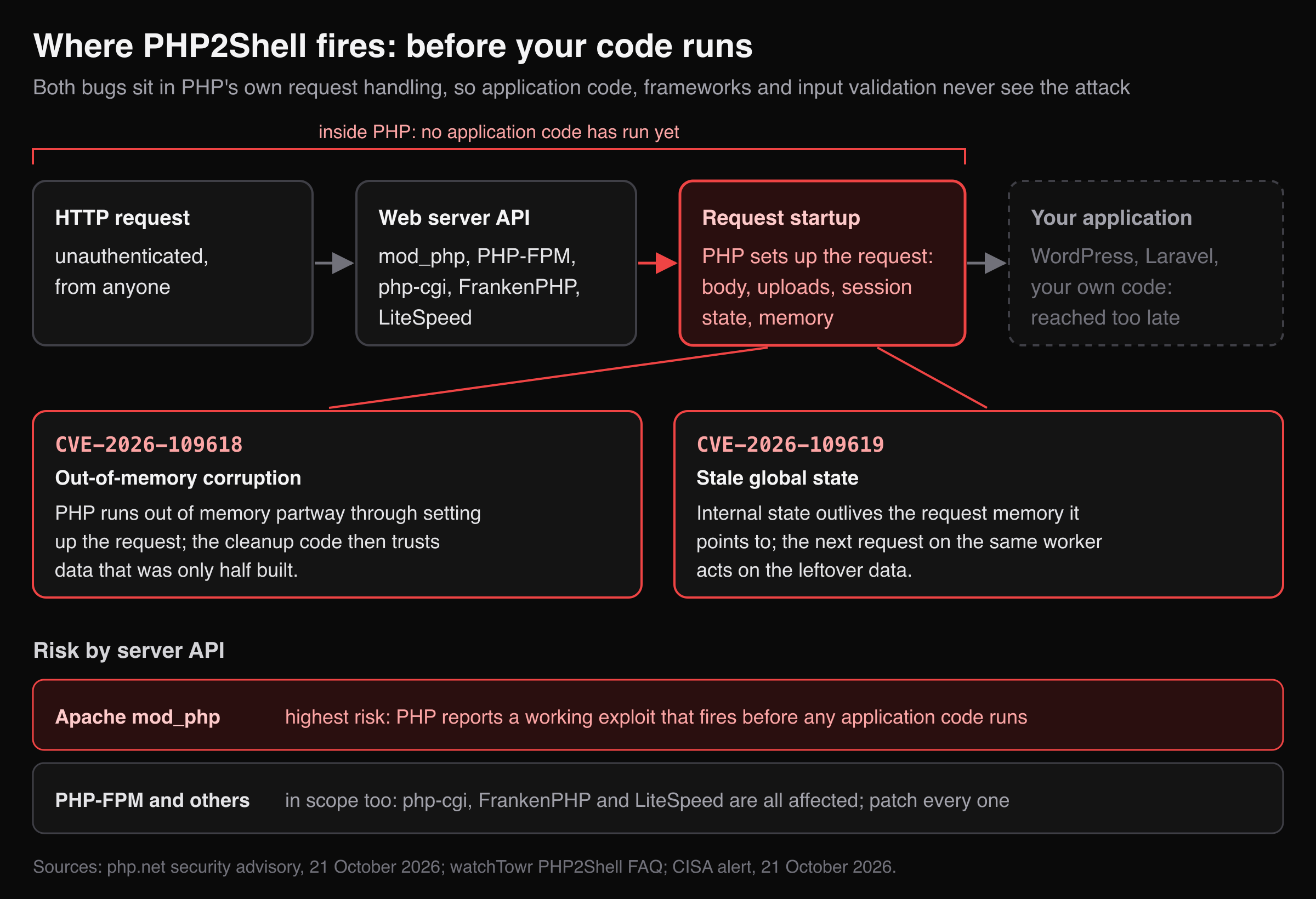
- CVE-2026-109618 is triggered, in watchTowr's words, "when PHP runs out of memory partway through setting up a request, leaving internal data half built for the cleanup code to trust."
- CVE-2026-109619 is internal state that outlives the request memory it points to, so the next request handled by the same PHP worker acts on leftover data.
Every web-serving mode of PHP is in scope: PHP-FPM, Apache mod_php, php-cgi, FrankenPHP and LiteSpeed. PHP rates mod_php highest, with "a demonstrated exploit where an unauthenticated request can trigger the attack before any application code runs." That also means a WordPress security plugin or a hardened Laravel config is no defence here; only the PHP binary changes the outcome.
Why a third of PHP sites have no official fix
The fixed releases cover the four supported branches, 8.2 to 8.5. Everything older is end of life, and for those the PHP project ships no release: 7.4, 8.0 and 8.1 get minimal source backports, and 7.3 and older get nothing.
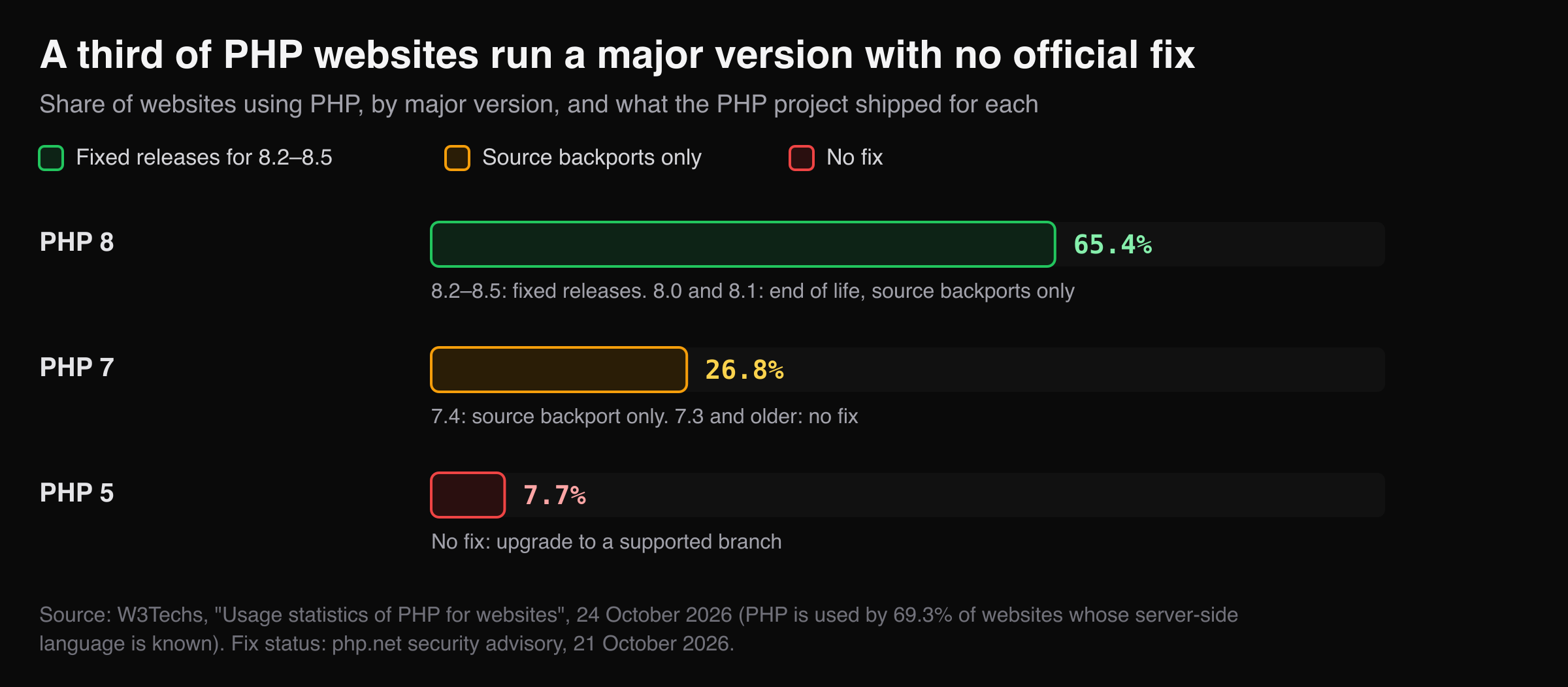
Put that against W3Techs' version data and the problem is visible: 26.8% of PHP websites run PHP 7 and 7.7% still run PHP 5, so roughly a third of PHP sites are on a major version with no official fixed release — before counting the 8.0 and 8.1 installs inside the PHP 8 bar. For those sites the realistic options are a distribution or LTS vendor package with the backport, building PHP from patched source, or an upgrade to a supported branch.
How do I check if my servers are affected?
Find the PHP binary that actually serves web requests, check what your site advertises to the outside, and confirm after upgrading that the new version is the one running.
1. Which PHP actually serves your site?
The command-line php and the PHP that serves web requests are often different binaries. Check the one that serves requests:
php -v                                   # the CLI, which may not be what serves your site
php-fpm -v 2>/dev/null || ls /usr/sbin/php-fpm*   # PHP-FPM; Debian names it php-fpm8.3 and so on
apachectl -M 2>/dev/null | grep -i php   # prints php_module if Apache runs PHP as mod_php
Compare the version against the table in the summary card. On shared hosting, the control panel's PHP selector shows the version per site; cPanel and CloudLinux published backports for older branches.
2. What does your site tell the outside world?
With expose_php on (PHP's built-in default), PHP announces its version in a response header:
curl -sI https://your-app.example/ | grep -iE '^(server|x-powered-by):'
A vulnerable site would show something like X-Powered-By: PHP/8.3.12. Here is the real output for CyberGym, our practice target, which is a Node.js app behind Nginx:
Server: nginx
No PHP header — but absence proves little, because many servers hide it. Use this check to find PHP you forgot about, not to rule PHP out. Forgotten subdomains and old marketing sites are where unpatched PHP tends to live; the OSINT feature starts from a domain and shows what public sources reveal about it, which is one way to build that list for your own domains.
3. Did the upgrade take effect?
Installing a package does not replace PHP code already loaded in memory. watchTowr's guidance is to restart every PHP worker after updating:
sudo systemctl restart php8.3-fpm   # match your version and service name
sudo apachectl graceful             # for mod_php
Then run step 1 again and confirm the version.
What can I do if I cannot upgrade today?
Apply PHP's interim settings, put a WAF in front, or take the system offline — none of which makes it safe. PHP lists interim measures that "reduce exposure to specific attack paths but do not make an installation safe." Apply them in php.ini or the FPM pool, not with ini_set() or .user.ini:
; FPM pool (for example /etc/php/8.3/fpm/pool.d/www.conf)
php_admin_value[memory_limit] = -1
; 8M without uploads, 32M with them; keep upload_max_filesize below post_max_size
php_admin_value[post_max_size] = 8M
php_admin_flag[session.upload_progress.enabled] = off
Each has a cost. memory_limit = -1 removes the out-of-memory path but lets a single request use as much memory as the server has; size the pool and watch memory while it is in place. A lower post_max_size breaks larger form posts and uploads. On PHP 8.5, PHP also lists fatal_error_backtraces = 0, which closes one confirmed path for CVE-2026-109619. Restart every worker after changing any of these.
Corrected 24 October 2026: an earlier version of this brief suggested post_max_size = 1M. PHP's advisory names 8M, or 32M where uploads are needed.
Then, from CISA's recommendations:
- Put the most exposed systems behind a web application firewall; Cloudflare deployed temporary rules ahead of the patch release, and a WAF may block known attack patterns, not every variant.
- Take systems that cannot be patched offline, as the governments above did.
- Watch for PHP worker processes that start shells or download tools; CISA's alert links detection rules.
The follow-up CVE-2026-115560, announced on 23 October, needs an unusual setup — an application that switches session.serialize_handler at runtime with upload progress enabled. The same session.upload_progress.enabled=0 setting covers it until the next regular release.
What has changed since the fixes shipped?
Checked against the sources on 24 October 2026:
- No new fixed releases. 8.5.12, 8.4.27, 8.3.36 and 8.2.35 are still the fixed versions in the PHP release archive. The PHP 8.6.0 release candidate RC4, out the same day, carries the fixes too; earlier 8.6 test builds do not.
- CVE-2026-115560 is still unfixed. PHP says it will be handled in the next regular bugfix release, with a full advisory then, and gives no date.
- Not in CISA's catalog yet. Neither CVE appears in the Known Exploited Vulnerabilities catalog as of its 23 October edition, despite watchTowr's report of exploitation in the wild.
- PHP 8.2 has two months left. The 8.2.35 release notes say the branch reaches end of life on 31 December 2026; a site moving off 7.x or 8.1 now should go to 8.3 or newer.
Key takeaways
- Upgrade to PHP 8.5.12, 8.4.27, 8.3.36 or 8.2.35, then restart every PHP worker; a package update alone leaves the old code running.
- Check the PHP that serves web requests, not the CLI:
php-fpm -vorapachectl -M, not justphp -v. - If you run PHP 7.x, 5.x, 8.0 or 8.1, there is no official fixed release: use a distro or LTS backport, or plan the upgrade now.
- Treat the
php.inimitigations as a bridge with costs, not a fix; PHP itself says they do not make an installation safe. - Build the list of every PHP host you own, including forgotten subdomains, before the next PHP advisory rather than during it.
FAQ
Is WordPress affected by PHP2Shell?
WordPress itself is not the vulnerable component, but every WordPress site runs on PHP, and the bugs are in PHP's request handling. A WordPress site is affected if its PHP version is unpatched, regardless of plugins or WordPress version.
Does a WAF protect me?
Partially. CISA says a web application firewall may provide some protection until patching is complete, and Cloudflare deployed temporary rules. A WAF blocks patterns it knows; it does not change the vulnerable code, so it is a bridge to the upgrade, not a substitute.
Is PHP-FPM safer than mod_php?
PHP rates the risk highest for Apache mod_php, where a demonstrated exploit fires before any application code runs. PHP-FPM, php-cgi, FrankenPHP and LiteSpeed are all affected as well, so the upgrade is needed in every mode.
Is PHP2Shell being exploited?
Exploitation attempts were logged from 17 October, and scanning reached millions of attempts by 22 October. watchTowr reports exploitation in the wild; as of 23 October, other vendors had seen probing but no confirmed successful compromise, and as of 24 October neither CVE was in CISA's Known Exploited Vulnerabilities catalog. Assume an unpatched internet-facing server is being tried.
What is CVE-2026-115560?
A separate, follow-up code execution issue PHP announced on 23 October. It needs an unusual session configuration and is being fixed in the next regular release; until then, session.upload_progress.enabled=0 mitigates it.
Sources
- PHP security advisory, 21 October 2026
- PHP informational advisory: session upload progress (CVE-2026-115560), 23 October 2026
- CISA — Critical vulnerabilities in PHP require immediate patching
- watchTowr — PHP2Shell FAQ
- The Hacker News — PHP warns of another unpatched RCE risk two days after PHP2Shell patches
- Wikipedia — PHP2Shell
- W3Techs — Usage statistics of PHP for websites
- CISA — Known Exploited Vulnerabilities catalog
For another bug that reached most of the web through a shared component the same week, see the HTTP2Shell brief. And if you want to see your own site's pages and endpoints before you test them, mapping the attack surface first is the place to start — or try it on your own site at hackergpt.app.